Table of Contents
- What is audio to MIDI?
- Why do the notes come back wrong?
- Which audio to MIDI converter should you use?
- How do you get a cleaner conversion?
- What do you actually fix afterwards?
- Why does a scale lock make it worse?
- What does a scale lock actually remove?
- When is a scale lock safe to use?
- What separates a wrong note from a blue note?
- Should you quantize the timing?
- What is the converted MIDI actually for?
- Where Melody Rack fits
- Frequently Asked Questions
You sang eight bars into a microphone, ran them through a converter, and got a MIDI clip back in a few seconds. Most of it is right. Then you look closer: one note sitting an octave low, two blips that were never notes at all, a phrase whose timing drifted, and one note that is simply the wrong pitch.
So you open the piano roll and start fixing. Every guide you find tells you to do the same four things: quantize the timing, delete the ghost notes, drag the octave errors back, trim the lengths. That advice is not wrong. It is just the whole of what anyone offers, and it treats a musical problem as a data-entry problem.
This is a guide to the parts nobody covers: why the errors happen, which of them are the tool's fault and which are yours, and why the most popular repair, forcing everything into the key, quietly destroys the best note in the phrase.
Quick summary
Audio to MIDI conversion reads pitch and timing out of a recording and returns a first draft of the notes. It is imperfect for everyone, and not only because the software is imperfect: two trained musicians transcribing the same sung melody agree with each other only about two thirds of the time. Feed it one dry, isolated instrument with clear attacks, fix octave errors and stray notes first, and never repair a wrong pitch by locking the part to a scale.
What is audio to MIDI?
Audio to MIDI conversion, also called MIDI transcription, turns a recording into editable note data. Software listens to the audio, estimates which pitches are sounding and when each one starts and stops, and writes those estimates out as MIDI notes you can move, retune, and play back with any instrument. The recording itself is not changed or included. What you get is a description of the performance.
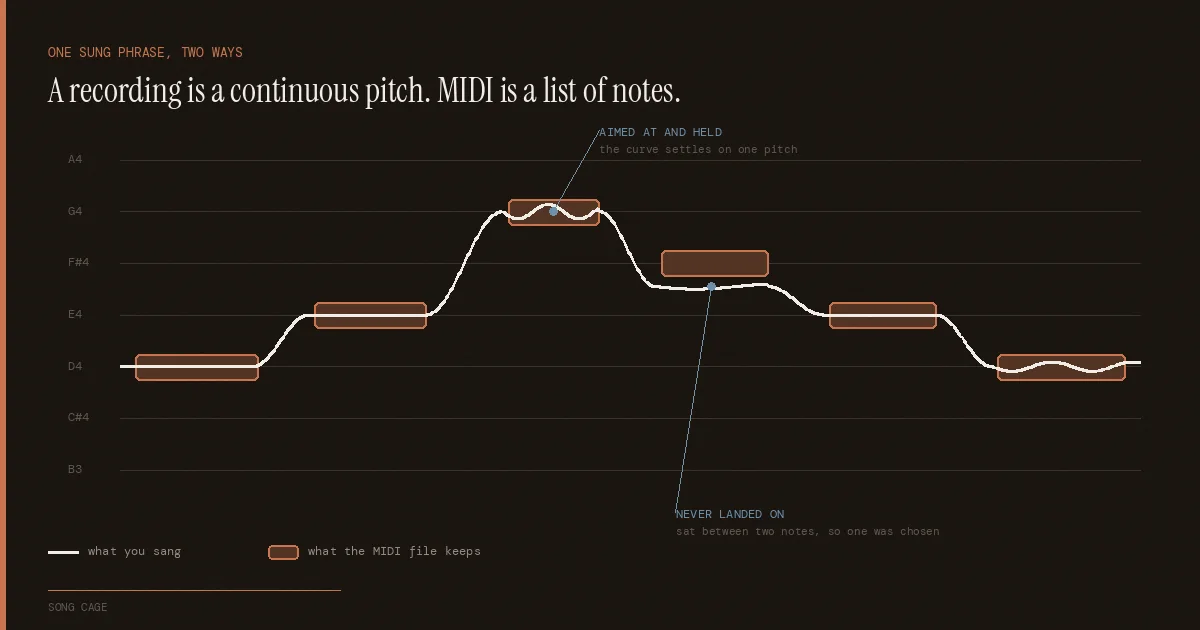
That distinction is the whole reason the process is fallible. A recording is a continuous, messy signal full of overtones, room sound, breath, and consonants. MIDI is a list of discrete events, each with one pitch and one start time. Converting between them means making decisions the audio does not contain, and different tools make those decisions differently.
The output is best understood as a first draft. It is faster than transcribing by ear and slower than nothing, and it becomes a finished part only after you have looked at it.
Why do the notes come back wrong?
Converted MIDI comes back wrong for two reasons, and only one of them is the software. Detection is imperfect, but so is the task: there is no single correct transcription of a sung melody, and two trained musicians given the same recording will not produce the same notes.
In 2021, a research team at Spotify published vocadito, a dataset of 40 short recordings of solo singing in seven languages, by singers of varying training, captured on a variety of devices. They asked two trained musicians to transcribe the notes in each one, independently. The two annotations agreed with each other at an average F-measure of just 0.64. Given the same recording, two people who read music produced meaningfully different sequences of notes.
We measured the same thing ourselves while testing Song Cage's melody capture against that dataset, on a held-out split of 20 amateur takes, and got 73.3% agreement between the two human annotation sets. Different slice, same conclusion: there is no single correct answer sitting in the audio waiting to be found.
Where the two humans disagreed
- Where a note starts. On a sung word, does the note begin at the consonant or at the vowel? The paper raises exactly this question and does not settle it, because it is not settleable.
- What pitch a note is. A singer sliding into a note, or applying vibrato, spends time at several pitches. Which one is "the" note is a judgement.
- Where one note ends and the next begins. Two notes at the same pitch, sung legato, may be one note or two.
The same paper reports one more finding that explains a lot of bad output: simply rounding the measured pitch to the nearest semitone, frame by frame, does not produce a reasonable note estimate. Pitch and notes are related but they are not the same thing, and the gap between them is where converters earn or lose their accuracy.
Which audio to MIDI converter should you use?
The right audio to MIDI converter depends on where you want to be working rather than on accuracy claims. Basic Pitch is the strongest free standalone option, NeuralNote puts the same model inside your DAW, and Ableton Live, Logic Pro and Melodyne all convert a vocal to MIDI without leaving the session.
| Tool | Where it runs | Handles | Cost |
|---|---|---|---|
| Basic Pitch (Spotify) | Browser, or a Python library | Polyphonic, any instrument, with pitch bends | Free, open source |
| NeuralNote | Standalone, VST3, AU (Mac) | The Basic Pitch model, inside your DAW | Free, open source |
| Ableton Live Convert | Built into Live | Separate Melody, Harmony and Drums commands | Included |
| Logic Pro Flex Pitch | Built into Logic | Monophonic audio regions | Included |
| Melodyne | Plugin, standalone, or ARA | Monophonic, percussive, and polyphonic material | Paid, tiered |
Feature details taken from each vendor's own documentation, September 2026.
Basic Pitch is the one a lot of other free tools are quietly built on, NeuralNote among them. Spotify released it in June 2022 under an open licence, and it is unusual in the category for being polyphonic, instrument-agnostic, and small enough to run in a browser tab at under 20 MB of memory. Spotify's own announcement describes what it produces as "a great starting point for transcriptions", which is a fair and notably honest description of the whole category.
The DAW-native options matter more than they look. Live's Convert Melody command reads the clip's transient markers to decide where notes divide, which means you can improve the result before converting by adding, moving, or deleting those markers. Melodyne picks an algorithm from the material and warns that switching it afterwards discards any editing you have already done, so choosing correctly first is not optional.
How do you get a cleaner conversion?
Most bad output is decided before you press convert. To convert audio to MIDI cleanly, give it one isolated instrument with clear attacks, recorded dry with no reverb, from an uncompressed file rather than an MP3. The vendors are unusually consistent about this, and their own manuals converge on those four things.
Ableton recommends isolated recordings, because anything else in the room gets detected as notes too. A full mix is the single most common cause of unusable output.
Notes that fade in or swell may not be detected at all, because most converters use the attack transient to decide a note has begun.
Celemony notes that reverberation makes notes overlap even in a solo vocal, turning monophonic material into effective polyphony and confusing the analysis.
Ableton warns that lossy formats can produce unpredictable conversions. Record to WAV or AIFF and convert from that, not from an exported MP3.
One more, which is not in any manual: convert a short section first. If the structure of the result is wrong, the downbeat in the wrong place or the phrasing chopped into fragments, no amount of note editing will save it. Fix the source and run it again. That order costs a minute and saves an evening.
What do you actually fix afterwards?
Four error types account for nearly all of the cleanup, and the order matters because each one changes what the next should be: octave errors first, then stray notes, then note lengths, and timing and pitch last, once the part is structurally right.
Octave errors first. A note detected an octave too high or low usually comes from a strong overtone being read instead of the fundamental. They cluster in the low register, so scan the bottom of the part before anything else, and look for any melodic leap of a full octave that has no musical reason to be there.
Then stray notes. Short blips that were never played: breath, a consonant, a chair, string noise. Delete them. In a sung part, be aware that the unpitched sounds in singing are real and identifiable; Melodyne explicitly detects sibilants like s, ch, k and t, along with audible breaths, precisely because a singer cannot give them a pitch.
Then note lengths. Detected releases are frequently late, so notes overlap and the part sounds muddy through a sustaining instrument. Trim each note to release where it should.
Timing and pitch last, once the part is structurally right. Which brings us to the fix most people reach for, and should not.
Why does a scale lock make it worse?
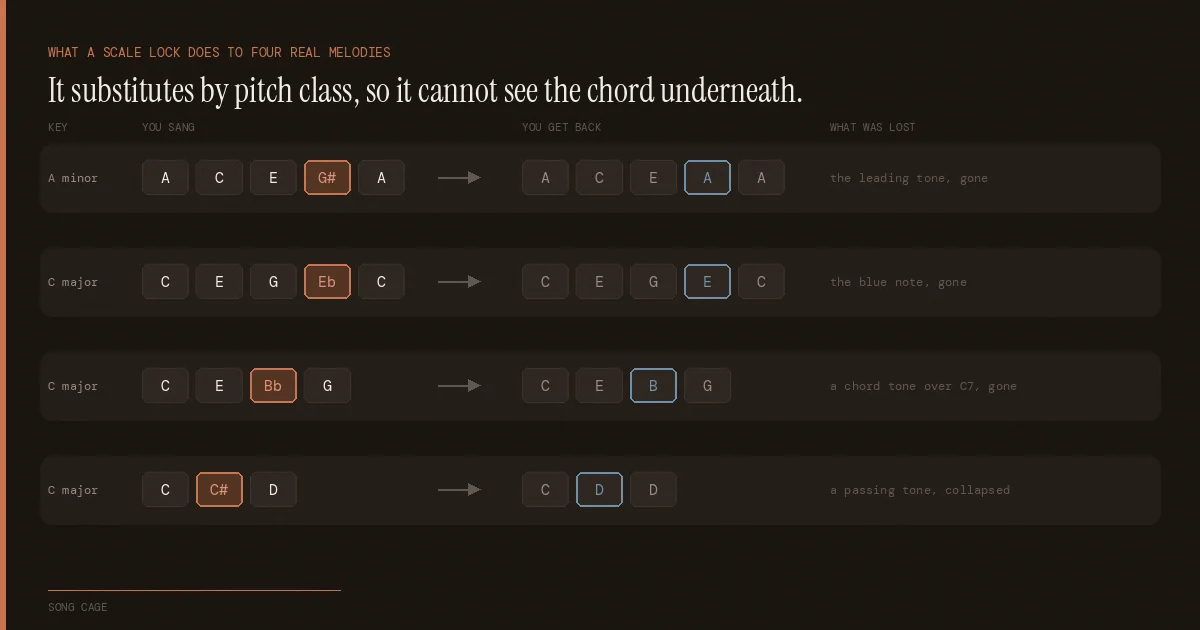
A scale lock makes converted MIDI worse because it is a fixed lookup table from one pitch class to another, and the chord playing underneath is never one of its inputs. It removes blue notes, chromatic passing tones and the raised seventh that makes a minor key resolve, while leaving in-key notes that clash with the harmony untouched.
Every DAW ships a device that forces MIDI into a key. Ableton has Scale. Logic has the Transposer plug-in, which Apple describes as correcting notes to a selected scale, and a Scale Quantize control in the piano roll. Drop one after your converted clip and every out-of-key note vanishes. It looks like exactly the repair you needed.
It is worth reading how Ableton describes the device, because the description is the problem. Scale "remaps notes based on a defined scale. Each incoming note is assigned an outgoing equivalent in a matrix." That matrix is a fixed lookup table from one pitch class to another. C sharp becomes C or D. E flat becomes E or D. It makes the same substitution on beat one of bar one and on the last sixteenth of bar eight, because the chord underneath is not one of its inputs. It cannot be. A pitch class is all it is given.
So it cannot tell the difference between a note that is wrong and a note that is the point.
What does a scale lock actually remove?
What a scale lock does to four real melodies
- A C E G# A, in A minor. That G sharp is the leading tone, the note that makes a dominant chord resolve. A natural minor scale does not contain it, so a scale lock set to A minor removes the most functionally important note in minor-key writing and hands back A C E A A.
- C E G Eb C, in C major. The flat third is the blue note the phrase exists for. It is not in C major, so it becomes E, and the phrase becomes ordinary.
- C E Bb G, in C major. The B flat is a mixolydian seventh. If the harmony under that bar is a C7, it is a chord tone. A scale lock still snaps it to B, against the chord.
- C C# D. A chromatic passing tone, the commonest deliberate out-of-key note in songwriting, collapses into C D D. A melodic step becomes a repeated pitch.
Sound On Sound, walking through exactly this cleanup in Live, reaches for a Scale device to "keep things in key" and then adds that after that, it is up to your ear to find the remaining differences. That is an honest account of the tool's limit. The scale lock cannot finish the job, because it never had enough information to start it.
When is a scale lock safe to use?
A scale lock is safe when nothing in the part was meant to sit outside the key. Playing a keyboard part in by hand and wanting every wrong finger corrected is exactly the job it was designed for, and it does that job well and instantly. The same is true of a generated or randomised line you are auditioning against a key centre, where there is no performance to preserve because nobody performed it.
What makes it dangerous on a converted take is the opposite condition. A sung phrase already contains decisions, and a lookup table cannot see which notes were decisions and which were errors. If you do reach for one on a converted part, put it on a duplicate track, keep the untouched original, and compare the two by ear before you commit.
What separates a wrong note from a blue note?
Both are out of the key, and in a piano roll they look identical, which is why the standard advice cannot distinguish them and neither can a scale lock. In the recording they look nothing alike: a pitch somebody aimed at and held sits on a centre, and a pitch nobody aimed at sits between two notes.
The voice arrives, settles, and stays, and the measured pitch clusters tightly around one note. The other kind, produced by sliding between two notes or by an unresolved reach, has no centre, because it was never a destination.
That is a decidable difference, and it is only available before the conversion throws it away. The moment a note becomes a single integer in a MIDI file, the evidence is gone, which is why the last-mile fixing is so hard downstream: by then everything is just a number, and a deliberate flat third and a botched one are the same number.
Three questions separate them, and a repair worth using asks all three. Does the harmony explain the note, meaning is it a chord tone under the chord actually playing? Does the performance explain it, meaning was it aimed at? Did the person say so, by pinning it themselves? Any note that answers yes to one of those should be left exactly where it is.
Should you quantize the timing?
Quantize carefully, and last. Snapping note starts to a grid fixes genuinely loose playing and flattens genuinely good playing, and the tool cannot tell you which one you have. Use a quantize amount rather than an on and off switch, and match the grid to the music rather than to habit.
If the part moves in sixteenths, a sixteenth grid is right; if it is mostly quarter notes, a fine grid invents detail that was never performed. Quantize the strict sections firmly, a steady comping pattern or a programmed-feeling bass line, and go much lighter where the timing is part of the performance.
The quantize amount is where the judgement lives. Pulling a phrase 40% of the way toward the grid removes the drift that reads as sloppy and keeps the push and drag that reads as human. A converted take that has been quantized to 100% is why so much audio to MIDI output sounds mechanical, and the detection is usually not to blame.
What is the converted MIDI actually for?
A repaired vocal line is raw material, not just a tidier version of what you sang. The same notes will double a synth, hand you a bass part, stack into harmony, play an instrument you cannot play, or seed the next section of the song. Everything above this heading is the boring half.
The reason this is worth saying is that almost every guide to audio to MIDI stops at the cleanup, as though a correct transcription were the deliverable. It is not. You converted the take because the tune was good, and a tune that exists as editable notes can go places a recording cannot.
Five things to do with a sung line once the notes are right
- Double it. Put a synth on the same notes an octave up, quiet, under the vocal. The oldest trick in pop production and still the fastest way to make a topline sound produced.
- Take the bass from it. Keep only the longest note in each bar, drop it two octaves, and you have a bass line that agrees with the melody by construction.
- Stack it. Copy the part, move it up a third inside the key, and fix the two or three notes where the interval turns sour against the chord.
- Play what you cannot play. Sing a saxophone line or a string counter-figure you could never perform, and let the sampler play it back in a register your voice does not have.
- Vary it into a second section. The notes are now editable, which means the phrase can be reshaped rather than replaced.
That last one is the largest of the five and it has its own rules, because a variation that changes the wrong features stops being the same tune. Varying a melody without losing it covers which changes a listener survives and which ones cost you the song.
Where Melody Rack fits
Melody Rack is an AU and VST3 MIDI effect for macOS and Windows, and a separate product from Song Cage. It exists for this last-mile problem, and it does the thing this article has been circling: it treats the repair as a harmony question rather than an editing one.
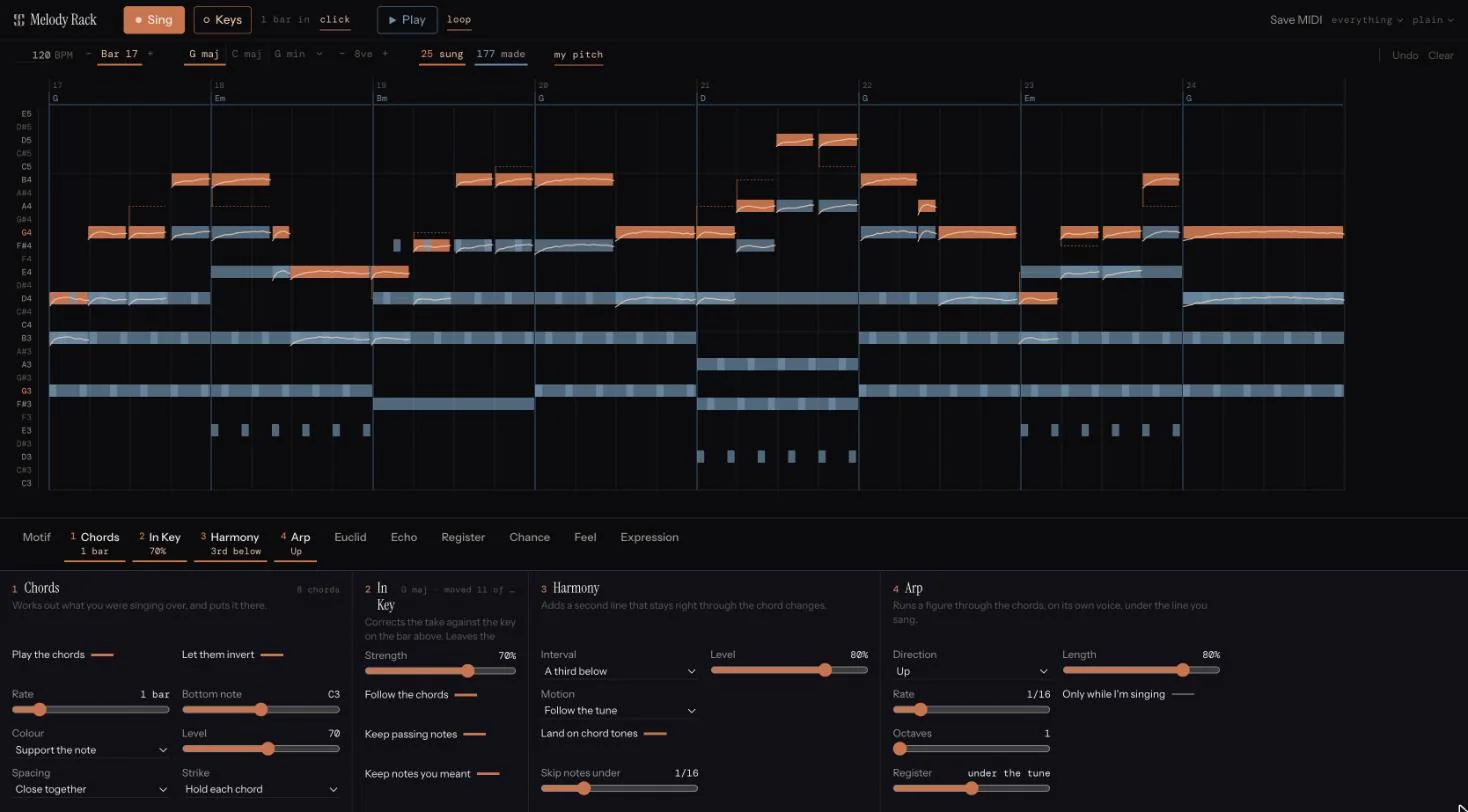
You sing or play a melody into your DAW and it arrives as notes on the grid, then runs through a rack of fourteen effects. Add the Chords slot and it works out a progression from your melody, which gives every effect after it something the piano roll never had: the harmony the phrase implies. In Key corrects the line against the key before Chords hears it, so a passing tone survives, a blue note you sang squarely on pitch survives, and a note that was genuinely a miss gets moved. The harmony line follows the changes instead of stacking a fixed interval that turns sour the moment the chord goes minor.
It also keeps the sung pitch curve rather than discarding it, which is what makes the aimed-at versus slid-past distinction available at all, and can write that curve out as per-note bend when you drag the clip to a track. There is a 14-day free trial.
If you would rather stay out of a DAW, Song Cage itself will capture a hummed melody and suggest chords that fit under it. Either way the point holds: the notes are not the finished part, and a phrase worth keeping beats a folder of voice memos you never open.
Capture the idea before you have to transcribe it
Hum it and Song Cage writes the notes, then suggests chords that fit the melody you actually sang.
Frequently Asked Questions
How accurate is audio to MIDI conversion?
Accurate enough to save real time, and never perfect. The ceiling is lower than most people assume: in Spotify's vocadito study, two trained musicians transcribing the same sung melodies agreed with each other at an average F-measure of 0.64. Expect a clean solo instrument to convert well, a full mix to convert badly, and every result to need a pass.
Can you convert vocals to MIDI?
Yes, and a solo vocal is one of the better cases, because it is monophonic. Melodyne's Melodic algorithm is built for lead vocal tracks specifically. Record dry, with no reverb, since reverberation makes a solo voice overlap with itself and behave like polyphony. Expect the unpitched parts of singing, consonants and breaths, to need cleaning up.
What is the best free audio to MIDI converter?
Basic Pitch, Spotify's open source converter, is the strongest free option and the model behind a good number of other free tools, including the NeuralNote plugin. It is polyphonic, works on any instrument, and detects pitch bends. If you already own Ableton Live or Logic Pro, their built-in conversion costs nothing extra and keeps you in the session.
Why does my converted MIDI sound robotic?
Usually over-quantizing rather than the conversion. Snapping every note to a grid at full strength removes the push and drag that made the performance sound played. Use a quantize amount instead of a switch, pull the part partway toward the grid, and leave expressive sections alone. Forcing everything into a scale has the same flattening effect on pitch.
Should I use a scale lock to fix wrong notes?
No. A scale device is a fixed lookup table from one pitch class to another, so it makes the same substitution everywhere regardless of the chord playing underneath. It removes blue notes, chromatic passing tones, and the raised seventh that makes a minor key resolve, while leaving in-key notes that clash with the harmony untouched. Fix wrong pitches individually, or use something that reads the chord.
Why does audio to MIDI put notes in the wrong octave?
Overtones. Every pitched sound contains harmonics above its fundamental, and when one of those is strong the analysis can lock onto it instead. It happens most on low notes, so check the bass register first. The fix is quick: select the note and move it one octave, rather than retuning it by ear.