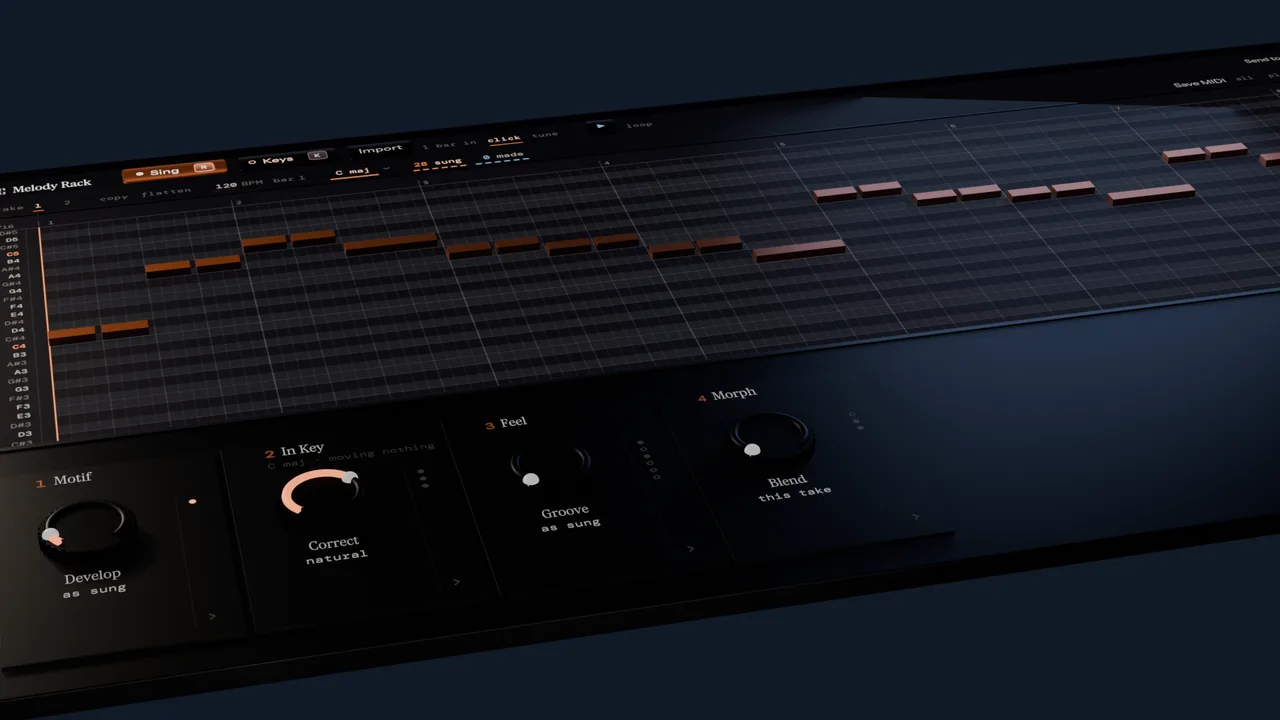
Sing it. Then run it through the rack.
Hum a rough line into your DAW and it lands on the grid as MIDI. Then the rack makes new melodic ideas from your notes, each one fitted to the harmony underneath.

Three ways in. All of them land on the beat.
Melody Rack makes no sound of its own. Whatever the rack writes is played by the instrument already on the track.
Sing it
Press Sing. It counts you in, or arms on the next bar line if the DAW is already rolling.
Play it
Press Keys. Your controller, the same count-in, the same grid.
Just press play
No arming, nothing to press in here. The rack listens and takes whatever the track sends past it.
What comes out is live MIDI to the instrument on the track, or a clip you drag onto one: everything, just what you sang, just the parts, or just the chords.
Or send it to Song Cage. One button puts the take in your Song Cage inbox as an idea: the chords the rack wrote, the melody as it came through the rack, and each part the rack made as its own take, so the harmony, the echo and the arpeggio are all there to write words to. Sign in with your Song Cage account and it works from the plugin window; you do not need the desktop app open.
Fourteen MIDI effects. All of them know the chords.
They work on notes, not audio. Chords writes the progression into the rack and the slots after it read it, so a delay, an arpeggiator or a harmony line stays inside the changes without being told to. These are the strips themselves, in any order you like.
-
 Writes the progression
Chords
Writes a progression from your melody, a chord a bar or two, from plain support to a reharmonization, and lets you type a chord onto any bar yourself. It goes into the rack, so every slot after it reads the chord under each note.
-
 Correction
In Key
Corrects notes that fall outside the key, before Chords hears them, and never moves a note in the key. A passing tone or a quick dip survives; a clam on the downbeat does not. It can tell a note you meant from one you missed, and leaves the one you meant.
-
 Second line
Harmony
A second line that stays right through the changes, instead of a fixed interval that breaks the moment the chord turns minor.
-
 Performance
Expression
How much of your singing reaches the synth. At zero, flat notes. At one, the scoop into the note and the fall off the end, written out as per-note bend.
-
 Rewrite
Bones
Keeps the notes that carry your tune and writes a new line on them. Hum a verse, get its chorus: same skeleton, new rhythm, new figures between the bones. Roll again for another.
-
 Answer
Reply
Sing the first half of a tune and hear a second half made out of it. Each roll answers in a different shape and rhythm, both built from what you sang, and names the one it chose so you can pin it.
-
 Between takes
Morph
Sing it twice and one dial walks the line from the first take to the second. Halfway is a real line between them, not both at once.
-
 Arpeggiator
Arp
Runs the chords the rack wrote, restarting on each change. Eight directions, a roll dial on Random, and it can rest whenever you rest.
-
 Transformation
Motif
Inversion, retrograde, augmentation, sequence and fragment on the phrase you just hummed, or the phrase rebuilt as the chorus or the verse it contrasts with. Inversion is diatonic, so it comes back in the key.
-
 Rhythm
Euclid
Turns a note into a rhythm. Hum one long note, get a pulse already in the key and in the chord.
-
 Note delay
Echo
Note delay that keeps its repeats in the harmony. Climbs by scale steps rather than semitones, and snaps each repeat to the chord it lands on.
-
 Range
RangeRegister
Folds a part into a range, because a sung take lands wherever your voice lives. Fold keeps the shape of the line; clamp flattens it, which is what a bass part wants.
-
 Probability
Chance
Rolls a die per note, or per phrase so a whole figure either happens or does not. Seeded, so a take renders the same twice.
-
 Timing
Feel
Swing, humanize and quantize as a dial rather than a button. A sung take is mostly phrasing, so the question is how much grid you want. Most takes want about 40%.
What happens between the take and the export.
Getting a voice into MIDI is the easy half. This is what the rack does with it once it is there.
It can tell a blue note from a wrong one
A sung note is usually rounded to one MIDI number and the rest is thrown away. Melody Rack keeps the frame-level pitch that produced each note, so it can ask how far your voice actually sat from the pitch it was rounded to. Near zero means you aimed at it and held it. Near half a semitone means the detector made a call. A flat third you meant survives; a note you missed gets corrected.
And there is a switch to turn that off, because correcting a transcription and correcting a performance are two different jobs, and only the person who sang it knows which one they wanted.
It corrects the line before the chords are written
A scale lock snaps whatever falls outside a set of seven pitch classes, however it was sung. In Key corrects only what is outside the key, and only what you did not mean: a passing tone or a quick dip on a weak beat is left alone, and so is a note you sang squarely on pitch. It runs before Chords, so the progression is fitted to the corrected line rather than to the notes you missed.
The chords live in the rack, so everything downstream follows them
The progression Chords writes is not a separate clip that the other slots have to be told about. It sits in the chain, so the harmony line follows it, the delay lands inside it and the arpeggiator runs through it. Change the chord and everything after it moves.
The performance survives all the way to the export
The sung pitch curve travels with each note through the whole chain. Transpose a note and the curve moves with it. Reverse the phrase and the curve reverses. Drag the result out as MPE and the scoop, the drift and the fall are written in as per-note bend, so what lands on the track is a recording of you rather than a piano roll approximation of you.
It writes the chorus from the verse
A verse and its chorus share a handful of structural notes, one or two a bar, and differ in everything hung between them. Bones finds those notes in what you sang, scoring each one against the chord underneath rather than by length alone, and keeps them. Then it writes a new surface on that skeleton out of your own hook, the bar of the take that carries the most: its rhythm and its interval shape, moved a step at a time, fill the gaps between the bones, so the new line repeats an idea the way a tune does. Turn Variety up and fewer of the new notes repeat the one before. Turn Roll and a different bar becomes the hook, a different line on the same bones. It reduces first and writes second, which is why the result still sounds like the tune you hummed rather than a shuffle of it. It is why we call it a melody generator that starts with your melody rather than one that starts with a key and a scale.
It goes in the MIDI effect slot.
In Logic that means it appears under MIDI FX, not under instruments.
Audio Unit · macOS
- Loads in the MIDI FX slot
- Universal, native on Apple Silicon and Intel
VST3 · macOS + Windows
- Goes on the track ahead of the instrument
- Any host with MIDI effect plugin support
Requirements
- macOS 11 (Big Sur) or later
- Windows 10 or later, 64-bit
- A free Song Cage account to start the trial
- Microphone access for the host, if you want to sing
One price.
Melody Rack
A MIDI effect plugin for your DAW
$29 if you own Song Cage
- Included: AU and VST3 on Mac, VST3 on Windows
- Included: All fourteen effects, nothing held back
- Included: Drag the result out as MIDI or MPE
- Included: The licence lives on your account, no key to type
- Included: 30 days to change your mind
Card or PayPal at checkout.
Common questions.
What is Melody Rack?
Melody Rack is a MIDI effect plugin for macOS and Windows, in AU and VST3 format. You sing or play a melody into your DAW and it becomes MIDI on the session's grid, then fourteen harmony-aware effects work on it: one writes a chord progression from the melody, another corrects the notes you missed and keeps the ones you meant, another adds a harmony line that stays right through the changes, another keeps the notes that carry your tune and writes a new line on them, and an arpeggiator runs through the chords. What comes out streams live to the instrument on your track, or drags onto a track as a MIDI clip.
It is made by Song Cage but sold on its own, at $39, with a 14-day free trial.
What is a MIDI effect?
A reverb sits after your instrument and changes the sound it made. A MIDI effect sits in front of it and changes the notes it is about to play. Melody Rack produces no audio at all, so it loads in your DAW's MIDI effect slot rather than the instrument slot.
Can it send what I hummed to Song Cage?
Yes. Send to Song Cage, in the header, files the take as an idea in your Song Cage inbox: the progression Chords wrote, with its bar lengths, as the idea's chords, and the melody as one take per part the rack made. The melody through the rack is the first take; Harmony, Echo, Arp and any other part follow, each with the notes as you sang them kept alongside. Open Song Cage on any device and it is there to write lyrics to. It sends notes, not audio, and it needs a Song Cage account, free or paid.
Is this part of Song Cage, or do I need Song Cage to use it?
It runs on its own. It shares Song Cage's audio engine and its music theory, but it has its own window, its own installer and its own licence, and you do not need the desktop app or the Song Cage plugin to use it. Melody Rack is a separate plugin, so the Song Cage licence does not include it. If you already own that licence, Melody Rack is $29 instead of $39, and the checkout works that out from your account with no code to enter.
Does it make any sound?
No. It sends notes to whatever instrument you have loaded on the track. There is a play button in the window so you can loop the take while you move a dial without driving the DAW back and forth, and that plays through the same instrument, so what you audition is the sound you are going to get.
Do I have to sing? I would rather not.
No. Press Keys and play the melody in on the controller already routed to the track, with the same count-in and the same grid. Or press play on a track that already has a MIDI region and the rack takes what goes past it, with nothing to arm and nothing to press. A played note states a pitch rather than reporting one, so the correction leaves it alone unless you ask it to.
Does it use AI?
The part that hears you does. Turning audio into notes is a neural model, because that is the only thing that works, and it is the same detector that ships in Song Cage. Everything after it is deterministic music theory: the progression, the correction, the harmony line and the arpeggio all come from rules, and the same take with the same settings gives the same result every time. Nothing generates a melody for you, and nothing you sing is used to train anything, which is the same line Song Cage draws everywhere else.
Does my take survive closing the window?
Yes. The recording, the rack settings and the key all save into the DAW project, so closing the plugin window or reopening the session next week brings the take back with its pitch curves intact.
Can I get the chords out on their own?
Yes. Next to the drag handle you choose what leaves: everything, just what you sang, just the parts, or just the chords. The sung line and the parts partition the rack exactly, so dragging both onto two tracks loses nothing and doubles nothing, and the clip name follows the choice so two drags arrive on the track with different names.
Which DAWs does it work in?
It installs as an Audio Unit and a VST3 on macOS, and as a VST3 on Windows, so it works in any DAW that hosts MIDI effect plugins. In Logic it loads into the MIDI FX slot; elsewhere it goes on the track ahead of your instrument. See Installing and Signing In for the per-host details.
Is there a standalone app?
No. It is a MIDI effect for a DAW, so there is nothing for it to do on its own.
What happens when the trial ends?
The rack stops sending notes to the track and the window says so. Nothing is deleted, your DAW project is untouched, and buying from the same window unlocks it again within a few seconds. Your own MIDI keyboard keeps reaching the track either way, because a lockout is about our output, not your controller.
What does the trial leave out?
One thing: dragging the clip onto a track. For 14 days the whole rack streams live to the instrument on your track, every effect, sung pitch and all, so you hear exactly what you would be buying. Keeping it as a MIDI clip is what the licence adds, and the drag handle becomes a Buy button until then.
What if I buy it and it turns out not to be for me?
You have 30 days to change your mind, and we refund it in full: email support@songcage.com. Melody Rack is a one-time purchase in US dollars, with no tax added at checkout, and there is no subscription.
Hum something and see
Fourteen days, the whole plugin, no card. Sign in once inside the window to start it.
VST® is a registered trademark of Steinberg Media Technologies GmbH.