Song Cage, on your iPad.
The same App Store app that captures ideas on an iPhone opens the full editor on an iPad: the timeline, the chord palette, the piano roll and Sheet view, with controls made for a finger.
One song free · 14-day trial in the app · iPadOS 15 or later
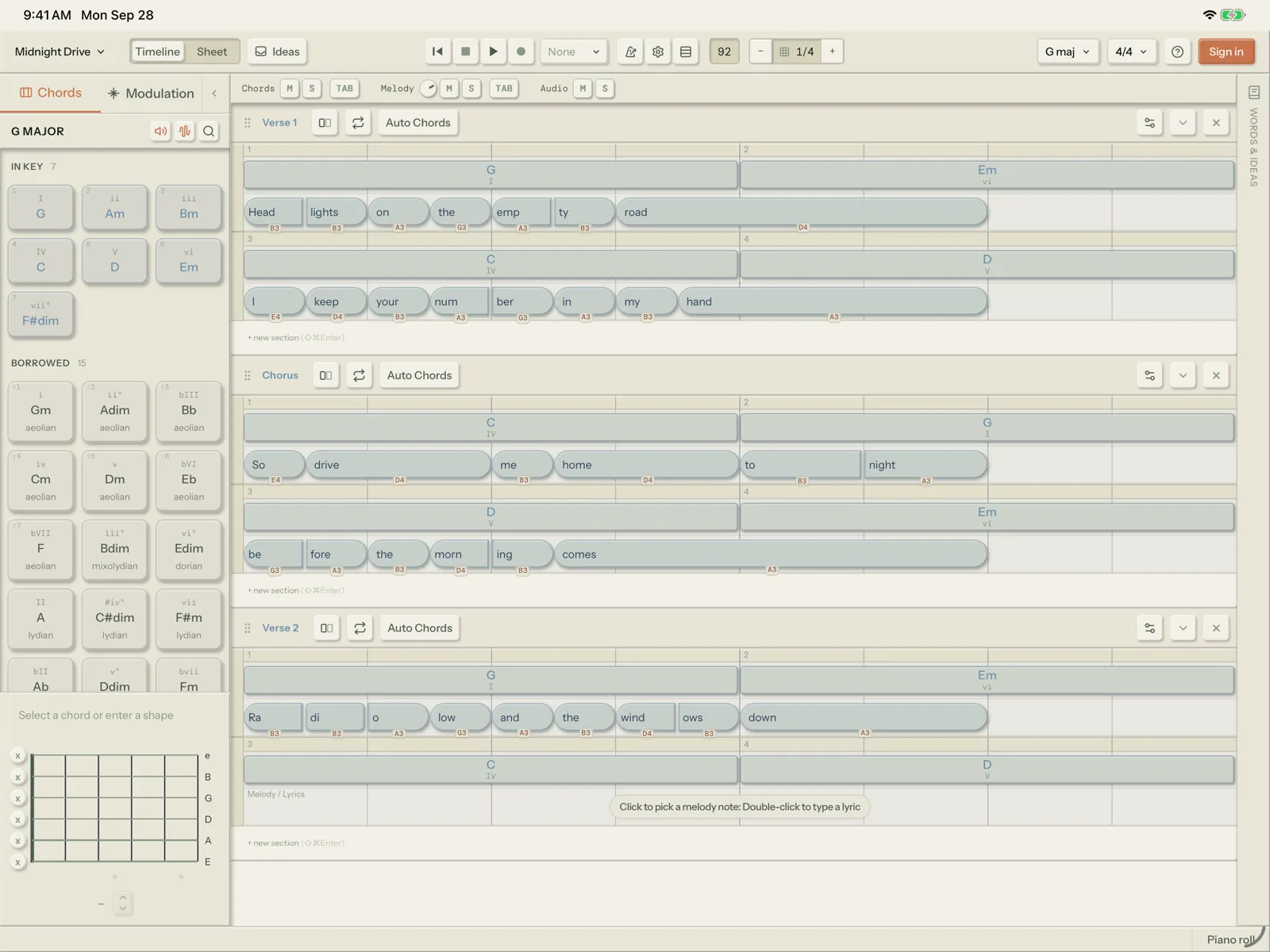
Not a cut-down version.
Song Cage on an iPad is the same canvas as the web app and the desktop app. Chord suggestions rank against the melody you have already written, every syllable carries its own note on the beat grid, and the modulation panel names a route between any two keys. With the licence, or during the trial, your songs sync with your other devices and what you capture on your phone lands in the same Ideas inbox.
- Chord palette and timeline In‑key, borrowed and secondary dominant chords for your key, ranked against your melody and the chords around them. Hold a chord and drag it onto the timeline.
- A grammar for your finger Tap a block to select it, drag it sideways to move it or drag its edge to trim it. Press and hold to lift it onto another line, or for the menu a right-click would open.
- Piano roll and Pencil Double-tap to add a note, pinch to zoom, and hold then drag to lasso a run. The Pencil in the roll's header draws a run of notes with one finger.
- Guitar tab on a fret neck Write tab with your finger on a fret neck at the bottom of the dock, with picking patterns and single notes.
- Sheet view and set lists Chords over lyrics on a page. Put songs in playing order and play them live, one after another, from Play Live in the song menu.
- Bring a keyboard Attach a hardware keyboard and the shortcuts work as they do on a computer. Press P to show or hide the piano roll.
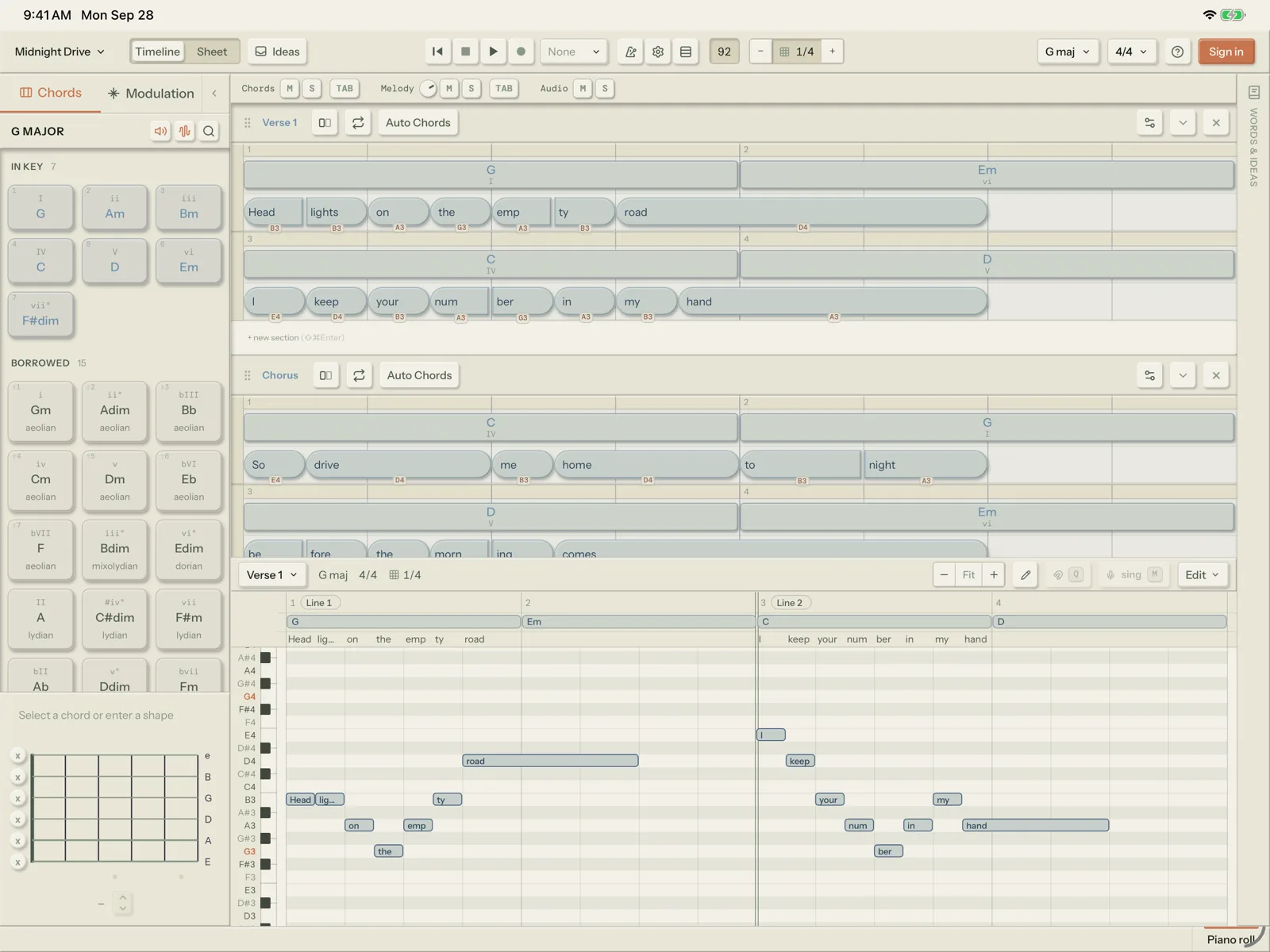
It works like the desktop app.
Start without an account. When one song is not enough, the trial and the licence are both in the app.
Free
One song, with every writing tool on it. You don’t need an account to start.
14-day trial
Sign in and tap Start the free 14-day trial for everything the licence includes. The trial is once per account, so one started on a computer carries over.
The licence
Buy it in the app, priced by the App Store in your currency. It belongs to your Song Cage account, so it unlocks the desktop app, the plugin and the web app too, and a licence bought on the shop unlocks the iPad when you sign in.
Runs on iPadOS 15 or later. A few things stay on a computer: MIDI controllers, opening a song file, and importing a folder of recordings.
Account & licenceCommon questions.
Is it the same app as the iPhone one?
Yes. There is one Song Cage app on the App Store. On an iPhone it opens the free capture app for voice memos, lyrics and chords. On an iPad it opens the full editor.
I already bought the licence on the website. Do I pay again?
No. The licence belongs to your Song Cage account. Sign in on the iPad with the same account and it applies there.
If I buy on the iPad, do I get the desktop app and the plugin?
Yes. A licence bought in the iPad app unlocks the desktop app for Mac and Windows, the AU/VST3 plugin and the full web app on the same account. Restore purchases brings it back on a new iPad.
How do refunds work for a licence bought on the iPad?
Apple handles them, through reportaproblem.apple.com. If you bought it on the website, email us within 30 days for a full refund.
What does Free include on the iPad?
One song, with the full chord palette, voicings, the modulation panel, the word tools and playback. More songs, PDF chord sheets and MIDI export come with the licence. Compare every feature.
Does it use AI?
No. Chord suggestions come from music theory: voice leading, how well a chord's notes fit your melody, and common progression patterns. Rhymes and synonyms are dictionary lookups. Why Song Cage has no AI.
Write your next song on the iPad
Free for one song. Sign in for 14 days of everything.