A Melody Generator That Starts With Your Melody
Every melody generator asks you for a key, a seed or a prompt, and hands back a line you have never heard. Melody Rack asks you to sing. It takes the four bars you hummed and writes new lines out of them: the skeleton regrown, the answering phrase, the version halfway between two takes. Nothing arrives from nothing. This page is the difference.
What Does a Melody Generator Do If You Already Have a Melody?
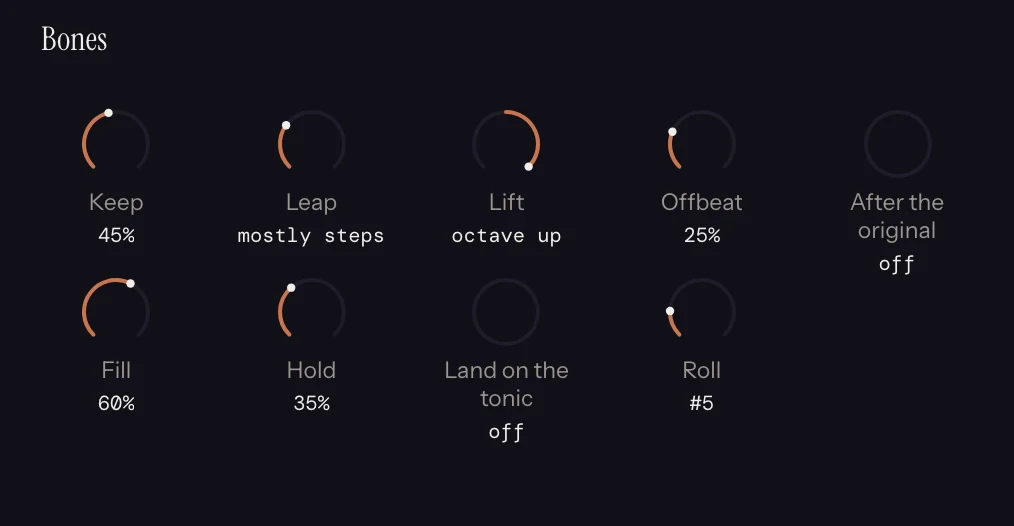
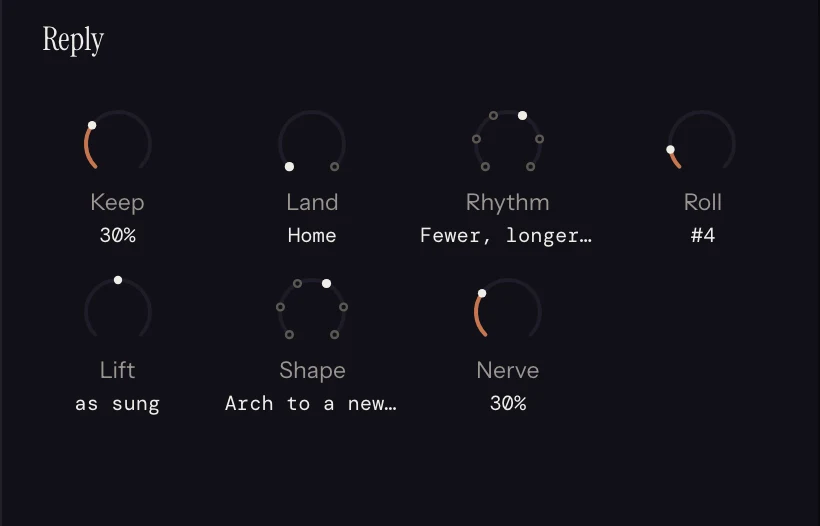
A melody generator is a tool that writes a melodic line for a song, and almost every one of them starts from nothing: you set a key, a scale and a length, or type a prompt, and a line appears. This one starts from a melody you already have, and it develops it. You sing a rough line into the plugin and it lands as MIDI on the DAW grid. From there the rack writes new lines out of that one. Bones keeps the notes that carry the phrase and grows a fresh line on that skeleton, so a verse comes back as its own chorus. Reply answers the first half of your tune with a second half made from it. Morph walks one dial between two of your takes, and halfway along is a real line between them rather than both at once. Motif inverts, sequences or fragments the figure you just sang, or rebuilds it as a chorus or a verse. Roll again and you get another, still built from your own material.
Whether a variation is still recognisably the same tune is not a matter of taste alone. Symbolic melodic similarity has been a benchmarked research task in music information retrieval for two decades, run as a formal MIREX evaluation against human similarity judgements. Bones is built for that side of the line: it reduces first and writes second, so what comes back is the tune you hummed with a new surface rather than a shuffle of your notes.
The harmony is what makes the results usable. The Chords slot works out a progression under the tune you sang, and every slot after it reads the chord beneath each note, so a variation lands inside your song instead of wandering out of it. That is the whole job harmony does here. It explains why the new lines hold up. It is not the headline.
- Bones: the notes that carry your tune, with a new line written on them
- Reply: a second half built out of the first half you sang
- Morph: one dial between two of your own takes
- Motif: inversion, retrograde, sequence and fragment on your phrase, or the phrase rebuilt as a chorus or a verse
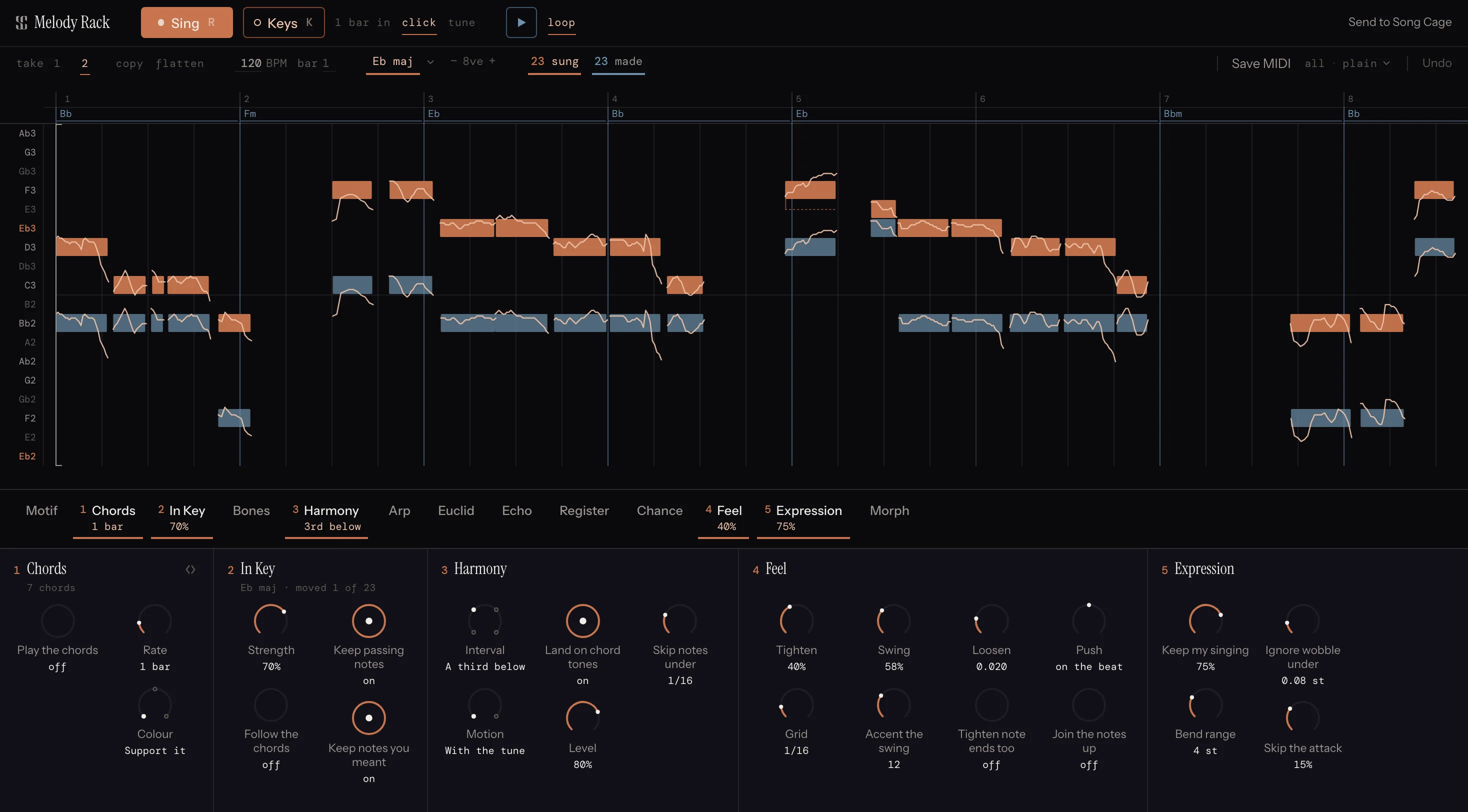
Every Other Melody Generator Starts From Nothing
Search for a melody generator and you get a page with a key dropdown, a scale dropdown, a length and a randomness slider, or else a text box. Press the button and a line appears. It is somebody's idea of a melody in A minor, and the next person to press the button gets a cousin of it. Those are real tools, and when you are staring at an empty project they are the right ones.
That is not the problem this solves. If you have already hummed something into your phone, you do not need a new melody. You need four more versions of the one you have, so you can hear which of them is the chorus. A generator that starts from scratch cannot help with that, because the thing that makes the idea yours is the first thing it throws away.
- Starts from a take, not from a key and scale dropdown
- Every variation is derived from notes you actually sang
- Roll for another without losing the take underneath
- No prompt box anywhere in the plugin
Is This Generation, Or Not?
It generates. A button produces notes you did not play, and calling it anything softer would be dishonest. What it will not do is invent a tune while you watch. Every note it writes is derived from notes you sang: which pitches it keeps, which bar it picks as the hook, which shape it answers with. Remove the sung take and there is nothing for it to work on.
Two places are genuinely unpredictable, and both are dials. Roll picks a different bar as the hook, and it is seeded, so the same roll renders the same twice. Chance rolls a die per note, or per phrase so a whole figure either happens or does not. Everything else is deterministic music theory: structural notes scored against the chord underneath, diatonic inversion, answering phrases built from your own figures. The one piece of machine learning in the plugin is the pitch detector that works out what you sang, and it reads your take rather than writing one.
- It generates notes; it does not invent tunes
- Remove the take and there is nothing left to generate from
- Roll and Chance are seeded, so a take renders the same twice
- No prompt box, no text input, nothing to describe in words
It Is a MIDI Effect, Not a Website
Melody Rack is an AU and VST3 MIDI effect for macOS and Windows. It goes in the MIDI effect slot ahead of an instrument, so whatever it writes plays straight through the synth or sampler already on that track, in your project, at your tempo, against the rest of the arrangement. There is no upload, no export step and no browser tab to copy a file out of.
When an idea is worth keeping, drag the MIDI out: everything, the sung line on its own, the individual parts, or just the chords. The sung pitch curve can come with it as per-note bend if you want the scoop into the note and the fall off the end. Or send the take to your Song Cage inbox as an idea, chords plus one take per part, and write lyrics to it later on any device.
- AU and VST3, macOS and Windows, in the MIDI effect slot
- Plays through the instrument already on the track
- Drag out everything, the sung line, the parts, or the chords
Common Questions
What is a melody generator?
A melody generator is a tool that produces a melodic line for you to use in a song. Most of them start from nothing: you pick a key, a scale and a length, or type a prompt, and the tool returns a line you have not heard before. Melody Rack works the other way around. You sing or play a melody in, and it writes new lines out of the one you gave it, so every result is derived from your own material rather than invented from a setting.
Is there a melody generator that uses my own melody instead of a prompt?
That is what Melody Rack is. You hum a rough line into the plugin and it becomes MIDI on the DAW grid. From there Bones keeps the notes that carry your phrase and writes a fresh line on that skeleton, Reply answers the first half with a second half built from it, Morph walks one dial between two of your takes, and Motif inverts, sequences or fragments the figure you just sang, or rebuilds it as a chorus or a verse. Roll again for another version. Take the sung take away and there is nothing for any of them to work on.
Is this an AI melody generator?
No. There is no prompt box in the plugin and nothing writing a melody in the background. The variations are music theory applied to the notes you sang: structural notes scored against the chord underneath, diatonic inversion, answering phrases built from your own figures. The one piece of machine learning in Melody Rack is the pitch detector that works out which notes you sang, and it reads your take rather than writing one. Song Cage explains that distinction in full on the no AI page.
Can it write the chords for the melody too?
Yes. The Chords slot writes a progression from your melody, a chord a bar or two, anywhere from plain support to a reharmonization, and you can type a chord onto any bar yourself. It sits in the rack, so every slot after it reads the chord under each note. That is what keeps the variations usable: a new line lands inside your song instead of wandering out of the harmony.
Is there a free melody generator I can try?
Melody Rack has a 14-day free trial with everything live, on Mac and Windows. Install it, sign in once inside the plugin, and the trial starts. Drag-out comes with the licence.
Does it work as a VST?
Melody Rack is an AU and VST3 MIDI effect for macOS and Windows. It goes in the MIDI effect slot ahead of an instrument, so whatever it writes plays through the synth or sampler already on that track. You can also drag the MIDI out: everything, the sung line on its own, the individual parts, or just the chords.
How the Variations Work
Sing Four Bars. Roll for Another.
14 days free, everything live. AU and VST3 for Mac and Windows. Nothing to prompt.
Download for Mac →Also on Windows. Sign in once inside the plugin to start the trial.