To make a chord chart with lyrics, write each lyric line and put the chord name above the syllable where the chord changes, which is often not the first letter of the word. Add the key, tempo and time signature at the top, label each section, and use bar lines wherever the words can't show how long a chord lasts.
That's the whole method, and most chord charts still go wrong in one of three places: the chord sits over the wrong syllable, nothing says how long it rings, or the chord line drifts away from the words the moment the chart is opened on a phone. This guide covers all three, with a real hymn as the worked example.
The short version
- Put each chord over the syllable where it changes, not over the start of the word
- Head the chart with the title, key, capo, tempo and time signature
- Label every section, and mark repeats instead of writing them out
- Use bar lines or slashes where the lyric doesn't show the timing
- Type it in a monospaced font, or as ChordPro, so the chords can't drift
What is a chord chart?
A chord chart is a written map of a song's harmony that a player can read while playing. The most common kind for songwriters is a lyric sheet with chord names printed above the words, so a guitarist or pianist can sing and play from one page. Two other kinds turn up in bands and studios. A bar chart drops the words and writes each measure as a box or a pair of bar lines, with slashes for the beats. A number chart writes chords as scale degrees instead of letter names, so the band can change key without a new chart; that's the Nashville Number System. "Chord chart" also gets used for the finger diagrams that show how to play a single chord on a guitar neck, which is a different thing entirely. If that's what you're after, we keep free guitar chord charts with audio. Everything below is about the first kind: chords over lyrics, written so anyone can play your song from it.
Where does the chord go above the lyric?
A chord goes above the exact syllable where it changes, which is usually a stressed syllable on a strong beat. When a word starts before the beat, the chord skips the first syllable and lands on the one that falls on the beat.
The opening of "Amazing Grace" shows why. The tune starts with a pickup: "A-" is sung before the first beat, and the G chord arrives on "-ma-". Here is the first verse in the key of G, with the simple chords most guitar charts use, and every chord over the syllable it changes on:
 G      G7         C         G
Amazing grace! How sweet the sound
                         D7
That saved a wretch like me!
  G        G7        C      G
I once was lost, but now am found;
                   D7  G
Was blind, but now I   see.
Put the G over the "A" and anyone reading it strums a beat early. The "I" that opens the third line is a pickup too, so its G sits over "once". The last line shows the second rule: when two chords land on short words, stretch the lyric with spaces ("I see") so the chord names never touch. Chords run together, as in "D7G", are an easy way to get a chart misread. The full chart, with the chord shapes for guitar, piano and ukulele, is in our Amazing Grace chords.
How do you show how long a chord lasts?
A chords-over-lyrics chart shows where each chord changes, but never how long it rings. When the words are evenly spaced that's fine, because the next chord tells you. When a chord holds through a long note, a rest or a bar with no words, the chart needs bar lines, slashes or beat counts to say it.
We ran into this building the chord-sheet importer in Song Cage: a pasted sheet can say exactly which word a chord sits over, and nothing at all about its length. Players fill the gap from memory, which is fine for a song they know and a problem for one they don't. Three marks fix it:
- Bar lines in the lyric line:
| G | C | G | D |puts one chord in each bar. - Slashes, one per beat:
G / / / C / G /in 4/4 means four beats of G, two of C, two of G. - A beat count after the chord:
G (2) C (2), for a chart that has no bar lines.
Use one system per chart. A reader who meets slashes on the first line expects them on every line after it.
What about chords before the first word or between lines?
An intro, an instrumental break or a turnaround has chords and no words, so it gets a line of its own with bar lines, such as Intro: | G | C | G | D |. A chord that changes on a held note, between two words, goes over the space where it happens rather than over the next word. If the change lands in the middle of a long vowel, write the vowel out, as in "sooo-ound", so there's a place to put the chord.
What goes at the top of a chord chart?
The header answers the questions a player asks before the first chord. Put the song's title first, then:
- Key, written as the key it sounds in: "Key: A".
- Capo, if there is one, with the shapes it gives: "Capo 2, play G shapes". The chord names in the chart should then be the shapes the guitarist plays, and the capo note tells everyone else what key that really is. Our guitar capo chart has every capo-and-shape pair worked out.
- Tempo in beats per minute, and the time signature: "92 BPM, 3/4".
Then label each section in the body, such as Intro, Verse 1, Chorus or Bridge, and say what repeats instead of writing it out again. "Chorus x2" or a road map line like "Intro, V1, C, V2, C, Bridge, C x2" saves pages, and it's the line a band looks at first when the song starts. A last note about feel, like "half-time in the bridge", earns its place more than another verse does.
Chords over lyrics, ChordPro or a bar chart: which format?
Use chords over lyrics when people will sing from the chart, ChordPro when the chart has to survive being typed, shared or opened in an app, and a bar chart when a band needs the form and the timing more than the words. Some writers keep the song in ChordPro and print chords over lyrics from it.
ChordPro puts each chord in square brackets in front of the syllable it belongs to, inside the lyric itself. It was created in 1992 by Martin Leclerc and Mario Dorion for a program called Chord, and this example is adapted from the official ChordPro site:
{title: Swing Low Sweet Chariot}
{start_of_chorus}
Swing [D]low, sweet [G]chari[D]ot,
Comin' for to carry me [A7]home.
{end_of_chorus}
Because the chord travels with its syllable, ChordPro can't drift out of line in any font, on any screen. The lines in braces are directives: a title, and markers for where the chorus starts and ends.
| Format | Best for | Shows timing? | Survives a phone screen? |
|---|---|---|---|
| Chords over lyrics | Singing and playing from one page | Only where the words do | ✗ unless the font is monospaced and lines are short |
| ChordPro | Typing, sharing and importing into apps | Same as the lyric | ✓ |
| Bar chart with slashes | Bands, sessions, instrumentals | ✓ every beat | ✓ |
| Nashville numbers | Changing key on the spot | ✓ with bar lines | ✓ |
✓ yes · ✗ no · text = partly.
Why do chords slide out of place on a phone?
Chords slide because a chords-over-lyrics chart is two lines lined up with spaces, and that only works if every character is the same width. Most phone and word-processor fonts aren't, and a narrow screen wraps long lines, which moves the chord line and the lyric line apart.
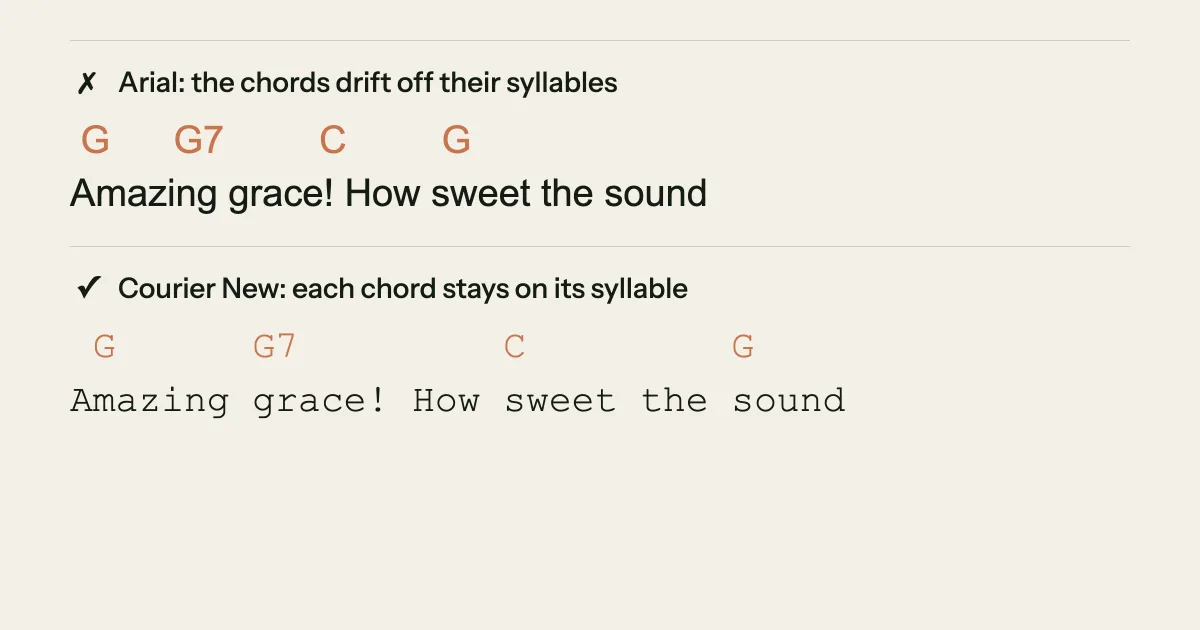
In a proportional font like the Notes app's default or Arial, an "i" is far narrower than an "m", so ten letters of lyric can be almost any width, and the ten spaces above them only line up by luck. A chart typed on a laptop looks right there and wrong everywhere else. Wrapping does the rest of the damage. A 40-character lyric fits a laptop line easily, but on a phone held upright it can break in two. The chord line breaks at a different point, and suddenly the G that belonged over "sound" sits over the next line's first word.
There are three fixes: use a monospaced font so every character takes the same width, keep lines short so they don't wrap, or write the chart in ChordPro so each chord is attached to its syllable instead of placed with spaces.
How do you make a chord chart in Google Docs, Word or Notes?
In Google Docs or Word, set the whole chart in a monospaced font such as Courier New, which both include. Type the chord line, then the lyric line under it, and space the chords over their syllables. Keep lines under the width of the page so nothing wraps. Bold the section labels so they stand out from the chords.
In Apple's Notes app on iPhone, use the Monostyled format from the Aa menu, which replaced the older Monospaced option in iOS 17. Notes doesn't have a page width to save you, so short lines matter even more there. Turning the phone sideways helps a chart you're reading, not one you're sharing.
Every one of these is a text editor pretending to be a music tool, which is why the chart breaks the moment someone opens it with a different font. If you write in ChordPro instead, any of them will do, because the brackets hold each chord to its syllable no matter how the text is displayed.
How do you make a chord chart on your phone?
The most reliable chord sheet maker on a phone is an app that attaches each chord to a word instead of placing it with spaces. In Song Cage on iPhone or Android, you switch a section's Lyrics view from Words to Chords, tap a word, and pick the chord; it stays on that word on every screen.
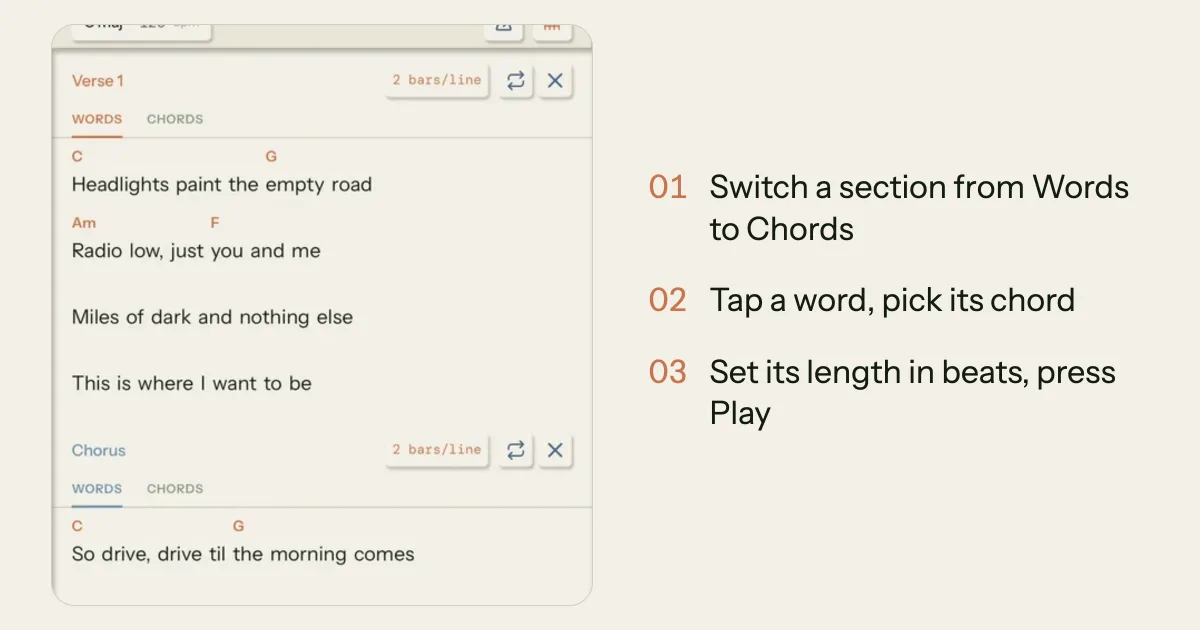
Song Cage's Lyrics tab works the way a chord chart does, with the timing added. In the Chords view a + sits above every word, and a dot sits in each space between words for a chord that changes on a held note. A wordless row takes an intro or instrumental line. Each chord gets a length in beats, from a quarter of a beat to eight, and each section a number of bars per line, so Play sounds the chart exactly as written, strummed or arpeggiated in time. On guitar, a capo makes the chords read as the shapes you play while the key shows what they sound like, as in "A maj · Capo 2 (G)".
The Songs tab shows the idea as a chord sheet, and with the one-time unlock you can autoscroll it on stage and send it as a PDF. The mobile app chapter of the docs covers every control, and our comparison of the best songwriting apps for iPhone and Android lists the other apps that put chords on the lyric.
Can you turn an old chord sheet into a song?
Yes. In the Song Cage editor on the web or desktop, paste a chord sheet into a line in Sheet view, either chords over lyrics typed in a monospaced font or ChordPro with brackets, and it lands as sections with the chords kept, rather than as plain words. The importer reads a chords-over-lyrics sheet by column, so a chart typed in a proportional font comes in only as well as it lines up. Hyphenate any word a chord splits, as in Beth-[D]le-hem, so the chord has a syllable of its own to sit on. And as covered above, a sheet only says where chords change, so the lengths that come in are a first guess until you set them.
Chord charts that stay lined up
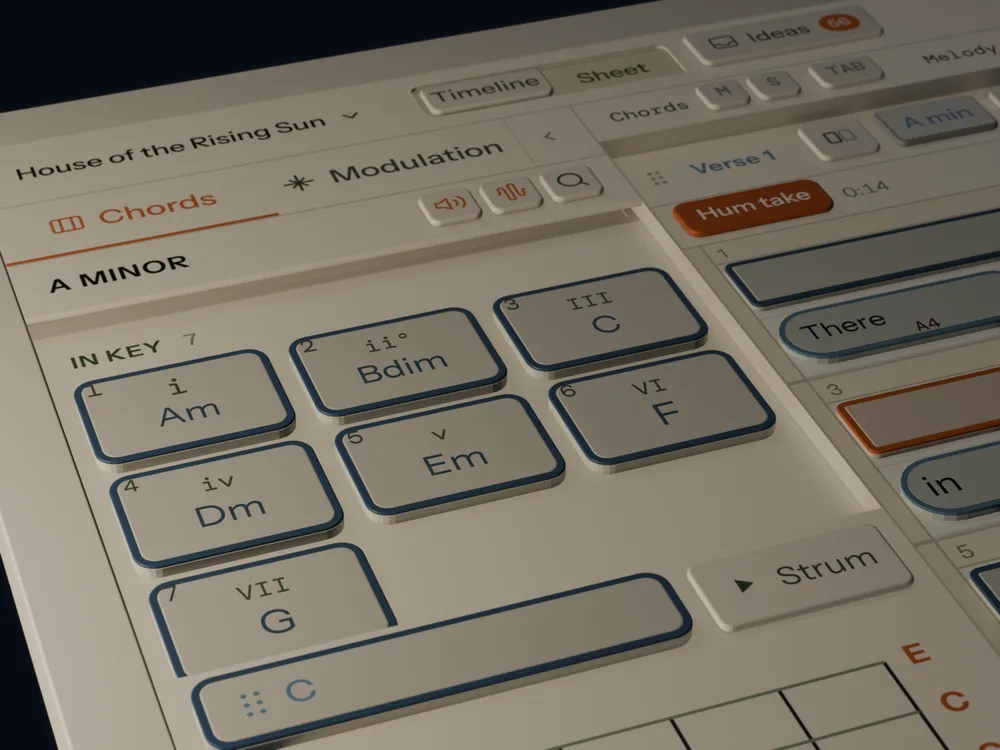
On iPhone and Android, Song Cage puts each chord on its word with a length in beats, plays the chart back, and keeps your takes with it. Your first 3 ideas are free, with no account.
Frequently Asked Questions
Do chords go above or below the lyrics?
Above. Chord names sit on the line directly above the lyric, over the syllable where each chord changes. That's the convention players expect, and it keeps the words readable as a lyric.
What font should I use for a chord chart?
A monospaced font such as Courier New, where every character takes the same width, so the spaces that place each chord line up on every screen. In Apple Notes, use the Monostyled format. In a proportional font, chords drift away from their syllables as soon as the chart is opened anywhere else.
What does a slash mean in a chord chart?
Two different things. Inside a chord name, as in G/B, the slash means "play G with B in the bass". Standing on its own, each slash adds one more beat of the chord before it, so G / / / is four beats of G.
How do you write a chord that changes in the middle of a word?
Split the word into syllables with hyphens and put the chord over the syllable where it changes, as in "Beth-le-hem" with the chord over "le". In ChordPro, put the bracket right before that syllable: Beth-[D]le-hem.
What is a ChordPro file?
A plain text file where each chord sits in square brackets in front of the syllable it belongs to, as in Swing [D]low, with directives in curly braces for the title and sections. The format dates from 1992, many chord-sheet and set-list apps import it, and the official site recommends the .cho file extension.
Is a chord chart the same as a lead sheet?
Not quite. A lead sheet writes the melody in music notation, with the chords above the staff and the lyric under it. A chord chart leaves out the melody and gives only the chords, usually over the lyric. Singers who know the tune use a chord chart; a player learning the melody needs the lead sheet.