Table of Contents
- How Should You Choose a Free Chord Reference?
- 1. All-Guitar-Chords.com
- 2. Melodician
- 3. FaChords
- 4. Chordbook.com
- 5. Scales-Chords.com
- 6. JGuitar
- 7. Oolimo
- 8. ChordBank
- 9. TrueFire Chord Charts
- 10. Berklee PULSE
- How Do You Read a Guitar Chord Diagram?
- What Do the Numbers on a Chord Diagram Mean?
- What Do X and O Mean Above the Strings?
- Why Does One Chord Have So Many Different Shapes?
- Which Chords Should a Beginner Learn First?
- What Is the Easiest Way to Play an F Chord?
- Full Comparison: Free Guitar Chord References
- What if You Need the Shape for a Chord You Are Already Writing With?
- Frequently Asked Questions
You are halfway through a song and the chart says Bm7. You know roughly where it lives, but not whether the shape in your head is the one that will sound right, and you would rather hear it than guess. That is the moment a chord reference earns its keep, and it is a different moment from wanting a chord generator or a full songwriting app.
This is a list of the places that answer that one question well: what does this chord look like, and what does it sound like. All ten are free to use. None of them require you to buy anything to see a diagram.
Quick Summary
Ten free guitar chord references, ordered by how good the free lookup experience is. All-Guitar-Chords is the best all-round interactive lookup. Melodician has the cleanest pages and lets you hear one string at a time. Scales-Chords has the deepest database. FaChords is the most configurable. TrueFire is the best printable chart.
How Should You Choose a Free Chord Reference?
The right chord reference depends on which of four jobs you have: looking a shape up fast, hearing whether you are playing it correctly, finding an easier version of a shape you cannot reach yet, or printing something for a music stand. Almost every tool below is strong at one of those and ordinary at the rest.
This list is ordered by the quality of the free, no-signup lookup experience, not by company size or how long the site has been running. Four things moved an entry up: audio you can trigger per chord, more than one voicing per chord, a left-handed mode that mirrors the diagram rather than reversing a picture, and pages that stay usable without an account.
Two things moved an entry down: gating any part of the diagram behind a signup, and burying the tool under lesson content you have to scroll past. Where a tool is the clear best at one specific job, that job is named in its "Best for" line, so you can skip straight to it.
1. All-Guitar-Chords.com

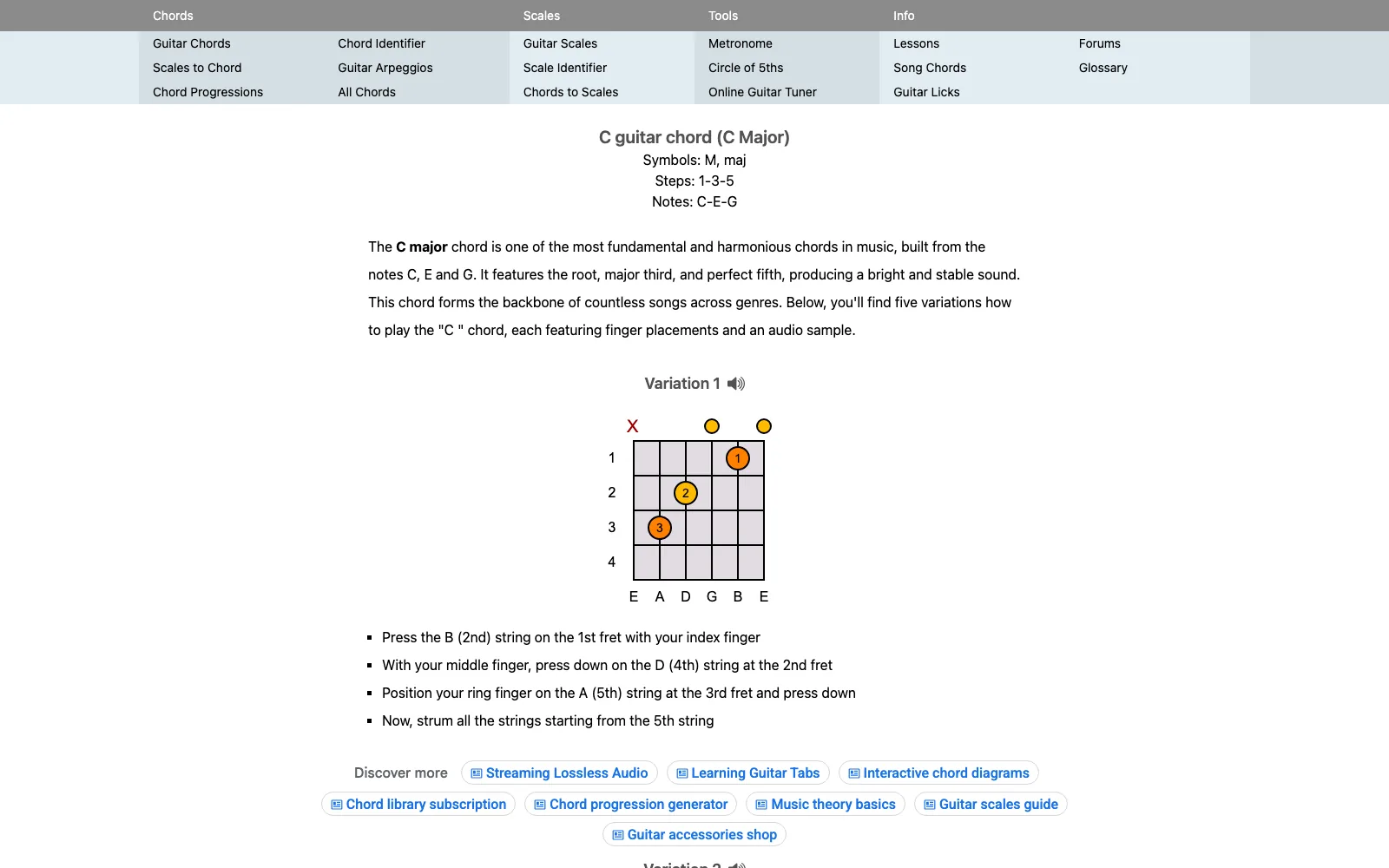
All-Guitar-Chords holds more than 2,700 guitar chords, every one with finger placements and an audio sample you can trigger from the diagram. You pick a root note, then a chord type, and get several variations at different points on the neck. Nothing is gated, and there is no account. The flow is built around the two clicks you actually make: root, then quality. An info button on each shape opens its notes and intervals, which turns a lookup into a short theory lesson if you want one.
The Advanced button is the part that separates it from simpler references. It exposes the full list of chord types in the database rather than the handful of common qualities most sites stop at, so the altered and extended chords that show up in jazz and gospel charts are actually there. A settings panel carries a left-handed mode and a vertical fretboard view, and it remembers sound preferences.
The trade-off is presentation. The interface looks like it was designed a decade ago, and there is no printable chart, so this is a reference you keep open in a tab rather than one you tape to a wall. For that job, see TrueFire further down.
Pros
- More than 2,700 chords, each with an audio sample
- Several neck positions per chord, open shapes flagged for beginners
- Advanced view exposes the full chord-type list, not just common qualities
- Left-handed mode and a vertical fretboard view
- Notes and intervals shown per shape
Cons
- Dated interface
- No printable chart
- Guitar only
2. Melodician

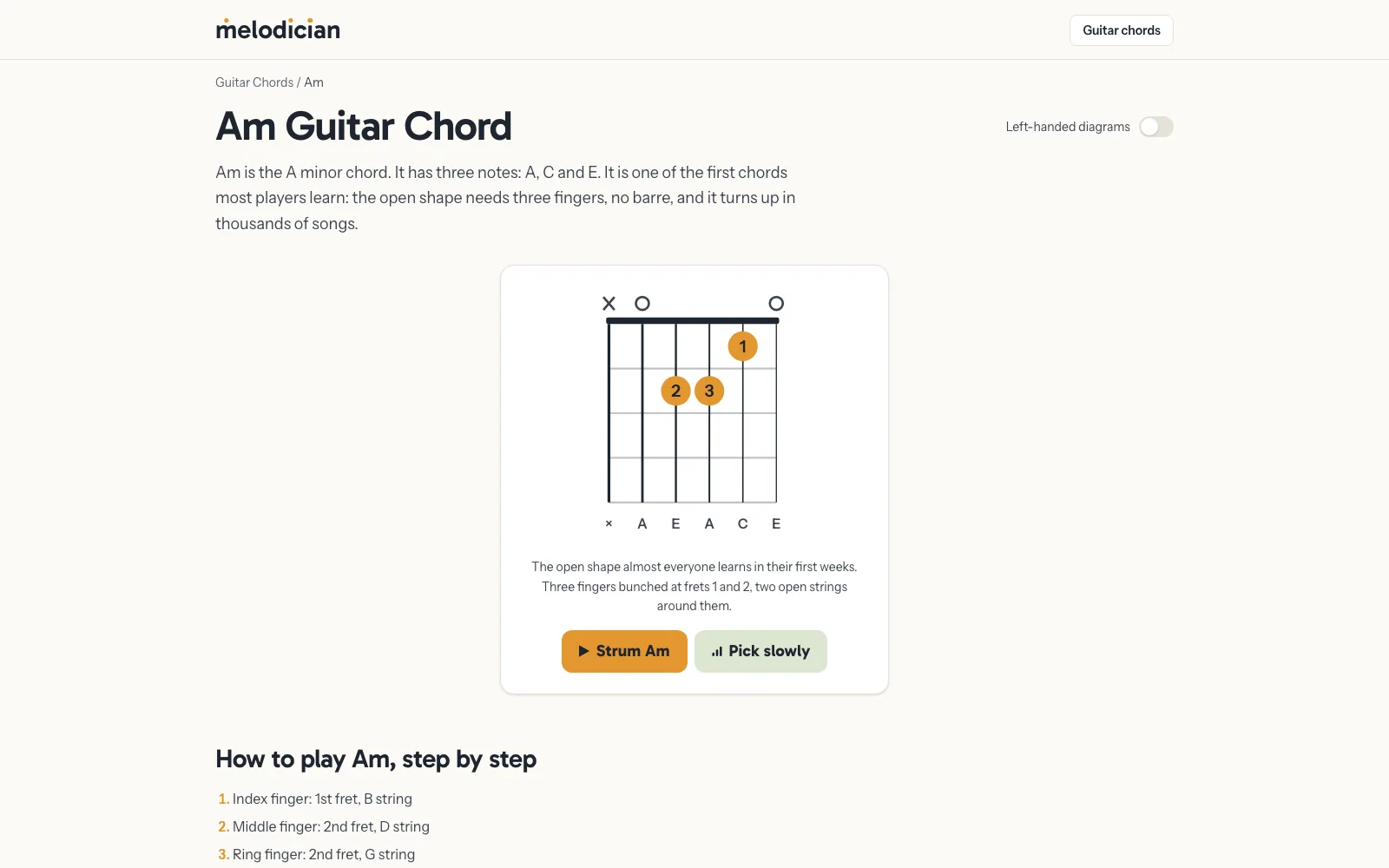
Melodician gives every chord its own page with an interactive diagram, recorded acoustic guitar audio, and step-by-step finger instructions. Its distinguishing feature is per-string playback: tap the diagram to strum the whole chord, or tap a single string to hear only that note. There is no account, no signup wall and no popups. That one-string-at-a-time control is the fastest way to find out that your third string is muted, which is the single most common reason a beginner's chord sounds wrong.
The other strong idea is the easier shape. On hard chords the page carries a reduced version alongside the standard one and explains what you are giving up, which is usually bass weight rather than the identity of the chord. The F page lays out the four-string F, then points out that the middle, ring and pinky are already in their final positions, so nothing has to be relearned when the full barre starts working. The Bm page does the same. Both list four common shapes, ordered easiest first.
Every page has a left-handed toggle that mirrors the diagram and is remembered by the browser next time. Printing a chord page produces a clean black-and-white chart with the navigation, player and footer left off the paper, which is unusually considerate and rare on sites like this.
The honest caveat is that it is new. Coverage is the common chords rather than an exhaustive database, and it is guitar only for now, with piano, ukulele and bass described as planned. Song listings hand off to a partner site.
Pros
- Recorded acoustic guitar audio, not a synthesised tone
- Tap one string to hear only that note
- Easier version of hard shapes, with a clear explanation of the trade-off
- Four common shapes per chord, ordered easiest first
- Left-handed toggle that persists between visits
- Prints as a clean black-and-white chart
Cons
- New site, so coverage is common chords rather than exhaustive
- Guitar only today
- Song links open a partner site
3. FaChords
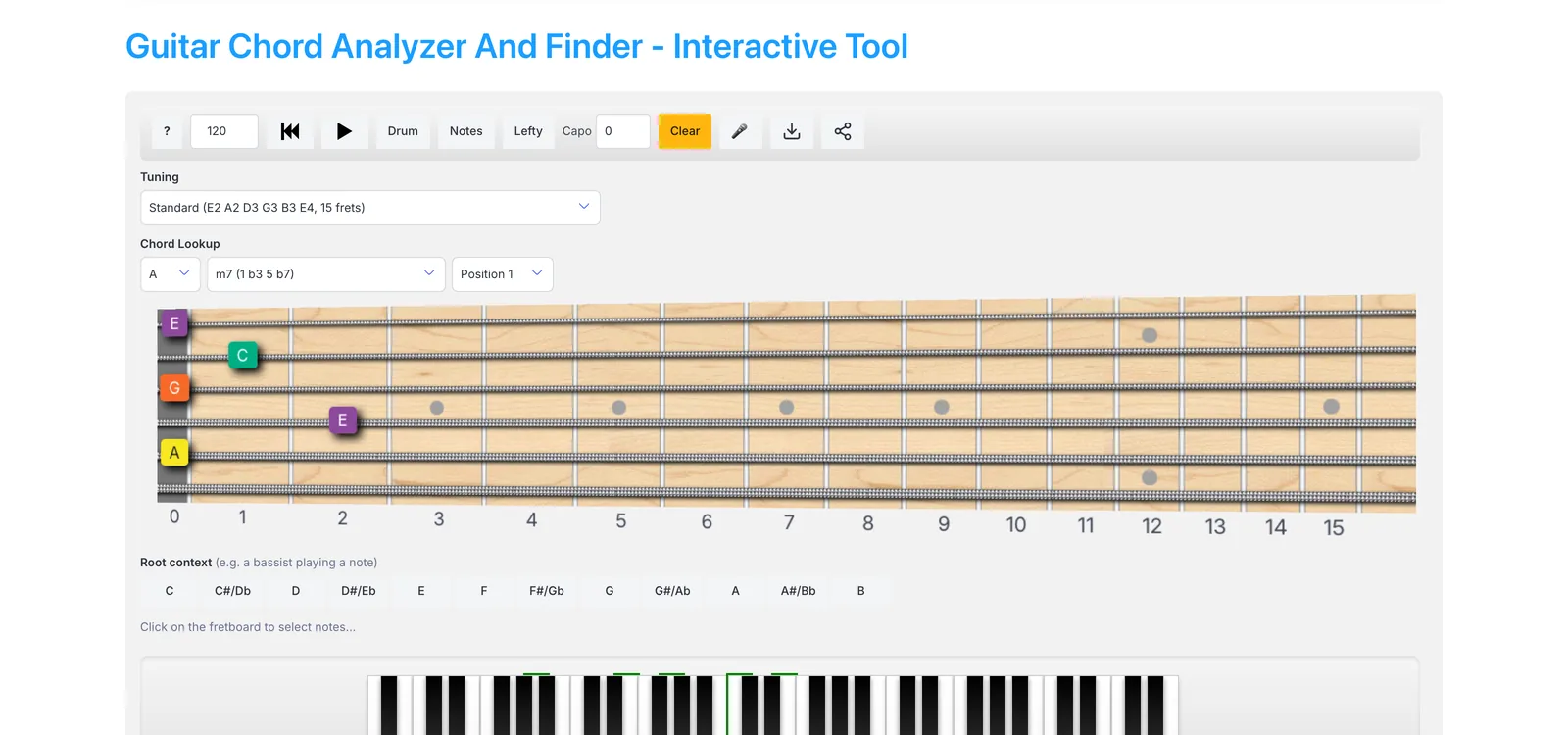
FaChords runs both directions at once. Click notes on a fretboard and it names the chord, or use the lookup dropdowns to browse voicings by key, type and position. What sets it apart is configuration: a capo on any fret, multiple tunings including drop D and open tunings, and a left-handed flip. When you move the capo, the tool recalculates note names and chord identification to match, which most free references do not attempt.
It also plays what you select in a loop with a four-beat countdown and an adjustable tempo, with an optional drum pattern behind it, so you can drill a change rather than just look at it. There is microphone pitch detection for identifying notes from a real guitar, a piano keyboard you can click for reference, and the option to download the fretboard as an image or grab an embed code.
If your capo maths is the actual problem rather than the shape, our guitar capo chart covers what key you land in for each fret position.
Pros
- Identifies a shape you click, and looks up shapes you name
- Capo on any fret, with note names recalculated
- Standard, drop D and open tunings
- Loop playback with countdown, tempo and optional drums
- Microphone pitch detection
Cons
- Dense page with a lot of lesson content around the tool
- More controls than a quick lookup needs
4. Chordbook.com

Chordbook's advantage is its sounds. It carries separately sampled electric and acoustic guitars and lets you choose which one plays, so a jazz voicing can be auditioned clean and electric rather than through a single generic tone. You can set left or right handed, move up the neck, and add a capo. The same sounds drive the diagrams on its information pages, not just the main app.
The MyChords feature is the useful extra: save the chords you have selected or built, play them back as a sequence, and keep the set for your next visit without creating a membership. That turns the reference into a rough scratchpad for a progression you are trying to remember. The site also carries scales and a tuner.
The presentation is showing its age in places, and the site's own copy still describes custom mobile views as in development, so expect the desktop experience to be the better one.
Pros
- Separately sampled electric and acoustic guitar sounds
- Save chords and play them back in sequence, no membership
- Left or right handed, capo, movable position
- Scales and a tuner alongside the chord app
Cons
- Dated design
- Mobile views described as still in development by the site itself
5. Scales-Chords.com
Scales-Chords covers by far the widest ground on this list. Its database holds over 84,000 chords and 500,000 chord charts across guitar, piano, ukulele, mandolin, banjo, bass, violin, viola and cello. You type a chord name in plain text and it parses what you meant, which is faster than working through dropdown menus. For anyone arranging for more than one instrument, a single source for all of them removes a lot of tab switching.
Each chord page is more thorough than the file size suggests. Ask it for Bm7 and you get the notes and interval structure, a note flagged as safe to omit, ten possible fret configurations, inversions, a dedicated left-handed section, related chords and scales, harmonised progressions, and the chord written on a staff. A tuning selector carries fifteen options, including drop D, half and full step down, seven open tunings, all fourths and all fifths.
The reason it sits here rather than at the top is presentation. Shapes are served as pre-rendered chart images rather than an interactive diagram you can play with, so it reads like a reference book: you go there knowing the chord you want, and you leave as soon as you have it. That is a fair trade for the depth, but it is a different experience from the interactive tools above.
Pros
- Over 84,000 chords and 500,000 chord charts
- Nine instruments, including piano, ukulele, mandolin and banjo
- Fifteen tunings, including drop D and seven open tunings
- Dedicated left-handed charts on every chord page
- Notes, intervals, inversions, related scales and harmonised progressions
Cons
- Static chart images rather than an interactive diagram
- Utilitarian presentation, dense with links
6. JGuitar

JGuitar's chord search draws diagrams for virtually any chord symbol you can write. The feature worth knowing about is batch lookup: enter several chord symbols separated by commas and it returns a diagram for each one, so an entire song's harmony becomes a single printable page rather than eight separate searches. For a player learning an unfamiliar chart, that is a real time saver.
Every shape carries two playback options rather than one, strummed and arpeggiated, and the arpeggiated version is the more useful of the two for checking your fingering, because a rolled chord exposes a dead string that a strum can hide. Coverage is deep: a search for Bm7 returns twenty-seven shapes, paged six at a time.
Note labels are configurable between none, finger numbers, letter names and chord tones, which matters more than it sounds. Finger numbers suit a beginner learning the shape; chord tones suit someone working out why a voicing sounds the way it does. Results also link through to a chord calculator and to scales that fit the chord.
Pros
- Batch lookup: comma-separate several chords, get all the diagrams
- Strummed and arpeggiated playback on every shape
- Deep coverage, with twenty-seven shapes returned for Bm7
- Label diagrams with finger numbers, note names or chord tones
Cons
- Plain, diagram-first presentation
- Results are paged six at a time
7. Oolimo

Oolimo pairs a chord finder with a chord analyzer, and its real contribution is the writing around both. It breaks a chord symbol into its five sections, walks through how a triad becomes a seventh chord and then an extended chord, and explains which stacked thirds can be raised, lowered or left out. If you have ever stared at a symbol like C7♯9 and wanted the logic rather than just the shape, this is the reference that supplies it.
The analyzer runs the other direction: enter a shape on the virtual fretboard and it returns the correct chord name, notes and intervals. That is genuinely useful when you have stumbled onto something good and want to write it down properly.
One considerate detail: sounds are not downloaded by default, and the site asks your preference first, which keeps it light on a phone connection. The theory writing is dense, and it is not the place to go when you just want a quick shape.
Pros
- Names the chord from a shape you enter on the fretboard
- Thorough explanation of chord symbol anatomy and intervals
- Asks before downloading audio, so it stays light on mobile data
Cons
- Dense theory writing
- Slower than a plain lookup when you only want the shape
8. ChordBank

Every other entry so far needs a browser and a connection. ChordBank is the native option, and the one to install before a rehearsal in a basement. It is free to download, currently at version 5.2.0, and holds a 4.7-star average across more than 6,200 App Store ratings, which is a strong showing for a utility app. The developer, Better Notes, describes a library of over 14,000 fingerings, each hand-curated rather than generated.
That curation claim is the interesting part, and the App Store listing is explicit that the shapes are not auto-generated. Software can enumerate every mathematically valid way to play a chord, and most results are unplayable or sound bad. A hand-checked library is a meaningfully different product from an exhaustive one, and it shows in which voicings you are offered first.
Beyond lookup it carries a left-handed mode, custom tunings, support for slash chords, and games that listen through the microphone as you play. Reach is the limitation: it is iOS only, and the current version requires iOS 18.6 or later, which rules out older phones. Android players should use one of the web references above, which work fine in a mobile browser.
Pros
- Works offline once installed
- 4.7-star average from more than 6,200 ratings
- Hand-curated fingerings rather than machine-enumerated ones
- Left-handed mode, custom tunings and slash chord support
Cons
- iOS only, no Android version
- Requires iOS 18.6 or later, so older phones are excluded
- Lookup is free, but the lessons sit behind a paid membership
9. TrueFire Chord Charts

Sometimes the right answer is paper. TrueFire publishes a free downloadable guitar chord chart plus a set of themed collections, grouped by the situation you are in rather than alphabetically: ten beginner chords, ten barre chords, ten blues, ten jazz, ten rock, fifteen country and fifteen songwriter chords. The songwriter set is the one worth printing if you write rather than cover.
Grouping by genre is a better idea than it first appears. A beginner working through an alphabetical database has no way of knowing which of 2,700 chords they will actually use this year, and a curated set of ten answers that question implicitly.
It is static, so there is no audio and no alternate voicings, and the charts exist partly to introduce TrueFire's paid video courses. Neither of those stops the chart from being free and genuinely useful.
Pros
- Free printable chart, no account to download
- Curated sets by genre, including a songwriter set
- Clear explanation of how to read a diagram alongside it
Cons
- Static: no audio, no alternate voicings
- Positioned as an entry point to paid courses
10. Berklee PULSE

Berklee PULSE is the online music method run by Berklee College of Music's City Music program, and its guitar chords tool is free to use. Dropdown menus select chord types and voicings, and clicking the guitar pick or the fretboard plays an audio reference. The institutional backing is the point: for a teacher assigning a reference to a class, provenance matters more than features.
The chord tool sits inside a larger set of free interactive tools worth knowing about on their own, including a tuner, a metronome, a practice timer, a piano chords reference, scales and modes, a circle of fifths chart and a song stretcher for slowing audio down without changing pitch. That collection is more useful to most learners than any single chord lookup.
The chord reference itself is one page in that suite rather than a purpose-built dictionary, so it is less deep than the specialists above, and the wider PULSE library invites you to create a free account.
Pros
- Backed by Berklee College of Music's City Music program
- Chord types and voicings via dropdowns, with audio reference
- Surrounded by free tuner, metronome, scales and circle of fifths tools
Cons
- Less deep than the dedicated chord dictionaries
- The wider library invites a free account
How Do You Read a Guitar Chord Diagram?
A guitar chord diagram is a picture of the first few frets, seen as though the guitar is standing upright in front of you. The six vertical lines are the strings, with the lowest-pitched string on the left. The horizontal lines are the frets. A dot shows where a finger presses down.
Once you know that, everything else on the diagram is annotation. The thick line across the top, when there is one, is the nut, meaning the diagram starts at the first fret. If the shape lives higher up the neck, a small number beside the grid tells you which fret the top of the box represents.
The convention is close to universal, which is why a chart from one site is readable on another. The variations you will meet are cosmetic: some references number the fingers, some name the notes, some colour the root.
What Do the Numbers on a Chord Diagram Mean?
Numbered dots tell you which finger to use. The numbering runs 1 for the index finger, 2 for the middle, 3 for the ring and 4 for the little finger. The thumb, when a chart wants it, is usually marked T.
Fingering is a suggestion rather than a rule, but it is a well-informed one. The fingering printed on a good chart is chosen so that the next chord in a common progression is reachable without resetting your whole hand. Ignoring it works fine on a single chord and causes problems the moment you have to change.
Some references let you switch the labels to note names or chord tones instead. Note names help you learn the fretboard; chord tones, marking which dot is the root, the third and the fifth, help you understand why a voicing sounds bright, dark or unresolved.
What Do X and O Mean Above the Strings?
An O above a string means play it open, with no finger pressing it down. An X means do not sound that string at all, either by not striking it or by muting it with a finger already on the neck.
The X is the one beginners skip, and it matters more than it looks. A D major with the low E ringing is not a D major any more, it is a D with an E in the bass, and it will sound unsettled underneath a melody that expects a clean root. This is the single most common reason a correctly fingered chord sounds wrong.
Muting is a technique in itself. On many shapes the easiest way to silence an unwanted string is to let the underside of a finger that is already fretting rest lightly against it, rather than trying to avoid striking it.
Why Does One Chord Have So Many Different Shapes?
Because a chord is a set of notes, not a set of finger positions. A major chord is a root, a third and a fifth, and any arrangement of those three notes is that chord. On a guitar the same three notes are available in several places at once, so a single chord name maps to many playable shapes.
The shapes are not interchangeable in practice. A low open position sounds thick and rooted. A voicing up at the eighth fret is thinner and more focused, which can let a vocal sit above it more clearly. Dropping the bass strings from a barre chord gives you the same chord with less weight, which is why reduced shapes work in real songs rather than being a compromise.
Choosing between them is arranging, not theory. Our guide to chord inversions covers what changes when a different note is in the bass.
Which Chords Should a Beginner Learn First?
Em, C, G, D and Am. All five are open shapes with no barre, and between them they cover a very large share of popular songs. Learn to change between them cleanly and most of the guitar repertoire opens up before you have touched a barre chord.
The order matters less than the changes. Playing five chords perfectly in isolation is a smaller achievement than moving between two of them in time, so practise pairs rather than individual shapes. G to C and Em to Am are the pairs that repay the effort fastest.
Barre chords come next, and F is usually the wall. A reference that offers a reduced version of F lets you keep playing songs while the full barre catches up. Our guide to writing a song on guitar works entirely within those first open shapes.
What Is the Easiest Way to Play an F Chord?
Play the four-string F. Instead of barring all six strings at the first fret, your index finger lies across just the B and high E strings, and the two bass strings are left out. Most hands manage that long before the full barre.
The reason it works is that a major chord only needs its three notes to be itself: the root, the third and the fifth. The small F holds F, A and C exactly as the big one does. What the six-string barre adds is doubled notes and bass weight, not new harmonic information, so the reduced shape is a real F rather than an approximation of one.
It is also efficient practice. In the four-string version your middle, ring and pinky are already sitting in their final positions, so when the barre eventually works, nothing about your fingering has to change. Your index simply grows from covering two strings to covering six. Melodician's chord pages are built around this idea and show the easier shape alongside the standard one.
Full Comparison: Free Guitar Chord References
| Reference | Audio | Multiple voicings | Left-handed | Capo / tunings | Printable |
|---|---|---|---|---|---|
| All-Guitar-Chords | Yes | Yes | Yes | No | No |
| Melodician | Yes | Yes | Yes | No | Yes |
| FaChords | Yes | Yes | Yes | Yes | Image |
| Chordbook.com | Yes | Yes | Yes | Capo | No |
| Scales-Chords | Yes | Yes | Yes | 15 tunings | No |
| JGuitar | Strum + arp | Yes | Not found | Tunings | Yes |
| Oolimo | Optional | Yes | Not found | No | No |
| ChordBank (iOS) | Yes | Yes | Yes | Custom | No |
| TrueFire chart | No | No | No | No | Yes |
| Berklee PULSE | Yes | Yes | Not found | No | No |
Checked against each tool's live site in August 2026. "Not found" means we could not locate the feature, not that it is definitely absent.
What if You Need the Shape for a Chord You Are Already Writing With?
Every reference above answers the question "how do I play this chord". There is a second question that comes up constantly while writing rather than learning: I have a progression going, so what does each of these chords look like on the neck, in this key, with this capo on.
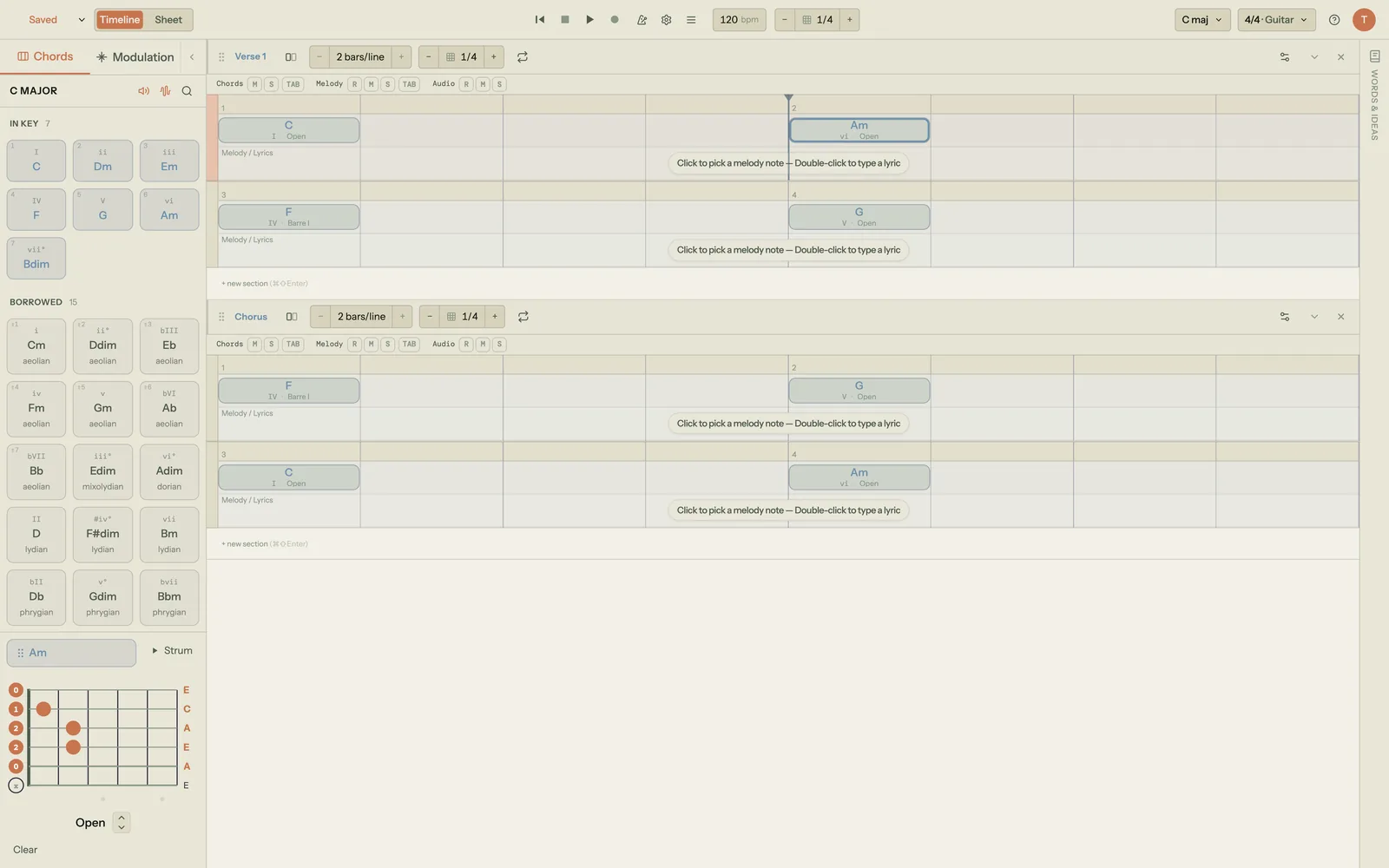
That is the gap Song Cage sits in. It is a songwriting app rather than a chord dictionary, so you do not look chords up alphabetically. Instead, the chords in your song each carry a fretboard diagram showing exact finger positions, open and muted strings, with multiple voicing positions per chord you can move through with the arrow keys. Put a capo on and the diagrams re-voice to the shapes you would actually play, while the underlying harmony stays where it was. A piano mode shows a keyboard layout for the same chords if you write at both instruments.
Which tool for which moment
- Learning a chord from a chart someone else wrote: use a chord dictionary from the list above.
- Checking whether your fingers are right: use one with per-string audio.
- Seeing the shapes for a progression you are writing: that is what Song Cage's fretboard view is for.
Song Cage's web app is free for one song, with no card required. A $79 licence covers the native desktop app, the AU/VST3 plugin and the full web app with unlimited songs and PDF and MIDI export, and signing in once in the desktop app or plugin starts a 14-day trial of everything. The full detail on voicings, the capo and instrument switching is in the Guitar and Piano chapter of the docs, and if you are building the progression itself, the ten most useful chord progressions is the place to start.
See the shape for every chord in your song
Fretboard diagrams with finger positions and muted strings, multiple voicings per chord, and capo-aware re-voicing, attached to the song you are actually writing.
Frequently Asked Questions
Where can I find free guitar chords online?
All-Guitar-Chords, Melodician, FaChords, Chordbook, Scales-Chords, JGuitar, Oolimo and Berklee PULSE are all free to use in a browser with no payment to see a diagram. All-Guitar-Chords has the largest free library with audio, at more than 2,700 chords. Melodician has the cleanest pages and is the only one on this list that lets you hear a single string at a time.
Is there a free guitar chord app?
Yes. ChordBank is free to download on iOS and works offline, which is the advantage over web references in a rehearsal room with no signal. It requires iOS 18.6 or later. There is no Android equivalent on this list, but every web reference here works in a mobile browser, and Melodician's pages are built to be readable on a phone.
Where can I download a printable guitar chord chart?
TrueFire publishes a free downloadable chord chart plus curated sets by genre, including a fifteen-chord songwriter set. Melodician takes a different approach: printing any chord page produces a clean black-and-white chart with the navigation, player and footer left off the paper. JGuitar's batch search also prints well, since you can enter a whole song's chords at once and get every diagram on one page.
What is the difference between a chord finder and a chord identifier?
A chord finder goes from name to shape: you know you need Bm7 and you want to see where to put your fingers. A chord identifier runs the other way, from shape to name: you have stumbled onto something you like and want to know what to call it. FaChords and Oolimo do both. Most chord dictionaries only do the first, so check which direction you need before choosing.
Are left-handed chord charts just mirrored images?
They should be properly redrawn rather than flipped, because a flipped image reverses any text and finger numbers along with the diagram. All-Guitar-Chords, Chordbook and FaChords all carry a dedicated left-handed mode, and Melodician has a toggle on every chord page that your browser remembers for next time. If a chart looks like a mirrored photograph with backwards numbering, find a different source.
Why does the same chord have four different shapes?
Because a chord is defined by its notes, not by finger positions, and the guitar makes the same notes available in several places. A major chord needs a root, a third and a fifth; any arrangement of those is still that chord. Low open shapes sound thick, higher voicings sound thinner and leave more room for a vocal, and reduced shapes drop bass weight without changing the chord's identity.