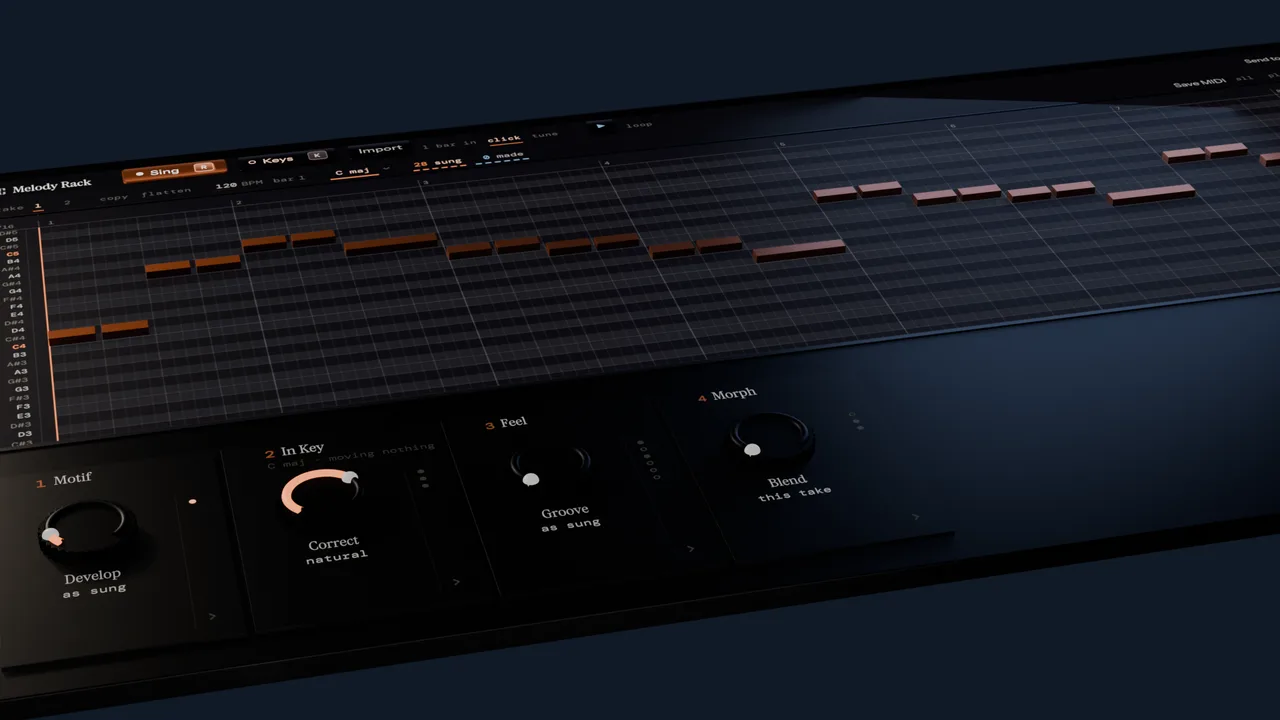
A chord plugin is a MIDI effect that sits in front of an instrument on your track and turns what you give it into chords. The ten below don't differ much in what comes out. They differ in what you have to put in: a key and a mood, one finger on a keyboard, chords you already know, or a melody you've already got.
That last group is the smallest, and it's the one most songwriters actually need. You usually have the tune before you have the harmony.
Song Cage makes the first entry, Melody Rack Chords. It leads the list because it's the free one built for the job this list is sorted around. Read its cons as closely as everyone else's.
Quick summary
If you have a melody and need chords under it, start with Melody Rack Chords (free), Bitsonic Melody Harmonizer for a MIDI line, or Wingman for a recorded vocal. If you want a progression to write a melody over, Scaler 3, Captain Chords or ChordJam. If you know the chords and just can't play them, InstaChord 2, Cthulhu or the free Ripchord.
What does a chord plugin actually do?
A chord plugin, often sold as a MIDI chord plugin, takes MIDI in and sends chords out. It usually makes no sound of its own: it sits ahead of a synth or piano on the track, so the chords play through whatever instrument you already use, and most let you drag the result onto your timeline as an ordinary MIDI clip.
What goes in is where they split. Some take a single note and answer with a chord you assigned to that key, which is how a non-pianist plays a four-note voicing with one finger. Some take a key, a scale and a few settings and generate progressions for you to audition. A few take a melody, read which notes land in each bar, and propose chords that hold those notes.
None of these changes your DAW. The chords end up as normal MIDI, so you can edit them, move them, or throw them away and keep only the one change that sparked something. The useful question is never "which is the best chord plugin". It's what you've already got, and what's missing.
Which kind of chord plugin do you need?
Chord plugins come in three kinds, sorted by what you give them. Melody-to-chords plugins (Melody Rack Chords, Bitsonic Melody Harmonizer, Wingman) write chords under a tune you already have. Chord generator plugins (Scaler 3, Captain Chords, ChordJam) start from a key and settings. One-finger players (InstaChord 2, Cthulhu, Ripchord) play chords you choose.
Match the plugin to the thing you're missing, not to the longest feature list.
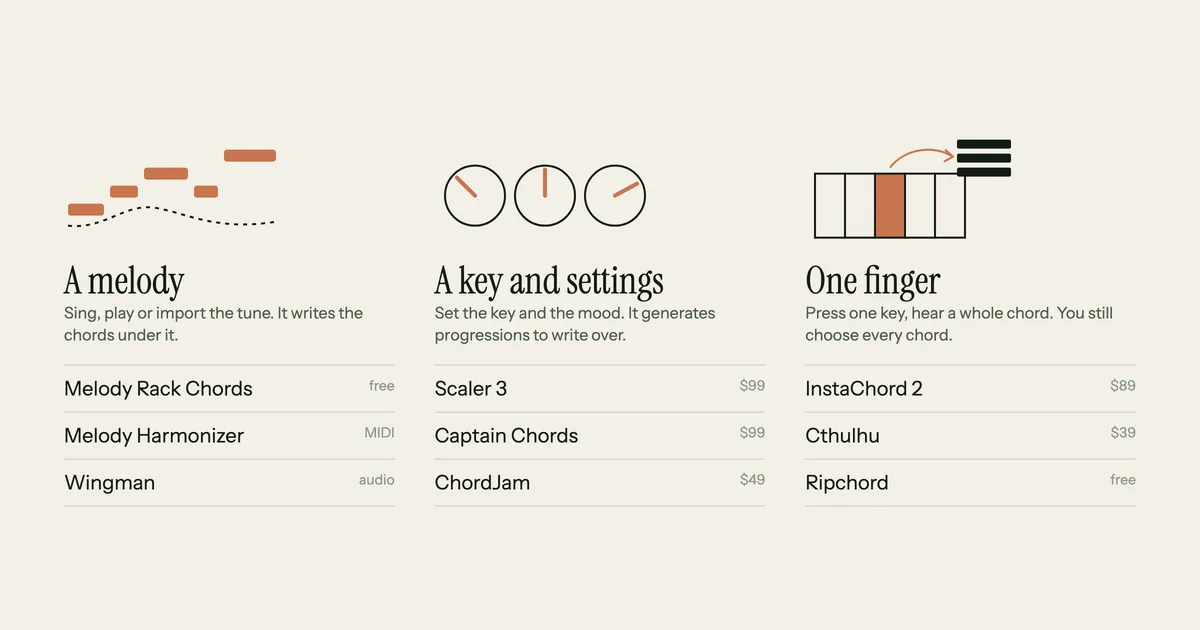
| Tool | You give it | Price (list, USD) | Formats | Systems |
|---|---|---|---|---|
| Melody Rack Chords | A melody you sing, play or import | Free (free Song Cage account) | AU, VST3 | Mac, Windows |
| Bitsonic Melody Harmonizer | A MIDI melody | Included with any paid Bitsonic product | AU, VST3 | Mac, Windows, Linux |
| Wingman | A recorded vocal, melody or loop | $59 | VST3, AU, AAX | Mac, Windows |
| Scaler 3 | Chord sets, or MIDI and audio to detect | $99 | VST, VST3, AU, AAX, standalone | Mac, Windows |
| Captain Chords | A key | $99, only in Captain Plugins Epic | VST, VST3, AU, AAX | Mac, Windows |
| ChordJam | A scale and settings to randomize | $49 | VST, VST3, AU, AAX, AUv3, standalone | Mac, Windows, iPad |
| InstaChord 2 | One finger, in a key | $89 | VST, VST3, AU, AAX | Mac, Windows |
| Cthulhu | One finger, chords you store | $39 | VST, AU, AAX | Mac, Windows |
| Ripchord | One finger, chords you map | Free | AU, VST3 | Mac, Windows |
| Your DAW's own tools | Varies by DAW | Included | Built in | Your DAW's |
List prices in US dollars from each maker's store or Plugin Boutique's US store, checked 27 November 2026. Features come from each maker's own product pages and manuals, linked in each entry, not from a side-by-side test of the plugins. Black Friday sales had most of the paid ones well below list that week.
1. Melody Rack Chords
Melody Rack Chords starts from a melody you sing. Hum a rough line against a count-in, fix any note it heard wrong, pick the key from what you sang, and it writes a chord progression fitted to the notes in each bar. Then the line and the chords both come out as MIDI. You can also play the melody in on a keyboard or import a recording.
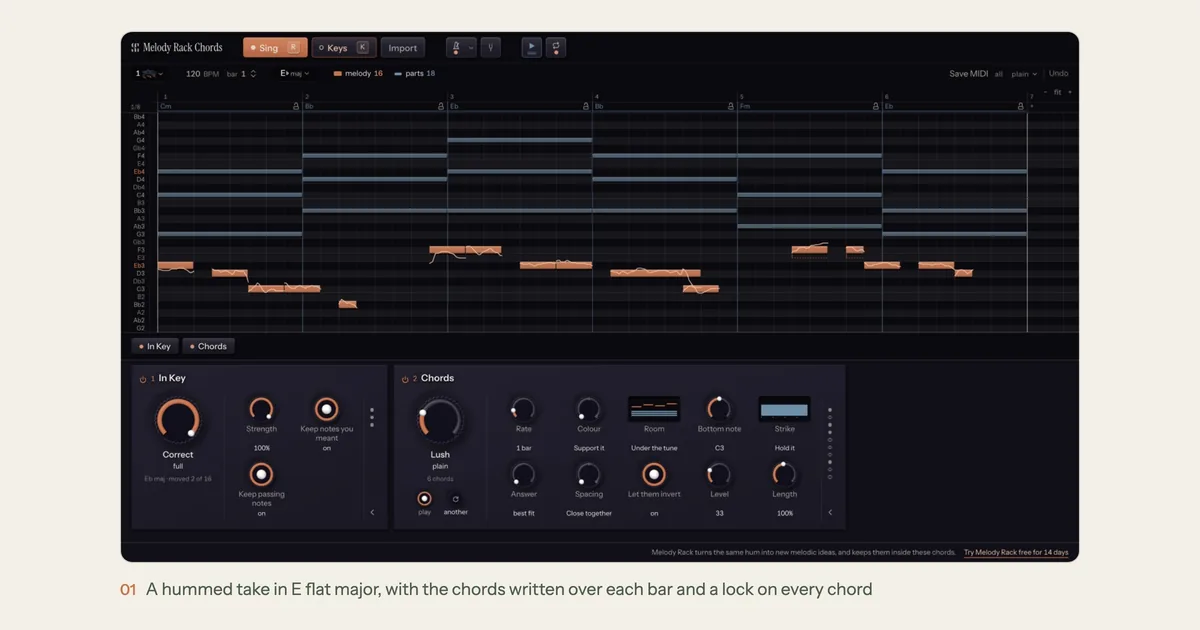
The editing is the part a quick demo skips. The take lands on a piano roll with your pitch curve drawn over it, so you can move a note, split one, join two, or sing the pitch you meant. The In Key module corrects the notes you missed and leaves the out-of-key ones you meant, and its Correct knob dials that back. The key is never chosen for you: it shows the keys your take sounds most like, and nothing changes until you click one.
For the chords, press another for a different answer, or turn Lush, which runs from plain chords changing every two bars to colored, opened-out chords changing every bar, then reharmonized chords spread wide, changing twice a bar. Lock the chords you like and the rest move around them, or write your own on any bar. Drag out the line, the chords, or both.
It's two of the fifteen modules in Melody Rack, the paid plugin that turns the same hum into new melodic ideas. The full walkthrough of the key and chord controls is in the Melody Rack docs.
Pros
- Sing, play or import the melody, then fix it on the roll
- Chords fitted bar by bar to the notes you sang
- Lock chords, ask for another, or write your own on any bar
- Free, with no trial and nothing that runs out
Cons
- Asks you to sign in with a free Song Cage account the first time
- Doesn't run in GarageBand or Pro Tools, and there's no AAX
- In Ableton Live, Cubase, Studio Pro and FL Studio it needs its own track feeding your instrument track
- Writes chords for a melody; it won't generate a progression from nothing
2. Bitsonic Melody Harmonizer
Melody Harmonizer also works from a melody, but it wants MIDI rather than your voice. Open a .mid file or arm MIDI Capture and play the clip from your DAW, choose Basic or Complex mode, generate, audition it on the built-in piano, and drag the chords back to your timeline.
Bitsonic's own advice is to feed it a clean single-note line: tight timing and clear phrasing give better harmony, and if the chords feel wrong, strip the source back to the melody line and remove the extra notes that confuse the analysis. Basic gives a direct result; Complex reaches for fuller chords.
The access changed after launch. It went out as a free entry in the KVR Developer Challenge 2026 in July. On Bitsonic's store now it's a bonus, included with any paid Bitsonic product (the cheapest is Profondo at $29), and Bitsonic pairs it with Melody Arranger at $49, which turns the chords into a piano part.
Pros
- Starts from your melody, not from a key
- Basic and Complex modes for plainer or richer chords
- Runs on Linux as well
Cons
- Needs a MIDI melody: no singing in, no audio
- No longer a free download on its own
3. Wingman
Wingman, from Mixed In Key, starts from audio. Record a vocal, a topline or a loop from a track in your DAW, and it suggests chord progressions and basslines that fit what it heard. You click through the progressions, edit single chords, and export the parts as MIDI or WAV.
Version 3.0, out in September 2026, added finer chord control: passing chords, how often the harmony changes, and splitting, deleting or resizing chords. It also brought a drums channel and recorded guitar parts that follow your progression, alongside stem separation and audio-to-MIDI. You can audition ideas with its own sounds or your VST3 instruments.
Mixed In Key calls the results accompaniment suggestions rather than a transcription of a song's chords, and advises recording a section where the melody is clear and not buried under other sounds. That makes it a better fit for an acapella or a vocal stem than for a rough hum. It runs inside Ableton Live, Logic Pro, FL Studio, Cubase, Studio One and Pro Tools, not on its own. Mixed In Key's Black Friday sale had it at $39, down from $59.
Pros
- Starts from a recorded vocal, melody or loop
- Chords, bass, drums and guitar in one plugin
- Runs in Pro Tools as well
Cons
- A production suite: a lot comes along with the chords
- Wants a clear recording, not a rough hum
4. Scaler 3
Scaler 3 is a full harmony workstation. It browses over 1,000 chord sets sorted by mood, artist and genre, suggests chords that fit the ones you have, and can detect the chords, key and scale in MIDI or audio you play into it. Its Motions then turn a progression into melodies, arpeggios and basslines.
Detection is the part that touches your own material. Play a MIDI part or an audio track into it and it lists the chords it found with suggested scales beside them, color-coded against the scale you chose. That's built for reading the harmony that's already there. With a bare melody, you get the key, and the chords are still yours to choose from its suggestions.
It also hosts your instruments inside it, syncs chords across several instances, and has an arrange page with lanes for chords, melody, bass and phrases. The list price is $99, and Scaler 2 owners can upgrade for $29 through Scaler Music's own site.
Pros
- Detects chords, keys and scales from MIDI and audio
- Huge chord-set library and voice leading
- Runs as a plugin or on its own
Cons
- Tied with Captain Plugins Epic as the most expensive here, and a lot of interface to learn
- Doesn't write a progression under a sung melody for you
5. Captain Chords
Captain Chords starts from a key. Mixed In Key's pitch is "pick any key and start dropping chords in", with control over inversions, substitutions and passing tones, plus progressions and rhythms grouped by genre. You can't buy it alone: it comes inside Captain Plugins Epic, five connected plugins for chords, melody, bass, beats and playing chords from one key.
The five-plugin set is the point. Captain Melody and Captain Deep read the chords you wrote in Captain Chords, so a track gets its harmony first and its other parts follow it. That suits a producer building a beat from an empty session.
It's the reverse of what a songwriter with a hummed chorus needs, because the chords come before the tune. Epic lists at $99, with a 30-day money-back guarantee; Mixed In Key's Black Friday sale had it at $49.
Pros
- Fast way to fill an empty session with harmony
- Other Captain plugins follow its chords
Cons
- Only sold in the five-plugin bundle
- Chords first, melody second
6. ChordJam
ChordJam, from Audiomodern, generates chords and progression patterns by randomizing within limits you set: scale, chord types, voicings, rhythms and range. Its sequencer and Arp mode keep producing new patterns synced to your tempo, and you drag any chord or pattern you like straight into your DAW as MIDI.
It triggers a new chord with every note you play, so it doubles as a performance tool, and version 1.5 added MPE, which lets chords glide from one to the next. It's also one of the few here that runs on an iPad, as an AUv3 app sold separately on the App Store.
Randomness is the feature, so it rewards auditioning over planning. It lists at $49, activates on three computers per serial, and needs an internet connection for download and activation.
Pros
- Endless variations inside your limits
- Runs on iPad too
Cons
- Knows nothing about a melody you already have
- Online activation
7. InstaChord 2
InstaChord 2, from W. A. Production, lets you play chords in any key with single keys: set up to 24 chords from over 60 shapes, then switch between them on the chord keys. A pattern editor turns them into strums, arpeggios and riffs, and you drag the MIDI to your DAW.
Version 2 added custom chords (pick the intervals, or play a shape and it learns it), five hold modes for how notes sustain and toggle, and a generator button that W. A. Production markets as AI generation, which spawns new riffs from the current scale.
It lists at $89, and the trial only allows major chords, so you can test routing in your DAW before paying but not the full harmony. Like the other one-finger tools, it plays the chords you choose rather than choosing them for your melody.
Pros
- Hard voicings under one finger
- Strum and pattern editor
Cons
- You still pick every chord
- Trial limited to major chords
8. Cthulhu
Cthulhu, from Xfer Records, is two MIDI effects in one: a chord memorizer that plays a stored chord from a single key, and a pattern arpeggiator with eight step-sequencer tabs. It ships with over 150 chord presets, and it can import MIDI or record the chords you play.
The arp is the reason most people own it. Each tab runs at its own length, so a single held chord turns into an evolving rhythmic riff, with chord-arpeggio mode, ties, and per-step velocity and duration.
At $39 it's the cheapest tool here sold on its own. In Logic, Xfer recommends its MIDI FX version, which installs automatically, and Xfer says it doesn't run in Reason.
Pros
- Chords and a deep arp for $39
- Import MIDI or record chords in
Cons
- Doesn't run in Reason
- Plays chords; doesn't suggest them for a tune
9. Ripchord
Ripchord, from Trackbout, is a free MIDI plugin that maps a full chord to a single key, so you play a progression with one finger. Build chord presets yourself, load expansion packs, or import any MIDI file that contains chords and Ripchord turns it into a preset you can play from your keyboard.
It records what you play and lets you drag that MIDI into your DAW, and its strum and humanize knobs loosen the timing and velocity so the chords sound less like a grid. It's open source under the GNU GPL v3.
It's AU or VST3 on a Mac and VST3 on Windows, with no VST2 version, so your DAW has to support VST3 MIDI fully. With no preset loaded, it does nothing.
Pros
- Free and open source
- Turns any chord MIDI file into something you can play
Cons
- No theory help: it plays what you map
- No VST2
10. The chord tools already in your DAW
Most DAWs ship a chord tool, and two of them touch your melody. FL Studio's piano roll Chord Stamp has an automatic top-down mode in which the note you click becomes the top note of a chord that fits the scale. Logic Pro's Chord track can analyze the chords in an audio or MIDI region.
FL's top-down stamp is the closest built-in thing to harmonizing a melody, one note at a time: your melody note stays on top and the chord is built under it. Logic's analysis reads chords that are already in a region, which suits a recorded piano or guitar part more than a single sung line, and its Chord Trigger effect plays a chord from one key.
Cubase's Chord Pads let you play and record chords from a keyboard, and its Chord Assistant suggests chords from the chord on a pad or a root key, not from your melody. Ableton Live's Chord effect adds up to six pitches to every incoming note. In Live 12 it can follow the clip's scale so the shape stays in key, but it never reads your melody to choose a chord.
Can a plugin really find the chords for a melody?
Yes, within limits. A melody note on a strong beat usually belongs to the chord under it, so a plugin can list the chords in your key that hold each bar's main notes and choose between them. What it can't know is the feeling you want, so a useful one offers choices per bar instead of one fixed answer.
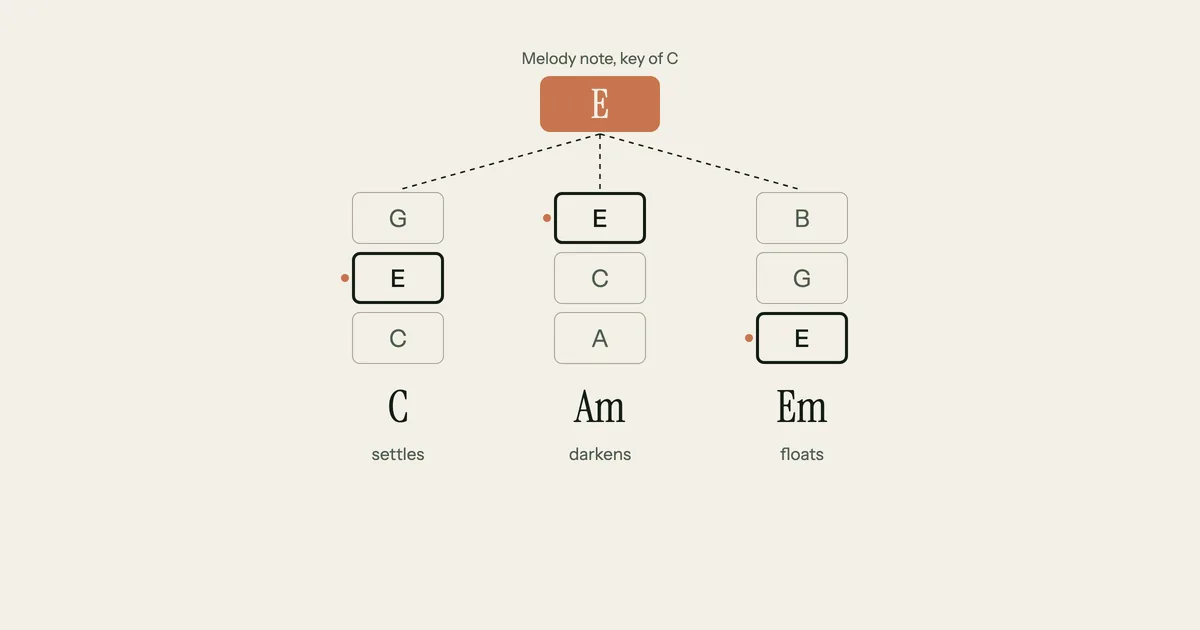
Take one note. In C major, an E held across a bar sits inside C (C, E, G), A minor (A, C, E) and E minor (E, G, B). All three are correct. They just feel different: C settles, A minor darkens, E minor floats. Multiply that by eight bars and a melody has thousands of correct progressions, and most of them are dull.
That's why the tools that start from a melody give you levers rather than a verdict. In Melody Rack Chords that's another answer, a Lush knob for plainer or richer chords, and locks on the bars you've decided. In Bitsonic's it's Basic or Complex, and in Wingman you click through whole progressions and edit single chords. If you want to do it by hand first, our guide to how to harmonize a melody walks through choosing the chord under each note.
Do you need a chord plugin if your DAW has chord tools?
Not to play chords. Every major DAW can stack notes into a chord or trigger one from a key. You need a plugin when the built-in tool doesn't start from what you have, which, for most songwriters, means a melody you sang that needs harmony under it.
The split is clean. If the problem is your hands, the built-ins and Ripchord cover it for free. If the problem is a blank session and you want ideas, the generators earn their price, and Scaler 3 adds detection on top. If the problem is a chorus you hummed into your phone last week, the useful tools are the ones that read the melody first.
Two checks before you install anything. Find out where MIDI effects go in your DAW: Logic has a MIDI FX slot, Bitwig and REAPER put them ahead of the instrument, and some DAWs need a separate track routed into the instrument track. And if your melody is still a voice memo, it has to become notes first. Our guide to audio to MIDI covers what to fix in a transcription and what to keep.
Which chord plugin should you pick?
Pick the chord plugin that starts from what you already have: a melody, a key, or chords you know. For a sung or hummed melody, Melody Rack Chords is the free choice; Bitsonic Melody Harmonizer covers a MIDI line and Wingman a finished vocal.
Pick by the last thing you made, not by the next thing you hope to make.
The short version
- You have a melody, sung or hummed: Melody Rack Chords, free.
- You have a melody as a MIDI part: Melody Rack Chords or Bitsonic Melody Harmonizer.
- You have a finished vocal or acapella: Wingman, or import the recording into Melody Rack Chords.
- You have nothing and want a progression to write over: Captain Chords or ChordJam; Scaler 3 if you'll use the depth. Outside the DAW, our chord progression tools roundup covers apps and web tools.
- You know the chords but can't play them: Ripchord free, Cthulhu if you want an arp, InstaChord 2 for strums and patterns.
- You aren't sure yet: your DAW's built-in tools, then one of the two free plugins.
Whichever you choose, treat the output as a draft. A chord plugin can hand you a correct progression in a second, and correct is the easy part. Play it under the melody, change the one bar that sounds like everyone else's, and keep the change that makes the line mean something. Our guide on how to write a chord progression covers what to change and why.
If you'd rather work in a songwriting app than a DAW, Song Cage, the app this blog belongs to, does the same job with Auto Chords, which reads the phrase you sang and lays a progression under it.
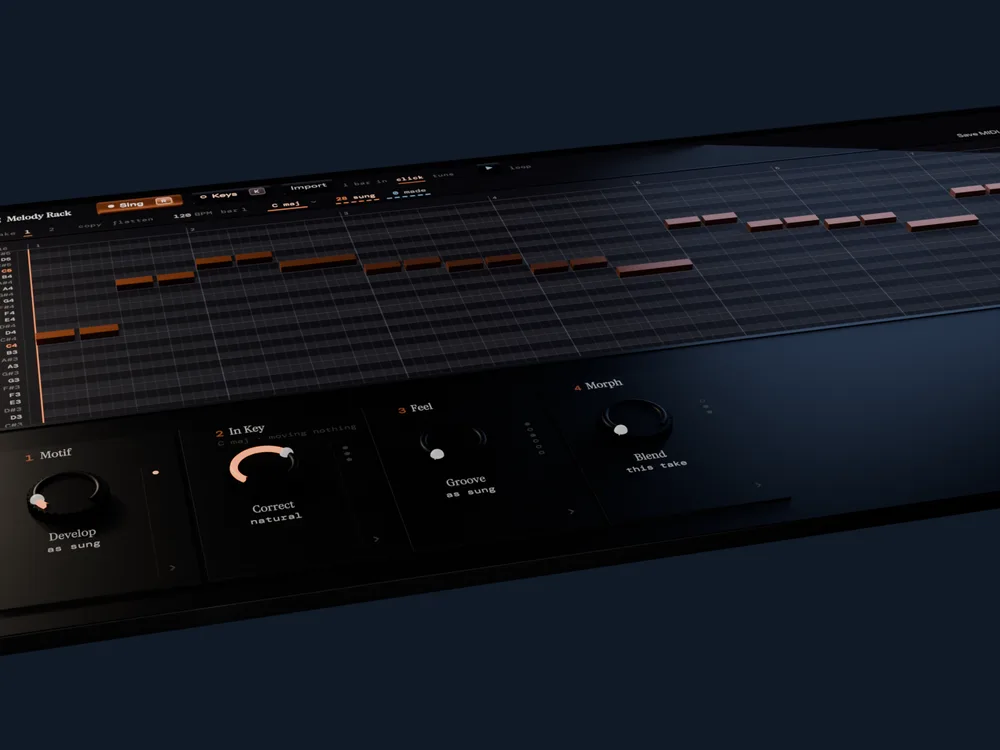
Sing the tune. Get the chords under it.
Melody Rack Chords is a free MIDI effect for your DAW. Hum a rough line, fix any note it heard wrong, and it writes a progression fitted to what you sang. The line and the chords both come out as MIDI.
Frequently Asked Questions
Is there a free chord plugin?
Yes. Melody Rack Chords is free with a free Song Cage account and writes chords from a melody you sing, play or import. Ripchord is free and open source and plays chords you map to single keys. Your DAW's own chord tools cost nothing extra too.
Can I hum a melody and get chords in my DAW?
Yes. Melody Rack Chords records you singing against a count-in, writes the line down as notes you can correct, and then fits a chord progression to it. Both the melody and the chords come out as MIDI you can drag onto your tracks.
Does a chord plugin make sound?
Usually not. Most chord plugins are MIDI effects: they send notes to an instrument on the track, and that instrument makes the sound. A few have sounds of their own: Bitsonic's built-in preview piano, Scaler 3's 50 internal sounds and the 250 sounds bundled with Captain Plugins Epic. Melody Rack Chords plays the instrument on your track, and in Ableton Live, Sonar and Reason its VST3 can also play a simple sound of its own. Scaler 3 can also host your instruments inside itself.
Do chord plugins work in GarageBand?
Mostly not. GarageBand hosts Audio Unit instruments and effects but has no MIDI FX slot, so MIDI-effect chord plugins such as Melody Rack Chords don't appear in it. Logic Pro opens GarageBand projects and has that slot. If a plugin offers a trial, as InstaChord 2 does, test it in your own DAW first.
Do these plugins use AI?
Some say so. W. A. Production markets InstaChord 2's generator button as AI generation. Melody Rack Chords uses no generative AI: the chords are worked out from the notes you sang, and the one piece of machine learning is the pitch detector that reads which notes those were.
Can I turn a recording into MIDI for free?
Yes. NeuralNote is a free plugin with open-source code that transcribes audio to MIDI, and version 2 can split a full mix into parts. Its v2 model is under a non-commercial licence, so check the terms before paid work. It writes the notes but not the chords, so pair it with a chord tool if harmony is what you're after.