Table of Contents
- How to Choose the Right Chord Progression Tool
- 1. Song Cage
- 2. Scaler 3
- 3. Chordify
- 4. Captain Chords (Captain Plugins Epic)
- 5. Autochords
- 6. Chord ai
- 7. ChordChord
- 8. ChordU
- 9. GarageBand Smart Chords
- 10. OtoTheory
- Chord Progressions for Songwriters: A Complete Guide
- What are the most popular chord progressions?
- What are diatonic chords?
- What are borrowed chords and how do you use them?
- What is a secondary dominant chord?
- What are good minor chord progressions for sad songs?
- How do I modulate between keys with pivot chords?
- What is the I–V–vi–IV chord progression?
- Full Comparison: Best Chord Progression Tools 2026
- Frequently Asked Questions
Updated May 14, 2026
Coverage refreshed in May 2026 for Song Cage's new Auto Chords feature (one-click melody-to-progression generation). Rankings, pricing, and competitor versions last verified April 2026: Scaler 3 (superseding Scaler 2) pricing and standalone support, OtoTheory feature set and pricing, and Captain Plugins Epic naming verified directly against vendor sites. Uberchord was sunsetted by its developer in August 2024 and has been replaced in the ranking by ChordChord. Original research compiled March 2026.
A chord progression tool is a piece of software that helps songwriters build, develop, and understand chord sequences, whether through a guided chord palette, a statistical chord suggestion engine, a DAW plugin, or audio-based chord extraction. The best chord progression tools in 2026 sit somewhere on a spectrum: quick inspiration generators at one end, deep harmonic workstations (borrowed chords, secondary dominants, modulation) at the other.
Quick Summary
We tested 20+ chord progression tools, from browser-based chord generators to DAW plugins and audio-extraction apps, across five weeks of real songwriting sessions. Here are the 10 best chord progression tools for songwriters in 2026, ranked by theory depth, borrowed chord support, modulation capability, and ease of use at every skill level.
This guide is specifically about chord progressions for songwriters, not producers or music professors. We tested every major chord progression tool with that frame in mind: how fast can you get a progression you love, how deep can you go when you want more, does the tool teach you anything about music theory while you use it, and can it capture song ideas fast before they disappear?
How We Ranked These Tools
Every tool was put through five weeks of real songwriting sessions by musicians across skill levels, from beginners with no formal theory background to experienced co-writers. Our scoring weighted these criteria:
No tool paid for placement. Song Cage is listed first because it ranked first across our chord progression criteria, and because this is the Song Cage blog. We are transparent about that.
How to Choose the Right Chord Progression Tool
Before jumping into rankings, here's a quick framework. Chord progression tools fall into distinct categories, and knowing which you need saves time.
You need a guided chord palette showing which chords work in any key, with audio for every option. No music theory knowledge required to start. Song Cage, Autochords, ChordChord.
You need chord progressions with real voicings: guitar fretboard diagrams and piano keyboard layouts, not just Roman numeral notation. Song Cage.
You need borrowed chords, secondary dominant chords, modal interchange, and pivot-chord modulation routes between any two keys. Song Cage.
You need MIDI export, DAW plugin integration, and chord generation inside a production environment. Scaler 3, Captain Chords.
You want to extract chord charts from YouTube or audio files, then use them as starting points for your own writing. Chordify, ChordU, Chord.ai.
You want the best chord progression generator at zero cost. Autochords, Song Cage free tier, ChordChord free tier, GarageBand (Apple only).
What separates a great chord progression tool from a basic generator
A basic chord progression generator picks chords by rule or randomness and plays them back. A great chord progression tool understands harmonic function: which chords create tension, which create resolution, which borrowed chords add emotional color, and how to move from one key to another through pivot chords. The best tools teach music theory through use, not through a textbook. In practice the difference is enormous.
1. Song Cage

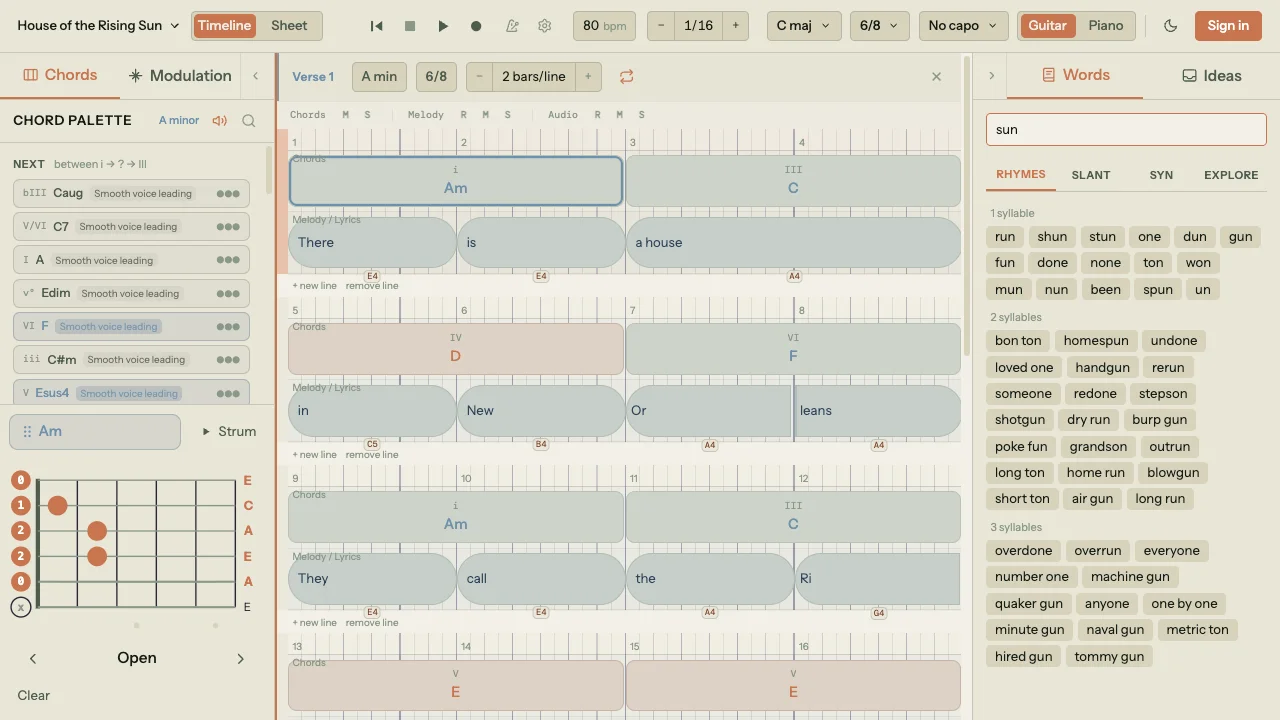
Song Cage is the best chord progression tool for songwriters in 2026 because the chord suggestion engine goes further than anything else on this list. Every other tool on the market either generates progressions generically, catalogues chords alphabetically, or picks from a preset library. Song Cage analyzes the specific beat you're writing at, reads the melody notes and the chords before and after that beat, and ranks every chord in the key by how well it fits the music you've already written. The modulation panel does the same thing for key changes. Those two features alone separate it from everything else in this ranking.
Here's how the suggestion engine works in practice. When you click an empty beat in the chord lane, Song Cage reads the melody notes already at that beat and the chords before and after it, then ranks every chord in the key by two independent scores. Fits Melody measures how many melody notes at that beat are chord tones, weighted so root matches outrank fifths and thirds outrank sevenths, displayed live as "1/1 · 99%" alongside each suggestion. Place (or Replace if you double-click an existing chord) ranks chords by how naturally they connect to the surrounding progression. Multi-chord patterns trigger named boosts: a I–V sequence leading into a slot strongly boosts vi (the Pop progression I–V–vi–IV); I–vi leading into a slot boosts IV (the 50s progression); the palette also recognizes the Andalusian cadence and others. Change a single melody note and every ranking updates in real time.
The interaction layer matches the engine. A ghost chord slot appears at the position you clicked so you can see the pending target. Each suggestion chip carries voice leading dots (●●● very smooth, ●●○ moderate, ●○○ larger jumps) plus a hover tooltip with directional arrows ("← from Am", "→ to F") that explain the ranking in plain language. Pick a chord and it enters audition mode: arrow keys cycle available voicings, Enter commits, Escape cancels.
The palette itself organizes every chord into three tabs. In Key shows the seven diatonic triads with Roman numeral labels. Borrowed pulls chords from parallel modes: Aeolian, Mixolydian, Dorian, Lydian, and Phrygian in major keys; Ionian, Harmonic minor, and Phrygian in minor keys. Each borrowed chord is flagged with its source mode. Secondary Dominants shows V chords that resolve to non-tonic targets (V/ii, V/vi, and so on), labeled with both the chord name and its resolution target. The three tabs are the territory, but the suggestion engine is what tells you which chord inside that territory to reach for at the moment you're writing.
Recently Song Cage added Auto Chords, which runs that same per-beat suggestion engine across an entire section in one click. A button in the section nav opens a dashed-outline ghost progression in the chord lane along with a preview action bar above it. A Held / Steady / Active slider tunes harmonic rhythm — Held holds one chord per phrase, Steady gives you one per bar, Active doubles up — and reshuffles the ghost progression instantly without rerunning the analysis. Each ghost block is interactive while the preview is live: hover to audition through the active instrument's voicing, right-click for ranked alternatives at that beat range, and click Accept (or Replace N when the section already has chord blocks) to commit the progression as a single undo step. It's the same melody-fit machinery as the per-beat suggestions, just applied at section scale — useful when you'd rather start from a generated draft and edit than place every chord by hand.
The modulation panel is the real separator. Open the Modulation tab and the Key Map places your current key at the center with all twelve major and minor keys arranged around it by harmonic distance: keys that share more chords sit closer. Click any target key and the panel surfaces every pivot chord that exists diatonic in both keys, ranked by harmonic strength (a chord that functions as IV or V in the target scores higher because those functions set up the strongest arrivals). Below the pivots, a full list of cadential routes covers every complexity level: direct (V→I, V7→I, bVII→I), three-chord cadences (ii→V→I, ii7→V7→Imaj7, and the tritone substitution ii7→bII7→Imaj7), and extended four- and five-chord routes (iii7→vi7→ii9→V13→Imaj7) with extensions chosen specifically for voice leading. Minor-key targets get routes adapted to the natural minor (iiø→V→i, iiø7→V7b9→im7). Each route has an Add here button that drops the chords straight onto your timeline. Return routes appear at the same time under a "Back to [home key]" heading, so you can plan a complete modulation arc in one view. Section key overrides then let a verse, chorus, and bridge each live in their own key with their own palette.
Song Cage also ships guitar and piano voicings built in, not abstract note names. Guitar mode shows a mini fretboard with real chord shapes from a curated database and transposes voicings automatically when a capo is set. Piano mode gives you four voicing types (Close, Open, Spread, Drop-2), all inversions, and an octave offset control. The Smooth Voicings command runs a Viterbi optimization across a selected progression and picks the voicing sequence with the least total hand movement (typical improvement: 42 semitones of hand travel down to 18). None of this is bolted on. It sits in the same canvas as the lyric workspace, voice recording, and a DAW-style chord timeline with drag, resize, and roll-boundary editing. For anyone learning how to write a song, from capturing a first idea to finishing a full arrangement, nothing else on the market covers the same surface area.
Pros
- Context-aware chord suggestion engine with live melody-fit scoring (1/1 · 99% format, root-weighted)
- Auto Chords: one-click melody-to-progression generation with Held/Steady/Active flavor and ghost preview before commit
- Progression suggestions that consider chords before AND after the target slot, with named pattern boosts (Pop, 50s, Andalusian)
- Voice leading dots (●●●) on every suggestion plus directional hover tooltips
- Modulation panel with Key Map, pivot chords ranked by harmonic strength, and full cadential route list
- Includes tritone substitution, extended routes with voice-led extensions (9ths, 13ths, Lydian dominant #11), and minor-key-specific routes
- Return routes shown simultaneously for planning a complete modulation arc
- Guitar voicings from a real chord-shape database, capo-aware; piano with Close/Open/Spread/Drop-2 and all inversions
- Smooth Voicings command runs Viterbi optimization for seamless piano voice leading
- Chord palette, lyric workspace, and voice recording on the same canvas
- Free tier covers the full chord palette, modulation panel, and voicings (the free web app is limited to one song)
Cons
- Full editor lives on web (any browser, plus PWA) and the native Mac/Windows desktop app; the free iOS and Android apps are capture companions that sync ideas to the full editor
- Unlimited songs, the native desktop app, and the AU/VST3 plugin are a $79 purchase
- No statistical "this chord follows that chord based on N real songs" database
2. Scaler 3
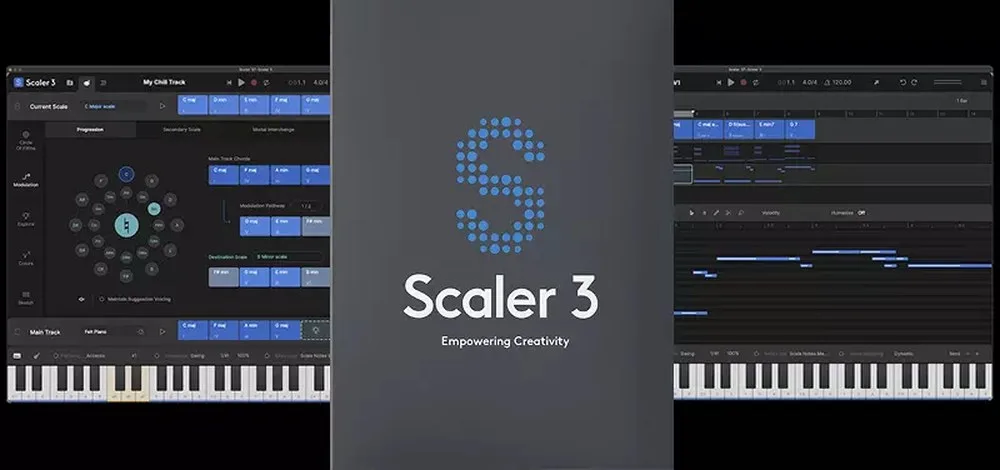
Scaler 3 (released March 2025, superseding Scaler 2) is the most complete chord progression tool inside a DAW environment. It runs as a VST, VST3, AU, or AAX plugin inside every major host, and, new in Scaler 3, as a standalone app on macOS, Windows, and iPad. The chord library is enormous: diatonic chords, borrowed chords, extensions (7ths, 9ths, sus chords, add9s), and modal chord sets are all one click away, with direct MIDI output to any instrument and configurable voicings, inversions, and humanization settings per chord. Detect mode identifies chords from incoming MIDI or audio, which makes it useful for transcribing ideas you've already played on a keyboard into your session.
The Chord Sets feature (now over 1,000 curated progressions, including artist sets from Carl Cox, MJ Cole, and The Temper Trap) is genuinely useful for breaking out of familiar patterns, and the Circle of Fifths, Colors, and Explore pages give you multiple entry points into harmonic territory. Pricing is a one-time $99 on Plugin Boutique (often on sale around $79), with the iPad app at $19.99 sold separately. For a producer who already lives in a DAW, it's one of the most complete chord tools available. For a songwriter who doesn't, even with the new standalone mode, the interface is denser and more production-oriented than songwriter-focused tools like Song Cage, and there's no lyric or voice-recording integration.
Pros
- Best chord progression tool inside a DAW environment
- Enormous chord library including extensions and modal sets
- Chord Sets organized by genre, mood, and artist
- MIDI detection from audio or incoming MIDI
- New standalone app on desktop and iPad (Scaler 3)
- One-time purchase, no subscription
Cons
- No native songwriting workflow (lyrics, voice recording)
- No dedicated modulation panel for key changes
- Denser interface than songwriter-focused tools
- iPad version sold separately
3. Chordify

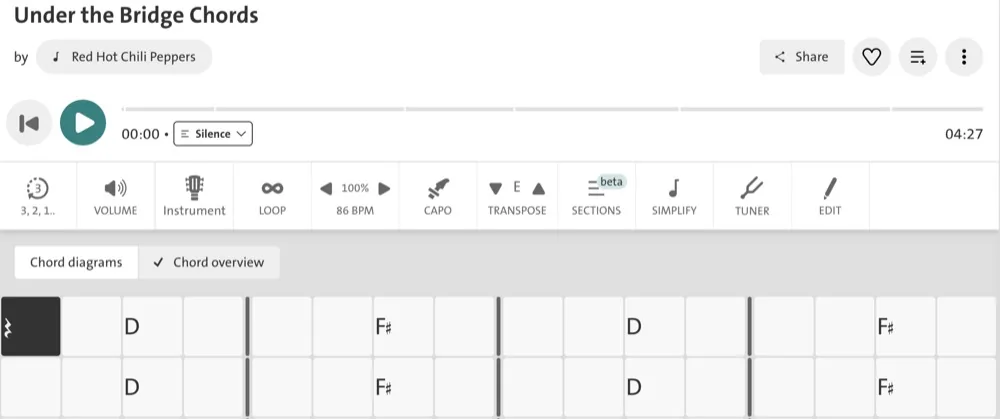
Chordify occupies a unique position in the chord progression tool landscape: it works in reverse. Instead of generating chord progressions, it extracts them from any audio source. Paste a YouTube URL, upload an MP3, or search within the app, and Chordify returns a synchronized chord chart that scrolls in time with the music. The index covers over 36 million songs, which makes it unmatched for learning the chord progressions behind songs you love or studying how popular chord progressions function across genres. Three main tiers: Free (capped at four songs per day with ads), Premium (around $8.99 per month), and Premium + Toolkit, which adds instrument-specific practice tools.
As a chord composition tool, Chordify has no generation or theory guidance capabilities: it only analyzes existing music. Premium + Toolkit recently added a Generate Lyrics feature, but the core product is still extraction, not composition, and there's no mode-organized borrowed chord library, no secondary dominant panel, and no modulation routing. It pairs well with a full composition tool like Song Cage: use Chordify to study the chord progressions behind songs you love, identify why specific moves hit emotionally, then use Song Cage to write your own with the same palette and enrich them with borrowed chords or key modulation. Accuracy varies with dense or heavily effected audio.
Pros
- Best chord extraction from any audio source or YouTube
- Synchronized playback with chord chart
- 36 million song index, great for studying popular progressions
- Mobile and browser apps
- Free tier covers basic extraction
Cons
- Analysis only, can't generate or compose chord progressions
- No music theory guidance or borrowed chord tools
- No chord composition workspace alongside extraction
- Accuracy varies with complex audio
- Free tier limited to four songs per day with ads
4. Captain Chords (Captain Plugins Epic)
Captain Chords is the chord module inside Captain Plugins Epic, Mixed In Key's chord-to-arrangement suite. Pick a key, pick a scale, and browse pre-built chord progressions by genre (Pop, R&B, Hip-Hop, EDM, Rock, Acoustic). Each chord can be played back with velocity, Humanize, Space, Strum, and Swing controls that make the output sound more musical than robotic. It runs as a VST/AU plugin inside every major DAW (Ableton, Logic, FL Studio, Cubase, Pro Tools, Studio One) and also as a standalone app.
For songwriters who want a curated starting point rather than a blank-theory approach, Captain Chords provides solid foundations. The depth for advanced chord theory (borrowed chords organized by mode, secondary dominants, modulation panels) is limited compared to Song Cage, but the genre templates lower the barrier to entry for beginners. The full Captain Plugins Epic suite bundles Chords with Melody, Beat, and Play modules for the $99 one-time price.
Pros
- Genre and mood chord progression presets
- Scale-aware melody suggestions (Captain Melody module)
- DAW plugin or standalone, flexible workflow
- Humanize, Space, Strum, and Swing controls on MIDI output
- Good for beginners who want guided starting points
Cons
- Limited borrowed chord and secondary dominant coverage
- No modulation panel or pivot chord navigation
- No lyric tools or voice recording
- No iOS version (macOS and Windows only)
5. Autochords

Autochords is the simplest and most accessible free chord progression generator available. Pick a progression feel (happy, sad, melancholic, dark) and a major or minor key, and it instantly outputs a progression with in-browser audio preview. No account, no download, no loading time. For chord progression generation beyond the basics (borrowed chords labeled by mode, secondary dominants, I–V–vi–IV variations with modal flavor, modulation routes), you'll quickly hit its ceiling. But as a free starting nudge when you're completely blank, it earns its place.
Pros
- Completely free, no sign-up, no install
- Fastest path to a chord progression starting point
- Covers common feels (happy, sad, melancholic, dark)
- Works on any browser or device
Cons
- No music theory depth (no mode-organized borrowed chords or secondary dominants)
- No guitar or piano voicings
- No modulation, no key exploration
- No lyric tools, recording, or arrangement
6. Chord ai

Chord ai uses machine learning to identify chords from any audio file or microphone input in real time. Play a song, hum a progression, or import audio, and it identifies the chords as they pass. Pitch detection also identifies the key, which helps when you want to understand why a particular chord sounds the way it does. For ear training and learning the chord progressions behind recordings, it's impressively accurate on most material.
As a chord composition tool, it doesn't function; it's analysis only, not generation. It pairs well with a proper composition tool like Song Cage: use Chord ai to identify a progression you heard, then use Song Cage to explore it harmonically, add borrowed chords, write lyrics alongside it, and develop it into a full song.
Pros
- Best real-time AI chord recognition from audio
- Works with microphone input, hum a progression
- Key identification alongside chord detection
- Good mobile apps (iOS and Android) for ear training on the go
Cons
- Analysis only, no chord generation or composition
- No music theory guidance, borrowed chords, or modulation
- No lyric tools or song structure
- Premium subscription required for unlimited use
7. ChordChord
ChordChord is a browser-based chord progression generator with genre-templated starting points (Pop, R&B, Hip-Hop, EDM, Rock, Acoustic) and AI prompt-to-progression generation. Pick a key, pick a scale (major, minor, harmonic minor, melodic minor, blues, pentatonic), and it outputs a progression with piano, guitar, and synth playback plus layered drums. Exports include MIDI, WAV stems, MP3 mix, and PDF chord charts, which is generous for a browser tool.
As a chord theory tool, it's lighter than Song Cage: there's no explicit borrowed chord browser or secondary dominant panel, and no modulation panel with pivot chord routes. What it does well is make progressions that sound production-ready quickly, with inversions, extensions, and humanized MIDI output. Good companion to a deeper tool like Song Cage when you want a fast genre-appropriate starting point before going deeper harmonically.
Pros
- Genre-templated progressions for fast starting points
- MIDI, WAV, MP3, and PDF chart exports
- Piano, guitar, and synth playback with layered drums
- AI prompt-to-progression generation
- Browser-based, no install
Cons
- No explicit borrowed chord or secondary dominant browser
- No modulation panel with pivot chord routes
- No lyric workspace or voice recording
- Pro tier price is high ($27/mo for full features)
8. ChordU
ChordU is an audio-to-chord extraction service, functionally similar to Chordify. Paste a YouTube URL or upload audio, and deep-learning models return a chord chart with beat tracking. Where it differentiates from Chordify is its Premium feature set: vocal and bass isolation, MIDI download of extracted progressions, time-synced lyrics, and custom tunings. For songwriters who want to pull a progression out of a record and then study the vocal or bass line in isolation, it's a stronger research tool than Chordify for that specific use case.
Like Chordify, ChordU is analysis-only: it doesn't generate or compose chord progressions, and there's no music theory framework or borrowed chord support. It's a study and reference tool, not a composition tool. Useful alongside a full chord progression tool like Song Cage for the writing phase.
Pros
- Deep-learning audio-to-chord extraction
- Vocal and bass isolation (Premium)
- MIDI download of extracted progressions (Premium)
- Time-synced lyrics and custom tunings
- Free tier covers basic extraction
Cons
- Analysis only, no chord progression generation or composition
- No borrowed chords, secondary dominants, or theory depth
- No lyric writing workspace
- Free tier is ad-supported and limited
9. GarageBand Smart Chords
GarageBand's Smart Instruments (Smart Guitar, Smart Strings, Smart Keyboard) let you play chord progressions by tapping chord buttons, with the instrument automatically generating realistic strumming or arpeggiation patterns. For Apple users who want to lay down a quick chord progression demo, it's impressively capable for a free tool.
As a chord exploration tool, it's very basic. There's no music theory guidance, no diatonic chord palette, no borrowed chord awareness, no secondary dominant suggestions, and no modulation capability. You have to know the chord you want before you tap it. GarageBand is a recording environment that can play chord progressions; it's not a tool for discovering or developing them. Best used after you've written your progression elsewhere.
Pros
- Completely free on Apple devices
- Smart Instruments make chord strumming sound realistic
- Great for recording a quick chord progression demo
- Full DAW alongside the chord tools
Cons
- Apple only, not available on Android or Windows
- No chord theory guidance or suggestion engine
- No borrowed chords, secondary dominants, or modulation
- You need to already know your chords before using it
10. OtoTheory

OtoTheory is a chord progression builder and music theory companion designed specifically for guitar, bass, and keyboard players. Pick a key and scale, drop chords onto a 4-bar progression, and OtoTheory plays them back over a full backing track of drums, bass, and harmony in one of 15 groove patterns spread across five categories (Energy, Vibe, Unplugged, Traditional, Synth). You can swap chords or change grooves without stopping playback, and the app continuously detects the key and scale of what you've written with a fit percentage so you can see when a chord pulls outside the diatonic palette.
The instrument-first design is what makes it stand out at this price point. The fretboard and keyboard overlays show scale tones and chord positions for guitar, bass, or piano in real time, which gives players a direct path from theory to physical voicings. The Pro tier adds Section management (Verse / Chorus / Bridge), Split Bar (two chords per measure for ii-V style moves), and three modes of multi-track MIDI export — Groove (drums + bass + harmony), Groove + Theory (with annotation), or Chords Only — to Logic, Cubase, Ableton, and other DAWs. Free tier includes 5 grooves, 20 progression presets, key/scale detection, and 3 local sketch saves; Pro at $2.99/mo unlocks all 15 grooves, 50+ presets, MIDI/audio export, and unlimited iCloud-synced sketches.
OtoTheory is shallower than Song Cage on borrowed chord theory and modulation: there's no mode-organized borrowed chord library, no secondary dominant browser, and no pivot-chord modulation panel. There's also no lyric workspace or vocal recording. Where it complements Song Cage is the practice-and-play side of writing: use OtoTheory to play a progression along with a drum-and-bass groove on guitar or piano, then bring the idea into Song Cage to develop the harmony with borrowed chords and write lyrics. Strong value for the price.
Pros
- Real-time backing tracks (15 grooves across 5 categories) playable as you build progressions
- Fretboard and keyboard overlays for guitar, bass, and piano
- Real-time key and scale detection with fit percentage
- Split Bar (two chords per measure) for ii-V style moves
- Three-mode multi-track MIDI export: Groove, Groove + Theory, Chords Only
- Pro tier is only $2.99/mo with a 7-day free trial
- 50+ chord progression presets covering Canon, Pop, Jazz, Blues, and more (Pro)
Cons
- No mode-organized borrowed chord library
- No secondary dominant browser or modulation panel
- No lyric workspace or voice recording
- iOS and web only — no native Android, Windows, or macOS app
- Free tier capped at 3 local sketches and 5 of 15 grooves
Chord Progressions for Songwriters: A Complete Guide
Understanding chord progressions at a deeper level makes every tool more powerful. Here's a reference for the concepts that come up most in songwriting.
What are the most popular chord progressions?
The most popular chord progressions in contemporary music cluster around a handful of patterns. The I–V–vi–IV is statistically the most common progression in pop. In G major, that's G–D–Em–C. The I–IV–V is the backbone of blues, folk, and rock. The vi–IV–I–V starts on the relative minor for a more emotionally ambiguous opening. The ii–V–I is the foundation of jazz harmony. All of these are available as starting points in Song Cage's chord palette, clearly labeled by Roman numeral.
What are diatonic chords?
Diatonic chords are the seven chords built naturally from any given key. They always sound harmonically correct together because they share the same scale notes. In any major key the diatonic pattern is: I (major), ii (minor), iii (minor), IV (major), V (major), vi (minor), vii° (diminished). Understanding diatonic chords is the foundation of music theory for songwriters, and the first layer of every chord palette. Song Cage displays every diatonic chord for any key you select with Roman numeral labels, so you see the function alongside the chord name.
What are borrowed chords and how do you use them?
Borrowed chords are chords taken from the parallel key, for example using chords from C minor while writing in C major. The most commonly borrowed chords are: the ♭VII (flat-seven major, e.g. B♭ in C major) which adds a rock or anthemic feel; the ♭VI (flat-six major, e.g. A♭ in C major) which creates cinematic weight; the iv (minor four, e.g. Fm in C major) which adds deep melancholy; and the ♭III (flat-three major, e.g. E♭ in C major) which creates an unexpected brightness. In Song Cage, borrowed chords pulled from Aeolian, Dorian, Mixolydian, Lydian, and Phrygian (in major keys) are grouped and labeled by source mode, so you can use them without needing to know why they work.
What is a secondary dominant chord?
A secondary dominant chord is the V (or V7) chord of any chord other than the tonic. In C major, the regular dominant is G (V→I). A secondary dominant like E7 functions as the V7 of Am (the vi chord): it creates a strong pull toward Am that makes the harmonic motion feel intentional and directed. Secondary dominants are one of the most effective tools for making a progression feel like it's going somewhere rather than just cycling. Song Cage's secondary dominant panel shows every available secondary dominant labeled by resolution target, so you can experiment without calculating them manually.
What are good minor chord progressions for sad songs?
Minor keys naturally produce the emotional weight that characterizes sad chord progressions. The i–VII–VI descending progression is one of the most recognizable: it's used in everything from rock anthems to film scores. The i–iv–VII–III circular minor progression feels melancholic and unresolved. The i–VI–III–VII creates a haunting quality from its descending bass line. Minor chord progressions can also integrate borrowed chords from the parallel major for unexpected brightness mid-section, through the same borrowing logic that major-key writers use in reverse.
How do I modulate between keys with pivot chords?
Key modulation, moving from one key to another mid-song, is one of the most powerful tools for creating emotional momentum. The smoothest modulation method uses a pivot chord: a chord that exists diatonic in both the current key and the destination key. For example, Am is the vi chord in C major and the ii chord in G major, making it a natural pivot between those two keys. The process: land on the pivot, let it sit for a beat, then resolve to the dominant of the new key before establishing the new tonic. Song Cage's modulation panel finds every pivot chord between any two keys automatically and scores routes by harmonic strength, removing the theoretical calculation and letting you focus on the musical result.
What is the I–V–vi–IV chord progression?
The I–V–vi–IV chord progression is so common in pop music that entire videos have been made about how many songs share it. In practice its ubiquity is a feature, not a bug: listeners recognize its emotional arc immediately, which means you can modify it with borrowed chords or reorder it to create something fresh from familiar material. Starting the same progression on vi (vi–IV–I–V) gives it a minor, more emotionally uncertain opening. Adding a borrowed chord between the IV and the next I (via ♭VII or iv) creates a surprise resolution. Understanding the I–V–vi–IV as a foundation rather than a formula is the key to using it creatively.
Full Comparison: Best Chord Progression Tools 2026
| Tool | Chord Palette | Borrowed Chords | Secondary Dominants | Modulation | Guitar Voicings | Lyric Tools | Mobile | Free Option | Rating |
|---|---|---|---|---|---|---|---|---|---|
| Song Cage | ✓✓ | ✓✓ | ✓✓ | ✓✓ | ✓✓ | ✓✓ | ✓ | ✓ | |
| Scaler 3 | ✓✓ | ✓ | ~ | ~ | ✗ | ✗ | ✓ | ✗ | |
| Chordify | ✓ | ✗ | ✗ | ✗ | ✗ | ~ | ✓ | ✓ | |
| Captain Chords | ✓ | ~ | ✗ | ✗ | ✗ | ✗ | ✗ | ✗ | |
| Autochords | ~ | ✗ | ✗ | ✗ | ✗ | ✗ | ✓ | ✓✓ | |
| Chord ai | ~ | ✗ | ✗ | ✗ | ✗ | ✗ | ✓ | ✓ | |
| ChordChord | ✓ | ✗ | ✗ | ✗ | ✗ | ✗ | ✓ | ✓ | |
| ChordU | ~ | ✗ | ✗ | ✗ | ✗ | ✗ | ✓ | ✓ | |
| GarageBand Smart | ~ | ✗ | ✗ | ✗ | ~ | ✗ | ✓ | ✓✓ | |
| OtoTheory | ✓ | ✗ | ✗ | ✗ | ✓ | ✗ | ✓ | ✓ |
✓✓ = Full support · ✓ = Partial · ~ = Minimal · ✗ = Not available
Explore Every Chord Progression, Start Free
Song Cage gives you the most complete chord progression toolkit for songwriters: diatonic chords, mode-organized borrowed chords, secondary dominants, a modulation panel with pivot chord routes, and real guitar and piano voicings. All in one place.
Frequently Asked Questions
What is the best chord progression tool for songwriters in 2026?
Song Cage is the best chord progression tool for songwriters in 2026. It provides a complete chord palette with diatonic chords, mode-organized borrowed chords, secondary dominant chords, and a modulation panel with pivot chord routes, all in a songwriter-friendly interface that also includes guitar and piano voicings, a lyric workspace, and built-in recording. For DAW producers, Scaler 3 is the best plugin option. For instrument players who want backing-track playback while sketching progressions on guitar, bass, or keyboard, OtoTheory is a strong budget pick at $2.99/mo.
What are the most popular chord progressions in pop music?
The most popular chord progressions in pop music are: the I–V–vi–IV (the most ubiquitous in contemporary pop, used in hundreds of well-known songs), the I–IV–V (blues and rock foundation), the vi–IV–I–V (relative minor variation with a more melancholic opening), the I–V–vi–iii–IV (expanded five-chord version), and the ii–V–I (jazz standard). Most hit songs use one of these as a foundation and modify it with borrowed chords, secondary dominants, or reordering to create their own sound.
What are borrowed chords and how do I use them in songwriting?
Borrowed chords are chords taken from the parallel key, for example using chords from C minor inside a song written in C major. They create emotional color and harmonic surprise that diatonic chords alone cannot produce. The most useful borrowed chords for songwriters are: the ♭VII (flat-seven major, adds rock energy or anthemic feel), the ♭VI (flat-six major, adds cinematic weight), the minor iv (adds deep melancholy), and the ♭III (flat-three major, adds unexpected brightness). In Song Cage, borrowed chords from Aeolian, Dorian, Mixolydian, Lydian, and Phrygian (in major keys) are displayed in a dedicated palette section and labeled by source mode.
What is a secondary dominant chord and when should I use one?
A secondary dominant chord is the V (or V7) chord of any chord other than the tonic. In C major, G is the regular dominant (V→I). E7 is a secondary dominant: it's the V7 of Am (the vi chord) and creates a strong pull toward Am. A7 is the secondary dominant of Dm (the ii chord). Secondary dominants make harmonic progressions feel purposeful and directed: they temporarily point toward a specific chord and then resolve there. Use them when a progression feels static or circular and you want to create forward momentum. Song Cage displays all secondary dominant chords automatically, labeled by their resolution target.
What is the best free chord progression generator?
Autochords is the simplest completely free chord progression generator, no account required, generates feel-based progressions instantly in browser. Song Cage has a free tier with full chord palette access including diatonic chords, borrowed chords, and secondary dominant chords, the most complete free chord tool for songwriters. ChordChord has a free browser tier with genre-templated generation. GarageBand's Smart Chords feature is free for Apple users who already have the app.
How do I modulate between keys in a song?
Key modulation, moving from one key to another mid-song, works most smoothly using a pivot chord: a chord that exists diatonic in both the current key and the destination key. For example, Am is the vi chord in C major and the ii chord in G major, making it a perfect pivot between those keys. The modulation process: land on the pivot chord, let it resolve ambiguously, then move to the dominant of the new key (D7 in the C→G example), then establish the new tonic (G). Song Cage's modulation panel automates this by showing every pivot chord between any two keys with routes scored by harmonic strength, making key modulation accessible to beginners and faster for experienced writers.
What are diatonic chords and why do they matter for songwriters?
Diatonic chords are the seven chords built naturally from any major key. They always sound harmonically correct together because they share all the same scale notes. In C major, the diatonic chords are: C (I), Dm (ii), Em (iii), F (IV), G (V), Am (vi), and B° (vii°). Diatonic chords matter because they're the "home team" in your key, the chords that always work. Everything else (borrowed chords, secondary dominants) is understood in relation to the diatonic framework. Song Cage displays all diatonic chords with Roman numeral labels, so beginners see the music theory while they write.
What are the best chord progressions for sad or emotional songs?
Sad chord progressions and emotional chord progressions typically use minor keys and descending bass movement. The most effective: i–VII–VI (natural minor descending, think cinematic); i–iv–VII–III (circular minor, melancholic and unresolved); i–VI–III–VII (another descending variation); vi–IV–I–V (relative minor of a major key, bittersweet); and I–♭VII–♭VI–♭VII (borrowing flat chords from the parallel minor into a major key, extremely emotional and uplifting-melancholic simultaneously). The last pattern is one of the most powerful tools for creating songs that feel simultaneously sad and anthemic.
What is the I–V–vi–IV chord progression?
The I–V–vi–IV is the most common chord progression in contemporary pop music. In the key of G major, it's G–D–Em–C. In C major, it's C–G–Am–F. Its ubiquity comes from its emotional arc: I (home), V (tension), vi (relative minor, emotional depth), IV (resolution back toward home, but not quite). It creates a satisfying loop that never fully resolves, keeping the listener engaged. Starting it on the vi (vi–IV–I–V) creates a completely different feel, darker and more uncertain. Adding a borrowed ♭VII between IV and the return to I adds unexpected weight. Song Cage displays I–V–vi–IV automatically as one of the first chord suggestions in any major key.
What is the difference between a chord progression generator and a chord progression tool?
A chord progression generator simply outputs chord sequences: it picks chords based on rules, mood labels, or randomization and presents them for you to accept or reject. A chord progression tool gives you the framework to build, understand, and develop your own progressions: it shows you which chords are available in your key, labels them with harmonic function, lets you add borrowed chords and secondary dominants intentionally, and helps you modulate between keys. The difference is between being given fish and learning to fish. Song Cage is a chord progression tool; Autochords and ChordChord are chord progression generators. Both have their uses.
What's the most beginner-friendly chord progression tool?
Song Cage is the most accessible chord progression tool for beginners with no formal theory background. The chord palette presents options visually with both chord names and Roman numerals, borrowed chords are clearly labeled by source mode, and the app is designed so you can learn music theory naturally through use. For instrument players who want to hear progressions over a drum-and-bass groove while learning, OtoTheory is a strong companion at $2.99/mo. For pure inspiration and zero learning curve, Autochords (free, no sign-up) gets you to a starting progression in seconds.
What chord progressions work for guitar songwriting?
The best chord progressions for guitar songwriting are ones that work in open-position guitar-friendly keys: G major (G–D–Em–C for I–V–vi–IV), D major (D–A–Bm–G), A major (A–E–F♯m–D), and E major (E–B–C♯m–A). These keys allow natural open-chord voicings that ring clearly and have strong sustain. For minor guitar chord progressions, Em, Am, and Dm are the most natural starting points. On guitar, the physical voicing matters as much as the harmonic content: a borrowed Fm in C major sounds incredible on piano but is an awkward barre chord on guitar. Song Cage's guitar fretboard diagrams show you which chord voicings are physically practical, so you write progressions that actually feel good to play.
How do I write chord progressions as a beginner with no theory?
Start with the chords in a key you know. If you play guitar, the key of G, D, or A gives you mostly open chords. The diatonic chords in G major are: G, Am, Bm, C, D, Em, F♯°. Start with I (G), IV (C), V (D), and vi (Em): these four chords are the foundation of most songs you know. Once those feel natural, add a borrowed chord: try ♭VII (F major in G) between the IV and I, which creates an immediately satisfying harmonic surprise. Song Cage automates this: pick G major, and the palette shows you all seven diatonic chords labeled I through vii, plus borrowed chords in a separate section ready to tap. You learn what works by hearing it, and understand why it works by seeing the label.
What is a major vs minor key and how does it affect chord progressions?
Major vs minor key is the most fundamental harmonic choice in songwriting. Major keys generally feel brighter, more resolved, and emotionally uplifting. Minor keys feel darker, more melancholic, and emotionally complex. The difference comes from the third scale degree: major keys have a major third (4 semitones above the root), minor keys have a minor third (3 semitones). This changes the emotional character of every chord built on the scale. In practice, many of the most powerful songs blur this distinction, using borrowed chords from the parallel minor in a major key (or vice versa). A I–V–vi–IV in G major feels bright; the same progression starting on vi (Em–C–G–D) feels more emotionally ambiguous.