Table of Contents
- What Counts as Songwriting Software in 2026?
- 1. Song Cage
- 2. MasterWriter
- 3. Hookpad (by Hooktheory)
- 4. GarageBand
- 5. REAPER
- 6. MuseScore Studio
- 7. BandLab
- Songwriting Software Comparison Table
- How to Choose Songwriting Software
- Should you buy songwriting software once or subscribe?
- Do you need software that works offline?
- Do you want to write inside your DAW?
- Are you writing lyrics first, chords first, or recording first?
- Frequently Asked Questions
Quick Summary
The best songwriting software in 2026 is Song Cage, a native Mac and Windows app that puts chords, lyrics, melody, and song structure in one offline canvas for $79. MasterWriter remains the deepest lyrics-only program, Hookpad is a chord research tool built on a database of analysed songs, and GarageBand, MuseScore Studio, and BandLab cover the free end. This guide ranks all seven by how directly they help you write (not produce) a song, with 2026 pricing verified from each vendor.
Pick by what you’re writing
- Lyrics, chords and melody in one program: Song Cage, with every chord suggestion ranked against the melody you sang.
- Lyrics only, with the deepest word research: MasterWriter.
- Studying how hit songs are built: Hookpad.
- Recording demos: GarageBand free on a Mac, REAPER on Windows, Mac or Linux, or BandLab free in a browser.
- Sheet music and lead sheets: MuseScore Studio, free.
Searching for songwriting software lands you in a confusing mix: lyric programs that ignore music, DAWs built for mixing rather than writing, and notation packages aimed at composers who read music. This guide sorts that out. Every program below is ranked by one question: how directly does it help you get from a blank page to a finished song?
The list covers Mac and Windows, one-time purchases and subscriptions, and three programs that cost nothing at all. If you write mostly on your phone, our companion roundup of the best songwriting apps covers the mobile-first side; this list is for songwriters who do their real writing at a computer.
What Counts as Songwriting Software in 2026?
Songwriting software is any program whose primary job is helping you write a song: find the chords, draft the lyrics, capture the melody, and shape the structure. That sounds obvious, but most software marketed to musicians is actually production software. A DAW assumes the song already exists and gives you tools to record and mix it. Notation software assumes you think in standard notation and gives you an engraving tool. Neither helps you decide what chord comes next or which rhyme lands hardest.
In practice, most songwriters end up with two programs: one for writing and one for producing. The writing tool is where ideas get captured and developed; the DAW is where finished songs become finished recordings. The rankings below put dedicated writing tools first, then the best free production and notation options for taking a written song further.
Built for the ideas stage: chord palettes, lyric workspaces, rhyme tools, melody capture. Song Cage, MasterWriter, Hookpad.
Built for recording, mixing, and finishing tracks. GarageBand, REAPER, BandLab. Great after the song is written.
Built for writing sheet music and lead sheets. MuseScore Studio. Ideal if you think on the staff, not the fretboard.
1. Song Cage

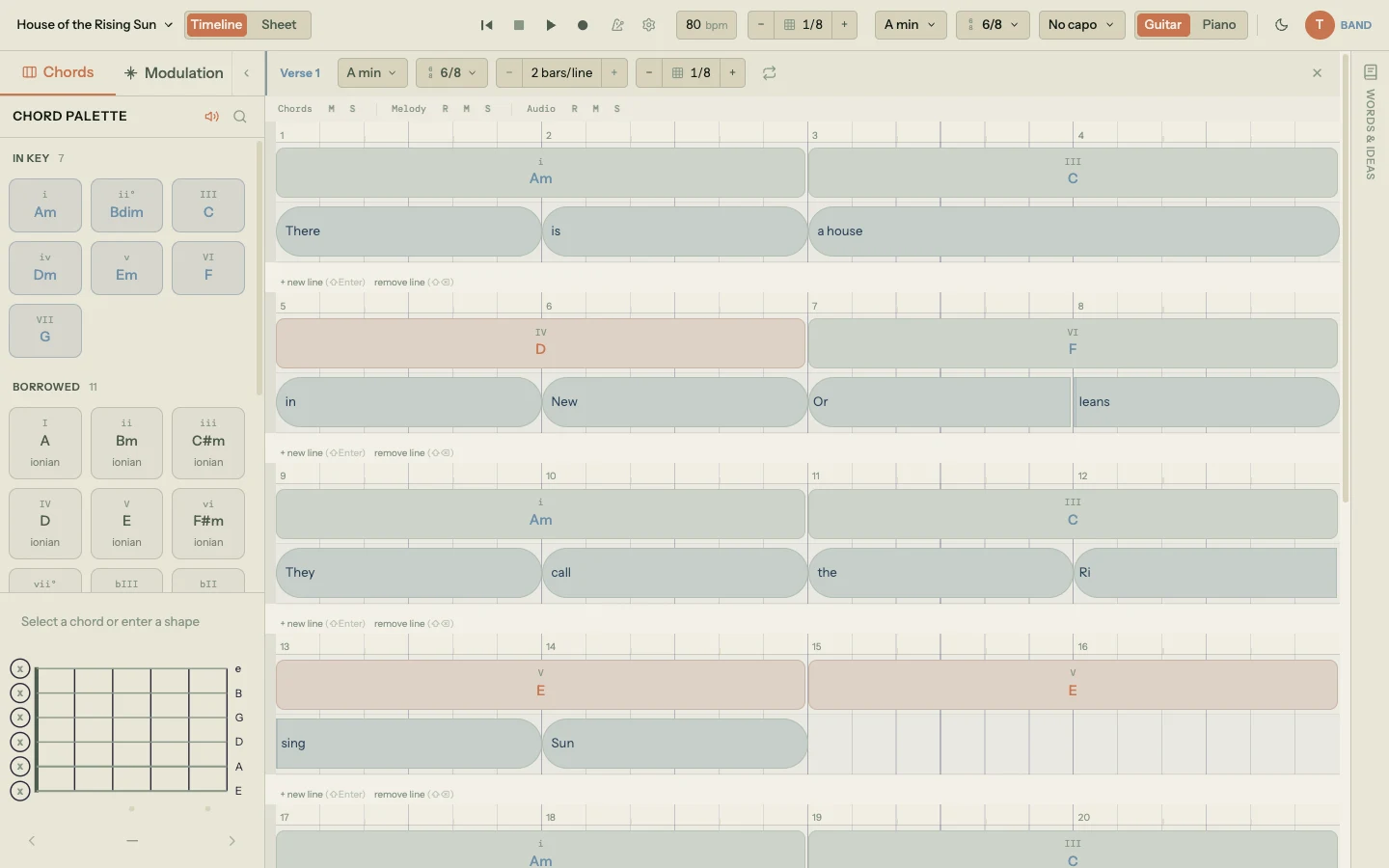
Song Cage tops this list because it is the only program here built for the entire act of writing a song: chords, lyrics, melody, and structure live on one canvas, in a native desktop app for Mac and Windows that costs $79 and works completely offline. Where MasterWriter handles only words and Hookpad handles only music, Song Cage treats a song as one thing. Sing a melody in, type the words onto its notes, and pick the chords under it without switching windows.
The chord palette is the standout, because it listens to the rest of your song. Every suggestion is ranked against the melody notes over that beat and the chords on either side, and the ranking reshuffles live when you change a note or place a chord. Each chip then names its role (in key, borrowed from a parallel mode, or a secondary dominant with its resolution, like → vi), so the theory shows up inside your own song instead of in a textbook. A modulation panel lays out chord-by-chord routes into any key. On the lyrics side you get a full workspace with rhymes, slant rhymes, and syllable splits, and on desktop the entire word panel works offline: write on a plane or in a cabin with no Wi-Fi and nothing is missing.
Melody does not have to be clicked in note by note. Record yourself singing or humming a phrase and Song Cage writes out the notes it hears, ready to drag onto a lyric line, or hold a key and sing a single note onto a syllable. Detection runs on your computer, so it works offline too. Ideas you get down in the free iPhone and Android apps wait for you in the desktop app's Ideas inbox.
The desktop app installs in about 95 MB, lives in your dock or taskbar, and runs natively on Apple Silicon, Intel Macs, and Windows 10 or later. The same canvas also runs as an AU/VST3 plugin inside Logic Pro, Ableton Live, FL Studio, and other DAWs, following your session's tempo and dragging parts out as MIDI clips. It comes with a 14-day free trial, then a single $79 license covers both platforms, the plugin, and the full web app. Updates install themselves.
Pros
- Chord suggestions ranked live against your melody and the chords around them
- Sing or hum a phrase and get the notes written out, even offline
- Native Mac and Windows apps plus an AU/VST3 plugin; one $79 license covers all three
- Works fully offline, including the rhyme and word tools
- Lyric workspace with rhymes, slant rhymes, and syllable splits beside the chords
- Free web app to try the whole workflow before buying
Cons
- Not a DAW: voice recording captures ideas, but there is no multitrack mixing or mastering
- The free iPhone and Android apps are capture-only (record, lyrics, chords); the full editor is the web and desktop app
- Younger product than the legacy names on this list
Pricing (verified October 2026 from songcage.com)
Desktop: 14-day free trial of everything, then $79; the license covers Mac and Windows plus the AU/VST3 plugin, and adds unlimited songs, export, and collaborators in the web app. Web app: free for one song, with no card required.
2. MasterWriter

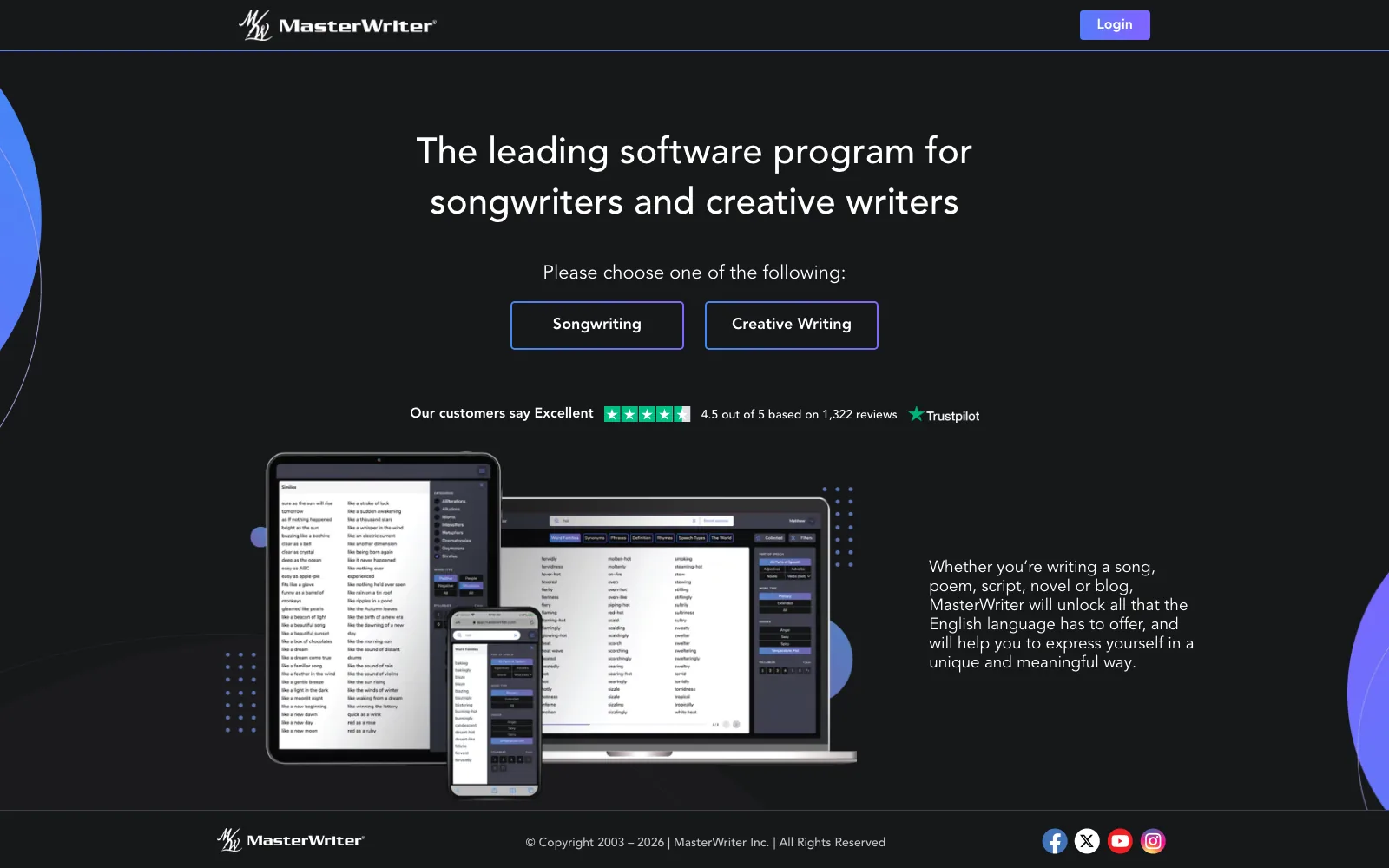
MasterWriter is the most famous name in songwriting software, and for lyrics it remains the deepest dedicated tool available: a rhyming dictionary with over 100,000 entries and 36,000 rhymed phrases, a 33,000-entry phrase library, and the unique Word Families reference that goes far beyond a thesaurus. Hit writers including David Foster, Gwen Stefani, and Rob Thomas have endorsed it for years, and it holds a 4.5/5 rating across 1,300+ Trustpilot reviews.
The workflow is built around collecting: double-click any rhyme, phrase, or synonym to gather candidates while you draft, and keep versions of a lyric side by side. The limitation is scope. MasterWriter is words only: no chord tools, no theory, and no melody timeline, so the musical half of your song happens somewhere else entirely. It is also subscription-only ($9.95 monthly, $99.95 a year, or $149.95 for two years, with a 90-day money-back guarantee) and it is web-based, so it needs an internet connection. For a wider look at the words-first category, see our roundup of the best apps for writing song lyrics.
Pros
- Deepest rhyming dictionary in the category: 100,000+ entries, 36,000 rhymed phrases
- Phrases, Word Families, and Speech Types references you will not find elsewhere
- Side-by-side lyric versions and painless song organization
- Decades of endorsements from Grammy-winning writers
- 90-day money-back guarantee
Cons
- Lyrics only: no chords, no theory, no melody tools
- Subscription only, with no one-time purchase option
- Browser-based, so it is built around an internet connection
- Interface shows its age next to modern writing tools
3. Hookpad (by Hooktheory)

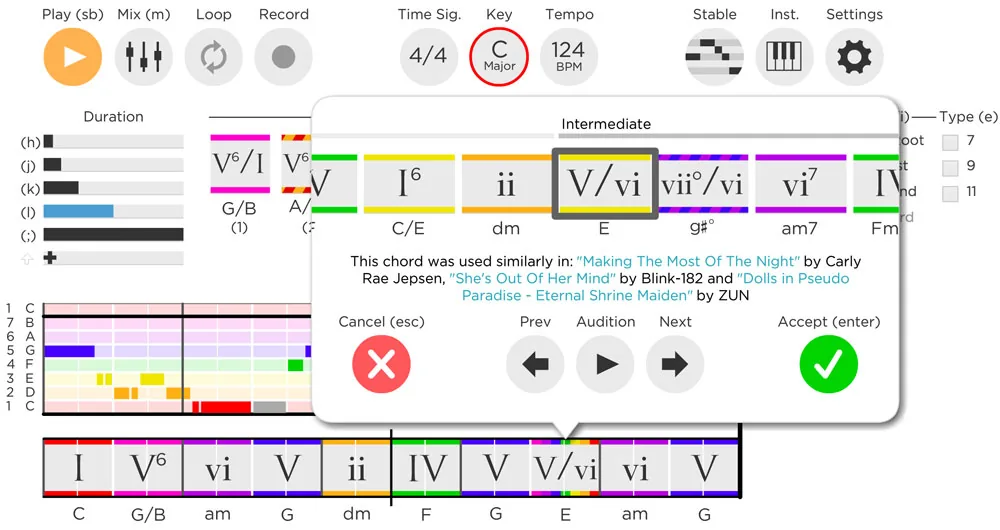
Hookpad is the most research-driven songwriting software you can run on a desktop. Its TheoryTab database of 75,000+ popular songs, analyzed in Roman numeral notation, lets you search what chords real hits use, and its Magic Chord suggestions are trained on that data rather than abstract theory rules. Sketch a chord progression and melody, audition them against 500+ instruments, and export MIDI or sheet music into any DAW on the Standard plan.
Pricing, verified from hooktheory.com: the free tier covers basics with a limited chord palette and one melody voicing; Standard is $7.99/month or a $199 one-time lifetime license, adding the full palettes, MIDI and sheet-music export, and the instrument library; the Aria AI co-writer is an optional +$14.99/month. It is a web app from Hooktheory that can be installed as a Chrome app on Mac and Windows, but there is no native desktop program and no lyric tools beyond basic lyric entry. For a head-to-head with our top pick, see Hookpad vs Song Cage.
Pros
- TheoryTab database of 75,000+ analyzed songs, the deepest chord research library anywhere
- Magic Chord suggestions grounded in real hit-song statistics
- $199 lifetime option avoids a forever subscription
- MIDI, sheet music, and lead sheet export on Standard
- 500+ instruments for sketching arrangements
Cons
- No real lyric workspace: no rhyme finder or word tools
- Web app only (installable through Chrome), with no native desktop program
- Aria AI raises the all-in monthly cost considerably
4. GarageBand
GarageBand is the best free songwriting software for anyone with a Mac, because it is already on the machine: a genuine multitrack studio with software instruments, amp models, Drummer tracks, and a massive loop library at zero cost. For songwriters who think with their hands on an instrument, recording a rough take and singing over it is a legitimate writing method, and GarageBand makes that effortless.
Its limits are the flip side of its nature. GarageBand is production software, so it offers no help with the writing decisions themselves: no chord suggestions, no theory labels, no rhyme tools. And it is Mac-only, which is why Windows users searching for it land on lists like our best GarageBand alternatives for songwriters. Pair it with a dedicated writing tool and it covers the demo stage beautifully; projects also open directly in Logic Pro when a song outgrows it.
Pros
- Completely free and preinstalled on every Mac
- Real multitrack recording with software instruments and amp models
- Drummer tracks and a huge loop library for fast demos
- Projects open directly in Logic Pro later
Cons
- Mac only; no Windows version exists
- No chord, theory, or lyric tools of any kind
- Production-first interface slows idea capture
5. REAPER

REAPER is the best DAW value in songwriting: a full professional recording program for a $60 one-time license, with a 60-day fully functional free evaluation and free updates promised through version 8.99. It is small, fast, endlessly customizable, and runs on Windows, macOS, and Linux, which makes it the natural recording companion on platforms where GarageBand does not exist.
As writing software, the same caveat applies as to every DAW: REAPER assumes you already know what to play. There are no chord tools, no songwriting aids, and the stock sounds are utilitarian, so most writers pair it with a dedicated writing tool and use REAPER for capturing takes and building demos. The $60 discounted license covers personal use and any business under $20,000 in yearly revenue; the commercial license is $225. If your songwriting process is fundamentally a recording process, this is the one-time purchase to make.
Pros
- $60 one-time license with free updates through v8.99
- 60-day unrestricted evaluation before paying
- Lightweight and fast, even on old laptops
- Runs on Windows, macOS, and Linux
- Deeply customizable for any recording workflow
Cons
- No songwriting aids: chords, lyrics, and theory are all on you
- Steeper learning curve than consumer tools
- Minimal bundled instruments and sounds
6. MuseScore Studio

MuseScore Studio is the best free notation software ever made, and for songwriters who work in standard notation it is genuinely all you need: write a lead sheet with melody, chord symbols, and lyrics, hear it back with realistic Muse Sounds instruments, and print or export a professional PDF. Version 4.7.5 shipped in September 2026, and the program remains completely free and open source on Windows, macOS, and Linux.
The fit depends entirely on how you think. If notation is your native language, MuseScore is a superb writing environment and the obvious way to hand charts to other musicians. If you write by ear, by voice memo, or by strumming until something sticks, notation-first software adds friction at exactly the wrong moment: you have to already know the notes before you can enter them. Most ear-first writers will be faster in a capture-first tool and can export a chart later when the song is done.
Pros
- Completely free and open source, with no upsells in the editor
- Professional engraving: lead sheets, chord symbols, lyrics, full scores
- Muse Sounds playback is remarkably realistic for free software
- Windows, macOS, and Linux support
Cons
- Notation-first: you must know what to write before you write it
- No chord suggestions, rhyme tools, or capture workflow
- Not a recording program; audio input is not the point
7. BandLab

BandLab is the most impressive free product in music software: a full multitrack studio that runs in any desktop browser, with hundreds of instruments, a quarter-million royalty-free samples, free mastering presets, and unlimited cloud projects (up to 16 tracks each), all at no cost. Because it is browser-based, it is the rare "software" pick that works identically on a Mac, a Windows PC, and a Chromebook.
Like GarageBand and REAPER, though, BandLab is production software. It will record, edit, and polish a song you have already written, and its SongStarter ideas can crack a blank page, but it has no chord theory, no rhyme tools, and no lyric workspace. It also lives in the cloud, so you need an internet connection; there is no offline mode for a writing session in a dead zone. As a free finishing studio behind a dedicated writing tool, it is hard to beat. Our full Song Cage vs BandLab comparison walks through exactly where each one shines.
Pros
- Truly free: unlimited projects, instruments, samples, and mastering presets
- Runs in any desktop browser, plus iOS and Android apps
- SongStarter ideas help with blank-page moments
- Community of 100+ million creators for feedback and collaboration
Cons
- Requires an internet connection; no offline writing
- No chord theory, lyric, or rhyme tools
- More tracks and mastering options sit behind the $14.99/mo Pro membership
Songwriting Software Comparison Table
| Software | Focus | One-Time Option | Free Version | Mac | Windows | Works Offline | Rating |
|---|---|---|---|---|---|---|---|
| Song Cage | Chords + lyrics + melody | $79 (desktop) | ✓ Web app | ✓ | ✓ | ✓ | |
| MasterWriter | Lyrics | ✗ Subscription | ✗ 90-day guarantee | Browser | Browser | ✗ | |
| Hookpad | Chords + melody | $199 lifetime | ✓ Limited | Browser | Browser | After first visit | |
| GarageBand | Recording demos | Free | ✓ | ✓ | ✗ | ✓ | |
| REAPER | Recording (full DAW) | $60 | 60-day trial | ✓ | ✓ | ✓ | |
| MuseScore Studio | Notation | Free | ✓ | ✓ | ✓ | ✓ | |
| BandLab | Cloud production | Free | ✓ | Browser | Browser | ✗ |
✓ = full support · Browser = runs in a desktop browser rather than as an installed app · ✗ = not available · Prices verified October 2026 from each vendor's site
How to Choose Songwriting Software
The right pick depends less on features and more on how you actually write. Three questions settle it for most people.
Should you buy songwriting software once or subscribe?
The one-time options in 2026 are Song Cage Desktop ($79), Hookpad Standard lifetime ($199), and REAPER ($60); MasterWriter and Hookpad's monthly plan are subscriptions, and the rest are free. The math is straightforward: MasterWriter at $99.95 a year costs more than a Song Cage desktop license within its first year, and every year after that is added cost. Subscriptions earn their keep when the product is genuinely cloud-dependent or constantly improving in ways you use. For a writing tool you may use for a decade, a one-time license is usually the better deal, and it keeps working even if you stop paying for everything else in your stack.
Do you need software that works offline?
If you ever write on planes, in cabins, backstage, or anywhere with bad Wi-Fi, this question outranks every feature list. MasterWriter and BandLab stop working when the connection drops, and Hookpad works offline only once you have opened it online. Installed programs (Song Cage Desktop, GarageBand, REAPER, MuseScore Studio) keep working anywhere, and Song Cage keeps even its rhyme and word lookups offline. There is a quieter benefit too: an offline writing app cannot show you a feed, a notification, or anything else that breaks the thirty seconds of focus a fragile idea needs. Where your ideas tend to arrive should decide where your software lives.
Do you want to write inside your DAW?
If you produce as you write, the friction is the window switch: most songwriting software lives outside the DAW, so every idea has to be carried across by hand. Song Cage is the one writing tool on this list that also runs as an AU/VST3 plugin. Its chord palette, lyrics, and melody sit on a track in your session, the timeline follows the project tempo, and a finished part drags onto a track as an ordinary MIDI clip. GarageBand, REAPER, and BandLab are the DAW itself, so they are where a plugin like that would live, not a substitute for it.
Are you writing lyrics first, chords first, or recording first?
Lyrics-first writers get the most from MasterWriter's dictionaries or Song Cage's lyric workspace. Chords-first writers want a chord progression tool with theory built in: Song Cage or Hookpad, depending on whether you want theory labels inside your own song or research data from other people's songs. Recording-first writers who hum into a mic and build from sound should start with GarageBand on a Mac or REAPER on Windows. Most working songwriters move between all three modes, which is the argument for software that keeps chords, words, and melody in one place instead of three.
Frequently Asked Questions
What is the best songwriting software in 2026?
Song Cage is the best overall songwriting software in 2026: it is the only program that combines chords (with full theory labeling), lyrics, melody, and song structure in one canvas, runs natively on both Mac and Windows, works completely offline, and costs $79. MasterWriter is the best lyrics-only choice, and Hookpad is the best for chord research.
Is there good free songwriting software?
Yes. GarageBand (free on every Mac) and BandLab (free in any browser) cover recording and production, and MuseScore Studio covers notation, all at no cost. For the writing itself, Song Cage's web app is free for one song with no card required, and signing in once in the desktop app or plugin starts a 14-day trial of everything.
What is the difference between songwriting software and a DAW?
Songwriting software helps you make the writing decisions: which chord comes next, which rhyme fits, how the sections fit together. A DAW (digital audio workstation) assumes those decisions are made and helps you record, edit, and mix the result. GarageBand, REAPER, and BandLab are DAWs; Song Cage, MasterWriter, and Hookpad are writing tools. Many songwriters use one of each.
What songwriting software works on both Mac and Windows?
Song Cage Desktop runs natively on macOS (Apple Silicon and Intel) and Windows 10 or later, and one $79 license covers both platforms. REAPER and MuseScore Studio also ship native Mac and Windows versions. MasterWriter and BandLab run in a desktop browser on either platform and need an internet connection; Hookpad also runs in the browser and can be installed as a Chrome app. GarageBand is the only Mac-exclusive on this list.
What is the difference between a songwriting app and songwriting software?
Mostly the device. People tend to say songwriting app for something on a phone or tablet and songwriting software for a program on a Mac or Windows computer, but the job is the same: helping you write the chords, lyrics, and melody. Some tools are both. Song Cage has free iPhone and Android apps for capturing ideas, a web app, a native Mac and Windows app, and a DAW plugin, and what you capture on your phone lands in the desktop app’s Ideas inbox. For phone-first tools, see our roundup of best songwriting apps.
Is MasterWriter still worth it in 2026?
For pure lyric writing, yes: its 100,000-entry rhyming dictionary, 36,000 rhymed phrases, and Word Families reference are still the deepest word tools in any songwriting program. The trade-offs are that it handles only words (no chords, theory, or melody), and it is subscription-only at $9.95/month or $99.95/year. Writers who want words and music in one program should look at Song Cage instead.
Do I need to know music theory to use songwriting software?
No. The best modern tools teach you as you write. Song Cage labels every chord with its Roman numeral function and explains why a borrowed chord or secondary dominant works in context, and Hookpad shows you what chords real hit songs use. Only MuseScore Studio assumes you read standard notation; everything else on this list works fine if you play by ear.
Put the Whole Song in One Program
Song Cage Desktop puts chords, lyrics, melody, and structure on one canvas, in a native app for your Mac or Windows PC that works completely offline. Try it free for 14 days, then it is $79.