Table of Contents
- How to Choose the Right Guitar Songwriting App
- 1. Song Cage
- 2. Guitar Pro 8
- 3. Ultimate Guitar
- 4. Chordify
- 5. BandLab
- 6. GarageBand
- 7. FaChords
- 8. SmartChord
- 9. Autochords
- 10. Songsterr
- What Music Theory Do Guitar Songwriters Actually Need?
- What are guitar-friendly keys and why do they matter for songwriting?
- How does a capo work for key transposition?
- Which borrowed chords work best on guitar?
- How does the I–V–vi–IV work on guitar, and what are guitar-friendly variations?
- How do guitarists modulate between keys?
- What are common minor chord progressions for guitar?
- Full Comparison: Top Guitar Songwriting Apps 2026
- Frequently Asked Questions
Updated April 2026
Guitar Pro 8 price ($69.95 one-time) and platform support verified against guitar-pro.com. Ultimate Guitar Pro pricing ($39.99/yr standard, $59.99/yr Pro+) confirmed against the App Store listing. FaChords confirmed free with no signup, tested against fachords.com. BandLab free tier and Membership pricing ($14.95/mo) confirmed. Songsterr Plus ($4.99/mo) and SmartChord (V12.10, April 2026) pricing verified against the App Store and Play Store. Rankings compiled from five weeks of hands-on guitar songwriting sessions.
A guitar songwriting app is any tool that helps guitarists capture, develop, and refine song ideas, whether through chord progression builders with real guitar voicings, tab editors, audio recording, music theory guidance, or lyric writing tools. The best guitar songwriting apps in 2026 span a spectrum: from context-aware chord palettes with full guitar fretboard diagrams at one end, to notation-heavy tab editors and full recording DAWs at the other.
Quick Summary
We tested 20+ guitar songwriting apps across five weeks of real writing sessions, from the first guitar riff to finished demo, with guitarists across skill levels and genres. Here are the 10 best guitar songwriting apps in 2026, ranked by how well they serve the actual songwriting process: capturing ideas fast, developing chord progressions with real guitar voicings, writing lyrics, and understanding why certain chord moves work.
This guide is specifically for guitarists who write songs, not for producers who happen to own a guitar, or session players learning covers. We tested every tool with one frame: does this make it easier to write a better song on guitar, and does it help you build chord progressions that actually go somewhere?
How We Ranked These Apps
Every app was put through five weeks of real guitar songwriting sessions, from first chord idea through completed lyric demo. Our scoring weighted five criteria:
No app paid for placement. Song Cage is listed first because it ranked first across our guitar songwriting criteria, and because this is the Song Cage blog. We are transparent about that.
How to Choose the Right Guitar Songwriting App
Guitar songwriting apps fall into distinct categories. Knowing which type you need saves time.
Need a chord palette with real guitar fretboard diagrams, music theory guidance, borrowed chord library, and modulation support. Song Cage.
Need professional guitar tab editing with realistic playback, multi-instrument support, and tab sharing. Guitar Pro 8.
Want to extract chords from songs you love or study how arrangements are built note-by-note. Chordify, Ultimate Guitar, Songsterr.
Need to record multi-track guitar demos and produce finished-sounding arrangements. BandLab (free), GarageBand (free, Apple only).
Want fast chord progression inspiration without theory depth. Autochords.
Need a comprehensive chord dictionary, fretboard trainer, and scale reference for guitar. SmartChord.
What separates a guitar songwriting app from a guitar learning app
Guitar learning apps (Yousician, Simply Guitar) teach you to play existing songs with real-time feedback. Guitar songwriting apps help you create new songs: building chord progressions, writing lyrics, recording ideas, and understanding music theory in a creative context. The distinction matters: the best guitar songwriting apps serve the creative process, not the learning-by-copying process.
1. Song Cage

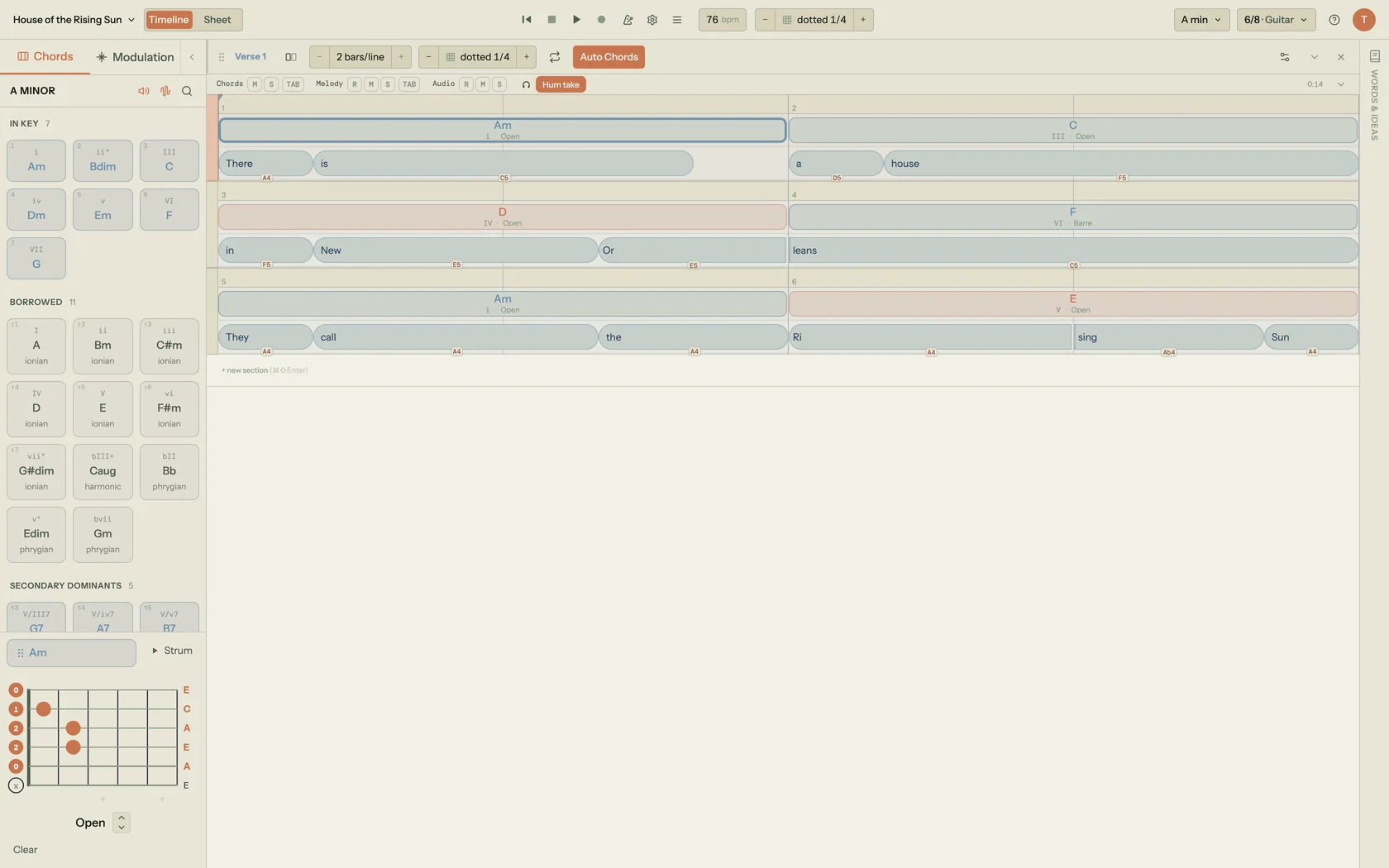
Song Cage is the best guitar songwriting app in 2026 because it was built for the exact moment a guitarist has a chord idea and needs to develop it, not just record it. The guitar fretboard diagram is central: every chord shows an actual fingering with multiple voicing options and automatic capo adjustment. When you pick a chord in Song Cage, you know exactly how to play it.
The chord palette is what separates Song Cage from every other guitar chord app. It is not a static chord dictionary, it is a context-aware suggestion engine. When you click an empty beat in the chord lane, Song Cage reads the melody notes at that position, the chord before it, and the chord after it, then ranks every available chord by how naturally it fits. The palette displays live scores alongside each chord ("1/1 · 99%"), voice leading indicators (●●● very smooth, ●●○ moderate), and directional tooltips ("← from G", "→ to Cadd9") that explain each suggestion in plain English. For guitarists who rely on ear more than theory, this is revelation: you hear something that sounds right, and Song Cage shows you why it works.
The three-tab chord palette organizes every option by harmonic function. The In Key tab shows the seven diatonic chords with Roman numeral labels: the chord shapes that always work in your key. The Borrowed tab shows chords from parallel modes: the flat-VII, flat-VI, and minor iv that guitarists reach for instinctively (the ♭VII in rock, the ♭VI in anthems), each labeled with its source mode. The Secondary Dominants tab shows the V7 chord pointing toward each diatonic target, giving guitar progressions that forward-moving harmonic tension that distinguishes a strong song from a static loop.
The modulation panel is what no other guitar app offers. Select any destination key and Song Cage maps every pivot chord between your current key and the target, with full cadential routes and an "Add here" button that drops the transition chords straight onto your timeline. For guitarists who play in guitar-friendly keys (G, D, A, E, C major) and want to modulate for a key change between verse and chorus, this is the only tool that makes it visual, audible, and effortless.
Guitar mode also includes capo-aware transposition: set your capo position and every chord diagram updates to show the open-position shapes that sound in the target key. The Smooth Voicings command runs a Viterbi optimization across your full progression to find the voicing sequence with the least total hand movement across the neck, a practical feature that guitar players notice immediately in how much cleaner a chord-to-chord transition sounds when you use the right inversion.
Beyond the chord tools, Song Cage is the only guitar songwriting app that treats lyrics as part of the song rather than a separate task. The lyric workspace lives alongside the chord lane: you write verse and chorus lyrics directly under the corresponding chord sections, click any word for rhymes, slant rhymes, and synonyms, and record a voice memo of your melody idea directly in-app. For guitarists who write complete songs rather than instrumental pieces, this eliminates the three-app problem: no more switching between Guitar Pro for chords, Notes for lyrics, and Voice Memos for melody ideas.
Key Features
- Guitar fretboard diagrams for every chord: open, barre, jazz voicings
- Capo-aware transposition built in
- Context-aware chord suggestions with live melody-fit scoring
- Diatonic, borrowed, and secondary dominant chord palette
- Smooth Voicings: Viterbi optimization for hand movement across the neck
- Modulation panel with pivot chords to any key
- Lyric workspace with rhyme finder, slant rhyme, synonym tools
- Built-in voice recording for melody capture
- DAW-style chord timeline (verse, chorus, bridge sections in a clear song structure)
- Free tier: full chord palette + guitar voicings (the free web app is limited to one song)
Pros & Cons
- Only guitar app combining chord palette + fretboard + lyric workspace
- Context-aware suggestions that understand your specific song
- Real guitar voicings, not just Roman numerals or note names
- Capo support built in
- Free tier covers all chord features (the free web app is limited to one song)
- Works for beginners and experienced guitarists equally
- Not a tab editor: can't export Guitar Pro or MusicXML notation
- Full editor lives on web and the Mac/Windows desktop app; the free iPhone & Android apps are deliberately capture-only (no timeline, export, or DAW)
- Not a full DAW: doesn't replace Logic or Ableton for production
2. Guitar Pro 8

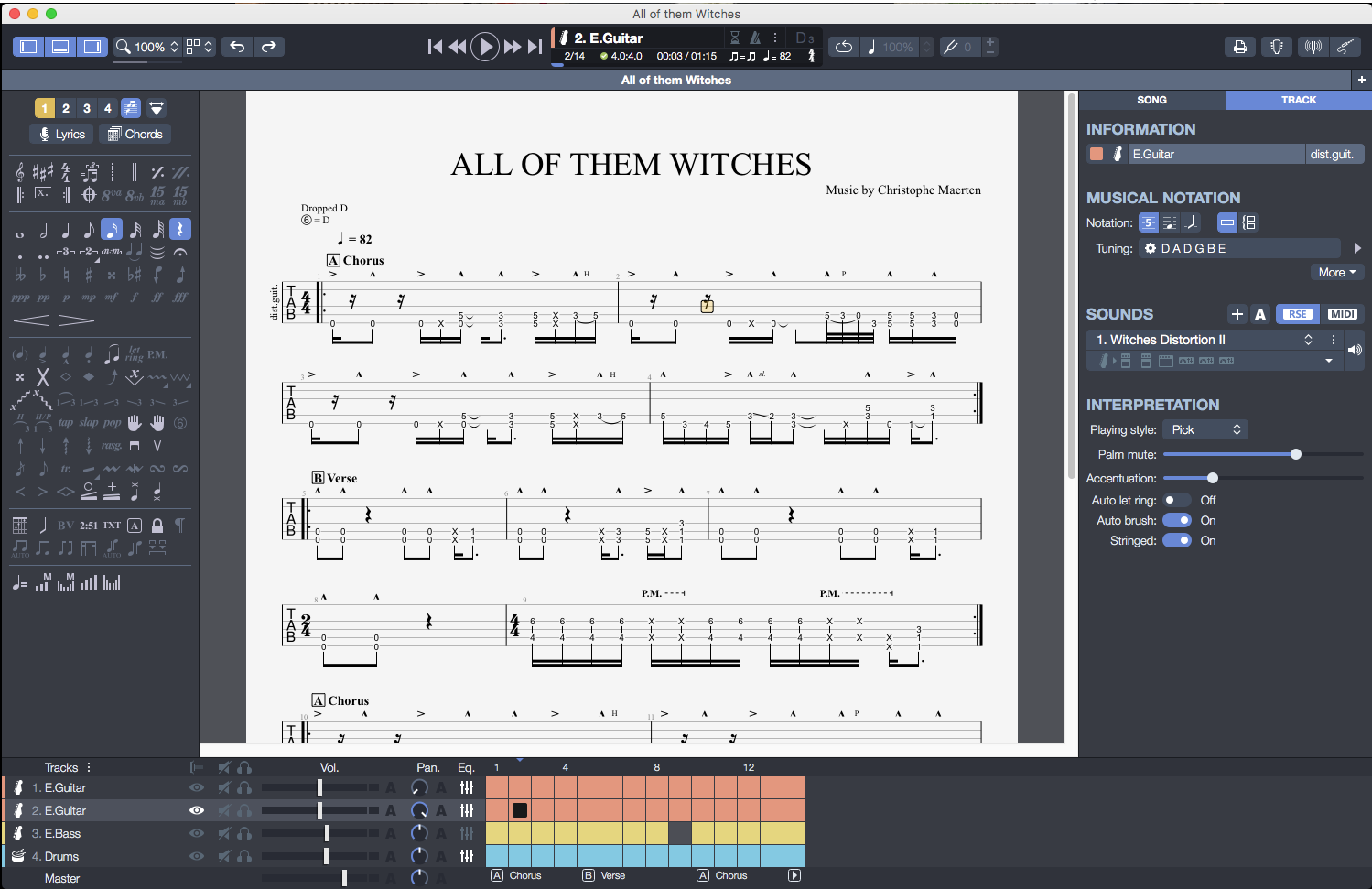
Guitar Pro 8 by Arobas Music has been the definitive guitar tab editing software for decades. The 2022 version 8 release maintained that position with a significantly improved interface, 200 RSE soundbanks for realistic playback, 80 effects and amp modeling options, and support for up to 5 computers per license. At $69.95 one-time, it remains the best value for professional-grade guitar notation.
The tab editing environment is unmatched: multi-track scoring with full notation alongside tab, real-time audio playback with guitar amp simulation, chord diagram display, scale editor, chord finder, and a tuner. For guitarists who need to write for bands (guitar, bass, drums, keys, strings), communicate song arrangements to other musicians, or create professional-quality transcriptions, Guitar Pro 8 is the correct tool. The companion Guitar Pro mobile app (iOS and Android, sold separately, with the mySongBook tab library subscription at roughly $5/mo) lets you view and annotate tabs on phone or tablet.
As a Guitar Pro alternative for the creative songwriting phase, before you're ready to notate anything, Song Cage is more useful. Guitar Pro has no chord suggestion engine that understands your song's harmonic context, no borrowed chord library organized by mode, no modulation panel with pivot chord routes, no lyric workspace, and no rhyme tools. Guitar Pro answers "how do I notate and share this chord progression?", Song Cage answers "what should my next chord be, and how does it connect to my lyric?"
Pros
- Industry standard guitar tab editor: the benchmark for notation
- 200 RSE soundbanks + 80 amp and effects models for realistic playback
- Multi-instrument scoring: guitar, bass, drums, keys, strings
- $69.95 one-time, no subscription, free 8.x updates, up to 5 computers
- Chord diagram library and scale editor built in
- Compatible with Windows and macOS (including Apple Silicon)
Cons
- No context-aware chord suggestions or harmonic guidance
- No borrowed chord library or modulation panel
- No lyric workspace or rhyme tools
- Not designed for the exploratory songwriting phase
- Mobile app is sold separately, not included in desktop license
- Heavy interface, not built for speed-first idea capture
3. Ultimate Guitar

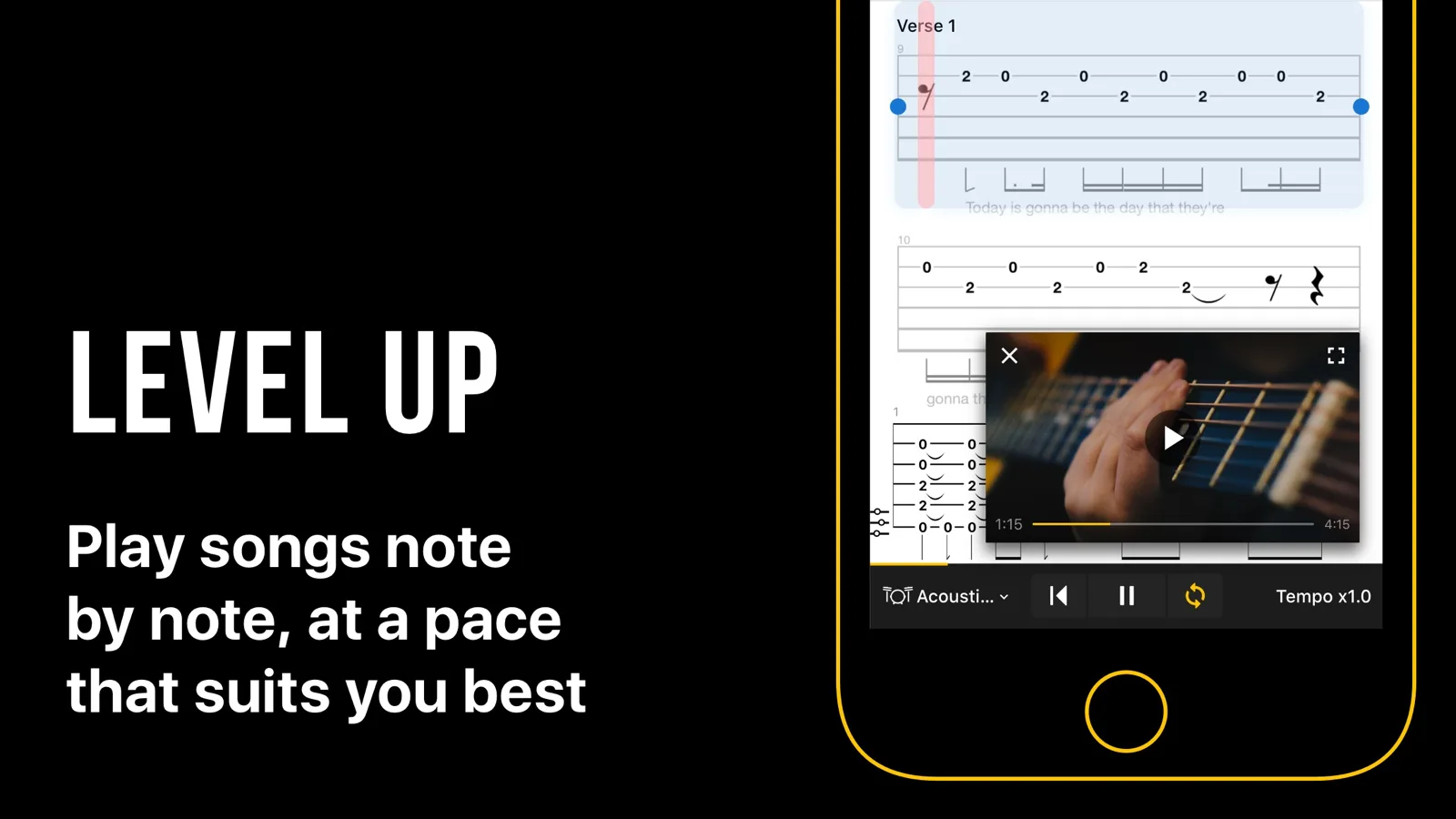
Ultimate Guitar has the largest user-generated guitar tab library in the world: 1M+ songs and 2M+ tabs (per ultimate-guitar.com/about) with chord charts, guitar tabs, bass tabs, ukulele tabs, and drum tabs contributed and verified by the community. Pro at $39.99/yr unlocks interactive playback with synchronised audio, transposition, tempo control, and looping. For guitarists who learn by studying songs, it is an indispensable reference: find any song, see how it is fingered on guitar, and study why the chord progressions work. The interactive tabs in the Pro tier sync with audio playback, let you slow down and loop difficult sections, transpose to a different key, and adjust tempo without affecting pitch.
The Pro tier at $39.99/yr ($3.33/mo effective) adds interactive tabs with synchronised audio playback, transposition, tempo control, looping, and offline access. The newer Pro+ at $59.99/yr ($5/mo) sits above Pro with additional premium content; Ultimate Guitar does not publicly itemise the full Pro vs Pro+ feature delta, so check the in-app screen before subscribing if you have a specific need. For guitarists who want to study songs as part of their songwriting process, hearing why certain chord progressions work in songs they love, it is essential. As a chord generation or harmonic guidance tool for new songs, it does not function: no chord suggestion engine, no borrowing tools, no lyric workspace.
Pros
- World's largest guitar tab library: 1M+ songs, 2M+ tabs
- Interactive tabs with synchronized audio playback (Pro)
- Transpose, tempo control, and loop for practice (Pro)
- $39.99/yr Pro plan is exceptional value
- Works across web, iOS, and Android
- Best tool for studying chord progressions from real songs
Cons
- No chord suggestion engine or music theory guidance
- No borrowed chord tools or modulation support
- No lyric writing workspace
- Tab quality varies: community tabs range from perfect to inaccurate
- Pro vs Pro+ feature delta is not publicly itemised
4. Chordify

Chordify is the best tool for extracting guitar chord progressions from songs you already know. Paste a YouTube URL, upload an MP3, or search the 36 million+ song library, and Chordify returns a synchronized chord chart that plays along with the audio, showing the guitar chord diagram for each chord as it appears. The Premium tier ($8.99/mo) adds transposition, tempo control, the digital capo, PDF chord sheet export, and MIDI download.
Chordify's guitar chord diagrams are displayed in real time alongside the audio: you see both the chord name and a fingering diagram for that chord as the song plays. Capo hints tell you which capo position gives you easier open-chord shapes for any song in any key. This is practically useful for guitarists who want to play along: it is the fastest path from "I want to play this song on guitar" to actually playing it. As a tool for creating new chord progressions, it does not function, it only analyzes existing music.
Pros
- Best AI chord extraction from audio or YouTube
- Guitar chord diagrams displayed in real time alongside audio
- Capo hints for guitar-friendly open chord shapes
- 36 million+ song library with transposition (Premium)
- Web, iOS, Android: works on any device
Cons
- Analysis only: no chord generation or music theory guidance
- No borrowed chord tools or modulation support
- No lyric writing or recording
- Free tier limited to 4 songs/day with ads
- Accuracy varies with complex or heavily effected audio
5. BandLab

BandLab is the best completely free DAW for guitarists recording song demos. The free tier gives you unlimited project creation, 16 audio + MIDI tracks per project, 370+ virtual instruments, 160,000+ royalty-free loops and one-shots from BandLab Sounds, cloud sync, and collaboration tools, with no trial period and no feature timer. Over 100 million creators use BandLab worldwide.
The Membership tier at $14.95/mo (or $99/yr for the first year, renewing at $149.50/yr) adds 32 tracks per project, AI production tools (Voice Cleaner, Audio-to-MIDI, AutoMix), distribution to major platforms with 100% royalty retention, and full access to Cakewalk Next (Mac and Windows) and Cakewalk Sonar (Windows-only), professional-grade desktop DAWs that were previously paid products. The free tier is the relevant one for most guitarists at the songwriting stage. BandLab is best used alongside Song Cage: Song Cage for chord progressions and lyrics, BandLab for the demo recording phase.
Pros
- Best completely free DAW for recording guitar demos
- Unlimited projects, cloud sync, and collaboration on the free tier
- 16 tracks per project (free): sufficient for most demos
- 370+ virtual instruments and 160,000+ samples included free
- 100 million+ users: largest free music creation platform
- Cross-platform: web, iOS, Android
Cons
- No chord suggestion engine or music theory tools
- No guitar fretboard diagrams or chord palette
- 16-track limit on free tier (32 tracks for paid)
- Not designed for the songwriting/chord development phase
- Membership renewal jumps from $99/yr to $149.50/yr after first year
6. GarageBand
GarageBand is entirely free on all Apple devices (Mac, iPhone, iPad) and contains a full multi-track DAW with guitar amp simulation, the Guitar and Strings Touch Instruments on iOS, a built-in tuner, drummer tracks, and a library of loops and sounds. On iPhone and iPad, the Guitar Touch Instrument displays chord buttons that you tap to strum: select your chord and the app generates a realistic strumming or arpeggio pattern.
GarageBand 10.4.14 (Mac, April 2026 update) supports 24-bit recording, third-party Audio Units plug-ins, Smart Controls for real-time sound shaping, and Logic Remote on iOS for wireless control from an iPhone or iPad while playing guitar. For Apple users, it is the natural starting point for demo recording: compose chord progressions in Song Cage, record the demo in GarageBand, and open the GarageBand file directly in Logic Pro (the "X" was dropped from the name in 2020; current version is Logic Pro 12.0) when you want to produce a full track. As a chord generation or music theory tool, GarageBand has no suggestion engine, borrowed chord library, or modulation guidance: you need to know your chords before you play them.
Pros
- Completely free on all Apple devices
- iOS Guitar Touch Instrument makes chord strumming easy: tap chords, app strums
- Full multi-track DAW with guitar amp simulation
- GarageBand projects open directly in Logic Pro for production
- 24-bit recording quality on Mac
- Logic Remote integration for wireless control
Cons
- Apple only: not available on Android or Windows
- No chord suggestion engine or music theory guidance
- No borrowed chord library or modulation panel
- Touch chord strumming is iOS-only (Mac uses standard track view)
- No lyric writing or rhyme tools
7. FaChords
FaChords runs in both directions at once: click notes on a fretboard and it names the chord, or use the lookup dropdowns to browse voicings by key, type and position. What sets it apart is configuration, with a capo on any fret, multiple tunings including drop D and open tunings, and a left-handed flip. When you move the capo it recalculates note names and chord identification to match, which most free references do not attempt.
It plays what you select in a loop with a four-beat countdown and an adjustable tempo, with an optional drum pattern behind it, so you can drill a change rather than just look at it. There is microphone pitch detection for identifying notes from a real guitar, a clickable piano keyboard for reference, and the option to download the fretboard as an image. The site has been running since 2012 and everything on it is free without an account.
FaChords is a reference rather than a writing tool: it will tell you what a shape is, but it does not hold a song. Song Cage is where the progression, the lyric and the structure live once you know which chords you want. The two work well side by side, and our free guitar chord charts roundup covers nine more references like it.
Pros
- Identifies a shape you click, and looks up shapes you name
- Capo on any fret, with note names recalculated
- Standard, drop D and open tunings
- Loop playback with countdown, tempo and optional drums
- Microphone pitch detection from a real guitar
- Completely free, no account required
Cons
- A reference only: no song file, no project to return to
- No lyric writing, recording or song structure
- No borrowed chord library organized by mode
- No chord progression suggestions in key
- Browser only, nothing offline
8. SmartChord

SmartChord (s.mart Music Lab) is the most comprehensive guitar reference app on Android, with 1M+ Play Store installs, a 4.6-star rating across 57K+ reviews, and a current version of V12.10 (April 2026). It contains 40+ tools: a chord dictionary covering every chord and every fingering for 40 instruments across 450 tunings, 1,100 scales, 400 picking patterns, and 500 drum patterns. The optional SmartChord PLUS UNLIMITED one-time purchase ($27.99) unlocks all premium features permanently.
For songwriters specifically, the chord progression builder lets you create progressions and see fingering diagrams for every chord, the circle of fifths explorer is useful for understanding key relationships, and the scale circle applies circle-of-fifths logic to scales and modes, a genuinely useful tool for guitarists exploring modal chord choices. SmartChord does not have context-aware chord suggestions, borrowed chord library organized by mode, modulation panel with pivot chord routes, or lyric writing tools. It is a comprehensive guitar reference companion rather than a full songwriting environment, excellent to pair with Song Cage for the theory reference layer.
Pros
- Most comprehensive guitar chord dictionary on Android
- 40+ tools: chord dictionary, scales, circle of fifths, chord progression builder
- 40 instruments, 450 tunings, 1,100 scales
- One-time purchase option ($27.99): no subscription
- 1M+ installs, 4.6 stars across 57K+ reviews: proven at scale
- Updated April 2026 (V12.10)
Cons
- Android only: not available on iOS or desktop
- No context-aware chord suggestions or harmonic guidance
- No borrowed chord library organized by mode
- No lyric writing or recording
- Reference tool, not a full songwriting environment
9. Autochords

Autochords (autochords.com) is the simplest and most accessible free chord progression generator for guitarists. Pick a feel and a key, the site explicitly highlights the easiest guitar keys (G major, E minor, C major, A minor) in its interface, and it outputs a chord progression with the notes for each chord and a "CC Edit/Export" option. No account, no download, no loading time on the web tool. A separate iOS app from the same publisher offers a paid PRO upgrade with additional moods.
For chord generation beyond the basics, borrowed chords labeled by mode, secondary dominant chords, I–V–vi–IV variations with modal color, key modulation routes, Autochords hits its ceiling quickly. There are no guitar fretboard diagrams, no context-aware suggestions, no lyric tools. It is a zero-friction starting nudge when you are blank, not a full chord progression tool. The website is genuinely free with no monetization traps and is particularly useful as the first stop before moving to Song Cage for deeper development.
Pros
- Completely free on the web: no sign-up, no install
- Fastest path to a chord starting point for guitarists
- Acknowledges guitar-friendly keys (G, Em, C, Am) explicitly
- Shows all diatonic chords in selected key alongside progression
- Works on any browser or device (companion iOS app available)
Cons
- No guitar fretboard diagrams or chord voicings
- No borrowed chords, secondary dominants, or modulation
- No lyric tools or recording
- Very limited theory depth
- A starting point, not a development tool
10. Songsterr

Songsterr is a subscription tab platform with over 1.3 million interactive guitar, bass, and drum tabs across 60,000 artists. Songsterr Plus costs $4.99/month and unlocks pause-free playback with original audio, variable speed, looping, solo/mute per track, pitch shift, and Guitar Pro/MIDI export. It is the cleanest tool on this list for studying how songs are actually built note by note.
Songwriting starts with stealing well, and Songsterr is the most direct way to dissect a reference track at quarter speed, loop the bridge, and mute the rhythm guitar to hear what the bass is doing underneath. It overlaps with Song Cage only at the edges: Song Cage is for capturing your own ideas before they evaporate; Songsterr is for studying other people's. The free tier inserts a forced pause every 10 bars, which makes Plus close to required for serious use. Tabs are curated rather than user-generated, which gives you one canonical version per song without contributor chaos, but does mean obscure cuts and very recent releases may not be in the library yet.
Pros
- 1.3M+ curated tabs with one canonical version per song
- Per-track solo/mute exposes voicings and counter-lines you can't hear in the mix
- Variable-speed playback without pitch change
- Loop any measure range for woodshedding a phrase
- Export to Guitar Pro and MIDI for use in your DAW
- Same Plus subscription works across web, iOS, and Android
Cons
- Core "play along" features are locked behind Plus; free tier pauses every 10 bars
- Library is curated, not user-generated, so deep cuts and obscure tunes are missing
- No idea-capture, lyrics, or original-composition tools
- AI transcription capped at 50 tabs/month even on Plus
- Ad-supported on the free tier
What Music Theory Do Guitar Songwriters Actually Need?
Most guitar theory resources are written for classical musicians or jazz players. Here is the theory that matters specifically for guitarists who write songs.
What are guitar-friendly keys and why do they matter for songwriting?
Guitar-friendly keys are those where the diatonic chords fall naturally into open-chord positions on standard tuning. G major (G, Am, Bm, C, D, Em, F#dim) gives you G, C, D, and Em as open chords: the four most common chords in pop and rock. D major (D, Em, F#m, G, A, Bm, C#dim) adds D, Em, G, and A as open chords. A major (A, Bm, C#m, D, E, F#m, G#dim) gives you A, D, and E as open chords. E major (E, F#m, G#m, A, B, C#m, D#dim) is the natural home key for many blues and rock guitarists. Choosing a guitar-friendly key for songwriting means your diatonic chord progressions sit naturally in your hand: a creative advantage, not a limitation.
How does a capo work for key transposition?
A capo allows you to play open-chord shapes in any key. With a capo at the 2nd fret, G major shapes sound in A major. At the 4th fret, D major shapes sound in F# major. At the 5th fret, A major shapes sound in D major. Understanding capo positions lets guitarists stay in comfortable hand positions while writing in any key that suits their vocal range, which is the practical reason capos appear on stage so often. Song Cage's capo-aware transposition shows you which open-chord shapes work for any key and capo position automatically, so you can write in your singer's range without abandoning the open chords that make a guitar part feel alive. Capos also unlock voice-leading options no barre chord can match: open strings ringing through a chord change.
Which borrowed chords work best on guitar?
The most effective borrowed chords for guitar songwriting are those that fall in comfortable positions in guitar-friendly keys. In G major, the ♭VII (F major) is a powerful open chord that appears in rock and folk anthems: it is the borrowed chord guitarists reach for most instinctively. The ♭VI (Eb major in G major) requires a barre at the 6th fret but creates enormous cinematic weight when used in the right context. The minor iv (Cm in G major) requires a barre but adds profound melancholy to a major-key verse. Song Cage labels all borrowed chords by mode and shows the fretboard diagram, so you can decide whether the shape is practical for your arrangement before committing it to the progression.
How does the I–V–vi–IV work on guitar, and what are guitar-friendly variations?
The I–V–vi–IV progression (in G: G–D–Em–C) is the most common in pop music because it works so naturally on guitar: all four chords are open positions in G major. Guitarists can explore variations by reordering. Starting on vi (Em–C–G–D, the "Axis" rotation) gives a darker, more melancholic feel with the same chords; starting on IV (C–G–D–Em) gives a brighter lift before the resolution. Adding a borrowed ♭VII between IV and I (G–D–Em–C–F in G major) adds an anthemic quality characteristic of UK rock and singer-songwriter styles. The F major chord (♭VII in G) is one of the most useful borrowed chords specifically for guitarists because it sits naturally in open position at the nut. Substituting the V with V7 (D7 instead of D) sharpens the pull back to I, a one-character change that gives the entire loop more harmonic motion.
How do guitarists modulate between keys?
Key modulation on guitar is often done through a capo change (adding or removing a capo between sections) or through pivot chords. The most guitar-natural modulations move between related keys that share common chord shapes. G major to D major (both guitar-friendly) shares the D chord as a pivot; E major to A major shares the A and E chords; C major to G major shares C, G, Am, and Em. The simplest pivot route is to find a chord diatonic to both keys, sit on it for a beat, then resolve into the new key's V–I cadence. Song Cage's modulation panel shows every pivot chord between any two keys and generates the full transition route, making key modulation practical for guitarists who previously avoided it because the theory felt inaccessible. The same panel surfaces return routes so a verse–chorus–verse modulation arc can be planned in a single view.
What are common minor chord progressions for guitar?
Minor chord progressions for guitar center on E minor, A minor, and D minor as the most natural minor tonal centers, since each one anchors on a comfortable open chord. The natural minor diatonic pattern (i–VII–VI) is extremely common in folk, rock, and metal: Em–D–C in E minor, Am–G–F in A minor. The Andalusian cadence (i–VII–VI–V: Em–D–C–B in E minor) is characteristic of flamenco and psychedelic rock and works with mostly open shapes in E minor. Adding a major V chord to a natural minor progression (the V becomes a dominant rather than a minor chord) creates a harmonic-minor feel with significantly more tension and forward motion before the resolution. The i–iv–VII–III progression (Em–Am–D–G in E minor) gives a lift toward the relative major, useful for choruses that need to feel less heavy than the verse.
Full Comparison: Top Guitar Songwriting Apps 2026
| App | Guitar Voicings | Chord Palette | Borrowed Chords | Capo Support | Lyric Tools | Recording | Tab/Notation | Free Option | Rating |
|---|---|---|---|---|---|---|---|---|---|
| Song Cage | ✓✓ | ✓✓ | ✓✓ | ✓✓ | ✓✓ | ✓ | ✗ | ✓ | |
| Guitar Pro 8 | ✓✓ | ~ | ✗ | ✓ | ~ | ✗ | ✓✓ | ~ | |
| Ultimate Guitar | ✓ | ✗ | ✗ | ✓ | ✗ | ✗ | ✓✓ | ✓ | |
| Chordify | ✓ | ✗ | ✗ | ✓ | ✗ | ✗ | ✗ | ✓ | |
| BandLab | ✗ | ✗ | ✗ | ✗ | ✗ | ✓✓ | ✗ | ✓✓ | |
| GarageBand | ~ | ~ | ✗ | ✗ | ✗ | ✓✓ | ✗ | ✓✓ | |
| FaChords | ✓✓ | ✗ | ✗ | ✓✓ | ✗ | ✗ | ✗ | ✓✓ | |
| SmartChord | ✓✓ | ~ | ✗ | ✓ | ✗ | ✗ | ✗ | ✓ | |
| Autochords | ✗ | ~ | ✗ | ✗ | ✗ | ✗ | ✗ | ✓✓ | |
| Songsterr | ✓✓ | ✗ | ✗ | ~ | ✗ | ✗ | ✓✓ | ~ |
✓✓ Full support · ✓ Partial · ~ Minimal · ✗ Not available
The Guitar Songwriting App Built for the Fretboard
Song Cage gives guitarists real chord voicings with fretboard diagrams, capo support, borrowed chords, a modulation panel, and a lyric workspace, all in one place. Free to start, no credit card.
Frequently Asked Questions
What is the best guitar songwriting app in 2026?
Song Cage is the best guitar songwriting app in 2026 for the active songwriting phase: chord progression development with real guitar fretboard diagrams, borrowed chord library, capo support, modulation panel, and a full lyric workspace. For tab editing and notation, Guitar Pro 8 ($69.95 one-time) is the industry standard. For studying chord progressions from existing songs, Ultimate Guitar Pro ($39.99/yr) has the largest tab library and Songsterr Plus ($4.99/mo) has the cleanest interactive playback. For free multi-track demo recording, BandLab (free) or GarageBand (free, Apple only) are the strongest options.
What is the difference between Guitar Pro and Song Cage?
Guitar Pro 8 is a professional guitar tablature editor and music notation tool, the best in its category for writing, editing, and sharing guitar tabs and multi-instrument scores. Song Cage is a songwriting composition tool: it helps guitarists build chord progressions with real voicings, write lyrics alongside chords, understand music theory through use, and capture song ideas before they disappear. They serve different creative phases, and many guitarists use both: Song Cage for the exploratory writing phase, Guitar Pro for notation and sharing once the song is written.
What is the best free guitar chord app?
Song Cage has the best free tier for guitar chord tools: full chord palette (diatonic, borrowed, secondary dominants), guitar fretboard diagrams for every chord with multiple voicings, capo-aware transposition, and the modulation panel, all available on the free tier. The free web app is limited to one song and needs no card; the license adds unlimited songs and PDF and MIDI export, and signing in once in the desktop app or plugin starts a 14-day trial of everything. Autochords is the simplest free chord progression generator on the web. Ultimate Guitar has a useful free tier for looking up chord progressions in existing songs. SmartChord is free on Android with a comprehensive chord dictionary.
Is Guitar Pro worth it for songwriting?
Guitar Pro 8 at $69.95 one-time is excellent value for guitarists who need to write formal tab notation, share arrangements with other musicians, or learn songs from professional transcriptions. It has a chord diagram library and supports multi-instrument composition. However, it is not designed for the creative exploration phase of songwriting: it has no chord suggestion engine, no borrowed chord library, no modulation panel, and no lyric workspace. For the writing phase, Song Cage is more useful. For notation and sharing once the song is written, Guitar Pro is the standard.
How do I write a guitar chord progression from scratch?
G major is the easiest starting key: G, C, D, Em are all comfortable open chords. Use the diatonic chords as your starting palette: I (G), IV (C), V (D), and vi (Em) cover most popular chord progressions. Begin with I–V–vi–IV (G–D–Em–C) and listen to which emotional direction it takes. Once that feels natural, add one borrowed chord: try ♭VII (F major in G) before the return to I, the shift from C to F to G is immediately powerful and characteristic of anthemic guitar songwriting. Song Cage shows every diatonic and borrowed chord with the guitar fretboard diagram, so you can see the shape and hear the sound before committing it to your song.
What is the best app for capturing guitar song ideas?
Song Cage is the best app for capturing guitar song ideas fast. Open the app, pick a key (guitar-friendly keys like G, D, A, E, C are the most common starting points), and the chord palette shows every chord available immediately, with the guitar fretboard diagram so you know exactly how to play it. Tap to hear any chord, drag it onto the timeline, add the next chord, and record a voice memo of your melody idea directly in-app. Everything is connected: the chord progression, the lyric sketch, and the audio idea are all in one place. When you come back later, the idea is whole, not scattered across Guitar Pro, a notes app, and Voice Memos.
What guitar keys are best for songwriting?
The best guitar songwriting keys are those where the most common chord shapes fall in open positions: G major (G, C, D, Em all open, the most popular songwriting key for guitar), D major (D, Em, G, A all open, great for fingerpicking), A major (A, D, E open, excellent for strumming), and E major (E, A, B open, natural for blues and rock). For minor keys, E minor, A minor, and D minor are the most guitar-natural. Capo use extends these: a capo at the 2nd fret in G position sounds A major; at the 5th fret in A position sounds D major. Song Cage's capo support shows you which open-chord shapes work in any key and capo position.
What are borrowed chords and how do guitarists use them?
Borrowed chords are chords taken from the parallel key, for example, using chords from G minor inside a G major song. The most useful borrowed chords for guitarists are those that fall in practical positions: the ♭VII (F major in G, a natural open chord) adds rock energy and is characteristic of UK indie and singer-songwriter styles. The ♭VI (Eb major in G, 6th fret barre) adds cinematic weight. The minor iv (Cm in G, 8th fret barre) adds profound melancholy to a major-key chorus. Even one borrowed chord in a progression creates the emotional color that distinguishes a memorable song from a predictable one. Song Cage shows borrowed chords labeled by mode with fretboard diagrams so you can choose based on both sound and practical playability.
How do I modulate between keys on guitar?
Key modulation on guitar is often done through pivot chords or capo changes. The most guitar-natural modulations move between related keys: G major to D major shares the D chord (V in G, I in D) as a natural pivot; E major to A major shares the A chord (IV in E, I in A). A capo change between sections also modulates: remove a capo at the 2nd fret (which made G shapes sound in A) and your G shapes now sound in G, an instant drop that can create a powerful release. Song Cage's modulation panel shows every pivot chord between any two keys with full cadential routes, making key modulation accessible to guitarists who previously avoided it because the theory felt abstract.
What is the best guitar app for beginners who want to write songs?
Song Cage is the best guitar songwriting app for beginners because it shows you both the guitar fretboard diagram and the harmonic function (I, IV, V, vi) for every chord simultaneously, so you learn which chord to play and why it works at the same time. The context-aware chord suggestions mean you don't need to know music theory to get started: the app surfaces the chords that fit your song in harmonic context, and the labels teach you the theory through use. The free tier covers the full chord palette with guitar voicings. For beginners who also want to learn to play existing songs by ear, Chordify is a strong companion tool.
What is an alternative to Ultimate Guitar?
For interactive guitar tab playback, Songsterr (Plus $4.99/mo) is the cleanest alternative to Ultimate Guitar: 1.3M+ curated tabs with one canonical version per song, variable speed, looping, and per-track solo/mute. For chord extraction from audio rather than user-submitted tabs, Chordify is the best alternative, with guitar chord diagrams and capo hints. Guitar Pro 8 is better for professional-quality tabs and multi-instrument notation. For the songwriting phase, creating new chord progressions rather than looking up existing ones, Song Cage is the most complete alternative.
Can I use BandLab for guitar songwriting?
BandLab is excellent for recording guitar demos: it is the best free multi-track DAW for guitarists who want to record chord progressions, vocals, and a drum loop without paying for recording software. However, it has no chord suggestion engine, no guitar fretboard diagrams, no borrowed chord tools, and no lyric writing workspace. The typical workflow for guitar songwriters is: Song Cage for chord progression development and lyric writing, BandLab (free) or GarageBand (free, Apple) for recording the demo once the song is written.
What are the most useful music theory concepts for guitarists who write songs?
The most practically useful music theory for guitar songwriters: diatonic chords (the seven chords that naturally fit any key, knowing these by label rather than just by shape changes how you write), the I–V–vi–IV progression and its variants (the foundation of most popular music), borrowed chords especially the ♭VII which is extremely common in guitar-based songwriting, understanding major vs minor key distinction (why the same chord shapes feel different in different tonal contexts), and basic modulation through pivot chords or capo changes. You do not need to read notation to master any of these, they are all learnable through ear and use, which is how Song Cage teaches them.
What app shows guitar chord voicings alongside music theory?
Song Cage is the only guitar songwriting app that shows guitar chord voicings alongside harmonic function labels simultaneously. When you look at the chord palette in Song Cage, you see: the chord name (G, Am, F), its Roman numeral function in the key (I, ii, ♭VII), its mode of origin for borrowed chords (Aeolian, Mixolydian), its voice leading quality (●●● smooth, ●●○ moderate), and its guitar fretboard diagram with the actual fingering, all at once, for every chord in the palette. This combination is unique and is why Song Cage is the most complete guitar music theory app for songwriters.