Melody Rack is an AU and VST3 MIDI effect plugin for macOS and Windows. You sing or play a melody into your DAW, it lands on the session's grid as MIDI, and fourteen effects work on it before it reaches the instrument on your track. Every one of them knows the harmony, because one of them writes a chord progression from the tune you hummed and the rest read it. This chapter is what the plugin is, what makes it different from the audio-to-MIDI tools you have already tried, and the handful of things it deliberately will not do.
What you'll learn
- What a MIDI effect is, and why Melody Rack makes no sound of its own
- What "harmony-aware" means in practice, and why it is the whole product
- How a take moves through the window: in, through the rack, and out
- What the plugin will not do, and why each of those is a decision
- How Melody Rack relates to Song Cage, and whether you need one to use the other
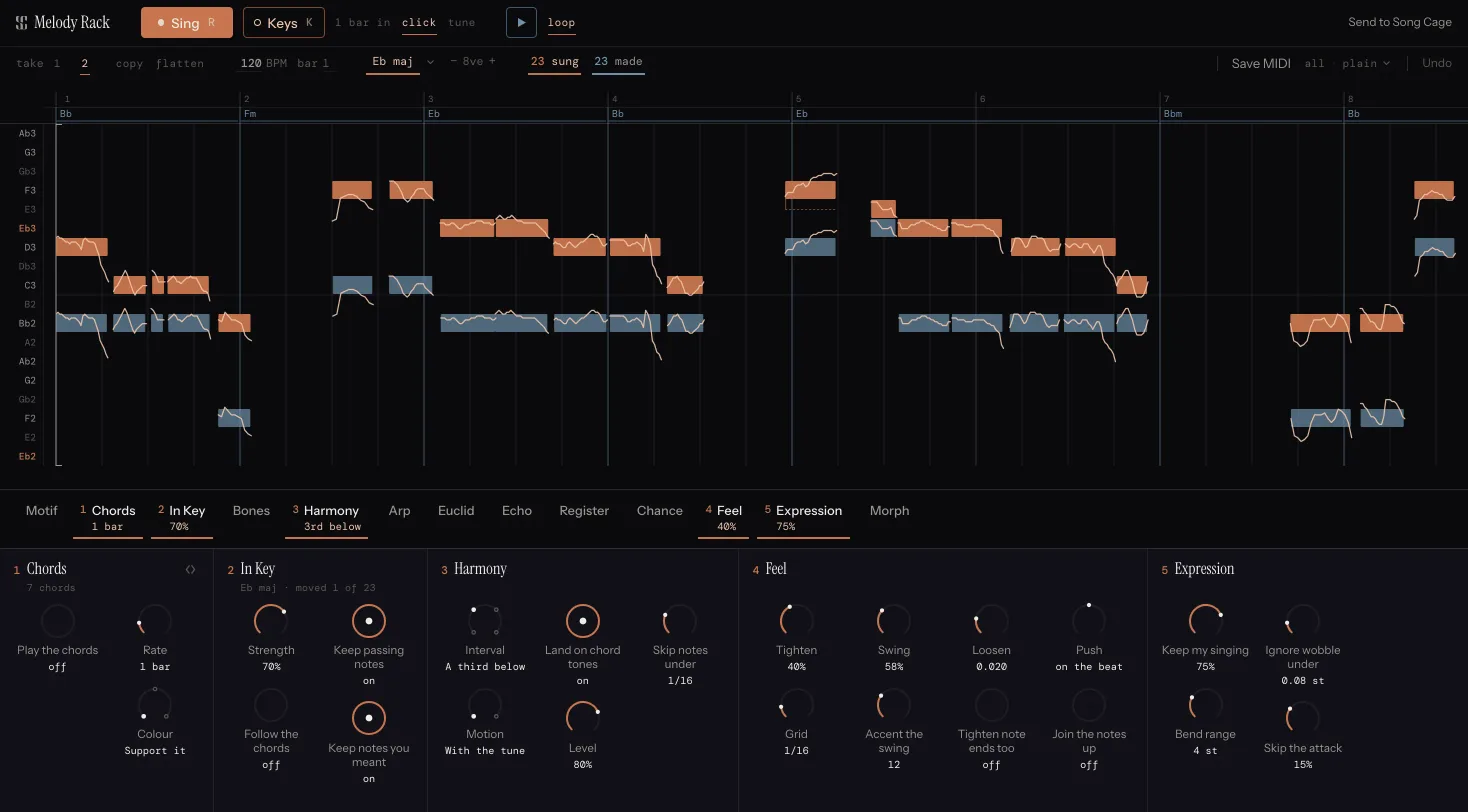
1.1 A MIDI effect, not an instrument
A reverb sits after your instrument and changes the sound it made. A MIDI effect sits in front of it and changes the notes it is about to play. Melody Rack is the second kind. It produces no audio at all, so it loads in your DAW's MIDI effect slot rather than the instrument slot: in Logic Pro that means it appears under MIDI FX, and in Ableton Live, REAPER and other VST3 hosts it goes on the track ahead of whatever instrument you have loaded.
That has one consequence worth getting straight before anything else. Whatever Melody Rack writes is played by the instrument already on the track. If you hear nothing, the first question is not whether the plugin is broken; it is whether there is an instrument after it. Chapter 11 covers that in full.
The upside of the arrangement is that you audition through the sound you are actually going to use. A harmony line generated by the rack comes out of your own pad, in your own session, at your own tempo, and if you like it you keep it as MIDI rather than as a bounce.
1.2 The part that hears you, and the part that does not
Turning a sung phrase into notes is a neural model. There is no rule-based way to do that job well, and Melody Rack ships the same detector Song Cage does, measured at 76.6% note-level F1 against a 73.3% ceiling for two trained musicians transcribing the same amateur singing.
Everything after the detector is deterministic music theory. The progression, the correction, the harmony line, the arpeggio: all of them come from rules, and the same take with the same settings gives the same result every time, including the parts that roll dice (the randomness is seeded, so a "random" figure renders identically twice and a roll number brings the old one back).
Nothing in the plugin generates a melody for you out of nothing, and nothing you sing is used to train anything.
1.3 What harmony-aware means
This is the sentence the product turns on, so it is worth spending a paragraph on.
Every scale-lock plugin on the market knows a scale and snaps anything outside it. That is a fixed lookup table of twelve pitch classes, and it never receives the chord as an input. Two things follow, and both of them are audible:
- It "fixes" the note that was the best thing in the phrase. The G sharp in A minor is the leading tone, not a mistake. The flat third over a blues is the point. Scale-lock takes both away.
- It leaves the note that actually clashes. A B natural is in C major and wrong over a C7, and a scale-lock plugin has no way to know that.
Melody Rack's Chords slot writes a progression from your melody and puts it into the rack, where the slots after it can read the chord under each note. In Key runs just before it and corrects the line against the key, so a passing tone survives, a downbeat clam does not, and the chords are fitted to what you meant to sing. Harmony picks a second line that stays right when the chord turns minor, instead of stacking a fixed interval that goes sour. Arp runs the progression. Echo snaps each repeat to the chord it lands on.
There is a second half to it, and it is the half nobody else can do at all. A sung note in this plugin carries the frame-level pitch curve that produced it, not just an integer. Every competitor throws that away at the moment a note gets a number. Keeping it is what lets In Key tell a blue note you aimed at and held from a near miss the detector rounded, and it is what lets Expression write your actual scoop and fall into the MIDI as per-note bend. Chapter 7 is that mechanism in detail.
1.4 The shape of a session
Every take follows the same path, and the window is laid out in that order top to bottom.
- Get a melody in. Sing it with a count-in, play it from a MIDI keyboard, press play in your DAW and let a clip on the track go past, or import a voice memo you already have. The first three land on the session's grid. A voice memo was not counted in, so its bar lines are only a guide. See Chapter 4.
- Name the key. The plugin ranks what you sang and offers its best two keys, one click each, with more behind the chevron. Until a key exists, the three harmonic slots do nothing at all, on purpose. See Chapter 6.
- Switch on the slots you want. Each opens on one knob; the rest are in its drawer. A fresh plugin has only In Key on, and In Key with no key is a no-op, so the rack starts by giving your take back untouched. Nothing happens to your melody until you ask for it. See Chapter 8.
- Get it out. Live MIDI to the instrument on the track, a MIDI clip dragged onto a track, or one press that files the whole thing in your Song Cage inbox as an idea. See Chapter 10.
In practice you go round steps 3 and 4 several times, which is why the plugin has a play button and a loop of its own: hearing a dial move should not mean rewinding the DAW to bar 1 every time.
1.5 What it will not do
Each of these is a decision rather than a gap, and knowing them up front saves you looking for a control that is not there.
It will not give an added note your voice
The hand-correction tools fix things the detector got wrong: a breath that came back as a note, one note broken in two by a wobble, a tail cut short by a consonant. You can add a note with a double-click, but a note nobody sang has no pitch curve, so Expression leaves it flat and the MPE export has no bend to write. For drawing whole parts, your DAW's piano roll is the better tool.
It will not quantize behind your back
Feel is the quantizer and it is a dial rather than a button, so your timing survives at any setting between raw and machine-tight. Nothing else moves your timing on its own. Q puts the notes you select on the grid, and a note you drag is pulled to the grid lines, only when you ask. Most sung takes want about 40%.
It will not pick a key for you
The ranker offers its best keys on the key row, one click each, and never applies one. A wrong key applied on the machine's own initiative is worse than no key at all, because "No key" is visibly a state and "E flat minor" looks like an answer.
It does not run outside a DAW
There is a standalone build for development, but the product is sold as the plugin only. It is a MIDI effect; on its own there is nothing for it to send notes to.
1.6 Melody Rack and Song Cage
Melody Rack is made by Song Cage and shares its audio engine and its music theory, but it is a separate product with its own window, its own installer and its own licence. You do not need the Song Cage desktop app or the Song Cage plugin to use it, and the Song Cage licence does not cover it. If you already own the Desktop + Plugin bundle, Melody Rack is cheaper, and the checkout applies that on its own with no code to enter. See the Melody Rack page for current prices.
The two products meet in one place: Send to Song Cage takes the take on the roll, with every part the rack made and the progression it wrote, and files it in your Song Cage inbox as one idea with several takes, ready for words. That needs a free Song Cage account, which you already have if you started the trial. See Chapter 10.
Chapter 2 covers installing it and unlocking the trial.