The Words panel sits beside your lyrics and follows your cursor. Click any word to see rhymes, slant rhymes, synonyms, and two tools for pushing past the obvious.
What you'll learn
- How the Words panel auto-follows the word you're working on
- How to find exact rhymes grouped by syllable count
- How slant rhymes and synonyms work
- How Explore (semantic drift) chains related words to wander conceptually
- How the Word Collider pairs words from two different semantic pools
Chapter 6 covered writing lyrics: getting words onto the grid in Sheet view and Timeline view. This chapter is about what happens when you're stuck on a word, or when the word you have is close but not right. The Words panel is a reference tool that lives in the right panel, always one click away, and it does its best to already be looking at the word you care about.
7.1 Opening the Words panel
The Words panel lives in the right panel of the app, under the Words tab (alongside the Ideas tab). If the right panel is closed, click the Words & Ideas button on the right edge of the canvas to open it.
At the top of the panel is a search input. Below it, a row of word tokens shows the words from the currently selected lyric block, each clickable. Below that, four tabs: RHYMES, SLANT, SYN, and EXPLORE.
You can type any word into the search input to look it up manually. But most of the time you won't need to, because the panel follows your cursor.
7.2 How the panel follows your cursor
The Words panel auto-picks the word you're most likely thinking about:
- When you select a lyric block in either view, the panel picks the last word of that block. If the block is a single word, it picks that word.
- When you're typing in the inline lyric input, the panel tracks your cursor position and picks the word under or nearest to the cursor, updating live as you type.
This means the rhyme list refreshes as you move through your lyrics. Click a word in the "There is a house" block and rhymes for "house" appear. Click the "Sun" block and rhymes for "Sun" appear. You almost never need to type into the search field.
If you want to look up a different word without selecting a block, type it into the search input at the top. Manual input overrides the auto-follow until you select another block.
7.3 Rhymes
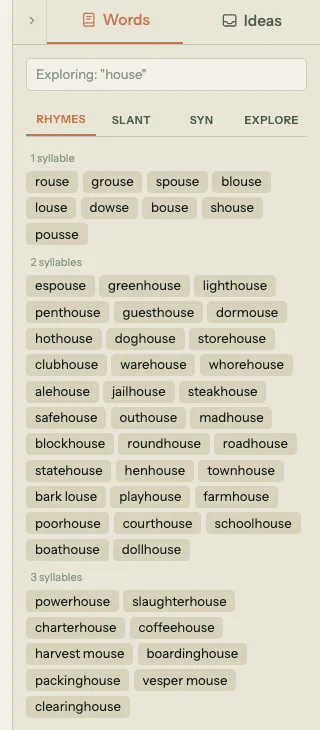
The RHYMES tab shows exact rhymes for the current word, grouped by syllable count.
Click any word in your lyrics (or type one in the search field) and the panel fetches rhymes. Results appear in groups: one-syllable rhymes, two-syllable rhymes, three-syllable rhymes, and so on. Each group is labeled with its count ("2 syllables"), and the words within each group are displayed as clickable buttons.
The syllable grouping is the key feature. When you're writing lyrics, syllable count matters as much as the rhyme itself. A two-syllable rhyme for "reason" fits a different rhythmic slot than a four-syllable one. By showing them in groups, Song Cage lets you scan for the right length without counting syllables in your head.
Click any rhyme word to copy it to your clipboard. Paste it into your lyrics wherever you need it.
7.4 Slant rhymes
The SLANT tab works identically to the RHYMES tab, but returns near rhymes (also called half rhymes or imperfect rhymes). These are words that share consonant or vowel sounds without being exact rhymes.
Slant rhymes are grouped by syllable count the same way exact rhymes are. They're often more useful than exact rhymes for modern songwriting, where a hard rhyme can sound forced and a near rhyme can sound natural. "Home" and "alone" is a slant rhyme. "Love" and "enough" is a slant rhyme. The SLANT tab finds these.
7.5 Synonyms
The SYN tab shows synonyms: words with similar meaning to the current word. Results display as a flat list (no syllable grouping) with up to 30 results.
Synonyms are useful when the word you have is the right idea but the wrong sound. If "beautiful" doesn't rhyme with anything you need, the SYN tab might surface "lovely", "gorgeous", or "stunning", and one of those might rhyme where the original didn't. Click any synonym to copy it.
7.6 Explore (semantic drift)
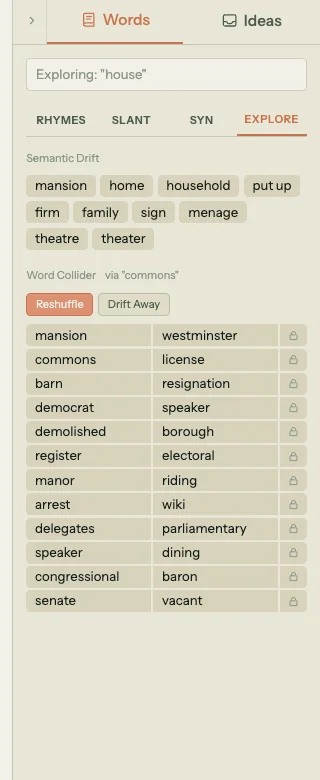
The EXPLORE tab contains two tools. The first is the Semantic Drift chain.
Semantic drift starts from the current word and shows a list of semantically related words. Click any of those words, and Song Cage fetches a new set of words related to the one you clicked. Click again to drift further. Each step takes you further from the original word, conceptually.
The chain of words you've drifted through appears at the top, separated by slashes. You can click any word in the chain to copy it. A Reset button clears the chain and returns to the starting word.
This is a tool for the moment when you know the territory you want to be in but not the exact word. Start with "fire" and drift through "flame," then "glow," then "warmth," then "comfort." The word you need might be three clicks away from where you started, in a direction you wouldn't have thought to search.
There's no depth limit. You can drift as far as you want. The results are cached locally, so revisiting a word you already explored is instant.
7.7 Word Collider
The second tool in the EXPLORE tab is the Word Collider. It works differently from everything else in the panel.
The Collider takes your current word, fetches a pool of associated words, picks one at random as a "bridge," then fetches a second pool of words associated with the bridge. It pairs words from the two pools into twelve combinations and displays them side by side.
Click Collide to generate the first set of pairings. Each row shows a left word and a right word drawn from different semantic neighborhoods, connected through the bridge. The bridge word is displayed at the top so you can see the conceptual path.
The pairings are deliberately unexpected. "fire" might bridge through "engine" to produce pairings like "flame / piston," "heat / exhaust," "blaze / steel." These aren't phrases you'd write directly. They're starting points: collisions of two ideas that your brain can turn into a line.
Working with pairings
- Click any word in a pairing to copy it.
- Lock a pairing by clicking the lock icon on its row. Locked pairings survive when you reshuffle.
- Reshuffle re-randomizes the unlocked pairings from the same two word pools without fetching new data.
- Drift Away keeps the first pool but picks a new bridge word, which fetches an entirely new second pool. The locked pairings stay, but the unlocked ones draw from fresh material.
The Collider is for when you're truly stuck: when rhymes feel predictable and synonyms feel safe. It breaks the pattern by forcing two unrelated word clouds into the same space and letting you find the connection.
That's the word toolkit. The next chapter covers how syllable splits shape the rhythm of your lyrics on the beat grid.