There is no step one in Song Cage. Start a song from lyrics, a chord progression, or a melody: whichever idea arrives first.
What you'll learn
- Why Song Cage has no required writing order
- How to start a song from lyrics
- How to start a song from chords
- How to start a song from a melody
- How the three layers respond to each other as you build
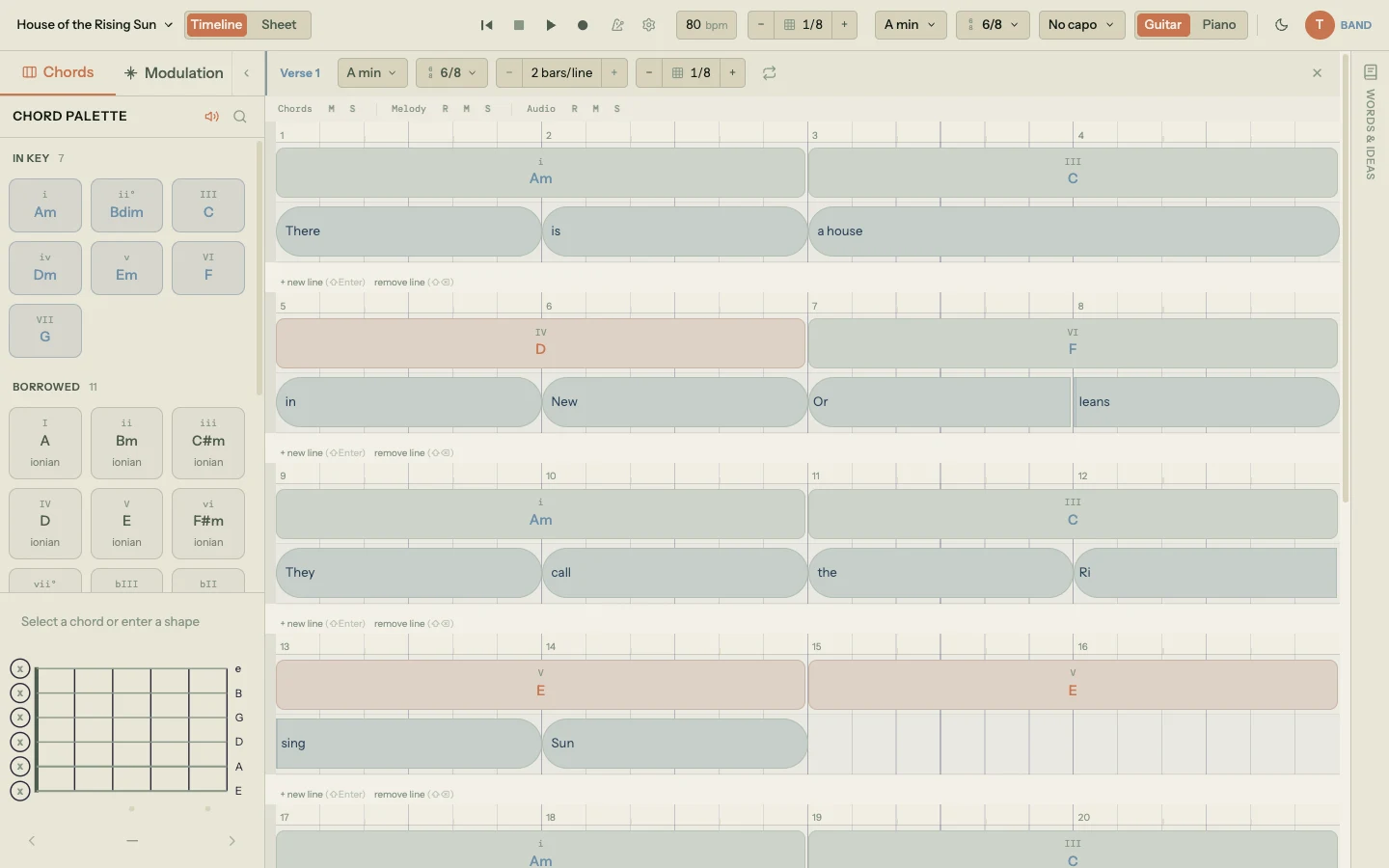
Chapter 3 walked you through the mechanics of creating a new song: key, tempo, sections, auto-save. This chapter is about the thing that happens before those mechanics matter. An idea arrives, and it might be a line of lyrics, a chord change, or a melody fragment humming in the back of your head. You need somewhere to put it now, in whatever form it showed up.
This chapter is deliberately short. It's about the mindset, not the mechanics. For the detailed how-to of each entry point, follow the chapter pointers at the bottom of the relevant section.
4.1 There is no step one
A lot of songwriting apps quietly assume an order. They want chords before lyrics, or a melody before either, or they ask you to pick a scale before you can type a word. That assumption comes from the tool, not from how songs actually get written.
In practice, songs don't start the same way twice. Sometimes a chord change clicks first. Sometimes a melody appears in your head on the drive home. Sometimes a lyric line lands fully formed and the rest of the song is the problem of catching up to it.
Song Cage treats all three of those moments as equal entry points. Every component in the app is both a starting point and a development tool. There's no setup screen, no order required, no "pick your key before you can do anything." Whichever thing you have first is the thing you capture first.
4.2 Starting with lyrics
If words arrive first, open Sheet view and start typing. It feels like a notepad.
Click into a section, type a line, press Enter, type the next line. Song Cage turns each word into a lyric block positioned on the beat, but you don't have to think about that yet. As you write, the Word Tools panel on the right auto-follows your cursor: click any word in your lyrics to see exact rhymes grouped by syllable count, slant rhymes, synonyms, and the Explore chain for semantic drift. The Word Collider pairs two seed words for fresh phrasing when a line has stalled.
Once the words feel close, switch to Timeline view. Now each word sits on the beat grid, and you can build chords and melody around the rhythm the lyrics already imply. The rhythm of the language shapes the rhythm of the music.
Both views stay synced, but Timeline view is where you shape when each word lands. Grab any lyric block and drag it horizontally to reposition it on the grid: it snaps to the current snap division (anywhere from 1/2 notes down to 1/32 notes). Drag its left or right edge to resize the duration, which controls how long that word holds.
Creating a syllable split has two paths, and you can use whichever fits the moment you're in. In Timeline view, hover a lyric block and click the scissors icon that appears: Song Cage detects syllable boundaries automatically, so "Rising" splits cleanly into "Ri" and "sing", and a phrase like "a house" separates into two independent blocks. In Sheet view, type a hyphen inside a word as you write: "Ri-sing" commits as a block whose clean text is "Rising" plus a syllable split stored at the right character position. The two methods produce identical data, so you can move between views without losing anything.
Once a word has splits, the dividers between syllables are draggable too. Each syllable slides along the beat grid, and its melody note follows. This is how a phrase like "in New Or-leans" gets its rhythm: not by retyping it, but by nudging each syllable to land where you want it felt.
Chapter 6 will cover writing lyrics in detail. Chapter 7 covers the word tools panel. Chapter 8 covers syllable splits and how they shape phrasing.
4.3 Starting with chords
If the chord change came first, go straight to the chord palette in the left sidebar. The palette has three tabs organized by music theory: In Key for diatonic chords, Borrowed for chords from parallel modes, and Secondary Dominants for V chords that resolve to non-tonic targets.
Click an empty slot in the chord lane and a ghost chord appears with the top suggestion based on the surrounding chords and any melody notes already placed. Click to accept, or drag any other chord onto the grid instead. No chord commits permanently until you place it.
As you place chords, the Next section in the palette recalculates every time. Each chord you choose reshapes the ranking for the one after it. Place two chords and the third has dozens of candidate progressions suggested by context. Place six and you've got a verse.
Once the progression feels right, add lyrics and melody on top.
Chapter 9 will cover the chord palette, ghost chords, and melody-fit scoring in depth. Chapter 11 covers modulation for when you want the key to lift or fall mid-song.
4.4 Starting with a melody
If you heard a melody in your head, open a lyric block and click to bring up the inline piano keyboard. Play the melody using your mouse, your QWERTY keyboard (A–L across the home row, Z and X for octave shifts), or a MIDI controller.
If the melody is harder to describe than to sing, arm the Melody or Audio track on a section and hit record. Sing or hum. Song Cage's pitch detection extracts the notes, times them to the grid, and places them on the lyric blocks for you to review in the Note Corrector.
Once the melody is down, the chord palette's Fits Melody section ranks every chord in the current key by how well its tones match the notes you played. The melody you sang is actively shaping the harmony suggestions. Change a note and the rankings reshuffle in real time.
Chapter 10 will cover every method of melody input, the chord-following mode, recording, pitch detection, and the Note Corrector.
4.5 Everything talks to everything
Whichever layer you start with, the other two layers stay aware of it as you build.
Change a chord and the melody-input guidance updates. Write a melody first and the chord palette reshapes around what you played. Change a lyric's rhythm and the melody notes reflow to match the new syllable timing. Move a chord block and the suggestions for its neighbors recalculate.
None of this requires you to understand the algorithms behind it. You experience it as the suggestions feel right, the chords fit the words, the melody locks in. The interconnection is invisible. But it's the reason Song Cage feels different from a chord chart taped to a lyric sheet: everything is alive, everything responds to everything else, and the song develops as one connected thing rather than a stack of disconnected layers.
The next chapter is where the mechanics start. Every layer you saw in this chapter is built on the beat grid, which the timeline chapter describes in detail.