Pick a destination key on the map. Song Cage shows you every route to get there, from a single pivot chord to a five-chord cadence with voice-leading extensions, and the return routes home.
What you'll learn
- How the Key Map shows the relationship between your current key and every possible target
- How pivot chords bridge two keys through shared chords
- How cadential routes (ii-V-I, tritone substitution, and others) establish a new key
- How to place route chords on your timeline with one click
- How section key overrides let different parts of your song live in different keys
- How return routes bring the song back to its home key
Chapter 9 covered the chord palette. Chapter 10 covered melody. This chapter covers the moment when the key itself needs to move: a verse that lifts into a brighter chorus, a bridge that drifts into a minor key, or a final chorus that steps up a half step for energy.
Modulation is one of the most powerful tools in songwriting, and also one of the hardest to execute without theory knowledge. The Modulation tab turns it into navigation: pick where you want to go, choose how you want to get there, and place the chords on your timeline.
11.1 The Key Map
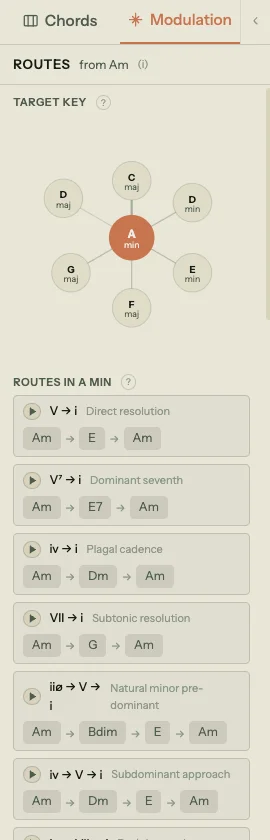
Click the Modulation tab in the left sidebar (next to the Chords tab) to open the modulation panel. At the top is the Key Map: a visual display showing your current key at the center and all twelve major and minor keys arranged around it.
The map is not decorative. Keys that share more chords with your current key sit closer. Keys with fewer shared chords sit farther away. This gives you a rough sense of harmonic distance before you select anything: a modulation from C major to G major (one shared chord difference) is a short trip, while C major to F# major is a long one.
Click any key on the map to select it as your target. The panel below updates with routes.
11.2 Pivot chords
When you select a target key, the panel first checks for pivot chords: chords that exist in both your current key and the target key. These are the natural bridges between the two keys.
For example, modulating from C major to G major: both keys contain the chords G, Am, Bm (or Bdim), C, D, and Em. Any of these can serve as a pivot, a chord where the listener is still in the old key, and after which the new key takes over.
The panel ranks pivot chords by harmonic strength. A chord that functions as IV or V in the target key scores higher, because those functions set up the strongest arrivals. A chord that functions as vi in the target key still works, but the landing is gentler.
11.3 Routes
Below the pivot chord analysis, the panel shows a list of routes: complete chord progressions that establish the new key. Routes are organized by complexity.
Direct routes
The simplest routes are two chords: a dominant resolving to the tonic of the target key. V → I in the target key is the most direct modulation possible. The panel also shows V7 → I (with a seventh for stronger pull) and alternatives like IV → I or bVII → I.
Three-chord cadences
More common in practice: ii → V → I gives the listener a pre-dominant, a dominant, and a resolution. The extended version, ii7 → V7 → Imaj7, adds sevenths for smoother voice leading. The panel also includes the tritone substitution variant: ii7 → bII7 → Imaj7, where the dominant is replaced by its tritone equivalent for a chromatic bass descent.
Extended routes
For longer, more gradual modulations: four- and five-chord routes walk the listener through a sequence that feels like a natural progression rather than a sudden shift. Routes like vi → ii → V → I or iii7 → vi7 → ii9 → V13 → Imaj7 take more time but arrive more smoothly.
The extensions on these chords (9ths, 13ths, #11s) are chosen for voice leading: ninths on pre-dominants carry into the next chord, thirteenths on dominants share a common tone with the tonic, and Lydian dominant (#11) on tritone substitutions aligns with the target's fifth.
Minor key routes
When the target key is minor, the routes adapt: V → i, iiø → V → i, iiø7 → V7b9 → im7, and extended versions that use the natural minor's VII chord and half-diminished ii.
11.4 Placing routes on the timeline
Each route in the panel has an Add here button. Click it to place the route's chords on the timeline, starting from the current selection point or the pending chord target.
The chords insert sequentially: if a route is ii9 → V13 → Imaj7, three chord blocks appear on the timeline at consecutive beat positions. You can then drag them to adjust timing, or change their voicings in the chord edit popover.
Placing a route doesn't automatically change the section's key. The chords land in your current key context with the correct pitch names for the target key. To make the chord palette and suggestions reflect the new key from that point forward, set a section key override on the section where the new key takes hold (see below).
11.5 Return routes
When you select a target key, the panel also shows return routes under a "Back to [home key]" heading. These are the same types of routes (direct, cadential, extended) but in the reverse direction: from the target key back to your original key.
This lets you plan a complete modulation arc. Place the forward route to leave your home key, write the section in the new key, then place a return route to come back. The two-way display means you can see your options for both legs of the journey at the same time.
11.6 Section key overrides
Chapter 5 introduced section key overrides. Here's how they work with modulation in practice.
Your song has a global key set in the toolbar (e.g., A minor). Every section inherits that key by default. When you modulate to a new key for a specific section, click the key badge in that section's header and pick the new key. The badge changes from "Inherited" to a highlighted override indicator.
Once the override is set:
- The chord palette re-ranks for the new key. In Key, Borrowed, and Secondary Dominant tabs all update.
- Roman numeral labels on existing chords recalculate relative to the new key.
- Melody-fit scoring uses the new key's scale when ranking chords.
- Modulation routes in that section depart from the overridden key, not the global key.
To clear an override and return to the global key, click the key badge again and choose Inherit from song.
Key overrides are per-section, so you can have a verse in C major, a chorus in D major, and a bridge in A minor, each with its own chord palette and suggestions. The song's global key stays as a home base that any section can return to.
11.7 Key change vs. transposition
Two common confusions, clarified:
Changing the key (via the toolbar key chip or a section override) recontextualizes the chords. A Dm on the timeline stays Dm. But if you change the key from C major to F major, that Dm shifts from being labeled "ii" to "vi." The chord palette, suggestions, and modulation routes all update. The pitches on the timeline don't move.
Transposing (via the Song menu) physically moves every chord by an interval. Transpose up a whole step and Dm becomes Em, F becomes G, Am becomes Bm. The key label in the toolbar updates to match. Melody notes transpose too. This is what you want when the singer needs the whole song a step higher.
In short: key change is a lens change (same chords, different harmonic context). Transposition is a pitch change (different chords, same harmonic context).
That covers modulation: picking a target key, choosing a route, placing it, and managing key overrides across sections. The next group of chapters moves from harmony to sound: guitar and piano modes, playback, and export.