Table of Contents
GarageBand is one of the most capable free music tools ever made. On any Apple device it gives you hundreds of instruments, professional-grade recording, Smart Drums, Apple Loops, and a direct upgrade path to Logic Pro. Many hit records started in GarageBand before moving into professional production. For recording, it's excellent. For songwriting (the process of developing chord progressions, melodies, and lyrics) it has significant gaps.
We tested 10 alternatives across chord theory, lyric writing, cross-platform access, and production depth. This is the definitive ranked list, verified from official sources in April 2026. If what you really want is an installable desktop program rather than another app, our ranking of the best songwriting software for Mac and Windows covers that side.
What GarageBand Is Missing for Songwriters
GarageBand has no chord suggestion system and no music theory guidance. You can play chords, but it doesn't help you find what chord comes next or explain why it works.
GarageBand has no lyrics editor, no rhyme finder for songwriters, no slant rhyme suggestions, no synonym tool, and no semantic word tools. Lyrics have to be written elsewhere.
GarageBand is not available on Windows, Android, or web browsers. Songwriters who need to work across devices or collaborate with non-Apple users hit a wall.
Guitar players get no chord voicing diagrams: you know a G major chord is needed but have to look up fingerings separately. No capo transposition, no barre chord alternatives.
GarageBand has no key modulation panel and no borrowed chord suggestions. Songwriters who want to move between keys or explore modal interchange have no harmonic guidance.
Android users have no GarageBand equivalent at all. There is no official Android version. For cross-platform mobile capture and production, the alternatives are significant upgrades.
The one-sentence summary
The best GarageBand alternative for songwriters depends on which gap you need to fill: chord theory + lyric tools → Song Cage; free cross-platform DAW → BandLab; professional Apple upgrade → Logic Pro; browser-based collaboration → Soundtrap; free Windows DAW → Cakewalk Sonar; beat-heavy composition → FL Studio; live performance workflow → Ableton Live; notation → MuseScore Studio 4.6; affordable professional DAW → Reaper.
The 10 Best GarageBand Alternatives for Songwriters

Song Cage
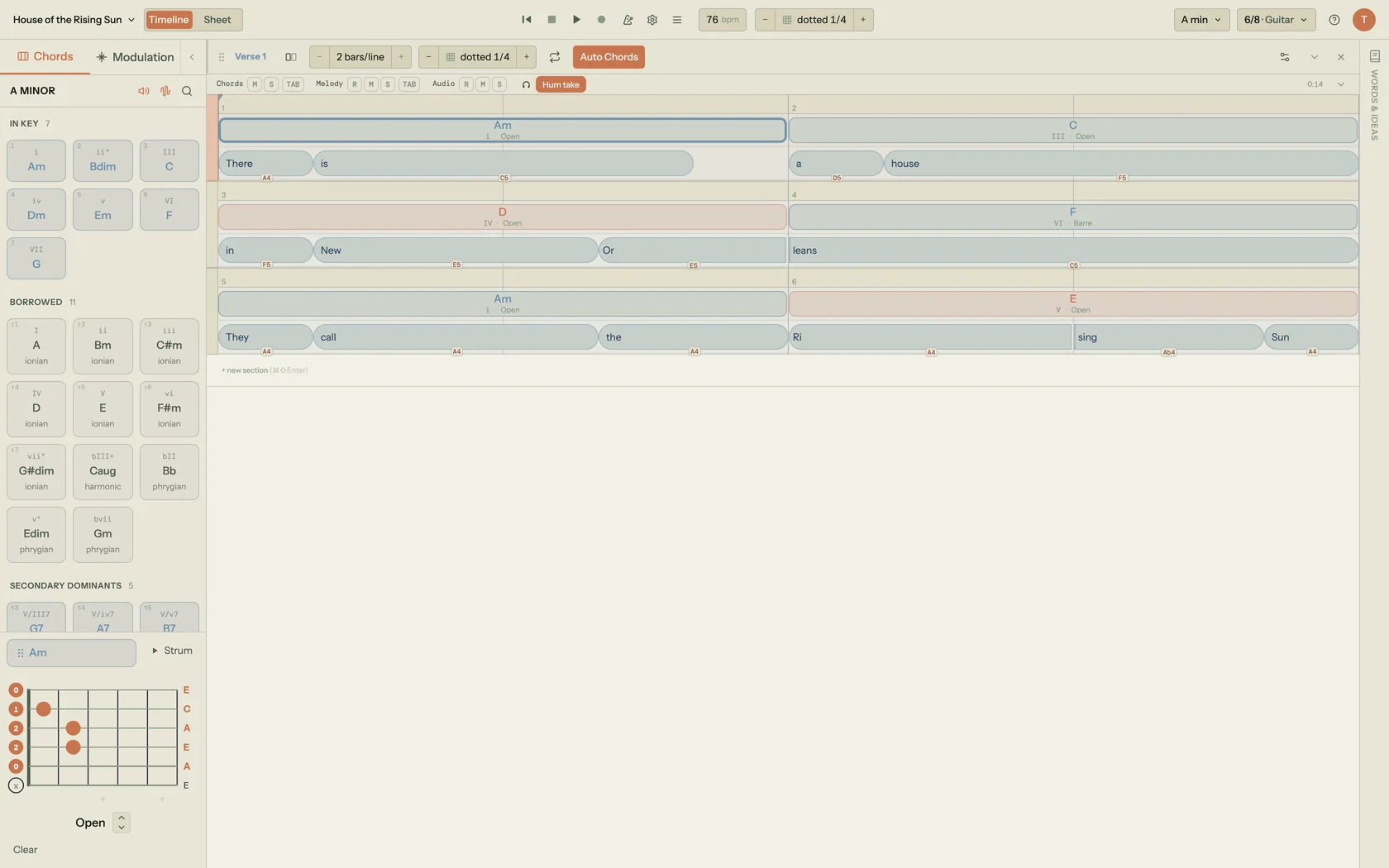
Song Cage is the best GarageBand alternative for songwriters because it fills the exact gap GarageBand leaves: a full chord palette with diatonic, borrowed, and secondary-dominant suggestions; a lyric workspace with rhymes, slant rhymes, and semantic word tools; guitar and piano voicing diagrams; and a modulation panel for pivot-chord routes between any two keys. The chord palette ranks suggestions against the chord before, the chord after, and the melody notes at that beat. Every chord ships with open-position, barre, and capo-adjusted guitar diagrams alongside piano keyboard fingerings.
The lyric workspace sits directly next to the chord timeline. Click any word and the word tools panel opens: perfect rhymes grouped by syllable count, slant rhyme suggestions, a synonym finder, and the Semantic Drift Chain for following thematic word associations. Built-in audio recording captures vocal melody directly over the chord progression. As a chord progression tool with a timeline view for verse/chorus/bridge arrangement, it handles the full writing process from first chord to first demo.
The typical workflow for Apple users: write in Song Cage, produce in GarageBand, finish in Logic Pro. Song Cage exports MIDI with the license, so the chord sketch lands cleanly in any DAW. Free tier includes the full chord palette, all lyric tools, and built-in audio recording. And for writers who want a native app in the dock or taskbar rather than a browser tab, the Song Cage desktop app runs on both Mac and Windows and works fully offline, and the same $79 license covers the AU/VST3 plugin and the full web app.
Pros
- Full chord palette: diatonic, borrowed, secondary dominants, extensions
- Lyric writing workspace with rhyme finder and slant rhymes embedded
- Guitar fretboard and piano voicing diagrams for every chord
- Modulation panel with pivot chord routes between any two keys
- Free native iOS and Android capture apps that sync to the full editor, plus a web app in any browser on desktop or mobile, not Apple-only
- Native desktop app for Mac and Windows, $79, works fully offline
- Built-in audio recording with chord context preserved
- Free tier includes full chord palette and all lyric tools
Cons
- Not a production DAW: no mixing, mastering, or multi-track production
- No virtual instrument library (instruments are for playback preview)
- Unlimited songs, MIDI export, and PDF export require the license
- Designed for composition, not audio production workflows

BandLab
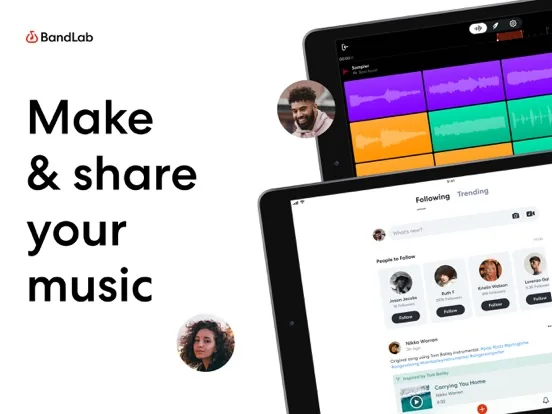
BandLab is the single most direct free GarageBand alternative for non-Apple users. With 100 million+ creators and an app updated April 21, 2026, it provides a full mobile DAW on iOS and Android with 385+ virtual instruments, drum machine, sampler, SongStarter AI (11 genres), auto-pitch, stem splitting, and unlimited multi-track projects with free cloud storage. Where GarageBand is Apple-exclusive, BandLab works on any device: iPhone, Android, browser, Chromebook, school laptop.
SongStarter AI provides instant harmonic and rhythmic starting points across 11 genres, a creative-ignition button GarageBand doesn't have. Real-time collaboration on shared projects lets co-writers work on the same session simultaneously from different locations. BandLab also connects to Cakewalk Sonar for Windows users who want to take mobile sketches into professional desktop production.
Pros
- Completely free, 100M+ creators worldwide
- iOS + Android + browser (not Apple-only)
- SongStarter AI for instant song ideas in 11 genres
- 385+ instruments, 250K+ samples, drum machine, sampler
- Stem splitter, auto-pitch, instant mastering
- Real-time collaboration on shared projects
- Connects to Cakewalk Sonar for Windows desktop production
Cons
- No chord theory palette or music theory guidance
- No lyric workspace or rhyme tools
- Full DAW complexity, more friction than GarageBand's simple interface
- AI features require Membership plan
- No seamless upgrade path to a professional macOS studio
Logic Pro
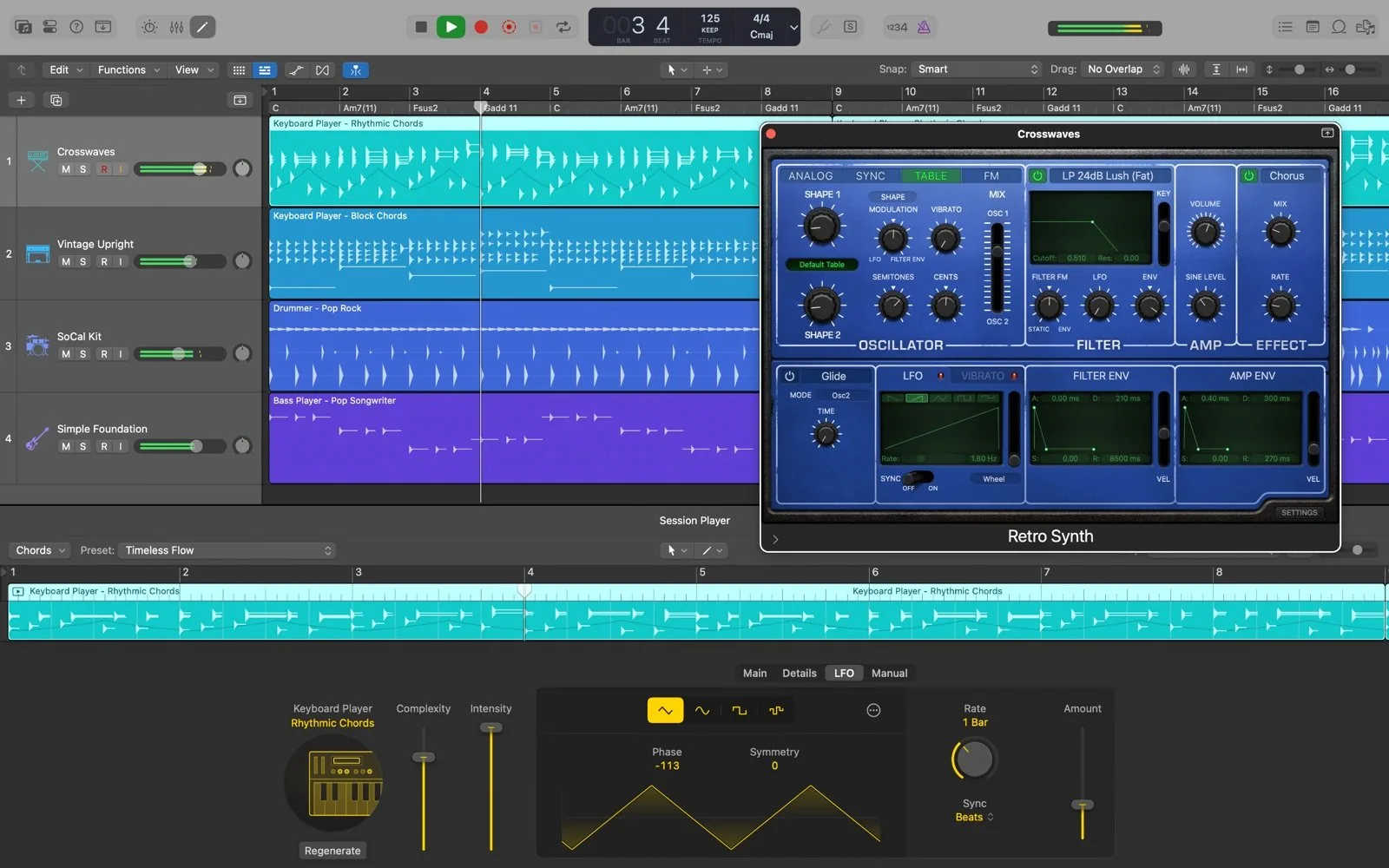
Logic Pro is the most natural GarageBand alternative for Apple users who've hit GarageBand's ceiling. Every GarageBand project from Mac, iPhone, or iPad opens directly in Logic Pro with the same interface, so the transition feels like an expansion rather than a switch. Logic Pro supports 1,000 stereo audio tracks, 1,000 instrument tracks, and 1,000 auxiliary tracks per project. Flex Pitch corrects vocal pitch with note-level precision. Takes and Comping lets you record unlimited passes and assemble the best parts. A 14GB sound library and full automation come standard.
Since 2026, Logic Pro is available two ways: $199.99 standalone (Mac App Store, confirmed Apple.com specs page and PCMag January 2026), or via Apple Creator Studio at $12.99/month or $129/year, which also includes Final Cut Pro, Pixelmator Pro, Motion, Compressor, and MainStage. Educators and students pay $2.99/month or $29.99/year. A 30-day free trial is available. Logic Pro for iPad mirrors the Mac version and now includes Quick Swipe Comping (April 2026 Apple Support page).
For songwriters, Logic Pro doesn't add chord theory tools or a lyric workspace, so those gaps remain. But it adds Chord Track (which transposes the entire project when you change the chord), Drummer (the most intelligent virtual drummer on any DAW), and a sound-design depth that makes the demo-to-release jump achievable in one application.
Pros
- GarageBand projects open directly, no conversion or data loss
- Same familiar interface as GarageBand, advanced features toggleable
- Flex Pitch for professional vocal tuning
- Unlimited tracks, automation, professional mixing console
- 14GB sound library, 7,500+ patches
- $199.99 one-time undercuts most competing professional DAWs
- Apple Creator Studio bundles Logic with 9 other apps at $12.99/mo
Cons
- Mac and iPad only (no Windows, no Android, no web)
- Still no chord theory palette or lyric writing workspace
- Steeper learning curve than GarageBand
- $199.99 one-time cost is significant for beginners

Soundtrap
Soundtrap, owned by Spotify, is a browser-based DAW that lets multiple songwriters edit the same multi-track session simultaneously from different devices. Where GarageBand creates a project on one device and requires file-sharing to collaborate, Soundtrap opens a URL and everyone with access can record, edit, and arrange in real time. This makes it the most natural tool for remote co-writing sessions.
Pricing (verified soundtrap.com/pricing, April 2026): free tier with unlimited projects, 7,280+ loops, and 450+ instruments. Sound Starter $115.08/year (about $9.59/month). Vocals & Songwriting $163.08/year ($13.59/month) adds 140+ vocal presets, real-time vocal tuning, Vocal Cleanup, and 8 hours of Interactive Transcripts. Production & Vocals $187.08/year combines all tiers. The Vocals & Songwriting tier targets singer-songwriters who want vocal production alongside the DAW. Soundtrap also publishes podcasts directly to Spotify on paid tiers.
Pros
- Real-time collaboration: multiple writers in the same session
- No installation, works in any browser on any device
- iOS and Android apps for mobile access
- Vocals & Songwriting tier with 140+ vocal presets
- Integrated transcription (8 hours on paid tiers)
- Direct Spotify podcast publishing on paid tiers
- Free tier with unlimited projects
Cons
- Requires internet connection, no meaningful offline mode
- No chord theory palette or music theory guidance
- No lyric workspace or rhyme finder
- Production depth less than desktop DAWs
- Annual pricing is higher than comparable desktop apps

Cakewalk Sonar
Cakewalk Sonar is the best free answer for Windows users asking "what do I use instead of GarageBand?" It is the successor to Cakewalk by BandLab (which ceased operation August 1, 2025, confirmed help.cakewalk.com), carrying forward 30+ years of development from SONAR Platinum. The free tier includes unlimited audio and MIDI tracks, the award-winning Skylight interface, VST3 support, 64-bit audio engine, ProChannel professional mixing modules, ARA support for audio editing integration, and VocalSync alignment for doubling and stacking vocal tracks.
For songwriters on Windows, Cakewalk Sonar provides what GarageBand provides on Mac: a familiar, capable starting point for recording, arranging, and exporting songs, at no cost. The mobile-to-desktop path mirrors iOS GarageBand → Logic Pro: sketch in BandLab on mobile, finish in Cakewalk Sonar on desktop. Premium features require BandLab Membership. Cakewalk Next, a separate newer product, offers a more streamlined creation-focused workflow for Windows.
Pros
- Free on Windows, no cost for the core professional DAW
- 30+ years of development heritage from SONAR Platinum
- Unlimited audio and MIDI tracks on free tier
- Professional mixing: ProChannel modules, 64-bit audio engine
- VocalSync for automatic vocal alignment and doubling
- VST3 support, compatible with professional plugin ecosystem
- Cakewalk by BandLab projects open in Sonar
Cons
- Windows only (no Mac, no mobile, no web)
- Steeper learning curve than GarageBand
- No chord theory tools or lyric workspace
- Premium features require BandLab Membership
- Recommended specs (8-core CPU, 16GB RAM) higher than typical beginner setup

FL Studio
FL Studio (by Image-Line) stands apart from every other DAW on this list with its lifetime free updates model: you buy FL Studio once and receive all future updates, new versions, new features, new plugins, at no additional cost, forever. FL Studio 2025.2 was released with Fruity Slicer 2, Emphasizer, and Loop Starter genre expansions, all free to existing customers. This directly contrasts with subscription DAWs or those that charge for major version upgrades.
Pricing (verified image-line.com and official Image-Line shop): Fruity Edition $99 (loops and patterns, no audio recording), Producer Edition $199 (adds audio recording, stem separation), Signature Bundle $269 (adds signature plugins), All Plugins Edition $449 (all 116+ native plugins). All editions include lifetime free updates. FL Studio is available on Windows and Mac. The Piano Roll is widely considered the most advanced MIDI composition tool on any DAW, the tool for building complex chord progressions and melodies note-by-note. For songwriters who think in terms of MIDI composition rather than live recording, FL Studio's production environment is significantly more powerful than GarageBand's.
Pros
- Lifetime free updates: pay once, receive all future versions
- Windows + Mac (unlike GarageBand's Apple-only)
- Fruity Edition $99: lowest entry price for a professional DAW
- Piano Roll widely considered the most powerful MIDI tool
- FL Studio 2025.2 released with Fruity Slicer 2, Emphasizer (free update)
- VST3 and AU support, full professional plugin ecosystem
Cons
- No free tier, minimum $99 Fruity Edition (60-day trial available)
- Fruity Edition has no audio recording, need Producer ($199) for that
- Steep learning curve for beginners coming from GarageBand
- No mobile app (no iOS or Android equivalent)
- No chord theory tools or lyric workspace for songwriter-specific needs
- Interface is non-traditional, different from most DAW conventions

Ableton Live 12
Ableton Live is the only major DAW with two distinct views: the Arrangement View (a traditional linear timeline like GarageBand) and the unique Session View, a grid of clips that can be triggered in any order, letting songwriters improvise song structure by launching loops and recordings on the fly. For songwriters whose process involves spontaneous exploration of arrangements (trying verse before chorus, hearing how sections work in different orders) Session View is genuinely different from anything in GarageBand or Logic Pro.
Ableton Live 12 pricing (verified ableton.com): Intro ~$99 (EUR 79, up to 16 tracks, 5GB+ sounds), Standard ~$449 (EUR 279, expanded features and 38GB+ sounds), Suite ~$749 (EUR 599, complete studio with 71GB+ sounds and Max for Live). A 30-day free trial of Live 12 Suite (all features) is available. Rent-to-own is available for Suite licenses. Live 12 includes stem separation (Live 12.3), Splice integration (12.3), and new Beat Tools and Build and Drop packs for electronic songwriting. Windows and Mac only, no mobile app.
Pros
- Unique Session View for improvisational song structure exploration
- 30-day free trial of full Suite (all features available)
- Rent-to-own available for Suite, spread cost over 24 payments
- Industry standard for electronic music and live performance
- Stem separation, Splice integration (Live 12.3)
- Windows + Mac
- Strong plugin ecosystem (VST2, VST3, AU)
Cons
- Suite pricing ($749) is the highest on this list
- No mobile app, desktop only
- No chord theory tools or lyric workspace
- Learning curve is significant: Session View logic takes time to internalize
- Intro version ($99) has significant limitations (16-track maximum)

Hookpad (by Hooktheory)
Hookpad is the most research-oriented chord composition tool for songwriters. Its TheoryTab database (72,000+ popular songs with chord progressions analyzed in Roman numeral notation) lets you search for songs that use a specific chord progression, copy their chord track into your project, and hear how professional songwriters have solved the same harmonic problems you're facing. No other tool on this list lets you search "what songs use IV–I–V–vi in C major" and see 200 examples with their melody lines.
As a Hookpad alternative with lyric writing, Song Cage is the more complete option: Hookpad has no lyric tools, no rhyme finder, and no guitar voicing diagrams. But as a chord theory research and composition tool specifically, Hookpad's Magic Chord AI (which suggests the next chord based on what's most common in its database) and the ability to copy any hit song's chord progression directly into your project are genuinely unique. Pricing (verified hooktheory.com/hookpad/pricing): Standard $7.99/month or $199 one-time lifetime. Aria AI add-on +$14.99/month. Web-only: Hookpad's landing page explicitly states it is "designed for larger screens."
For a head-to-head, see our full songwriting app comparison.
Pros
- 72,000+ TheoryTab songs, copy any chord progression into your project
- Magic Chord AI, data-driven suggestions from real song analysis
- MIDI export to any DAW
- Sheet music and MP3 export (Standard)
- Melody composition with scale degree highlighting
- $199 lifetime option, no recurring cost
Cons
- No lyric tools, no rhyme finder, no word workspace
- No guitar voicing diagrams or guitar-specific features
- Web only, no mobile app (designed for larger screens)
- No modulation panel or pivot chord tools
- Aria AI adds significant cost (+$14.99/mo on top of Standard)
- Steep learning curve for the melody entry interface

MuseScore Studio 4.6
MuseScore Studio is the most widely used free music notation software in the world. For songwriters who need to create lead sheets, chord charts, or professional sheet music (from a GarageBand project or from scratch) MuseScore Studio 4.6 provides the tools GarageBand can't touch. Released 2025, the 4.6 update adds a chord symbol overhaul, fretboard diagram auto-fill from chord symbols, and the new Cantai online AI vocals feature.
The chord symbols overhaul in 4.6 adds individual scaling, stacking, and parenthesized modifiers. Fretboard diagrams now auto-fill based on associated chord symbols, meaning guitarists who write a lead sheet automatically get chord fingering diagrams without manual entry. Cantai (online AI vocals) is available on Windows and Mac (not Linux, per the beta announcement) as a subscription. MuseScore Studio remains completely free on all three desktop platforms. For songwriters who submit sheet music to publishers, co-writers, or session musicians, MuseScore Studio is the professional standard at zero cost.
Pros
- Completely free on Windows, Mac, and Linux
- Professional notation: lead sheets, chord charts, full orchestration
- Chord symbols overhaul in 4.6 with advanced modifiers
- Fretboard diagrams auto-fill from chord symbols (4.6)
- AI vocals via Cantai online sounds (4.6, Windows/Mac)
- The standard for sheet music in music education worldwide
Cons
- Not a DAW: no audio recording, no mixing, no production
- Notation-first workflow is different from GarageBand's audio-first approach
- No chord suggestion tools or music theory guidance for songwriting
- No lyric workspace beyond lyrics attached to notation
- Desktop-only, no mobile app
- Cantai AI vocals require paid subscription on Windows/Mac

Reaper
Reaper (v7.72, May 7, 2026, from cockos.com) is the professional DAW that punches far above its price point. The discounted license at $60 covers individuals and businesses with gross annual revenue under $20,000, which includes the vast majority of independent songwriters. The commercial license is $225. Both include free updates through version 8.99. A 60-day full-functionality free trial (no track limits, no feature restrictions, no watermarks) lets you evaluate the complete professional tool before committing.
Reaper's production capabilities rival Logic Pro and Ableton Live at a fraction of the cost. Unlimited audio and MIDI tracks, full VST2/VST3/AU plugin support, professional mixing with comprehensive automation, and JSFX (hundreds of included JavaScript-based effects) that cover most common production needs. The installer is approximately 20MB, a hundred times smaller than comparable DAWs, and updates usually install in under a minute. Available on Windows, Mac, and Linux, making it the most cross-platform option on this list. No mobile app.
Pros
- $60 discounted license: professional quality at beginner pricing
- 60-day full-functionality free trial, no limits
- Windows, Mac, AND Linux: broadest platform coverage of any DAW
- Unlimited tracks, full VST support, professional mixing
- Free updates through version 8.99 included
- 20MB installer, extremely lightweight and fast to update
- Highly customizable interface and keyboard shortcuts
Cons
- Steeper learning curve than GarageBand
- No mobile app
- No chord theory tools, no lyric workspace, no rhyme finder
- Default sound library is minimal, relies on third-party plugins
- No AI composition features or built-in sample AI tools
- Less "ready out of the box" than GarageBand's curated library
Full Feature Comparison
| App | Chord Theory | Lyric Tools | Recording | Android / Web | Free Tier | Mac | Windows | Price From |
|---|---|---|---|---|---|---|---|---|
| GarageBand (baseline) | None | None | Professional | Apple only | Free | Yes | No | Free |
| Song Cage | Full palette + theory | Rhymes + semantic | Built-in | iOS + Android apps + web | Full tools | Yes | Yes | Free / $79 |
| BandLab | No | No | Full DAW | iOS + Android + web | Full | Yes | Yes | Free |
| Logic Pro | Chord Track only | No | Professional | Apple only | 30-day trial | Yes | No | $199.99 |
| Soundtrap | No | No | Multi-track | Browser + mobile | Unlimited projects | Yes | Yes | $115/yr |
| Cakewalk Sonar | No | No | Professional | Windows only | Unlimited tracks | No | Yes | Free |
| FL Studio | No | No | Producer+ | Desktop only | Trial only | Yes | Yes | $99 |
| Ableton Live | No | No | Professional | Desktop only | 30-day trial | Yes | Yes | ~$99 (Intro) |
| Hookpad | 72K+ songs database | No | No | Web (no mobile) | Limited | Yes | Yes | $7.99/mo |
| MuseScore Studio | Chord symbols | Notation only | No | Desktop only | Fully free | Yes | Yes | Free |
| Reaper | No | No | Professional | Desktop only | 60-day trial | Yes | Yes | $60 |
Check = full support · Partial = limited/trial only · Cross = not available
How to Choose the Right GarageBand Alternative
Decision guide by gap
- If GarageBand's problem is no chord theory: Song Cage. The only tool with a full chord palette, borrowed chords, modulation panel, and music theory suggestions embedded in a mobile-first songwriting canvas.
- If GarageBand's problem is Apple-only: BandLab (free, iOS + Android + browser, 100M+ users) for production, or Song Cage (free native iOS and Android apps, plus web) for chord and lyric writing.
- If GarageBand's problem is the production ceiling: Logic Pro ($199.99 one-time or $12.99/mo via Apple Creator Studio). Opens GarageBand projects directly, same interface, professional capabilities.
- If GarageBand's problem is Windows: Cakewalk Sonar (free, professional Windows DAW) or BandLab (free, any device including Windows browser). FL Studio ($99+, lifetime updates) to own it outright.
- If GarageBand's problem is collaboration: Soundtrap. Real-time collaborative editing from any browser, multiple writers on the same session simultaneously.
- If GarageBand's problem is notation: MuseScore Studio 4.6 (free, Windows/Mac/Linux). Professional sheet music, chord symbols, and fretboard diagrams auto-filled from chord symbols.
The Songwriting Tools GarageBand Doesn't Have
Song Cage adds what GarageBand is missing: a chord palette with music theory, a lyric workspace with rhyme finder, guitar voicings, and a modulation panel, in any browser on desktop or mobile. Free to start.
Frequently Asked Questions
What is the best GarageBand alternative for songwriters in 2026?
Song Cage is the best GarageBand alternative for songwriters specifically because it fills the gap GarageBand leaves: chord progression tools, music theory guidance, and a lyric writing workspace with built-in rhyme finder. GarageBand is excellent for recording and production but has no chord palette, no borrowed chords tool, no lyric workspace, no rhyme finder for songwriters, and no modulation panel. Song Cage covers all of these as a full songwriting tool in any browser on desktop or mobile, plus free native iOS and Android capture apps that sync to the full web and desktop editor. For a free cross-platform production alternative, BandLab (100M+ creators, iOS + Android, updated April 21, 2026) is the strongest option. For an Apple professional upgrade, Logic Pro ($199.99 one-time or $12.99/mo via Apple Creator Studio) opens GarageBand projects directly.
What does GarageBand lack for serious songwriters?
GarageBand lacks the following features that serious songwriters need: no chord palette or chord suggestion system, no music theory guidance or borrowed chord tools, no modulation panel for key changes, no lyric writing workspace, no rhyme finder for songwriters, no slant rhyme suggestions, no synonym or semantic word tools, no guitar fretboard voicing diagrams, and no song structure framework for verse/chorus/bridge arrangement. GarageBand is designed for creating demos and recording performances, not for the compositional writing process of developing chords, melody, and lyrics together. Songwriters who use GarageBand typically need Song Cage for chord and lyric writing alongside it.
Is there a free GarageBand alternative for Android?
Yes. BandLab is the best free GarageBand alternative for Android. With 100 million+ creators and an app updated April 21, 2026, BandLab provides a full mobile DAW on Android with 385+ virtual instruments, drum machine, sampler, SongStarter AI (11 genres), auto-pitch, stem splitting, and unlimited multi-track projects with free cloud storage. Song Cage has a free native Android app on Google Play, plus the web app in any Android browser. The mobile app is a free idea-capture tool that syncs to the full chord-and-lyric editor on web and desktop, where the free tier includes the full chord palette and all lyric tools, no payment required. GarageBand has never been available on Android: there is no official Google Play version.
How much does Logic Pro cost in 2026?
Logic Pro pricing (verified from Apple.com specs page and PCMag review January 2026): $199.99 as a standalone one-time purchase from the Mac App Store. Also available through Apple Creator Studio (a subscription bundle) at $12.99/month or $129/year, which includes Logic Pro plus Final Cut Pro, Pixelmator Pro, Motion, Compressor, MainStage, and AI-enhanced versions of Keynote, Pages, Numbers, and Freeform. Educators and students pay $2.99/month or $29.99/year. A 30-day free trial of Apple Creator Studio is available. Logic Pro for iPad is included with the Creator Studio subscription.
What is the best free GarageBand alternative for Windows?
Cakewalk Sonar is the best free GarageBand alternative for Windows. It's free to download and use with unlimited audio and MIDI tracks, professional mixing tools, and 30+ years of development heritage from SONAR Platinum. Note: Cakewalk by BandLab (the previous version) ceased operation August 1, 2025: users should upgrade to Cakewalk Sonar (confirmed help.cakewalk.com FAQ). BandLab is also available in any Windows web browser at no cost with real-time collaboration and 385+ instruments. For songwriters specifically who want chord theory tools on Windows, Song Cage's web app works in any browser including Windows.
What happened to Cakewalk by BandLab?
Cakewalk by BandLab ceased operation on August 1, 2025 (confirmed from the Cakewalk Sonar FAQ at help.cakewalk.com, published April 30, 2025). It has been succeeded by Cakewalk Sonar, a new brand identity with a redesigned UI featuring high DPI display support, feature enhancements, and continued development commitment. Cakewalk Sonar opens projects created in Cakewalk by BandLab. Cakewalk Sonar is free to use with core features; premium features require BandLab Membership. Users of Cakewalk by BandLab should download Cakewalk Sonar: the two can coexist on the same computer during transition.
Does FL Studio have lifetime free updates?
Yes. FL Studio has offered lifetime free updates for 25+ years and continues to do so (confirmed from image-line.com). When you buy any edition of FL Studio, you receive all future updates to that edition at no additional cost, forever. FL Studio 2025.2 was released as a free update to all existing customers, adding Fruity Slicer 2, Emphasizer, and Loop Starter genre expansions. Pricing (verified from official Image-Line shop, USD): Fruity Edition $99, Producer Edition $199, Signature Bundle $269, All Plugins Edition $449. Available on Windows and Mac. This lifetime model directly contrasts with subscription DAWs and DAWs that charge for major version upgrades.
Is Reaper free to use?
Reaper offers a 60-day free trial with full functionality: no track limits, no feature restrictions, no watermarks (confirmed from cockos.com). After 60 days, a license is required: $60 discounted license (for individuals or businesses with gross annual revenue under $20,000, confirmed from cockos.com purchase page) or $225 commercial license. Both include free updates through version 8.99. Reaper version 7.72 was released May 7, 2026. Available on Windows, Mac, and Linux: the broadest platform coverage of any professional DAW on this list. The 20MB installer makes it extremely lightweight to set up and update.
What is Soundtrap and does Spotify own it?
Soundtrap is a browser-based DAW (also available on iOS and Android) owned by Spotify. It focuses on real-time collaboration: multiple users can edit the same multi-track session simultaneously from any device. Pricing (verified soundtrap.com/pricing, April 2026): free tier with unlimited projects and 7,280+ loops. Sound Starter approximately $9.59/month ($115.08/year). Music Production approximately $13.59/month ($163.08/year). Vocals & Songwriting approximately $13.59/month ($163.08/year) with 140+ vocal presets and real-time vocal tuning. Production & Vocals approximately $15.59/month ($187.08/year). The Vocals & Songwriting tier specifically targets singer-songwriters who want vocal production tools in a collaborative browser environment.
Can I use Song Cage alongside GarageBand?
Yes. Song Cage and GarageBand serve different parts of the process and work best as complementary tools. Song Cage handles the compositional phase: developing chord progressions with music theory guidance, writing lyrics with the built-in rhyme finder, and capturing voice memos with chord context attached. GarageBand handles the production phase: recording actual instruments, building arrangements with loops and virtual instruments, adding production polish. The typical Apple-ecosystem workflow: write chord progressions and lyrics in Song Cage (mobile), capture voice memos with chord context in Song Cage, develop into a demo in GarageBand (iPad or Mac), finish in Logic Pro. Song Cage exports MIDI (with the license) which can be imported into GarageBand.
What is the best GarageBand alternative for iPad?
Logic Pro for iPad is the best professional GarageBand alternative for iPad. It's part of the Apple Creator Studio subscription ($12.99/month or $129/year) and mirrors the Mac version closely, with Quick Swipe Comping for vocal assembly by swiping the best takes on the touch screen (added April 2026, confirmed Apple Support page). GarageBand projects from iPhone and Mac open directly in Logic Pro for iPad. For songwriting-specific chord and lyric tools on iPad, Song Cage's web app works in the iPad browser (installable as a PWA) with the full chord palette, lyric workspace, and rhyme finder; there is also a free native iOS capture app for quick ideas that sync to the editor. BandLab is available on iPad as well as iPhone for free mobile production.
What is MuseScore Studio 4.6 and what's new in it?
MuseScore Studio 4.6 is the latest version of the world's leading free music notation software (confirmed from musescore.org). New features in 4.6: comprehensive chord symbols overhaul with individual scaling, stacking, and parenthesized modifiers; fretboard diagrams that auto-fill based on their associated chord symbol; a new fretboard diagram legend generator from chord symbols in a score; Cantai online AI vocals (paid subscription, Windows and Mac only, not available on Linux); significantly improved realtime playback; new options for showing and hiding empty staves; VST3 support on Linux; and numerous workflow enhancements. MuseScore Studio remains completely free on Windows, Mac, and Linux. It is a notation tool, not a DAW: it creates sheet music but does not record or produce audio.
Is Hookpad a good GarageBand alternative for songwriters?
Hookpad is a good GarageBand alternative specifically for chord theory and melody composition, not for production or recording. GarageBand has no chord theory tools; Hookpad has the deepest chord theory tools of any songwriting app, backed by 72,000+ analyzed songs in the TheoryTab database. The Magic Chord AI suggests what chord comes next based on what's most common in real hit songs. MIDI and sheet music export to any DAW. Pricing (verified from hooktheory.com): $7.99/month or $199 one-time lifetime. However, Hookpad has no lyric tools, no rhyme finder, no guitar voicing diagrams, no mobile app (web-only, designed for larger screens), and no audio recording. For a Hookpad alternative with lyric writing added, Song Cage covers comparable chord depth and adds the full lyric workspace, guitar voicings, modulation panel, and free native iOS and Android apps (plus web).
Which GarageBand alternative is best for music theory for songwriters without reading music?
Song Cage is the best tool for music theory for songwriters without reading music: it's specifically designed so you learn theory through use rather than study. The chord palette labels every chord by harmonic function (I, IV, V, vi) and explains borrowed chords by their source mode (Aeolian borrow, Dorian borrow) in plain language. The modulation panel shows pivot chord routes between keys without requiring you to know why they work. The context-aware chord suggestions are ranked by harmonic function and compatibility, so you see what fits, with an explanation of why, every time you choose a chord. Hookpad also teaches theory through use via its scale degree melody input and popular chord statistics, but it has no lyric tools. Song Cage is the complete chord and lyric writing software that delivers music theory suggestions and the full songwriting workflow, not just composition.