Table of Contents
- What Makes a Good Song Idea Capture App
- 1. Song Cage
- 2. Dubnote
- 3. BandLab
- 4. Voice Memos
- 5. GarageBand for iOS
- 6. Spit Notes
- 7. Suonote
- 8. Notetracks
- 9. AudioNote 2
- 10. Songwriter's Pad
- Full Feature Comparison
- How to Choose the Right App for How You Write
- Why does idea context beat pure audio?
- Should you capture on mobile or develop on desktop?
- Frequently Asked Questions
Verified May 2026
Pricing and feature data verified May 2026 from official vendor sources: Dubnote (dubnote.com), BandLab (Google Play, updated April 21, 2026), Voice Memos Layered Recording (Apple Newsroom December 1, 2024 and The Verge December 11, 2024), GarageBand multi-take recording (Apple Support, March 18, 2025), Spit Notes (getspitnotes.com, March 2026 update), Suonote (suonote.com), Notetracks (pro.notetracks.com), AudioNote 2 (Apple App Store, by Luminant Software), and Songwriter's Pad v3.0.2 (November 2025). Coverage updated for iOS 18.2's Layered Recording on iPhone 16 Pro and Pro Max.
A song idea capture app is a mobile or desktop tool built around one job: getting the melody, lyric, or chord progression out of your head and into a saved file before it disappears. Every songwriter has lived the same thirty-second window where a hook arrives and the wrong tool means the hook is gone. The best capture apps in 2026 do more than record audio. They store harmonic context, organize ideas into something findable weeks later, and keep the lyric, the chord, and the voice memo connected to each other rather than scattered across three apps.
Quick Summary
We tested 10 apps songwriters use to capture musical ideas on the go — from full songwriting canvases to dedicated voice recorders. The winners differ by what you most often need to capture: a chord-and-lyric idea, a sung melody fragment, or a full arrangement sketch. Many active songwriters use two together — one for instant audio, one for developing the captured idea. Companion guides: best songwriting apps, best lyric writing apps, and best chord progression tools.
Every songwriter knows the feeling: a melody arrives out of nowhere — in the car, in the shower, half-asleep — and you have about thirty seconds to capture it before it's gone. The tool you reach for in that moment matters enormously. The wrong choice means fumbling through menus while the idea fades. The right choice means one tap and you're recording.
But capturing is only half the battle. A voice memo library with 400 untitled recordings is its own kind of lost idea. The apps that work best for songwriters don't just record. They organize, contextualize, and keep the idea connected to the chords, lyrics, and tempo information that tells you what you were thinking when the idea arrived.
What Makes a Good Song Idea Capture App
The right capture app depends on which part of the songwriting moment you most often need to save. There are six criteria that consistently separate music-specific capture tools from general voice recorders.
How many taps between idea arriving and recording starting. One tap is ideal. Three taps is too many.
Does the app store the key, chords, tempo, and lyrics alongside the audio — or just an untitled waveform?
Can you find the hook you recorded six weeks ago? Searchable transcription, tags, and BPM make ideas retrievable.
Ideas arrive away from desks. The capture flow has to work with one hand, on a small screen, in unpredictable environments.
Can you develop the idea inside the same app — adding chords, lyrics, arrangement? Or do you immediately need to migrate?
Great ideas arrive before you've committed to a subscription. The free tier needs to cover the core capture workflow.
1. Song Cage

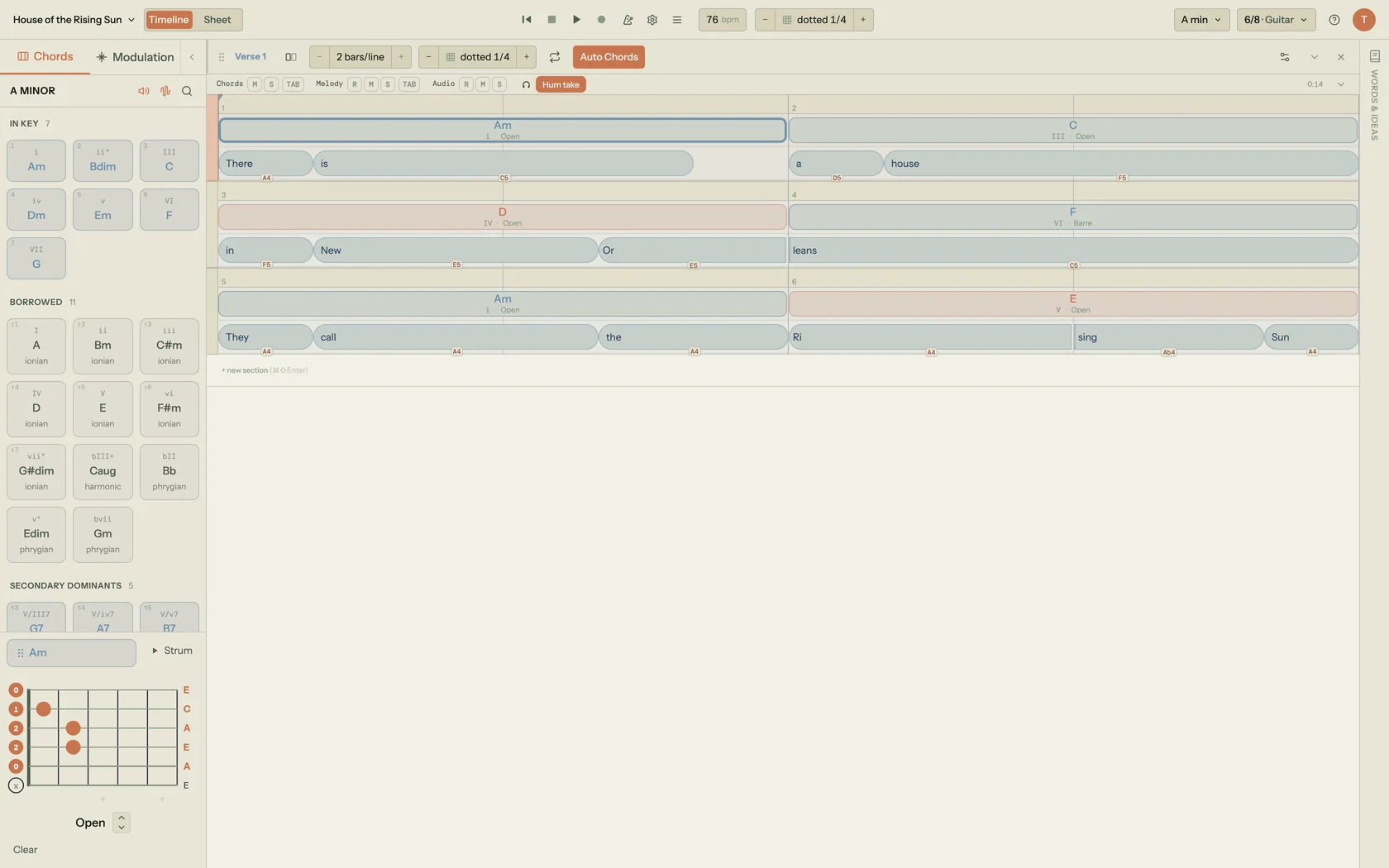
Song Cage is the only song idea capture app that stores the complete musical context of an idea — chord progression, lyrics, vocal recording — in the same connected file. Open it on your phone, pick a key, tap a chord, and you're recording a vocal melody over a harmonic foundation in under ten seconds. When you return tomorrow you don't have a mystery waveform labeled "recording 4:23am" — you have a chord progression in G major with a vocal take and a lyric fragment, ready to develop.
This is the defining difference between Song Cage and every other capture tool: it's a song idea capture app and a chord and lyric writing software at the same time. The chord palette shows every diatonic chord in the chosen key, plus borrowed chords from parallel modes, secondary dominants, and context-aware suggestions ranked against any melody notes you've already recorded. The lyric workspace opens directly alongside the chord timeline. The built-in rhyme finder — a complete lyric writing app with rhyme suggestions including slant rhymes, synonyms, and a semantic Explore panel — lets a lyric fragment be captured and developed without switching apps. When the vocal melody arrives, the built-in audio recorder captures it over the chord structure you've built, with both stored together in the same project. On desktop, record audio into a section and click "Detect melody." Song Cage extracts the pitches from your recording in the browser, snaps the detected notes to the most likely key with one tap (top-three candidates ranked, raw notes recoverable), and drags onto the timeline as a melody lane that Auto Chords can harmonize in one click. Wander mode covers the same ground when you just want to sing freely and watch chord suggestions rank against the notes in real time.
As a music theory app for songwriters, Song Cage surfaces harmonic information that helps you understand what you've captured: chord function labels, a modulation panel with pivot-chord routes between any two keys, and borrowed-chord explanations. As a DAW songwriting tool with a verse/chorus/bridge timeline, it bridges the gap between raw idea and structured draft. Auto Chords — a one-click melody-to-progression generator with a Held/Steady/Active harmonic-rhythm slider — turns a captured melody into a starting progression so you can edit rather than place every chord by hand. On the guitar side, the fretboard voicings and modulation panel make it a complete guitar songwriting app with no notation overhead.
Ideas captured on mobile sync to desktop for development; ideas built on desktop sync back to mobile for a quick playback in the car. Free tier includes the full chord palette, all lyric tools, and built-in recording. Start free at app.songcage.com →
Key Features
- Chord palette (diatonic + borrowed + secondary dominants) in any key
- Lyric workspace with rhyme finder, slant rhyme, synonyms, and Explore panel
- Built-in vocal audio recording layered on chord structure
- Auto Chords: one-click melody-to-progression with Held/Steady/Active flavor
- Modulation panel with pivot-chord routes between any two keys
- Guitar fretboard voicings and piano voicing diagrams for every chord
- DAW-style verse/chorus/bridge timeline
- Free native iOS & Android apps, plus web and desktop — capture on the phone, finish on web or desktop
Pros & Cons
- Chord context stored with every idea, not just audio
- Full rhyme finder and slant-rhyme tools embedded in the lyric lane
- Free tier includes the full chord palette and every lyric tool
- Works on iOS, Android, and desktop with cloud sync
- No AI generation — every suggestion is grounded in music theory
- Desktop hum-to-chord pipeline: pitch detection in the browser, snap-to-key, and Auto Chords from a vocal recording — or hold M and sing a single note straight onto a syllable
- Requires selecting a key before capturing — slightly more setup than a pure voice recorder
- The free web app is limited to one song, with no PDF or MIDI export
- BPM is set manually rather than auto-detected from recording
2. Dubnote
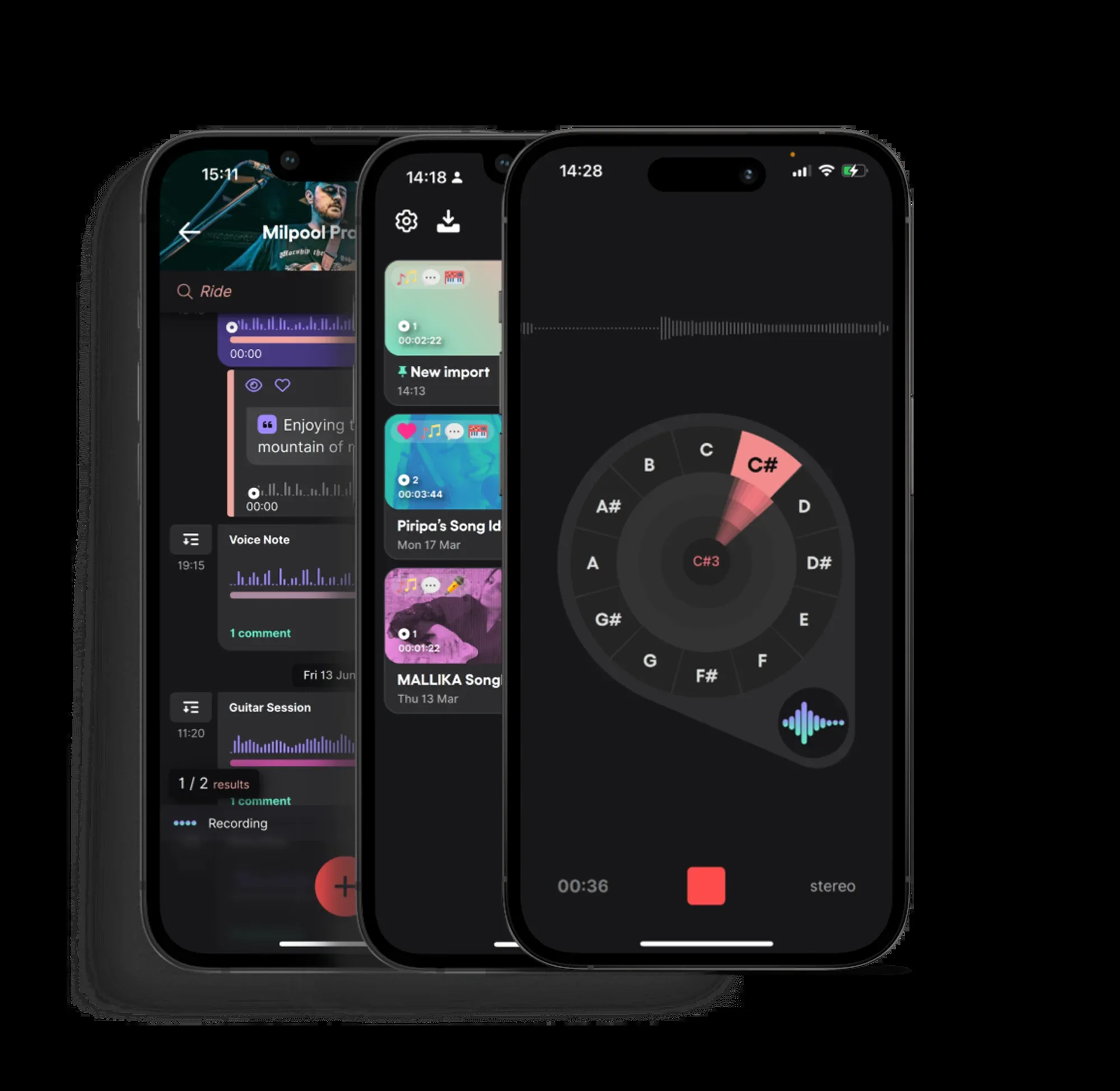
Dubnote (by Vochlea Music, iOS 17.3+, featured in MusicRadar and Sound On Sound) is built on a simple observation: Voice Memos gives you an untitled waveform; Dubnote gives you a musical object. Every recording is automatically processed by on-device AI: split into sections (verses, hooks, riffs), tagged with detected BPM, transcribed for both spoken thoughts and sung lyrics, and filed into a notebook with a custom cover. Six months later, you can search for a lyric fragment and find the recording it came from.
The collaboration feature — shared notebooks with time-stamped comments and layered recordings from multiple writers — makes Dubnote genuinely useful for co-writing situations where ideas need to be built on remotely. All AI processing happens on-device, so recordings are never sent to external servers. Pricing (verified from dubnote.com): free tier for the core capture workflow; Premium $24.99/year for unlimited recordings, advanced AI, and full collaboration. iOS only — no Android version at time of writing.
Pros
- On-device AI auto-splits recordings into sections automatically
- Automatic BPM detection on every recording — DAW-ready instantly
- Music-tuned lyric transcription — searchable by lyric fragment
- Notebooks with custom covers — a clean, organized idea library
- Real-time collaboration with time-stamped comments
- All AI runs on-device — recordings stay private
Cons
- iOS only — no Android support
- Requires iOS 17.3 or later
- No chord tools, no lyric workspace, no rhyme finder
- Pure voice recording — no harmonic context stored
- Advanced features require the $24.99/yr Premium subscription
3. BandLab
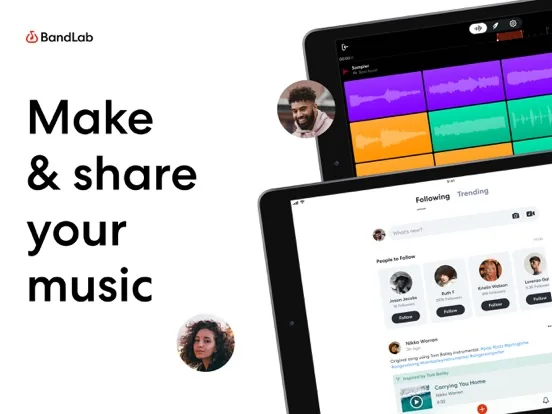
BandLab is the dominant free music creation platform globally, with 100 million+ creators on iOS and Android (updated April 21, 2026 on Google Play). For song idea capture, its key strength is the ability to go from raw idea to multi-layered demo without leaving the app. Capture a vocal take, immediately add a drum loop from 250K+ royalty-free samples, layer a virtual instrument from 385+ options, and apply auto-pitch correction — all in the mobile interface in the same session.
SongStarter AI generates 3 unique royalty-free compositions in 11 genres (including Drift Phonk and Hip-Hop) to spark a new idea when the well is dry. The stem splitter separates uploaded songs into vocals, drums, bass, and other parts. Auto-pitch, instant mastering, and distribution to streaming platforms are all included in the free tier. For songwriters who want a complete production environment — not just a capture tool — BandLab is the most powerful free option available. Its limitation as a pure capture app is the full DAW interface: there's more friction to opening and starting than with Voice Memos or Spit Notes.
Pros
- Completely free with 100M+ creators worldwide
- iOS + Android — broadest platform coverage of any DAW
- 385+ instruments, 250K+ samples, drum machine, sampler
- SongStarter AI — instant song ideas across 11 genres
- Stem splitter, auto-pitch, instant mastering, free cloud storage
- Direct distribution to streaming platforms
Cons
- Full DAW interface — more friction to start than pure capture tools
- No chord-theory palette or music-theory guidance
- No lyric workspace with rhyme tools
- AI tools require the paid Membership plan
- Production-focused — less suited to lyric-first songwriting capture
4. Voice Memos
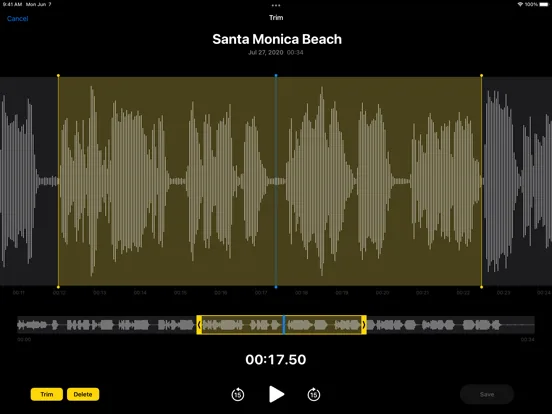
Voice Memos' advantage is that it's always there. Pre-installed on every iPhone, it opens in one tap with no account, no setup, and no friction. For capturing a melody or lyric fragment before it disappears, the argument for Voice Memos is simply this: it's the app you'll actually reach for when an idea arrives unexpectedly.
A significant upgrade arrived with iOS 18.2: Layered Recordings on iPhone 16 Pro and iPhone 16 Pro Max (confirmed Apple Newsroom December 1, 2024 and The Verge December 11, 2024). The A18 Pro chip's Neural Engine handles the vocal isolation entirely on-device, separating the sung melody from the instrumental audio playing through the speaker — so you can sing over a guitar or piano backing track without headphones, and Voice Memos saves two discrete tracks rather than a single mixed waveform. Both layers sync to Mac and can be dragged directly into Logic Pro for editing. In practice this is the first time a built-in iOS app produces a vocal-and-backing-track pair clean enough to start a demo from, and it lands the iPhone 16 Pro a real songwriting upgrade rather than a marketing one.
The trade-off is everything Voice Memos isn't: no organization for music (hundreds of untitled recordings), no BPM detection, no key detection, no lyrics connection, no chord context, and transcription tuned for speech rather than sung melodies. Most active songwriters eventually move to a music-specific app to manage the library — but Voice Memos remains the right choice for the literal first thirty seconds.
Pros
- Pre-installed — always available, no download required
- Completely free, no account needed
- Layered Recording on iPhone 16 Pro / Pro Max (iOS 18.2+)
- A18 Pro chip isolates vocal from instrumental automatically
- Syncs to Mac and Logic Pro for professional editing
- Fastest possible time-to-recording on iOS
Cons
- No organization for music — hundreds of untitled recordings
- No BPM, no key detection, no chord tools
- Audio and text are separate apps with no connection
- Transcription is designed for speech, not sung melodies
- Layered Recording limited to iPhone 16 Pro and Pro Max
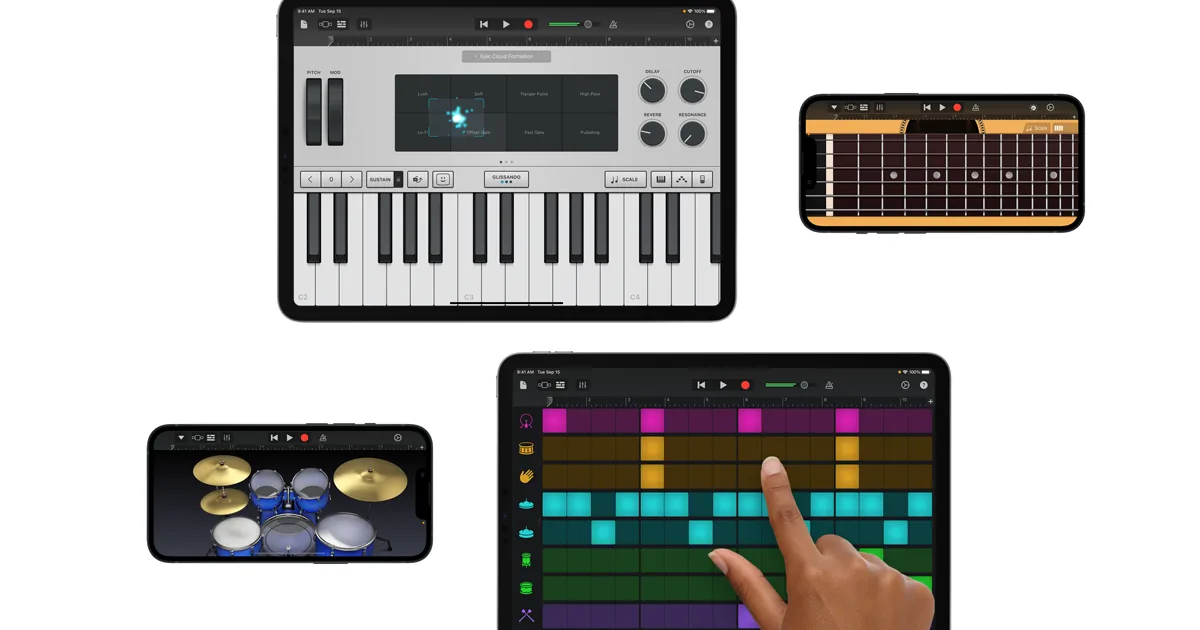
5. GarageBand for iOS
GarageBand for iOS is a complete professional DAW, free on every iPhone and iPad. For song idea capture specifically, its most useful feature is Multi-Take Recording (confirmed Apple Support, March 18, 2025): enable it and GarageBand creates a new take every time the playhead loops through a section, so you can record a melody or riff five times in a row and immediately pick the best version. This is particularly valuable for capturing melodic variations of the same idea.
Live Loops provides a grid-based environment for triggering loops and recordings — useful for capturing rhythmic and arrangement ideas. The instrument library is extensive: guitars, synths, drums, keyboards, strings. GarageBand files sync to Mac via iCloud and open directly in Logic Pro for advanced production. To use multi-take in practice: tap Track controls, open Track Settings, enable Multi-Take Recording, then arm the track and let the cycle range loop — each pass is stored as a take you can audition and comp by swiping through the take list. For Apple-ecosystem users who want a fully professional mobile recording environment at no cost, GarageBand remains the benchmark. The trade-off is full DAW complexity, which means higher setup friction than a purpose-built capture app.
Pros
- Completely free on all Apple devices
- Multi-take recording — capture multiple versions in quick succession
- Live Loops for arrangement-idea capture
- Huge instrument and sound library
- iCloud sync and seamless Logic Pro handoff
- Professional production quality from mobile
Cons
- Apple only — no Android version
- Full DAW complexity — higher friction than pure capture tools
- No chord-theory palette or music-theory guidance
- No lyric workspace or rhyme tools
- Best for producers; less suited to lyric-first or chord-first songwriters
6. Spit Notes

Spit Notes is built around one core problem: your lyric draft is in Notes and your melody is in Voice Memos, and they're permanently separated. Spit Notes keeps them in the same note — tap once to record, type lyrics alongside the audio, and both live together, searchable and organized. The March 2026 update (confirmed getspitnotes.com March 18, 2026) added chord detection (drop a recording in and chords appear labeled and editable), a built-in tuner with a VOI mode for voice, stem splitting into vocals and instruments, and a Control Center widget that starts recording with a single swipe from the lock screen — before you even open the app.
Other features: automatic transcription of sung lyrics and hums, an AI rhyme book with context-aware suggestions (it understands what you've already written), a rhyme highlighter that assigns a unique color to each rhyme group so couplets and end-rhymes light up visually across a long verse, and auto-scroll for hands-free reading during rehearsal. The highlighter is particularly useful for hip-hop and pop writers tracking internal rhymes that ear-skim alone misses, and the rhyme book widens scope from perfect rhymes to slant rhymes when you tap the toggle. Pricing is unusually accessible: free for up to 10 notes, $1.99 one-time unlocks unlimited notes (going to $4.99 per getspitnotes.com), and AI features such as transcription and the AI rhyme book start at $1.99 per month. iOS 18.0 or later is required for the Control Center widget and the stem-splitting features.
Pros
- One-tap recording from a Control Center widget on the lock screen
- Lyrics and audio live in the same note — never separated
- Chord detection on recordings — see the harmony behind what you hummed
- AI rhyme book and rhyme highlighter
- Transcription, tuner (with VOI voice mode), stem splitting
- $1.99 one-time for unlimited notes — lowest cost on this list
Cons
- iOS only — no Android
- Requires iOS 18.0 or later
- No chord palette for writing progressions (detection only, not creation)
- No music-theory tools or borrowed-chord library
- AI features require an additional subscription
7. Suonote

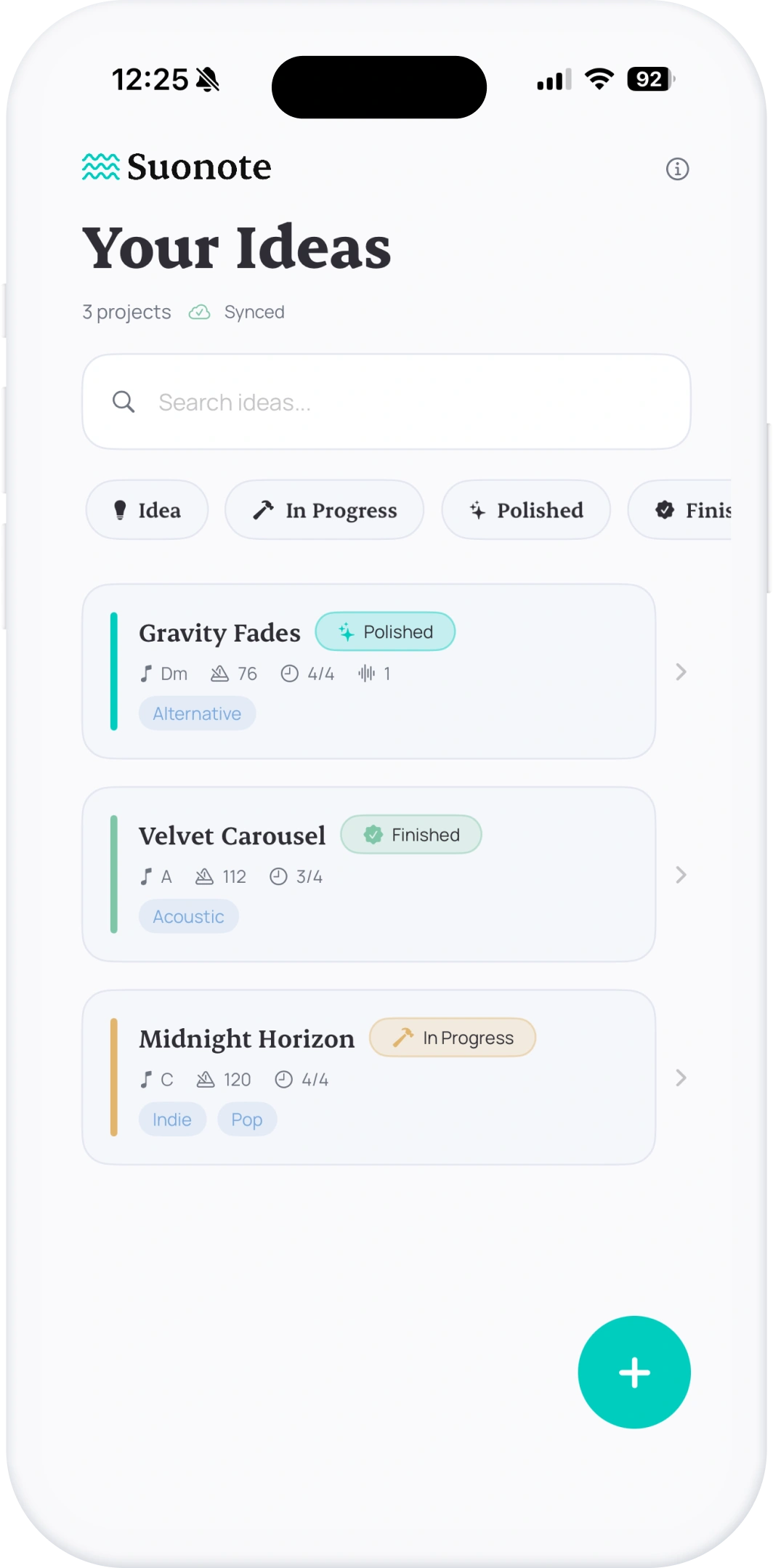
Suonote takes a different approach to the fragmentation problem: instead of just combining voice and text, it structures the entire pre-production workflow. Create a project in seconds, set key, BPM, and time signature, arrange verse/chorus/bridge sections with chord timelines, add lyrics per section, and record takes linked to specific sections — so a verse melody recording is attached to the verse section, not floating in a general recording library.
Export the structured project to a DAW via MIDI, chord charts, PDF, or a portable project file. For songwriters who need to arrive at a DAW session with a structured draft rather than a pile of unorganized voice memos, Suonote is the most organized pre-production tool on this list. It's local-first (full offline support), supports Apple Shortcuts and App Intents for Siri-triggered quick capture, and keeps all audio, lyrics, chords, and arrangement in a single connected project. iOS 17+ required; iPhone and iPad.
Pros
- Sections + chord timeline + lyric editor + takes — fully structured
- Takes linked to specific song sections, not a general recording pile
- MIDI, chord chart, PDF, and project-file export for DAW handoff
- Local-first with full offline support
- App Intents and Siri for quick capture flows
- Most structured capture-to-DAW workflow on this list
Cons
- iOS only — no Android
- Requires iOS 17 or later
- More setup required than pure voice recorders
- No embedded rhyme finder or lyric word tools
- Less suited to pure melody/lyric capture — better for arranged drafts
8. Notetracks

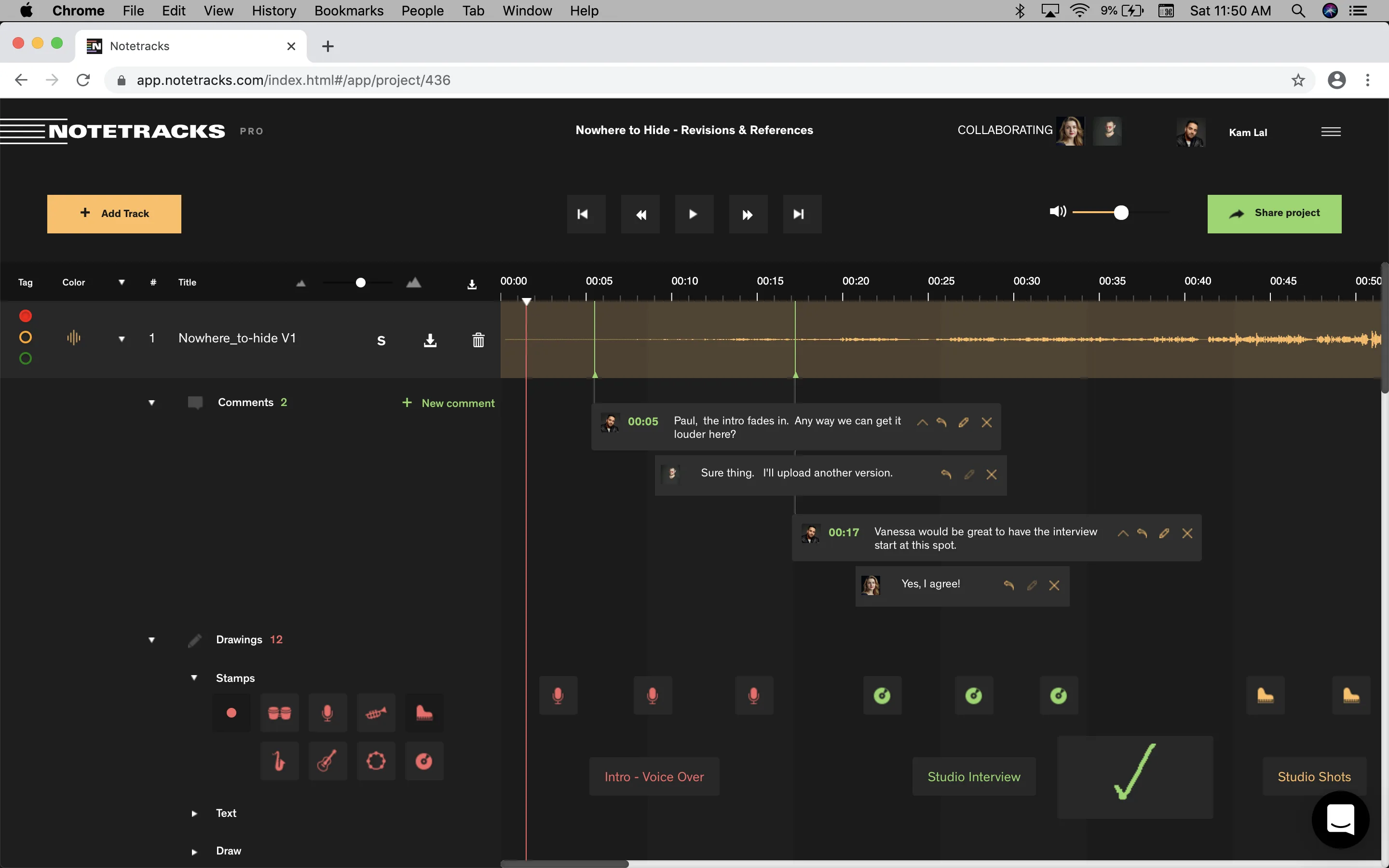
Notetracks is primarily a collaborative audio review platform — less a capture tool, more a sharing tool for after you've captured. Upload a recording of your song idea, share it with a co-writer or producer, and they can leave comments pinned to the exact second of the audio. "That melody at 0:42 — can you try it a minor third higher?" These comments live directly on the waveform, visible to both parties, without email threads or vague time references.
For songwriters working with remote collaborators — producers, co-writers, session musicians — Notetracks solves the specific problem of giving and receiving useful, actionable feedback on rough idea recordings. It integrates with Adobe Audition, Pro Tools, Audacity, and Hindenburg for comment export. The free plan includes unlimited recordings with 2 collaborators; Starter ($9/mo annual) adds 10 projects, 2GB storage, and unlimited collaborators. Not a capture tool in the traditional sense, but an essential part of the idea-to-collaboration workflow for many songwriters.
Pros
- Time-stamped comments pinned to exact moments on the waveform
- Real-time collaboration with unlimited collaborators (paid)
- Integrates with Pro Tools, Adobe Audition, and Audacity
- Toggle between track versions for comparison
- Free plan available with core features
- Audio transcription for searchable notes
Cons
- Not a capture tool — requires uploading existing recordings
- Web-based — no dedicated mobile capture app
- No chord tools, no lyric workspace, no rhyme finder
- More suited to feedback workflow than initial idea capture
- Paid plans needed for more than 2 collaborators
9. AudioNote 2
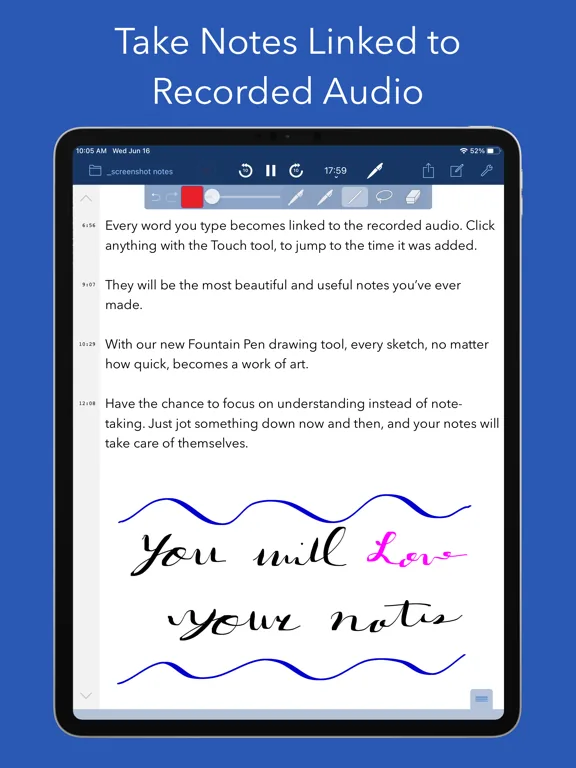
AudioNote 2 (by Luminant Software, iOS 15+, Mac, and Windows) solves a specific problem: you record an idea session and take notes during it, but later you can't remember which part of the recording corresponds to which note. AudioNote links every note you type to the exact audio timestamp when you typed it. Tap any note and playback immediately jumps to that moment — so a note reading "hook idea — try a higher ending note" takes you directly to the 2:34 mark where you sang the phrase.
For songwriters who use a talk-and-play capture approach — speaking thoughts and observations while recording a practice session — AudioNote creates a navigable map of the recording. On-device transcription (added in recent updates) makes notes searchable without manually reviewing audio. Pro features ($9.99/year, includes a 1-month free trial) add higher-quality recording, audio import, and time-of-day timestamps. Cross-platform: iOS, Mac, and Windows.
Pros
- Tap any note to jump to that exact audio moment — unique navigation
- On-device transcription makes notes searchable
- iOS, Mac, and Windows — broadest desktop coverage on this list
- 1-month free trial of the Pro tier
- Rich text notes, drawings, photos all linkable to audio
- iCloud and Dropbox sync
Cons
- General note + audio tool — not built specifically for music
- No BPM, no chord tools, no key detection
- No lyric workspace or rhyme finder
- Higher learning curve than pure voice recorders
- Pro features require subscription
10. Songwriter's Pad

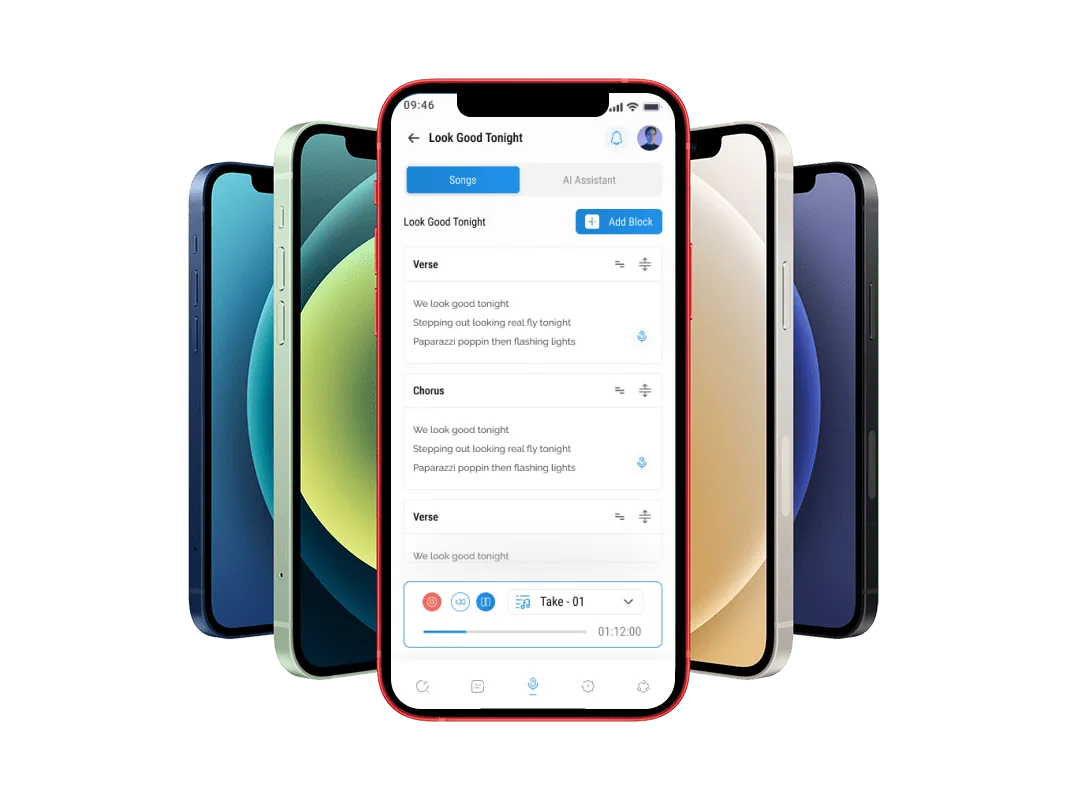
Songwriter's Pad (by DantéMedia LLC, v3.0.2 November 2025) is the broadest-platform app on this list: iOS, Android, Mac, and Windows, with auto-sync across devices. Its core feature is separate lyric block editing — create distinct blocks for verse, chorus, pre-chorus, bridge, and outro, each with its own lyrics and structure. A built-in rhyme dictionary and thesaurus live alongside the lyric blocks, and voice recording with instrumental beats lets you capture a vocal idea over a backing track.
The AI lyric generator — the tool's primary differentiator — takes a theme, genre, and voice style and produces a starting lyric draft for each song section. For songwriters who hit a blank page and want a generated starting point to react to and rewrite, this is faster than writing from scratch. Pro tier ($12.99/mo or $79/yr): unlimited AI lyrics, unlimited songs, full AI access. Note: the Android version has faced stability complaints in recent reviews (2.6/5 on Google Play); iOS reviews are more positive.
Pros
- iOS, Android, Mac, and Windows — best platform coverage
- AI lyric generator by theme, genre, and song section
- Separate lyric blocks for verse, chorus, bridge
- Built-in rhyme dictionary and thesaurus
- Voice recording with instrumental beats
- Auto-syncs across all devices
Cons
- Android version has reported stability issues (2.6/5 Google Play)
- No chord-theory tools or music-theory guidance
- AI features require the Pro subscription ($12.99/mo)
- Rhyme dictionary less deep than Song Cage's or RhymeZone's
- No BPM detection or audio-organization features
Full Feature Comparison
| App | Chord Tools | Lyric Workspace | Voice Recording | BPM Detection | Transcription | Android | Free Tier | Paid From | Rating |
|---|---|---|---|---|---|---|---|---|---|
| Song Cage | ✓✓ | ✓✓ | ✓ | ✗ | ✗ | ✓ | ✓ Full tools | $79 | |
| Dubnote | ✗ | ✗ | ✓ AI-split | ✓ Auto | ✓ Music | ✗ | ✓ Core | $24.99/yr | |
| BandLab | ✗ | ✗ | ✓ Full DAW | ~ Manual | ✗ | ✓ | ✓ Full | Membership | |
| Voice Memos | ✗ | ✗ | ✓ Layered* | ✗ | ~ Speech | ✗ | ✓ Full | Free | |
| GarageBand | ✗ | ✗ | ✓ Multi-take | ~ Manual | ✗ | ✗ | ✓ Full | Free | |
| Spit Notes | ~ Detect | ✓ + Rhymes | ✓ One-tap | ✗ | ✓ | ✗ | ✓ 10 notes | $1.99 once | |
| Suonote | ✓ Timeline | ✓ Per section | ✓ Per section | ~ Manual | ✗ | ✗ | ~ Limited | See site | |
| Notetracks | ✗ | ✗ | ✗ Upload only | ✗ | ✓ | ~ Web | ✓ 2 collabs | $9/mo | |
| AudioNote 2 | ✗ | ✗ | ✓ Linked | ✗ | ✓ On-device | ✗ | ✓ | $9.99/yr | |
| Songwriter's Pad | ✗ | ✓ + AI gen | ✓ With beats | ✗ | ✗ | ✓ | ✓ Limited | $12.99/mo |
*Layered Recording limited to iPhone 16 Pro and Pro Max with iOS 18.2 or later.
How to Choose the Right App for How You Write
The real question isn't "which app" — it's "what do you need to capture?" A melody idea is different from a chord progression idea is different from a lyric fragment is different from a full arrangement sketch. The best capture app for you depends on which of these you most commonly need to save. Many active songwriters use two apps together: one for instant audio capture (Voice Memos or Spit Notes), one for developing the captured idea into something complete (Song Cage).
Match the app to the moment
- Mostly melodic ideas by singing — Dubnote (AI-organized, BPM-detected, transcribed) or Voice Memos (fastest capture, plus Layered Recording on iPhone 16 Pro).
- Chord progressions and lyrics together — Song Cage. The only app that captures harmonic context alongside lyrics and audio in one place on the phone, then syncs every fragment to the full editor on web and desktop to finish the song.
- Lyric writer or rapper — Spit Notes. One-tap recording, lyrics and audio in the same note, rhyme book, chord detection, lock-screen widget.
- Full production on mobile — BandLab (free, Android + iOS, 385+ instruments, SongStarter AI) or GarageBand iOS (free, Apple only, professional quality, Logic Pro handoff).
- Remote collaborators — Notetracks for time-stamped feedback pinned to audio tracks, or Dubnote for shared notebooks with co-writers.
- Structured pre-production drafts for DAW handoff — Suonote. Sections, chord timeline, lyrics per section, MIDI/PDF export.
Why does idea context beat pure audio?
Most capture tools record audio. The recording sits in a list of waveforms with no information about what key it was in, what chords were underneath it, or what words you were singing. Weeks later, you scrub through 40 untitled recordings trying to find the one with the descending hook — and the one you find is just audio, with no chord context to develop it.
The shift the best 2026 tools make is to capture the context around the audio, not just the audio. BPM detection (Dubnote) tells the DAW what tempo to import at. Section auto-split (Dubnote) breaks a five-minute jam into "verse," "hook," "riff." Lyric transcription (Dubnote, Spit Notes, AudioNote) makes recordings searchable by what was sung, not just by date. Chord context (Song Cage) tells you the recording is in G major moving to E minor, so when you return you can immediately add the next chord rather than re-deriving the harmony by ear.
The cost of pure audio capture is a library of forgotten ideas. The cost of contextual capture is ten extra seconds of setup at the moment of recording — pick a key, tap a chord — in exchange for ideas that stay developable months later.
Should you capture on mobile or develop on desktop?
Capture happens on mobile because ideas arrive away from desks: in the car, the shower, walking the dog, half-asleep at 4am. Development happens on desktop because chord arranging, lyric editing, and arrangement work benefit from a large screen and a keyboard. The capture app that makes this split work well needs both halves: a one-handed mobile capture flow, and a sync path to a desktop environment where the captured idea can grow into a song.
Of the apps on this list, Song Cage, BandLab, Songwriter's Pad, and AudioNote 2 are the only ones with both halves built in. Song Cage syncs mobile-captured chord-and-lyric ideas to its desktop browser app for full arrangement and recording. BandLab syncs mobile projects to its web DAW. Voice Memos and GarageBand sync to Mac via iCloud, but the desktop apps aren't structured songwriting environments — they're Logic Pro and the same Voice Memos app on a larger screen. For songwriters who want a single tool that handles both capture and development, the mobile-to-desktop sync path matters as much as the capture flow itself.
Capture Your Next Idea With Chords Already in Place
Song Cage is the only idea capture app that stores chord progressions, lyrics, and audio recording in one connected canvas. Start on mobile, finish on desktop. Free to start — no credit card required.
Frequently Asked Questions
What is the best app for capturing song ideas fast in 2026?
Song Cage is the best app for capturing song ideas fast when the idea has both a harmonic component and a lyric or melody component. It's the only capture tool that stores chord context, lyrics, and audio recording in the same connected file on iOS and Android. For pure melodic voice capture with AI organization, Dubnote is the best musician-specific voice recorder (BPM detection, auto-split, lyric transcription; iOS only; free with Premium $24.99/yr from dubnote.com). For lyric + voice in one note with one-tap lock-screen recording, Spit Notes ($1.99 unlimited notes, iOS 18.0+) is the fastest option.
What makes a song idea capture app better than Voice Memos?
Voice Memos gives you untitled audio files. Music-specific capture apps give you musical objects. Four differences matter: (1) organization — a music app keeps recordings searchable by BPM, key, lyric text, or tag, while Voice Memos produces hundreds of untitled files sorted by date; (2) context — a chord-and-lyric capture app stores what key and chords the idea was in, not just the audio; (3) lyrics connection — an app like Spit Notes keeps the lyric text and the voice recording in the same note, while Voice Memos and Notes remain separate apps with no connection; (4) music-tuned transcription — Voice Memos transcription is designed for speech, while Dubnote's is tuned for sung lyrics and searchable by fragment. The compounding effect shows up at six weeks: a Voice Memos library is hundreds of dated files; a Dubnote or Song Cage library is filterable by tempo, lyric phrase, or key.
What is Dubnote and why is it popular with musicians?
Dubnote (by Vochlea Music, iOS 17.3+, featured in MusicRadar and Sound On Sound) is a voice recorder built specifically for musicians. Unlike Voice Memos, Dubnote auto-splits recordings into sections (verses, hooks, riffs) using on-device AI, detects BPM automatically, transcribes speech and sung lyrics to make recordings searchable, organizes everything in notebooks with custom covers, and enables real-time co-writing collaboration with time-stamped comments. All AI runs on-device — recordings never leave your phone. Pricing (verified from dubnote.com): free tier for core features; Premium $24.99/year for unlimited recordings, advanced AI, and full collaboration. iOS only — no Android at time of writing.
Is Voice Memos good enough for capturing song ideas?
Voice Memos is the best zero-friction option — pre-installed, no account, one tap to record. With iOS 18.2, Layered Recordings on iPhone 16 Pro and Pro Max (confirmed Apple Newsroom December 1, 2024 and The Verge December 11, 2024) allow recording a vocal over an instrumental through the speaker without headphones, using the A18 Pro chip to isolate the vocal into a separate track. For quick melodic capture, it works. The limitations: no organization for music (hundreds of untitled recordings), no BPM detection, no chord context, no lyric integration, and transcription designed for speech rather than sung melodies. Most active songwriters eventually move to a dedicated tool to manage their idea library.
What is BandLab and how many users does it have?
BandLab is a free music creation platform with 100 million+ creators, available on iOS and Android (updated April 21, 2026 on Google Play). It's a full mobile DAW with 385+ virtual instruments, a 250K+ sample library, drum machine, sampler, SongStarter AI (generates 3 unique compositions in 11 genres), auto-pitch correction, stem splitter, instant mastering, and unlimited multi-track projects with free cloud storage. For songwriters who want to sketch a chord progression and immediately develop it into a full demo with drums, bass, and production on the same mobile session, BandLab is the most powerful free option. AI tools require the Membership plan.
What is Spit Notes and how does it capture song ideas?
Spit Notes (iOS 18.0+, getspitnotes.com) is built around one-tap recording and keeping lyrics and audio in the same note — so you never lose the connection between what you sang and what you wrote. Open the app, tap once, you're recording. The March 2026 update added chord detection on recordings (chords appear labeled and editable), a built-in tuner with VOI mode for voice, stem splitting into vocals and instruments, and a Control Center widget for recording from the lock screen without opening the app. Also includes automatic transcription, an AI rhyme book, a rhyme highlighter, and auto-scroll. Pricing: free (up to 10 notes), $1.99 one-time for unlimited notes (going to $4.99 per getspitnotes.com). AI features from $1.99/month.
What is GarageBand's Multi-Take Recording feature?
Multi-Take Recording in GarageBand for iOS (confirmed Apple Support, March 18, 2025) creates a new take on a track each time the playhead loops back to the beginning of a section. You record the same melody or riff multiple times in quick succession — GarageBand stores each attempt — then choose the best version afterwards. This is particularly useful for capturing melodic variations: play or sing the same phrase five different ways, then select the one that feels right. To enable, tap Track controls → any track → Track Settings → Recording → Multi-Take Recording on. GarageBand is free on all Apple devices and syncs to Mac and Logic Pro via iCloud.
Which song idea capture apps work on Android?
Android-compatible apps from this list: Song Cage (iOS + Android + desktop, full chord + lyric + recording canvas), BandLab (iOS + Android, free, updated April 21, 2026 — the most powerful free mobile DAW on Android), and Songwriter's Pad (iOS + Android + Mac + Windows, by DantéMedia, v3.0.2 November 2025, $12.99/mo or $79/yr). iOS-only apps on this list: Dubnote (iOS 17.3+), Voice Memos (iOS), GarageBand (iOS), Spit Notes (iOS 18.0+), Suonote (iOS 17+). AudioNote 2 is iOS + Mac + Windows. Notetracks is web-based. For Android songwriters, Song Cage and BandLab are the two strongest options.
What is Suonote and who is it best for?
Suonote (suonote.com, iOS 17+, iPhone and iPad) is a structured pre-production songwriting tool for songwriters who want to arrive at a DAW session with an organized draft rather than scattered voice memos. Create a project with key, BPM, and time signature, arrange verse, chorus, and bridge sections with chord timelines, add lyrics per section, and record takes linked to specific sections. Export via MIDI, chord charts, PDF, or a portable project file. Local-first (offline support), with optional iCloud sync. Supports Apple Shortcuts and App Intents for Siri-triggered quick capture. Best for topliners, producers, and collaborators who need to deliver structured musical drafts to remote collaborators or recording sessions.
How does Song Cage compare to Dubnote for idea capture?
They solve different parts of the capture problem. Dubnote is the best tool for capturing a pure melodic voice idea — it records, auto-splits into sections, detects BPM, transcribes lyrics, and organizes everything in searchable notebooks. Song Cage captures harmonic ideas — chord progressions, lyric drafts, and vocal melodies — in one connected canvas. It's the best app when you need to capture not just what you sang but what key it was in, what chords were underneath it, and what words you were thinking. Many songwriters use both: Dubnote for instant melodic capture on the go, Song Cage for developing those captures into structured songs. Rule of thumb: if the idea is melodic only and arriving in the next twenty seconds, capture in Dubnote and re-key it in Song Cage later; if the idea already has a sense of harmony, capture in Song Cage first so the chord context lands with it. Song Cage is iOS + Android + desktop; Dubnote is iOS only.
What is the fastest app for capturing a song idea in under 10 seconds?
For pure audio: Spit Notes (iOS) — the Control Center widget records from the lock screen in one swipe + one tap, before opening the app. Voice Memos — pre-installed, one tap to open and record, no account needed. For chord + audio capture: Song Cage opens to a key selector, then tap a chord and tap record — under 10 seconds with a key already set. All three prioritize minimal friction. The distinction: Voice Memos and Spit Notes capture what you sang; Song Cage also captures the harmonic foundation, which means the idea is more complete and more developable when you return to it.
Can I hum a melody and get chord suggestions?
Yes. In the Song Cage desktop browser, record audio into a section and click "Detect melody." Song Cage extracts the pitches from your recording in the browser. The detected notes appear in a staging strip where you snap them to the most likely key with one click (top-three key candidates ranked, raw notes always recoverable). Drag the melody onto the timeline as a melody lane, then tap Auto Chords for a one-click melody-to-progression with a Held / Steady / Active harmonic-rhythm flavor, or click empty chord slots one at a time to see melody-aware chord suggestions ranked against the melody notes. Native mobile melody detection is in progress; the audio recorder itself works across iOS, Android, and desktop today. See the deeper review in our best songwriting apps 2026 roundup.
Can I capture a song idea on Apple Watch?
Voice Memos can be triggered from Apple Watch to start a recording on iPhone. Spit Notes' Control Center widget can be accessed from an Apple Watch face in some configurations. None of the music-specific tools on this list have full Apple Watch apps — the interaction model of Watch apps makes complex music tools impractical. The most reliable method for Apple Watch song idea capture: use the Voice Memos Apple Watch complication to start a recording from the wrist, then organize and develop the recording in Song Cage or Dubnote on iPhone when you're back at the phone.
Does Song Cage work offline for song idea capture?
Yes — Song Cage's core capture features (chord palette, lyric editing, audio recording) work offline on iOS and Android. Ideas captured offline sync to the cloud and across devices when connectivity is restored. This is essential for the real-world use case of capturing ideas in locations with no signal — studios without WiFi, rural locations, underground venues. Suonote is explicitly designed as local-first (offline by default, iCloud optional). Dubnote processes all AI features on-device, so AI organization also works offline. BandLab requires connectivity for cloud features but core recording works offline. Voice Memos and GarageBand work fully offline as Apple native apps.
What is the best app to capture song ideas for free?
Best free options by use case: (1) chord + lyric + audio capture — Song Cage free tier: one song in the free web app, full chord palette, all lyric tools including rhyme finder and slant rhymes, built-in audio recording, iOS + Android. (2) Pure voice recording with music organization — Dubnote free tier: BPM detection, auto-split, lyric transcription, notebooks. (3) Lyric + audio in the same note — Spit Notes free: 10 notes, rhyme book, chord detection. (4) Full mobile production — BandLab: completely free, 100M+ users, 385+ instruments, SongStarter AI, iOS + Android. (5) Pure voice memo — Voice Memos: pre-installed on iPhone, completely free, fastest capture available.