Song Cage, on your desktop.
Song Cage Desktop is a native songwriting app for your dock or taskbar. It works offline, one keystroke puts it next to your DAW, and a MIDI keyboard plays chords and melody straight onto the timeline.
Download. Write. Sync when you want.
The same Song Cage canvas you already use on the web, in a native app that lives in your dock or taskbar and survives a closed laptop on an airplane.
Download & install
Native installers for macOS (Apple Silicon and Intel) and Windows. Lives in your Applications folder or Start menu. Cmd‑Tab or Alt‑Tab puts it next to your DAW and your browser.
Write offline
Open the app on a plane, in a hotel, at a coffee shop with bad Wi‑Fi. Chord palette, lyric editor, word panel, melody timeline, voice memos. All of it works with no network at all.
Sign in to sync
Sign in once and your songs sync to the cloud library you already have on web and mobile. Edit on the train, pick up where you left off at home. Sync comes with a Pro subscription; the app you bought works offline forever either way.
The full canvas, in a native app.
Song Cage Desktop is a native app for songwriters on macOS and Windows. It puts the full Song Cage canvas (chord palette, lyric editor with syllable splits, offline word panel, and a DAW-style melody timeline) in a real app that lives in your dock or taskbar and opens in one click, no browser tab. Everything works fully offline: write on a plane, in a hotel, or on stage with no Wi‑Fi, and your songs stay on your machine. Sign in with a Pro subscription and the same song syncs to the web app and the mobile app within seconds. The AU/VST3 plugin for your DAW comes with the same license, no second purchase. It runs natively on Apple Silicon and Intel Macs and 64-bit Windows PCs, installs in about 60 MB, and costs $69 once, with no subscription and no renewal.
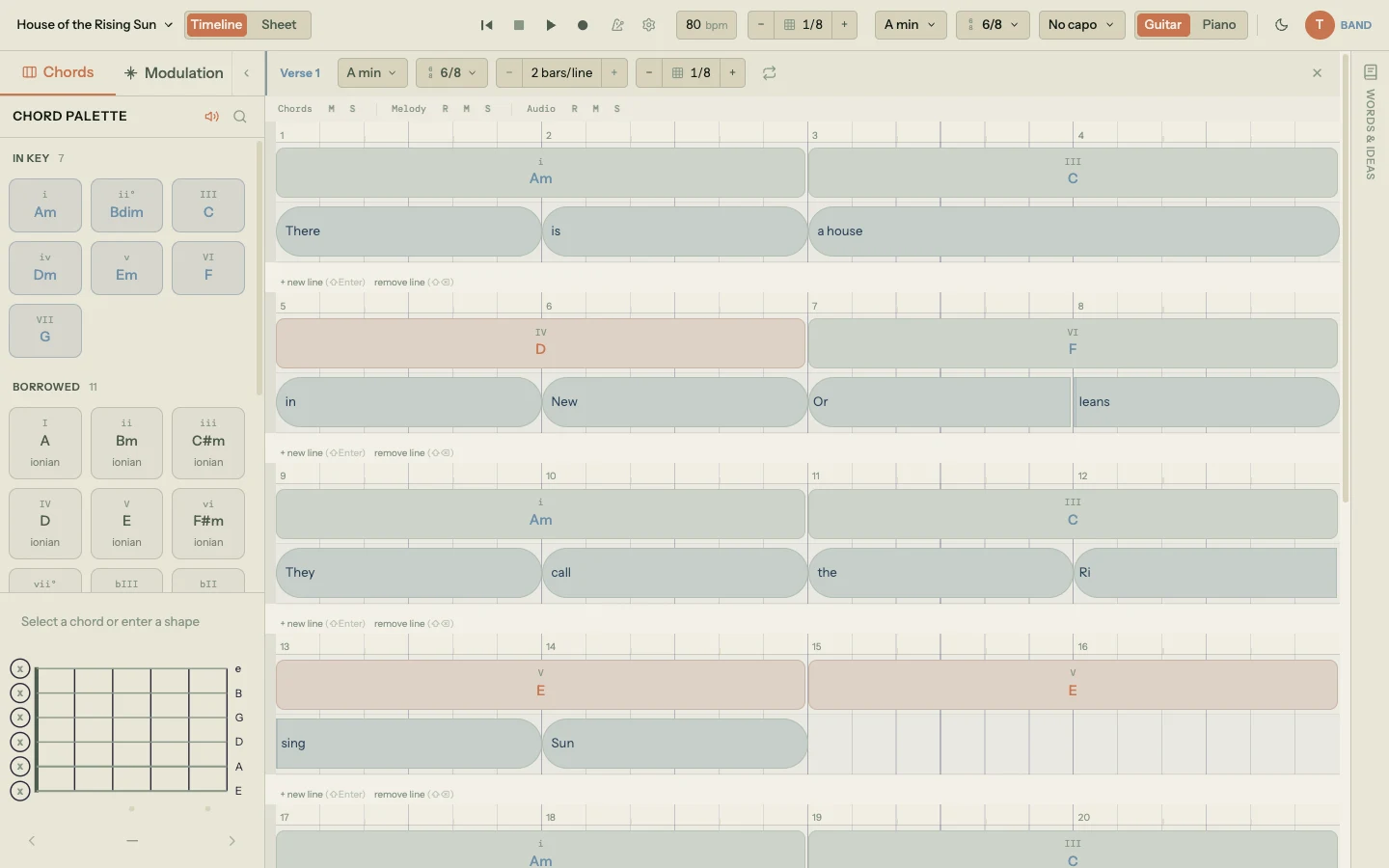
Melody capture: hum a line into your laptop mic and Song Cage writes the notes.
- Chord palette In‑key, borrowed, and secondary dominant chords for whatever key you're in. Suggestions rank against melody and surrounding chords.
- Lyric editor with syllable splits Each syllable carries its own pitch. Drag dividers and the melody re‑snaps to the grid.
- Offline word panel Rhymes, slant rhymes, synonyms, and word associations. No network call. Works on stage with no Wi‑Fi.
- Plug in a MIDI keyboard Play a chord and Song Cage names it and places it. Play a note and it fills the syllable under the cursor. Pick your device in the app; sustain pedal included. Browsers have no MIDI API on macOS at all, so this only exists in the native app and the plugin.
- Melody from audio, at full accuracy offline Hum or sing into your laptop mic, the app extracts the melody, snaps it to your key, and drops it on the timeline. Auto Chords harmonizes it. The full detection model ships inside the app, so it runs at full accuracy with no connection.
- Native menus and shortcuts Cmd‑N for a new song, Cmd‑Shift‑M for Export MIDI, Cmd‑Shift‑P for Export PDF. Window position and size remembered across launches.
- Optional cloud sync Sign in with Pro and the same song shows up on web and mobile within seconds. Sign out and the app keeps working offline.
Runs natively on the computer you already own.
One $69 license covers both platforms.
macOS
- macOS 12 or later
- Apple Silicon (M1 and later)
- Intel, as a separate native build
Windows
- Windows 10 or later
- 64-bit x64 installer
- Code-signed by Digital Candy LLC
Footprint & speed
- About 60 MB installed
- Around 250 MB of memory at idle
- Cold start under three seconds
A Tauri shell rather than Electron keeps it roughly a tenth the size of a comparable Electron app. The app also updates itself: one click verifies the signature and restarts on the new version, free for the whole v1.x line.
Desktop app manualOne price. No subscription.
Apple Silicon · Intel Mac · Windows
Common questions.
How is the desktop app different from the web app?
It's the same Song Cage canvas. The differences are at the OS level: it lives in your dock or taskbar, it opens with one click instead of a browser tab, it remembers its window size and position, it has a native menu bar with keyboard shortcuts, and it works fully offline. The songwriting experience is identical to app.songcage.com. For the complete walkthrough, read the desktop app manual.
Does it work offline?
Yes. Songs are stored locally in the app. You can write on a plane, in a hotel, anywhere with no Wi-Fi. When you reconnect, your edits sync to the cloud library automatically (if you're signed in with Pro). If you're not signed in, the app still works. You just keep your songs local.
Do I need a Song Cage account?
No. You can use the desktop app fully offline with no account. Sign in only if you want your songs to sync to app.songcage.com and the mobile app, or to import them inside the AU/VST3 plugin.
I already pay for Song Cage Pro. Is the desktop app included?
No. Pro covers the web and mobile apps: cloud sync across your devices, unlimited songs, exports, and sharing with your band. The desktop app and the AU/VST3 plugin are a separate one-time purchase of $69, and that one payment covers both of them on both macOS and Windows, permanently.
They are priced separately because they are different things. Pro is a service that runs every day; the desktop app is software you own outright and keep whether or not you ever pay us again. Your 14-day desktop trial runs independently of your subscription, so you can try it properly before deciding.
What about Apple Silicon and Intel Macs?
There are two installers, one built natively for Apple Silicon (M1 and later) and one for Intel Macs. Pick the one for your chip on this page. Cold start is under three seconds on a 2020+ machine.
How big is the install?
About 60 MB installed. The native shell is Tauri (not Electron), which keeps the footprint roughly one-tenth the size of comparable Electron apps. Memory usage idles around 250 MB.
Will it auto-update?
Yes. A small banner appears in the app when a new version is available. One click downloads, verifies the signature, and restarts the app on the new version. You can also disable auto-update and check manually from the menu.
Is there a Windows version?
Yes. Song Cage Desktop runs on Windows 10 and later (64-bit). Download the installer. It's code-signed by Digital Candy LLC, works fully offline, and auto-updates just like the Mac build. One $69 license covers both platforms.
Windows shows “Windows protected your PC” when I install. Is that a problem?
No. That’s Microsoft Defender SmartScreen, and it appears for any newly released app until it has been downloaded enough times to build a reputation with Microsoft, regardless of signing. The installer is genuinely code-signed by Digital Candy LLC, the company behind Song Cage. To continue, click More info, confirm the publisher reads Digital Candy LLC, then click Run anyway. The prompt goes away on its own as more people install this version.
Does it use AI?
No. Chord suggestions come from music theory rules: voice leading, melody-chord-tone scoring, and progression patterns. Rhymes and synonyms come from dictionary lookups that ship inside the app. Auto Chords is a deterministic rule-based scorer. Same melody and key produce the same progression every time.
Song Cage, on your desktop
The native desktop app is here. Download it for your Mac or Windows PC, or start writing in the web app right now.