
Table of Contents
- How to Choose the Right Songwriting App
- 1. Song Cage
- 2. Hookpad by Hooktheory
- 3. Guitar Pro 8
- 4. MuseScore
- 5. Chordify
- 6. Demo: Songwriting Studio
- 7. GarageBand
- 8. Notetracks
- 9. Songwriter's Pad
- 10. Autochords
- Full Comparison Table: Best Songwriting Apps 2026
- Chord Progressions: A Quick Guide for Songwriters
- The most popular chord progressions
- Minor chord progressions
- Borrowed chords and secondary dominant chords
- Key modulation and pivot chords
- Diatonic chords and music theory basics
- Song Structure Basics Every Songwriter Should Know
- Frequently Asked Questions
Updated April 7, 2026
Rankings refreshed with updated pricing, new feature releases, and additional testing data. Song Cage modulation panel, Hookpad pricing, and Guitar Pro 8 features verified current as of April 2026. Original research compiled January 2026.
A songwriting app is a digital tool that helps musicians write, develop, and capture original songs by combining chord progression builders, lyric workspaces, melody recording, and song structure templates in a single environment. The best songwriting apps in 2026 reduce the gap between a musical idea and a captured draft, so you spend less time switching tools and more time writing.
Quick Summary
We tested 30+ songwriting apps — chord progression tools, lyric writers, melody capture apps, song arrangement software, and full DAW alternatives — across six weeks of real songwriting sessions. Below are the 10 best options in 2026, ranked for all skill levels from beginners learning music theory to experienced composers.
If you want to write a song in 2026, you have a problem: the tools are fragmented. There are chord progression apps with no lyric workspace. There are song lyrics writers with no music theory. There are voice recording apps that can't tell you what key you're in. And there are full DAWs that are overkill for capturing a song idea before it disappears.
Figuring out how to write a song — especially if you're learning — shouldn't require juggling five apps. We spent six weeks testing every major tool in the space to find which ones actually serve the way songwriting happens: a flash of melody, a chord feel, a lyric line, all at once and all needing to be captured immediately.
Whether you're writing on guitar, writing on piano, lyrics-first, or melody-first, here are the best songwriting tools available right now. These songwriting tips are grounded in six weeks of real creative sessions, not spec sheets. We also focused specifically on how each app helps (or doesn't help) with writer's block, the single most common creative obstacle songwriters face.
How We Ranked These Apps
Every app was put through six weeks of real songwriting sessions by musicians across skill levels, from beginners with no music theory background to professional co-writers. Our scoring weighted these criteria:
No app paid for placement. Song Cage is listed first because it ranked first across all criteria, and because this is the Song Cage blog. We are transparent about that.
How to Choose the Right Songwriting App
The right songwriting software depends entirely on how you write. Most apps serve one part of the process. They're either chord tools, lyric apps, notation software, or recording tools. Very few cover the full creative arc from first idea to rough demo. Before picking, identify which of these describes you:
You need guitar chord voicings, fretboard diagrams, and chord progressions for songwriting, not just tab notation. Song Cage or Hookpad.
You need a piano chord app with real voicings, music theory for piano, and piano chords for songwriting. Learning how to write a song on piano is much easier with a visual keyboard that shows real chord voicings. Song Cage.
You need a song lyrics writer with rhyme finder, rhyming words for songs, and a thesaurus for songwriters built into the app. Song Cage, Songwriter's Pad.
A music theory app that teaches through use, not a textbook. Music theory basics and diatonic chords should be explained as you write. Song Cage, Hookpad.
You need a voice recording app for musicians that also knows what key you're in. Song Cage, GarageBand, Demo Studio.
You need guitar tab software or a full score editor: more transcription tool than song idea app. Guitar Pro, MuseScore.
What makes a great songwriting app in 2026?
The best songwriting tools reduce the gap between the idea and the capture. That means: fast access to chord progressions in any key, some form of music theory guidance (even if invisible), a lyric workspace, and a way to record your voice immediately. Apps that do only one of these things force you to switch tools, and context-switching kills creative momentum.
1. Song Cage

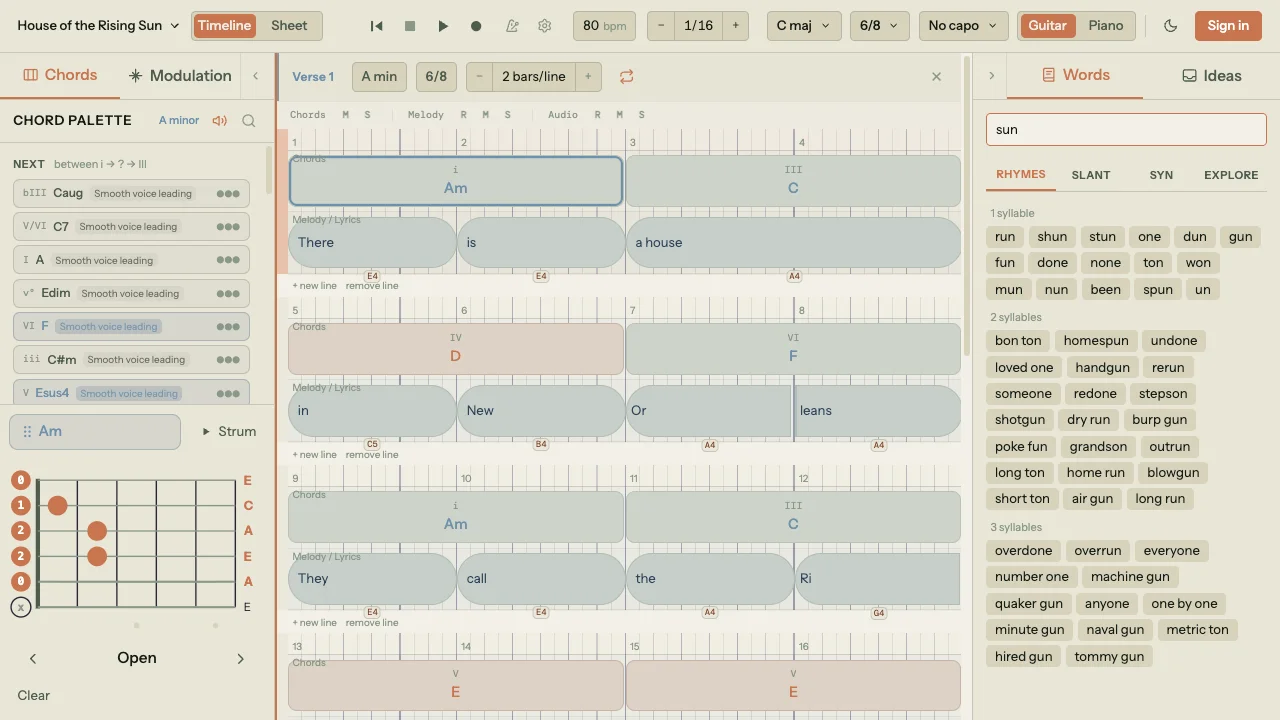
Song Cage is the only songwriting app built around the full creative moment, not just one piece of it. It handles chord progressions for beginners and advanced writers simultaneously, includes a complete lyric workspace with a built-in rhyme finder and synonym finder for lyrics, records your voice immediately when melody strikes, and gives you a DAW-style timeline to arrange song structure without needing a full production environment.
The centerpiece is the chord palette, but it's not a static list. Click an empty spot on the timeline and Song Cage reads the chords before and after that position, plus any melody notes you've already written at that beat, and suggests chords that actually fit the context you've built. Hover a suggestion and it tells you why it works: which of your melody notes are chord tones, how smoothly it voice-leads from the previous chord, and what role it plays in the key. You don't need to know the theory upfront; it teaches you as you go. The palette organizes chords by theory (diatonic, borrowed from parallel modes, secondary dominants) with Guitar and Piano voicing modes so you hear real instrument voices, not abstract note names.
The modulation panel is where Song Cage separates from every chord progression tool on the market. Pick a destination key and it builds chord-by-chord routes to get you there through shared pivot chords, so the modulation feels smooth rather than jarring. Wandered too far harmonically? It also shows you routes back home. For any songwriter who's ever wanted their chorus to hit harder by modulating up, or just needs a way out of a key change they got lost in, this is the tool. No other consumer songwriting app offers this.
The lyric workspace is essentially a RhymeZone alternative built inside your song. Click any word and instantly get rhyming words for songs, slant rhyme suggestions, synonyms, and an Explore panel (Semantic Drift Chain + Word Collider) that follows chains of thematically related words and generates unexpected pairings in the lineage of Jeff Tweedy's word ladder and the Burroughs cut-up technique. This is the thesaurus for songwriters that standalone apps have tried to be, except here it's embedded in your lyric draft, not a browser tab.
Song Cage also lets you record audio directly into a section: arm the track, hit record, and capture a vocal melody or guitar riff before the idea fades. The recording lives inside your song project alongside the chords and lyrics, so you never lose the context around it.
Key Features
- In-key, borrowed & secondary dominant chord palettes
- Modulation panel with pivot chord routes between keys
- Guitar chord voicings with fretboard diagrams
- Piano chord voicings with visual keyboard
- DAW-style drag-and-drop song timeline
- Built-in vocal & audio recording
- Lyric workspace: rhyme finder, slant rhyme, synonyms, Explore panel
- MIDI melody input (MIDI songwriting)
- Real-time collaboration (Band tier)
- Desktop browser app (mobile coming soon)
Pros & Cons
- Only app combining chord theory + lyric tools + recording
- Borrowed chords & modulation: no other consumer tool has this
- Works for beginners with no music theory required
- No AI gimmicks: real music theory, real rules
- Desktop browser: works on any computer, no install
- Free tier genuinely useful
- Not a full DAW (intentional; use with Logic/Ableton for production)
- Collaboration requires Band tier ($20/mo)
- Desktop only for now; mobile app coming soon
2. Hookpad by Hooktheory

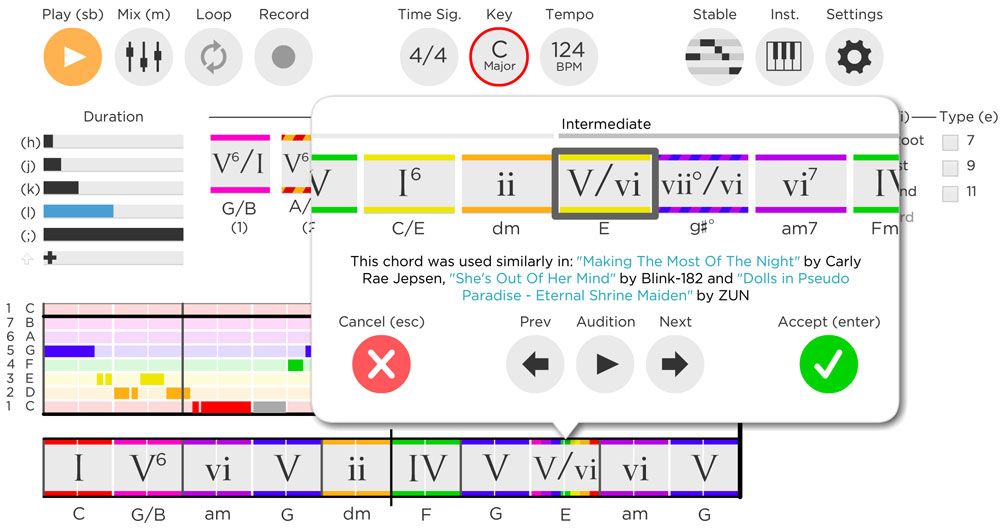
Hookpad (by Hooktheory) is the most established music theory app in the songwriting space. The Hookpad review consensus across the community is consistent: it's the best chord suggestion engine available, backed by the TheoryTab database of 70,000+ real song analyses. When you select a chord, Hookpad shows you which chords are statistically most likely to follow, based on real popular music, not abstract theory rules. The melody guide highlights consonant and dissonant notes in real time against your current chord.
For the Hookpad pricing, the monthly option ($7.99/mo) is accessible, but the lifetime price ($199) and the additional cost of Hooktheory books (Hooktheory I at $14.99, Hooktheory II at $19.99) means the full Hooktheory experience can run over $250. An optional Aria AI add-on tacks on another $14.99/mo if you want AI chord/melody suggestions. Compared to Song Cage Pro at $12/mo — which includes lyric tools, recording, and a song arrangement timeline — Hookpad is expensive for what it covers.
Looking for a Hookpad alternative or Hooktheory alternative? Song Cage covers comparable chord palette depth — including borrowed chords and modulation — plus adds the lyric workspace and built-in recording that Hookpad lacks. The Hooktheory vs Hookpad distinction matters too: Hooktheory is the education platform (books, ChordCrush), while Hookpad is the songwriting composition tool. You can use one without the other.
Pros
- Best chord suggestion engine in class
- 70,000+ real-song database via TheoryTab
- Excellent MIDI export to any DAW
- Music theory basics taught through use
- Browser-based, no install needed
Cons
- Limited lyric editor: no built-in rhyme finder or synonym finder
- No built-in voice recording app capability
- Poor mobile experience: desktop only in practice
- Combined pricing high vs alternatives
- No modulation panel or pivot chord routes
- No song arrangement/timeline feature
3. Guitar Pro 8

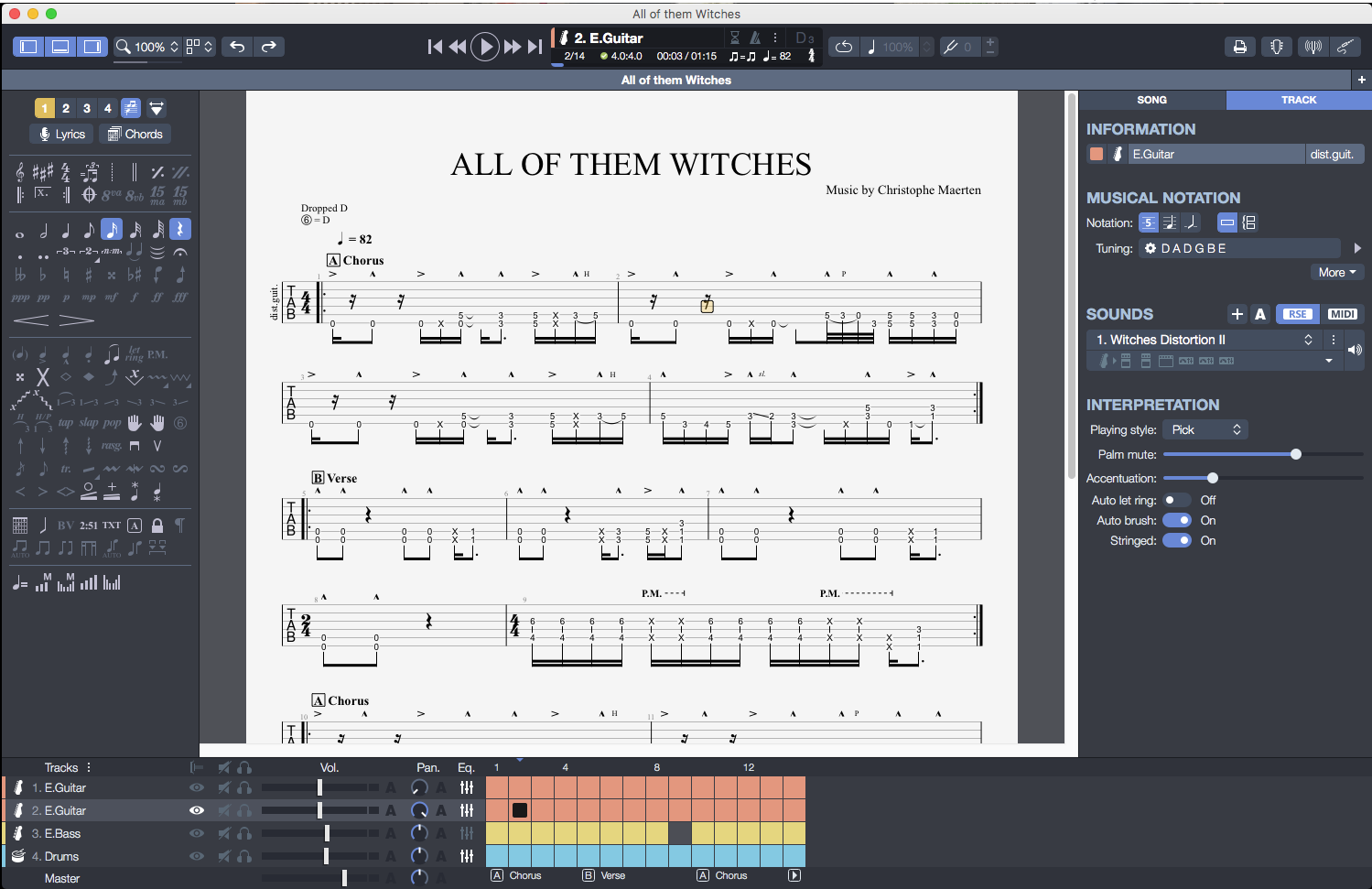
Guitar Pro 8 is the reference standard for guitar tab software. It's been the industry benchmark for decades. The Guitar Pro 8 review from the guitar community is essentially unanimous: for notation, transcription, and tab editing, nothing else comes close. The Realistic Sound Engine (RSE) delivers accurate instrument playback, the multi-track editor is full-featured, and the chord and scale libraries are among the most extensive available.
For music theory for guitarists, Guitar Pro's chord library and visual guitar fretboard diagram tool are genuinely excellent. For music theory guitar in the context of understanding scale positions and modes, it's a strong reference: you can see every voicing of every chord across the neck, in any tuning. The guitar chord app functionality is deep and well-organized. However, Guitar Pro is fundamentally a guitar tab software for notating and transcribing music, not for exploring what music could be. There's no chord progression suggestion engine, no help with music theory basics if you're stuck on what comes next, and no lyric tools whatsoever.
Looking for a Guitar Pro alternative for songwriting specifically? Song Cage covers the guitar songwriting app use case — guitar chords for songwriting, voicings, music theory guidance — without the notation overhead. MuseScore is the best free Guitar Pro alternative for notation. For writing new music from scratch rather than transcribing, Song Cage or Hookpad serve the creative phase better.
Pros
- Best-in-class guitar tab software
- Extensive guitar chord voicings library
- Visual guitar fretboard diagram tool
- Realistic Sound Engine (RSE) playback
- Huge MySongBook tab community
- Multi-track song arrangement software
Cons
- No chord progression suggestions for songwriting
- Basic lyrics panel for syncing words to notation, not a full lyric workspace
- Steep learning curve for music theory beginners
- Desktop-first: poor mobile capture experience
- Not a guitar songwriting app; it's a transcription tool
4. MuseScore

MuseScore Studio (formerly MuseScore 4, current stable 4.6.5 as of December 2025) is the best Guitar Pro alternative when budget is the priority. It is completely free, open source (GNU GPL), and handles standard notation, guitar tablature, and audio playback reliably. It is desktop-only — Windows, macOS, and Linux. Note the distinction: musescore.org is the free notation editor, while musescore.com is a separate paid sheet music marketplace, and the MuseScore mobile app ("MuseScore: Sheet Music & Chords") is a reader tied to that marketplace, not a mobile version of the Studio editor.
As a songwriting tool for capturing ideas, MuseScore Studio has the same limitation as Guitar Pro: it is a notation editor, not an idea-exploration platform. It is best deployed after the creative phase, when you have a song and need to notate it, not during the writing phase. Use MuseScore alongside Song Cage or Hookpad for a complete write-then-notate workflow.
Pros
- Completely free and open source (GNU GPL)
- Solid guitar tab and standard notation editor
- Good playback and massive community library
- Actively maintained (Studio 4.6.5, Dec 2025)
Cons
- No chord progression tools for songwriting
- No lyric tools: not a song lyrics writer
- Desktop-only editor — mobile app is a separate marketplace reader, not the editor
- Less polished than Guitar Pro for pure tab transcription
5. Chordify

Chordify is the best chord recognition tool available for songwriters who learn by ear. Paste a YouTube link or upload an audio file and it generates a playable chord chart in seconds, synced to the audio. The free tier gives you a few songs with ads; paid tiers remove ads and unlock features like transpose, MIDI download, PDF chord sheets, tempo change, setlists, loop, capo, and — on the top Premium + Toolkit tier — lyric generation, a chord trainer, and a chord detector. If you are studying popular chord progressions in music you admire, Chordify is a fast research tool.
It's not a music composition app or a chord progression generator for writing new music. But as a complement to a full songwriting tool like Song Cage, it's useful for chord research and ear training. Many writers use Chordify to reverse-engineer a progression they like, then open Song Cage to build something new around that harmonic idea.
Pros
- Instant chord extraction from any audio (deep-learning based)
- Catalogue of 36M+ songs with chord charts
- Great for learning popular chord progressions
- Three-tier pricing gives you a cheap entry point at $2/mo Basic
- Works on web, iOS, and Android
Cons
- Not a composition or chord progression tool for writing
- No dedicated lyric workspace (Premium + Toolkit has a lyric generator, but it is not a lyric editor)
- Accuracy varies with audio quality
- Best tools (transpose, MIDI, PDF, loop, capo) live behind Premium or Premium + Toolkit
6. Demo: Songwriting Studio

Demo: Songwriting Studio (by Demo Music, LLC) is one of the most polished song demo apps on Apple hardware. It runs across iPhone, iPad, Mac (via Catalyst), and Apple Vision Pro, and it does the mobile song capture experience very well: multitrack recording, chord tracking, a lyric workspace with a built-in rhyme tool, CoWrite collaboration, iCloud sync, and export of mix, stems, MIDI, and chord sheet. A recent release ships a "Suggest in Chords" feature that runs on-device — sing into the app and it recommends chords to fit your melody — and the release notes explicitly say "We've got big plans for 2026, and none of them include AI."
Where Demo still falls short of Song Cage is music-theory depth: its chord tools stop well short of borrowed chords, secondary dominants, and modulation routes, and its rhyme tool is simpler than a full word-tools panel. It is also Apple-only — there is no Android version, and the developer has explicitly confirmed "we are not working on Android." Demo is the strongest pure mobile-first capture app on this list, and a reasonable complement to Song Cage if you need a polished on-device iPhone/iPad recorder with chord tracking. Rated 4.6 stars across thousands of App Store ratings.
Pros
- Best pure mobile capture UX on Apple hardware
- Multitrack recording + chord tracking in one app
- Built-in rhyme tool and CoWrite collaboration
- On-device "Suggest in Chords" melody-to-chord feature, no AI
- Export to mix, stems, MIDI, and chord sheet
Cons
- Music theory shallower than Song Cage: no borrowed chords, secondary dominants, or modulation routes
- Word/lyric tools simpler than a full word-tools panel
- Apple-only — no Android version (developer has ruled it out)
- Best as a mobile capture tool rather than a full desk composition environment
7. GarageBand
GarageBand is the best free DAW alternative for Apple users, and as a production tool, it's genuinely impressive at that price. The Smart Instruments feature makes it easy to lay down a backing track without music theory piano knowledge, and the recording quality is professional-grade. Many hit records have started in GarageBand before moving to Logic.
But GarageBand is song arrangement software, not a songwriting app. There are no chord progression suggestions, no music theory guidance, no lyric workspace, no rhyme finder. If you're using GarageBand to capture a song idea, you're essentially using it as an expensive voice recording app. Pair it with Song Cage (for writing) and GarageBand (for production demos) and you have a complete mobile-to-desktop workflow on Apple devices.
Pros
- Completely free on Apple devices
- Professional-quality recording
- Smart Instruments for quick backing tracks
- Seamless Logic Pro upgrade path
- Excellent as song arrangement software
Cons
- Apple ecosystem only: no cross-platform
- No chord/theory songwriting tools
- No lyric workspace: not a song lyrics writer
- Overkill as a song idea app
8. Notetracks

Notetracks is not a songwriting app in the traditional sense. It is a feedback and collaboration layer that sits on top of audio and video files: you upload a rough demo, and collaborators leave timestamped audio, text, or drawing annotations at specific moments in the track. Notetracks started life as an iOS app for music makers and then pivoted to a browser-based product called Notetracks Pro — so today it runs in any major web browser with no current native mobile app. It also integrates with Adobe Audition and Audacity. For remote co-writing situations where you need structured feedback before revising, it is genuinely useful. Song Cage Band handles the real-time collaborative songwriting side; Notetracks handles the review-and-feedback phase after a rough demo exists.
Pros
- Excellent timestamped audio and video feedback tool
- Draw annotations and threaded replies on a waveform
- Integrates with Adobe Audition and Audacity
- Runs in any major browser — no install
Cons
- Not a composition tool: no chord or melody tools
- No lyric workspace or rhyme generator
- No current native iOS or Android app — legacy iOS app was deprecated when they pivoted to Notetracks Pro
- Pro tier is $15/user/mo ($149/yr), Team is $29/user/mo
9. Songwriter's Pad

Songwriter's Pad (by DANTÉ MEDIA) has grown into a cross-platform AI-assisted song lyrics writer. You get verse/chorus/bridge-friendly Song Block editing, a rhyme dictionary, a thesaurus, a mood-based idea generator, and — in newer versions — an AI Lyric Generator in English, Spanish, French, and German. It now runs on iOS, iPadOS, macOS, Android, and a standalone Windows build, which makes it one of the more cross-platform options on this list.
The limitation is still depth: there is no dedicated slant rhyme surface, no semantic word map like Song Cage's Explore panel, and no chord integration — the AI generator is a separate feature rather than an embedded word-tool in your draft. Pricing has moved to Free + Pro at $12.99/mo or $79/yr rather than a one-time purchase. Worth considering if you write lyrics across multiple devices and want AI generation on tap, and a reasonable companion to a chord-focused tool like Song Cage when you need both halves of a song on the same canvas.
Pros
- Cross-platform: iOS, iPadOS, macOS, Android, Windows
- Song Block editing for verse/chorus/bridge organization
- Built-in rhyme dictionary and thesaurus
- AI Lyric Generator (English, Spanish, French, German)
- Free to download; Pro unlocks full tools
Cons
- No chord or music theory tools
- No voice recording linked to lyrics
- Rhyme toolkit shallower than Song Cage: no dedicated slant rhyme or Explore-panel-style word exploration
- Pro subscription ($12.99/mo or $79/yr) needed for full tools
10. Autochords
Autochords is the simplest chord progression generator on this list. Select a mood (sad, happy, dark) and it outputs chord progressions for beginners and experienced writers to try. For sad chord progressions or emotional chord progressions in particular, it surfaces minor and modal options quickly without requiring music theory knowledge. The web version at autochords.com is free with no sign-up. There is also an actively maintained iOS app (by Astrocode Pty Ltd, version 5.4.0 as of Feb 2026, free with optional PRO tiers at $0.99/mo, $5.99/yr, or $17.99 lifetime) for iPhone, iPad, and Vision Pro. It is a useful free starting nudge, but nothing more: there is no music theory explanation, no lyric tools, no melody generator, and no way to arrange or record.
Pros
- Web version completely free, no sign-up
- Fast mood-based chord progression generator
- Good for sad/emotional chord progressions ideas
- Active iOS app with lifetime PRO tier at $17.99
Cons
- No music theory explanation or guidance
- No lyric tools, recording, or song arrangement
- Not a music composition app: inspiration only
- No Android app — web + iOS only
Full Comparison Table: Best Songwriting Apps 2026
| App | Chord Tool | Music Theory | Lyric Tools | Voice Recording | DAW Timeline | Guitar/Piano Voicings | Mobile | Price | Rating |
|---|---|---|---|---|---|---|---|---|---|
| Song Cage | ✓✓ | ✓✓ | ✓✓ | ✓✓ | ✓ | ✓✓ | Soon | Free/$12mo | |
| Hookpad | ✓✓ | ✓✓ | ~ | ✗ | ~ | ~ | ~ | $7.99/mo | |
| Guitar Pro 8 | ✓ | ~ | ~ | ~ | ✓ | ✓✓ | ~ | ~$70 | |
| MuseScore | ~ | ~ | ~ | ✗ | ~ | ~ | ~ | Free | |
| Chordify | ✓ | ✗ | ✗ | ✗ | ✗ | ✗ | ✓ | Free/€9mo | |
| Demo Studio | ✓ | ✗ | ✓ | ✓✓ | ✗ | ✗ | ✓✓ | Free/$6mo | |
| GarageBand | ~ | ✗ | ✗ | ✓✓ | ✓✓ | ~ | ✓ | Free(Apple) | |
| Notetracks | ✗ | ✗ | ✗ | ✓ | ✗ | ✗ | ✓ | Free/$9mo | |
| Songwriter's Pad | ✗ | ✗ | ✓ | ✗ | ✗ | ✗ | ✓ | $4.99 | |
| Autochords | ~ | ✗ | ✗ | ✗ | ✗ | ✗ | ✓ | Free |
✓✓ = Full support · ✓ = Partial · ~ = Minimal/workaround · ✗ = Not available
Chord Progressions: A Quick Guide for Songwriters
Understanding chord progressions for songwriters, even at a basic level, dramatically expands what you can write. Here's a fast reference for the most important concepts every songwriter should know. These are all available as ready-to-use palettes inside Song Cage.
The most popular chord progressions
The I–V–vi–IV (often written as I V vi IV) is the most recognizable chord progression in pop music. It underpins hundreds of well-known songs. In the key of G major, that's G–D–Em–C. The I–IV–V (I IV V) is the backbone of blues, rock, and folk. The vi–IV–I–V (relative minor variation) creates a more emotional, melancholic feel, useful for sad chord progressions and emotional chord progressions. The I–IV–ii–V is a jazz-adjacent progression that creates forward motion.
Minor chord progressions
Minor chord progressions add emotional weight and darkness. The i–VII–VI (natural minor) is one of the most recognizable; think rock anthems and cinematic scores. The i–iv–VII–III is used constantly in pop for its circular, flowing feel. Minor key songwriting is where borrowed chords become especially powerful. Borrowing from the parallel major can inject unexpected brightness into a dark progression.
Borrowed chords and secondary dominant chords
Borrowed chords are chords taken from the parallel key (e.g., using chords from C minor inside a song in C major). They create emotional color that diatonic chords alone can't. Secondary dominant chords are V chords that resolve to a chord other than the tonic. They create temporary tension and release that makes a song feel harmonically rich. Both are available automatically in Song Cage's chord palette.
Key modulation and pivot chords
Key modulation, moving from one key to another mid-song, is one of the most powerful tools in a songwriter's toolkit. A pivot chord is a chord that exists naturally in both the current key and the target key, making the transition feel smooth rather than abrupt. How to modulate keys smoothly is one of the most common questions in songwriting. Song Cage's modulation panel shows you which pivot chords connect any two keys.
Diatonic chords and music theory basics
Diatonic chords are the seven chords built naturally from any given key: the "home team" chords that always work together. Understanding what are diatonic chords is the foundation of music theory for songwriters. In any major key, the diatonic chords follow a predictable pattern: major, minor, minor, major, major, minor, diminished. Music theory basics like this are displayed automatically in Song Cage as you write.
Song Structure Basics Every Songwriter Should Know
Good song structure isn't a formula, but understanding the verse/chorus/bridge (verse chorus bridge) architecture helps you make intentional decisions about what a song needs. Here's a quick reference:
Standard song structure
Verse: sets up the story and tension. Pre-chorus: builds energy into the chorus. Chorus: the emotional peak and hook. Bridge: provides contrast and resolves narrative tension. Most hits use some variation of Verse / Chorus / Verse / Chorus / Bridge / Chorus. How to write a chorus that sticks: it needs a clear hook, the title of the song, and a memorable melodic shape that contrasts with the verse. How to write a verse effectively: it should establish character and situation, building naturally toward the chorus emotional payoff. How to arrange a song and how to write a bridge are both questions Song Cage's timeline helps you answer visually: you can see the structure of your song and feel where it needs a new section.
Song arrangement tips for beginners: keep your chorus chord progression simple (2–4 chords), save your more complex borrowed chords for bridges or pre-choruses, and don't change the key dramatically without a pivot chord. Song arrangement software like GarageBand or Song Cage's timeline lets you drag sections around until the structure feels right, far faster than committing everything to notation.
Need a DAW alternative for songwriters who don't want to learn a full production environment? Song Cage's song timeline is designed exactly for this: drag chord blocks and sections around to map song structure without learning Ableton or Logic.
Write Your Next Song Without Switching Apps
Song Cage gives you everything on this list in one place: chord palettes, borrowed chords, lyric tools, built-in recording, and a song timeline. Works for beginners and experienced composers alike.
Frequently Asked Questions
Song Cage is the best all-around songwriting app in 2026 for most writers. It's the only tool combining chord theory (including borrowed chords, secondary dominant chords, and modulation), a full lyric workspace (rhyme finder, slant rhyme, synonym finder for lyrics, Explore panel), built-in voice recording, and a DAW-style song timeline. For notation-heavy work, Guitar Pro remains the standard. For melody-focused chord composition with no lyric needs, Hookpad is excellent.
Song Cage has a genuinely useful free tier covering the core chord palette, lyric workspace, and recording. GarageBand is the best free option if you're on Apple devices and primarily need recording and production. MuseScore is the best free guitar tab software and notation tool. Autochords is the best free chord progression generator for quick inspiration.
Hookpad (by Hooktheory) is a melody-and-chord-first music composition app with a powerful chord suggestion engine backed by 70,000+ song analyses. It has zero lyric tools, no built-in voice recording, and limited mobile support. Song Cage covers chord palettes with comparable depth — including borrowed chords and a modulation panel that Hookpad lacks — and adds a full lyric workspace with rhyme finder, slant rhyme, synonym tools, built-in recording, and a song arrangement timeline. Hookpad pricing runs $7.99/mo or $199 one-time; Song Cage starts free and goes to $12/mo for Pro. For a Hookpad alternative, Song Cage is the strongest direct replacement.
Guitar Pro is excellent guitar tab software for transcription and notation but is not designed for the exploratory phase of songwriting. It doesn't offer chord progression suggestions, music theory guidance for writing new ideas, or lyric tools. If you're looking for a guitar songwriting app — a tool that helps you find guitar chords for songwriting and figure out what to play next — Song Cage or Hookpad serve that phase better. Use Guitar Pro after the writing phase, for notating what you've created. Looking for a Guitar Pro alternative for songwriting specifically? Song Cage covers guitar chord voicings, guitar fretboard diagram visualization, and chord progressions for songwriting without the tab-editor overhead.
Song Cage is the best option for beginners because it's built around the idea that music theory basics and music theory piano beginners should be learned through use, not through study. The chord palette shows which chords work together in any key without requiring you to know why, but the theory is visible if you want to understand it. Diatonic chords are clearly labeled; borrowed chords are flagged as outside the key. It's also a music theory app for piano beginners and guitar beginners simultaneously, since it supports both instruments with real voicings and fretboard/keyboard diagrams. Hookpad is the other strong option for beginners interested in music theory, though its interface has a steeper learning curve.
Song Cage has the most complete lyric writing toolkit — rhyme finder, rhyming words for songs, slant rhyme suggestions, a thesaurus for songwriters (synonym finder for lyrics), and an Explore panel with a Semantic Drift Chain and Word Collider — all embedded in your lyric draft. It's the closest thing to a RhymeZone alternative that lives inside a songwriting app rather than a separate browser tab. Songwriter's Pad is the best pure lyric-focused mobile app if you don't need chord tools. RhymeZone remains popular as a standalone rhyme generator but requires context-switching outside your writing environment.
How to write a chorus: keep the chord progression simple (usually 2–4 chords), make the melody the highest and most energetic point in the song, and put your hook/title in the first or last line. How to write a verse: use it to build narrative and tension leading into the chorus; your verse chord progression can be more complex than the chorus. How to write a bridge: it should contrast with both verse and chorus in feel and/or key. This is where borrowed chords and key modulation create the most impact. Song Cage's lyric workspace + chord palette + modulation panel give you all the tools to execute each of these structurally.
Sad chord progressions typically use minor keys and descending bass lines. The most common: i–VII–VI–VII (natural minor loop), i–iv–VII–III, and the vi–IV–I–V (which starts on the relative minor). Emotional chord progressions often use borrowed chords. For example, the ♭VI–♭VII–I move (borrowing from the parallel minor into a major key) creates an intensely uplifting emotional surge. The I–V–vi–IV is one of the most universally emotional progressions in pop music. In Song Cage, these are all accessible from the chord palette: you can browse borrowed chords and minor chord progressions without needing to know the theory behind them.
A rhyme scheme is the pattern of rhymes at the end of lines in a song or poem, typically denoted with letters (AABB, ABAB, ABCB, etc.). In songwriting, ABAB (alternating rhymes) and AABB (couplet rhymes) are most common in verses, while choruses often use tighter AABB or AAAA structures. Slant rhyme — where words share similar but not identical sounds (e.g., "home" and "stone") — gives lyrics a more natural, less forced feel than perfect rhyme. Song Cage offers rhyming words for songs, slant rhyme suggestions, and an Explore panel (Semantic Drift Chain + Word Collider) so you can follow unexpected thematic word chains as you write.
Writing a melody over chords starts with identifying the chord tones (notes in the chord) and using them as anchor points for your melodic phrases. Non-chord tones — passing notes, neighbor notes, suspension tones — create interest and movement between anchors. Melody writing tips: start your phrase on a chord tone, land on chord tones at the end of phrases, and use rhythmic variation (not just note variation) to create interest. In Song Cage, the MIDI melody input lets you record your melody idea directly into the app against a chord progression. The melody writing app functionality shows which notes are consonant or dissonant against each chord, making how to write a melody over chords a visual process rather than a theoretical one.
The fastest way to capture song ideas is a combination of voice memo (for melody) and quick chord/lyric notes (for harmony and words). The problem with most voice recording apps for musicians is that they don't know what key you're in, so the recording sits in isolation with no musical context. Song Cage solves this by letting you record a vocal memo, add chord information, and write lyric fragments all in the same session, so your song idea is captured with enough context to develop it later. As a song idea app, it's designed specifically for this use case: fast capture before the idea fades.
Major keys generally feel brighter, more uplifting, and resolved. Minor keys feel darker, more melancholic, and emotionally complex, which is why sad chord progressions and emotional chord progressions tend to use minor keys. The difference comes from the third scale degree: major keys have a major third (4 semitones above the root), while minor keys have a minor third (3 semitones). In practice, many songs use both, mixing major and minor elements through borrowed chords. Key modulation from minor to major (or vice versa) mid-song is one of the most powerful emotional tools in songwriting.
No — Hooktheory is the company and education platform (including music theory books and the ChordCrush ear training app), while Hookpad is Hooktheory's songwriting composition tool. You can subscribe to Hookpad separately without the books. The Hooktheory review covers both the platform and its products; a Hookpad review focuses specifically on the composition tool. If you're looking for a Hooktheory alternative or a Hookpad alternative, Song Cage is the strongest comparison, covering similar chord palette depth while adding lyric tools, recording, and song structure features that Hookpad lacks.
Yes — the majority of professional songwriters use digital tools throughout their process. Voice recording apps for musicians (Voice Memos, Song Cage) are nearly universal for capturing ideas. Chord tools like Hookpad or Song Cage are widely used in the composition phase. DAWs like Logic, Ableton, or Pro Tools handle demo production. The trend over the last five years is toward tools that reduce the gap between inspiration and capture, which is exactly why songwriting apps as a category have grown significantly. Songwriting tools are not crutches; they're the equivalent of a piano or guitar, instruments for exploring musical ideas.