
Table of Contents
- How to Choose the Right Lyric Writing App
- 1. Song Cage
- 2. Songwriter's Pad
- 3. RhymeZone
- 4. MasterWriter
- 5. Werdsmith
- 6. iA Writer
- 7. Notion
- 8. Google Docs
- 9. Scrivener
- 10. Voice Memos + Notes (Budget Combo)
- Full Comparison: Best Lyric Writing Apps 2026
- How to Write Song Lyrics: A Quick Guide
- How to write a verse
- How to write a chorus
- How to write a bridge in a song
- Understanding rhyme scheme
- Overcoming writer's block
- Frequently Asked Questions
Updated April 11, 2026
Rankings refreshed with updated pricing, new rhyme and slant rhyme features, and additional testing data. Song Cage Explore panel, RhymeZone database, and MasterWriter pricing verified current as of April 2026. Original research compiled February 2026.
A lyric writing app is a digital tool that helps songwriters draft, organize, and refine song lyrics by combining a distraction-free workspace with rhyme finders, slant rhyme suggestions, synonym tools, and song structure templates. The best apps for writing song lyrics in 2026 eliminate the gap between a stuck line and an unstuck one — so you spend less time switching tabs and more time writing.
Quick Summary
We tested 25+ lyric writing apps — from dedicated song lyrics writers to rhyme generators, note apps, and all-in-one songwriting tools — across five weeks of real lyric sessions. Here are the 10 best apps for writing song lyrics in 2026, with honest pros, cons, and pricing.
Learning how to write song lyrics is harder than most people expect — and it's even harder when your tools fight you. The best lyric writing app doesn't just give you a blank page. It gives you rhymes when you're stuck, synonyms when a word feels wrong, structural templates when you don't know if you're writing a verse or a chorus, and a way to hear your lyric against real chords.
Most apps only cover one piece of that. There are rhyme generators that don't know what key you're in. There are note apps with no rhyme finder. There are songwriting tools with strong chord palettes and zero lyric workspace. These songwriting tips come from testing every major option: here's what actually works in 2026. Writing chords too? We also reviewed the 10 best all-around songwriting apps of 2026 — chord palettes, song timelines, and recording tools ranked alongside their lyric features.
How We Ranked These Apps
Every lyric writing app was put through five weeks of real songwriting sessions by writers across skill levels — beginner lyricists, intermediate songwriters, and working professionals. We scored each tool on five criteria:
No app paid for placement. Song Cage is listed first because it ranked first across all criteria, and because this is the Song Cage blog. We are transparent about that.
How to Choose the Right Lyric Writing App
The right app depends on how you write. Most lyric tools only serve one part of the process — they're either rhyme databases, distraction-free editors, or generic note apps. Very few connect your words to your music. Before picking, identify which of these describes you:
You need a lyric writing app that understands music — chord integration alongside the lyric workspace so a word change and a chord change happen in the same session. Song Cage.
You need a rhyme finder with syllable-grouped rhyming words for songs, slant rhyme options, and an Explore panel to chase unexpected word chains. Song Cage, RhymeZone.
You need to capture song ideas the moment they appear — fast lyric entry and voice recording on your phone. Song Cage, Songwriter's Pad, Werdsmith.
You have dozens of songs and need to manage drafts, tags, and versions across an album or EP. Notion, Google Docs, Scrivener.
You need scaffolding — verse/chorus/bridge templates, rhyme scheme guidance, and songwriter-friendly vocabulary tools. Song Cage, Songwriter's Pad.
You need deep word tools: a thesaurus for songwriters, synonym finder for lyrics, semantic word exploration, and a distraction-free writing environment. MasterWriter, Song Cage.
What separates great lyric tools from mediocre ones
The best lyric writing apps do more than store text. They help you find the right word when you're stuck — with rhyming words for songs, slant rhyme alternatives, and a synonym finder for lyrics. They understand song structure (verse, chorus, bridge). And ideally, they connect your words to your music, so a lyric change and a chord change can happen in the same session without switching apps.
1. Song Cage

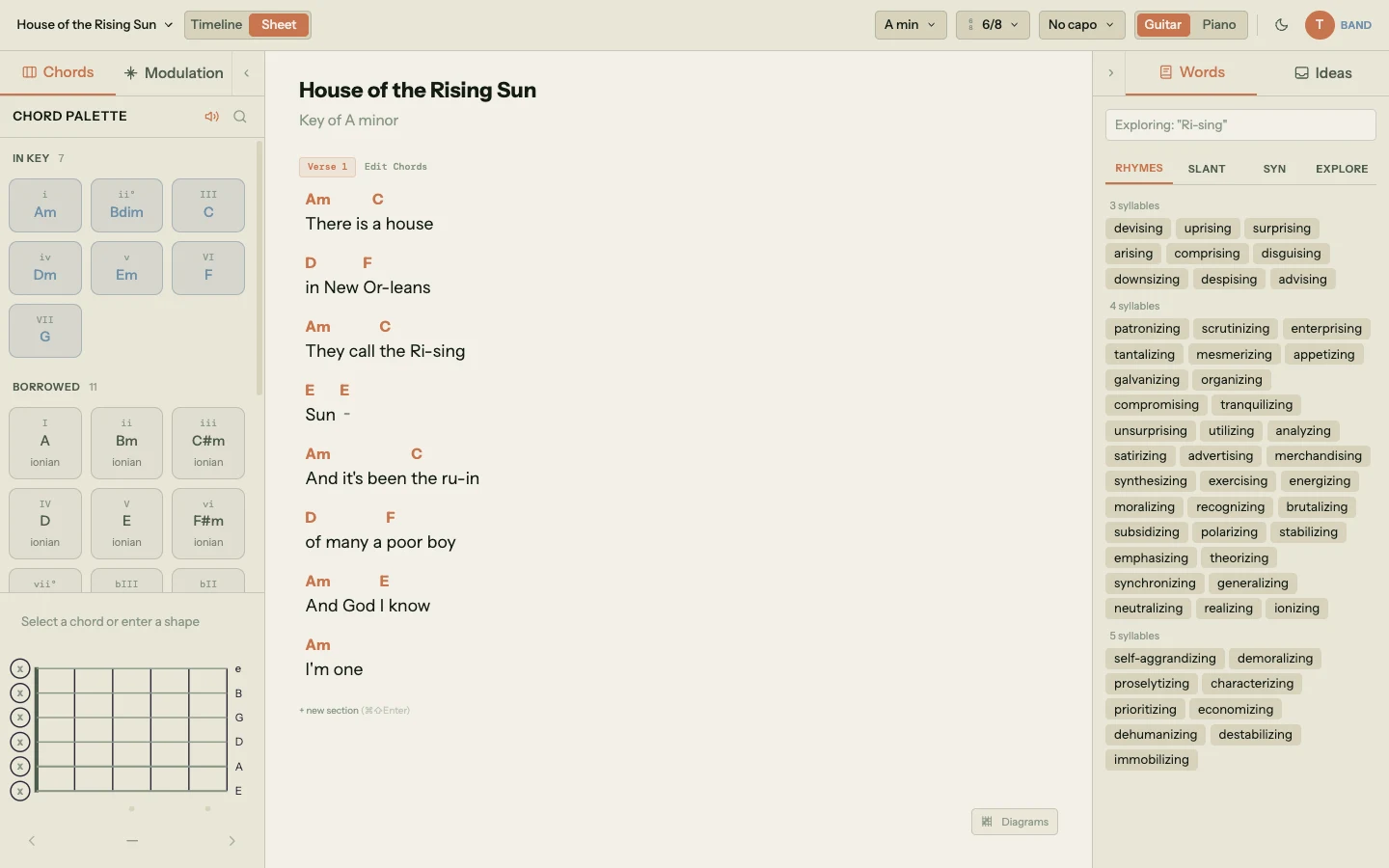
Song Cage is the best lyric writing app in 2026 because it's the only one that treats lyrics as part of the song, not a separate task. The lyric workspace lives side-by-side with the chord palette and song timeline — which includes diatonic chords, borrowed chords, secondary dominant options, and a modulation panel designed for music theory for songwriters at every level — so a lyric change, a chord change, and a melody idea happen in the same session, on the same screen. Melody writing and lyric writing are deeply linked; how to write a melody that fits your lyric is something you can only test if you have both in front of you simultaneously.
The Word Tools panel lives embedded next to your lyric draft, no browser-tab-switching required. Click any word in your lyrics and five modes are one tap away: a rhyme finder for clean rhyming words for songs (grouped by syllable count, so you never force a line to fit the rhythm), slant rhyme suggestions (near-rhymes that sound more natural than perfect rhymes), a synonym finder for lyrics for direct word swaps, and the Explore tab, which is where Song Cage pulls ahead of every other lyric writing app.
The Explore panel is the single most useful feature for breaking writer's block in any lyric writing app we tested, and it openly sits in a lineage songwriters will recognize: Jeff Tweedy's word ladder (from How to Write One Song), and the cut-up technique used by William S. Burroughs, Brion Gysin, and David Bowie to surface unexpected lyric phrases. The Explore panel is essentially a digital, infinitely refillable version of both. It holds two tools. The Semantic Drift Chain starts from any word in your lyric and builds a visible chain of thematically related words — click a suggestion and it becomes the next link, so "ocean" drifts to "tide" drifts to "salt" drifts to "memory," and you follow the chain until a word unlocks a line you couldn't find by looking up synonyms. The Word Collider is the cut-up engine: it generates twelve random pairings by colliding associations from your seed word with associations from a second "bridge" word, producing combinations like "electric garden" or "paper thunder" that you'd never reach any other way. Lock the pairings you like, reshuffle the rest, hit Drift Away to pick a new bridge. If you've ever built a Tweedy word ladder with a notebook and a pen, the Word Collider is the same exercise without the friction.
Each song section (verse, chorus, bridge) gets its own workspace block within the timeline, with independent lyric and chord tracks — so how to write a chorus, how to write a verse, and how to write a bridge are all handled as structurally distinct surfaces instead of one continuous blob of text.
Song Cage also has built-in voice recording, so when a melodic idea arrives mid-session you capture it immediately without switching apps. As a song idea app and lyric writing tool combined, it eliminates the most common creative failure: losing an idea while switching between three apps to capture it.
Key Features
- Lyric workspace per song section (verse, chorus, bridge)
- Rhyme finder with syllable-grouped rhyming words for songs
- Slant rhyme suggestions (near-rhymes by assonance and consonance)
- Synonym finder for lyrics
- Explore panel: Semantic Drift Chain for following thematic word chains
- Word Collider for unexpected word pairings — purpose-built for writer’s block
- Word Tools panel embedded in the lyric workspace — no separate browser tab
- Chord palette alongside lyrics (in-key, borrowed, secondary dominants)
- Modulation panel with pivot chord routes between any two keys
- Built-in voice recording
- DAW-style song timeline with verse/chorus/bridge blocks
Pros & Cons
- Best word tools of any lyric writing app
- Rhyme, slant, synonym, and Explore all one click away from any word
- Lyrics and chords on the same canvas
- Captures song ideas instantly — voice + lyric + chord
- Works for beginners who've never written lyrics before
- Explore panel + Word Collider break writer’s block unlike any other app
- Not a general-purpose writing app (intentional)
- Collaboration requires Band tier
2. Songwriter's Pad

Songwriter's Pad has grown from a simple mobile lyric writing app into a cross-platform AI-assisted songwriting tool (by DANTÉ MEDIA). You get verse/chorus/bridge-friendly Song Block editing, a built-in rhyme dictionary for finding rhyming words for songs, a dictionary/thesaurus, a mood-based word/phrase idea generator, and a clean writing interface that stays out of your way. Newer versions layer in an AI Lyric Generator (English, Spanish, French, German) and an in-app beat store — useful if you want a quick creative nudge, though the AI generation is a separate feature from the pure lyric workspace.
For a dedicated song lyrics writer app — especially on mobile — it is now one of the most cross-platform options available (iOS, iPadOS, macOS, Android, and a standalone Windows build). The limitations are still real: the rhyme toolkit is basic with no true slant rhyme surface, no semantic word map, and no chord integration, and there is no voice recording in the lyric workspace itself. It is a good starting tool for lyric-only writers who want AI assistance on tap, and a reasonable companion to a chord-focused tool like Song Cage when you need both halves of a song on the same canvas.
Pros
- Cross-platform: iOS, iPadOS, macOS, Android, Windows
- Song Block editing for verse/chorus/bridge organization
- Built-in rhyme dictionary and thesaurus
- AI Lyric Generator (English, Spanish, French, German)
- Free to download; Pro unlocks full tools
Cons
- Rhyme tools shallower than Song Cage: no dedicated slant rhyme surface or semantic word map
- No chord integration or song timeline
- No in-app voice recording linked to lyrics
- Pro subscription ($12.99/mo or $79/yr) needed for full tools
- AI generation is a separate feature, not embedded in the draft like Song Cage's word tools
3. RhymeZone

RhymeZone (owned by Merriam-Webster, built on Datamuse data) is the dominant free rhyme finder on the web — and for good reason. The database covers perfect rhymes, near rhymes (including slant rhymes), synonyms, antonyms, homophones, and related words, backed by an offline database of more than 150,000 words in the mobile apps. For a quick rhyme generator lookup, nothing beats its speed and depth. The syllable-grouped breakdown is genuinely useful for matching syllabic rhythm, and the "Poet Maker" tool lets you combine rhyme and meaning constraints in one search.
The problem is that RhymeZone exists in a browser tab, separate from wherever you're actually writing your song. Every time you need a rhyming word for songs, you break out of your creative flow to switch tabs, search, scroll, and return. As a RhymeZone alternative, Song Cage embeds the same core functionality — plus slant rhyme, synonym, and semantic tools — directly inside the lyric workspace, eliminating that context switch entirely.
Pros
- Best pure rhyme database — largest free option
- Syllable-grouped rhyming words for songs
- Near rhymes, synonyms, antonyms all in one tool
- Completely free — no account required
- Works in any browser on any device
Cons
- Lives in a separate browser tab — breaks creative flow
- No lyric workspace — purely a rhyme generator lookup
- No song structure, chords, or melody capture
- No context awareness — doesn't know your song's mood or key
- Mobile apps ($2.99 iOS/Android) have not been updated since 2022–2023, though the website is actively maintained
4. MasterWriter

MasterWriter has been the professional songwriter's word tool of choice for years. It offers a rhyme finder, a comprehensive thesaurus for songwriters, a pop culture word database, a phrases dictionary, and alliteration tools — all within a single application. For word-craft depth, it's genuinely impressive, and it's used by Grammy-winning songwriters and Nashville professionals.
MasterWriter is now a web-based subscription (monthly $9.95, yearly $99.95, or two-year $149.95) delivered via app.masterwriter.com in your browser, with no native mobile or desktop app (the only App Store presence is a thin companion called MW Recorder). It has no chord integration, the UI is showing its age, and it is designed as a word research companion, not a full lyric writing app — you still need a separate place to write the actual lyric. For working professionals who write for a living, it is worth the subscription. For most songwriters, Song Cage covers the bulk of the word tool functionality at a lower price point, with a full lyric workspace and chord integration embedded in the same canvas.
Pros
- Deepest thesaurus for songwriters available
- Pop culture references and phrases database
- Alliteration tool — unique in the space
- Trusted by professional Nashville songwriters
- Comprehensive synonym finder for lyrics
Cons
- Subscription only: $9.95/mo, $99.95/yr, or $149.95/2-yr (no lifetime license)
- No native desktop or mobile app — delivered in-browser via app.masterwriter.com
- No chord integration or song structure tools
- Interface dated compared to modern lyric writing apps
- Word tool only — not a full lyric writing workspace
5. Werdsmith

Werdsmith (by Werdsmith Pty Ltd) is a beautifully designed writing app built for writers — poets, novelists, screenwriters, and lyricists. It now runs on iPhone, iPad, Mac (Apple Silicon), Vision Pro, and Apple Watch, with strong organization features, a daily writing streak, a Novel Mode, automatic chapter formatting, and an AI feature called Ghostwriter that suggests the next lines in your own writing style. As a pure lyric drafting environment on Apple hardware, it is one of the best-looking options available.
The limitation is clear: Werdsmith is a writing app that happens to work for lyrics, not a dedicated song lyrics writer. There is no rhyme finder, no rhyme generator, no thesaurus for songwriters, no song structure templates, and no chord integration. If you are fighting writer's block and need a word tool, you are back to switching apps. Apple-only is also a significant constraint: there is no Android version, no Windows build, and no web app. Best used as a companion to a proper lyric tool, not a replacement.
Pros
- Beautiful, distraction-free mobile writing environment
- Strong organization and tagging
- Daily writing streak — builds creative habit
- Good for poetry-adjacent lyric styles
- Affordable premium tier
Cons
- No rhyme finder or rhyme generator
- No song structure templates
- No chord integration or music context
- Apple-only: no Android, no Windows, no web app
- Ghostwriter AI is style-continuation, not lyric-specific word tools
- Not built for songwriter-specific workflow
6. iA Writer

iA Writer is one of the most acclaimed distraction-free writing apps available — a 2025 Apple Design Award Finalist, with a focus mode, syntax highlighting for parts of speech, an Authorship tracking system that color-codes AI-pasted vs typed text, and a "flow state" design philosophy. Many songwriters use it as their lyric drafting environment for its simplicity and cross-device sync via iCloud, Dropbox, or Google Drive. The Markdown-based structure also makes it easy to organize song sections with headers.
But iA Writer is built for long-form writers, not songwriters. There is no rhyme finder, no rhyming words for songs lookup, no synonym finder for lyrics, no song structure templates, and no chord context. It is a beautiful blank page. If that is what you need — and many experienced songwriters do — it is worth the one-time per-platform purchase. Worth noting: iA pulled the Android version in September 2024 (existing installs still run but no longer receive updates), so cross-platform means Apple + Windows today, not Android. For anyone who needs word tools while writing, the tab-switching problem remains.
Pros
- Best pure writing focus environment on the market
- Excellent cross-platform sync
- Markdown structure works for song sections
- One-time purchase — no subscription
- Highly praised by professional writers
Cons
- No rhyme finder, synonym tools, or lyric-specific features
- No song structure templates or rhyme scheme tracking
- No chord integration or music context
- Built for prose writers, not lyric writing specifically
7. Notion

Notion is one of the most popular productivity tools used by creative professionals, and many songwriters use it to organize their song catalog, track drafts, and manage co-writing credits. The database and template flexibility is genuine — you can build a very functional song management system in Notion with tags, statuses, and linked notes.
As a lyric writing tool, it's generic. Notion has no rhyme finder, no rhyme generator, no synonym finder, no thesaurus for songwriters, and no understanding of song structure. It's a document editor with good organization. The songwriters who use Notion effectively tend to use it alongside a proper lyric writing app — Song Cage or Songwriter's Pad for writing, Notion for cataloging finished drafts. Using Notion as your primary lyric workspace means fighting writer's block without any word tools.
Pros
- Best organization tool for large song catalogs
- Excellent tagging, filtering, and database features
- Cross-platform and collaborative
- Generous free tier
- Highly customizable workspace
Cons
- No lyric-specific tools whatsoever
- No rhyme finder, synonym finder, or thesaurus
- No song structure templates
- Best used for organization, not active lyric writing
8. Google Docs

Google Docs is where a huge percentage of songwriters actually write their lyrics — not because it's the best tool, but because it's free, works everywhere, and makes collaboration effortless. For a co-writing session where two writers need to work on the same lyric simultaneously from different locations, Google Docs is still unbeaten for sheer accessibility.
As a lyric writing app, it has none of the tools that make lyric writing easier. No rhyme finder, no rhyming words for songs lookup, no synonym finder, no thesaurus, no song structure templates, no verse/chorus/bridge organization. You're entirely on your own to find rhymes, manage structure, and avoid writer's block. Google Docs is best thought of as a final destination for lyrics already written elsewhere — not the place to write them.
Pros
- Completely free and available everywhere
- Best real-time collaboration of any option
- Comments and version history for co-writing
- Familiar interface — zero learning curve
Cons
- Zero lyric-specific features
- No rhyme finder, synonym finder, or word tools
- No song structure — just a blank document
- Not a song idea app — no voice recording or melody capture
9. Scrivener

Scrivener is the gold standard for complex long-form writing projects — novels, screenplays, non-fiction books. Some songwriters use it for album-scale projects, where each song is a document within a larger project structure, and the corkboard/outliner views help see how songs relate thematically. For organizing a 12-song album with draft versions, notes, and reference material, Scrivener is genuinely powerful.
For most songwriters, it's overkill. The learning curve is steep, it has no lyric-specific tools (no rhyme finder, no song structure templates, no rhyme generator), and the one-time cost is significant. Worth considering only if you're working on a major project where song organization is the primary challenge — not if you're trying to write better lyrics.
Pros
- Excellent for managing complex multi-song projects
- Corkboard and outliner views for song relationships
- One-time purchase — no subscription
- Powerful for album/EP scale songwriting
Cons
- Steep learning curve — takes weeks to set up properly
- No rhyme finder, rhyme generator, or word tools
- No song structure templates or chord integration
- Overkill for individual song lyric writing
10. Voice Memos + Notes (Budget Combo)

Voice Memos (Apple) or the Google equivalent, combined with your phone's Notes app, is the zero-cost entry point for capturing song ideas. Voice Memos is genuinely useful as a voice recording app for musicians — it captures a melody or lyric fragment immediately without any setup, and on iPhone 16 Pro / Pro Max the newer Layered Recordings feature lets you sing a vocal on top of an existing instrumental without headphones. As of iOS 18, Apple Notes can also record audio directly inside a note and auto-transcribe it in English and a handful of other languages, which narrows the old voice-versus-text gap considerably.
The hard ceiling is still obvious: no rhyme finder, no rhyming words for songs lookup, no synonym finder, no song structure, no chord context. Even with the iOS 18 improvements, Voice Memos and Notes maintain separate libraries — a clip recorded in Voice Memos does not auto-appear in Notes, and there is no way to fight writer's block with word tools when you hit a wall. Think of this as the "before" state: the friction that a proper lyric writing app like Song Cage is designed to eliminate.
Pros
- Completely free — built into every phone
- Fastest possible way to capture a song idea
- Voice Memos now includes on-device transcription and Layered Recordings (iPhone 16 Pro / Pro Max)
- Zero learning curve
Cons
- No lyric tools of any kind
- Voice Memos and Notes still keep separate libraries (iOS 18 only closes the gap part-way)
- No song structure or rhyme scheme support
- No path forward when writer's block hits
- The "before" state — not a long-term solution
Full Comparison: Best Lyric Writing Apps 2026
| App | Rhyme Finder | Slant Rhyme | Synonym/Thesaurus | Song Structure | Chord Integration | Voice Recording | Mobile | Price | Rating |
|---|---|---|---|---|---|---|---|---|---|
| Song Cage | ✓✓ | ✓✓ | ✓✓ | ✓✓ | ✓✓ | ✓✓ | Soon | Free/$12mo | |
| Songwriter's Pad | ✓ | ✗ | ✗ | ✓ | ✗ | ✗ | ✓✓ | $4.99 | |
| RhymeZone | ✓✓ | ✓ | ✓ | ✗ | ✗ | ✗ | ✓ | Free | |
| MasterWriter | ✓✓ | ✓ | ✓✓ | ~ | ✗ | ✗ | ✗ | $180/yr | |
| Werdsmith | ✗ | ✗ | ✗ | ✗ | ✗ | ✗ | ✓ | Free/$3 | |
| iA Writer | ✗ | ✗ | ✗ | ✗ | ✗ | ✗ | ✓ | $50 | |
| Notion | ✗ | ✗ | ✗ | ✗ | ✗ | ✗ | ✓ | Free/$10 | |
| Google Docs | ✗ | ✗ | ✗ | ✗ | ✗ | ✗ | ✓ | Free | |
| Scrivener | ✗ | ✗ | ✗ | ~ | ✗ | ✗ | ~ | $60 | |
| Voice Memos + Notes | ✗ | ✗ | ✗ | ✗ | ✗ | ✓✓ | ✓✓ | Free |
✓✓ = Full support · ✓ = Partial · ~ = Minimal/workaround · ✗ = Not available
How to Write Song Lyrics: A Quick Guide
Understanding the fundamentals of lyric writing makes every tool more useful. Here's a fast reference for the concepts that come up most often when learning how to write song lyrics effectively.
How to write a verse
The verse is where you build narrative, establish character, and create emotional context that makes the chorus land harder. A good verse uses a consistent rhyme scheme (ABAB, ABCB, and AABB are most common), sets a lower melodic energy than the chorus, and ends on an unresolved note that pulls the listener forward. When writing a verse, give yourself permission to be specific — concrete images ("coffee gone cold," "the green coat on the chair") land harder than abstract descriptions.
How to write a chorus
The chorus is the emotional peak of the song — the section that contains your hook, your title, and your central message. It needs to be simpler than the verse melodically and harmonically, because the listener needs to be able to anticipate and sing along quickly. Good choruses typically: start on the title or hook phrase, use a rhyme scheme that's tighter than the verse (often AABB or AAAA), and repeat the same chord progression every time without variation. The melodic shape of the chorus should contrast clearly with the verse — usually higher, broader, more sustained.
How to write a bridge in a song
The bridge provides emotional contrast and narrative release in the third act of a song. It appears once, usually after the second chorus, and goes somewhere neither the verse nor the chorus has gone — often to a new key, a new perspective, or a new emotional state. How to write a bridge in a song effectively: change the rhyme scheme from the verse and chorus, shift the melodic center (often higher), and say something the rest of the song has been building toward. The bridge is where borrowed chords and key modulation create the most powerful moments.
Understanding rhyme scheme
A rhyme scheme is the pattern of rhymes at the end of lyric lines — denoted with letters (ABAB, AABB, ABCB). ABAB (alternating rhymes) is the most common in verses because it creates a sense of forward motion. AABB (couplet rhyme) is satisfying and feels resolved — common in choruses. ABCB (only the second and fourth lines rhyme) sounds less forced than full ABAB and is popular in folk and country songwriting. Slant rhyme — words that sound similar but don't rhyme perfectly ("home" and "stone," "heart" and "start") — gives lyrics a more natural, conversational feel and is favored by many contemporary songwriters over forced perfect rhymes.
Overcoming writer's block
Writer's block in lyric writing is almost always caused by one of three things: trying to rhyme before you have the idea, being too attached to a specific word, or not having enough vocabulary range to find an alternative. The most effective fixes: use a synonym finder for lyrics to replace the stuck word with something that unlocks a new direction; use semantic drift to explore what the word connects to emotionally and conceptually; try a slant rhyme instead of forcing a perfect rhyme; or write the idea in prose first, then convert it to lyric form after. Changing the rhyme scheme of the section (e.g., switching from ABAB to ABCB) often immediately releases the block.
Write Better Lyrics — Without Switching Tabs
Song Cage puts your rhyme finder, synonym tools, slant rhyme, and lyric workspace in one place — alongside your chord palette and voice recorder.
Frequently Asked Questions
Song Cage is the best lyric writing app in 2026 for most songwriters. It combines a full lyric workspace with a rhyme finder, slant rhyme suggestions, a synonym finder for lyrics, and the Explore panel (Semantic Drift Chain + Word Collider) — all embedded directly in your lyric draft. It also integrates chord progressions and voice recording, so your lyrics and music develop together. For a pure standalone rhyme generator, RhymeZone is the best free option. For professional word tools, MasterWriter is the industry choice at higher cost.
Song Cage has a free tier that gives you access to the core lyric workspace, rhyme finder, and basic word tools. RhymeZone is the best completely free rhyme generator — no account required, works in any browser. Songwriter's Pad has a free tier with basic lyric structure. Google Docs and Notion are free and work for text drafting but have no lyric-specific tools. For capturing song ideas on the go, Voice Memos combined with Notes is the free zero-friction option.
Start with a clear central idea — the one thing you want the song to say. Write the chorus first (the emotional peak), then build the verse around the story that leads to it. Use a simple rhyme scheme like ABAB or AABB to start, and don't worry about being too perfect. When a line feels forced, use a slant rhyme instead of a perfect rhyme (it sounds more natural). Tools like Song Cage help beginners because they show rhyming words for songs instantly, offer slant rhymes and an Explore panel for writer's block, and let you adjust lyrics against actual chords, so you can hear whether a lyric line works melodically before you commit.
A rhyme finder gives you perfect rhymes — words where the ending sound matches exactly ("love" / "above," "night" / "light"). A slant rhyme tool gives you near-rhymes — words that share similar but not identical sounds ("home" / "stone," "heart" / "start," "eyes" / "light"). Slant rhymes are often preferred by contemporary songwriters because they sound less forced and more conversational than perfect rhymes. Song Cage provides both rhyme types with syllable grouping, so you can find a rhyming word for songs that fits both the sound and the rhythm of your lyric.
A rhyme scheme is the pattern of end-rhymes across lines in a song section — denoted with letters where matching letters rhyme. ABAB means lines 1 and 3 rhyme and lines 2 and 4 rhyme (alternate rhyme). AABB means lines 1 and 2 rhyme, then lines 3 and 4 rhyme (couplet). ABCB means only lines 2 and 4 rhyme, common in folk and country because it sounds less forced. Most verses use ABAB or ABCB; choruses often tighten to AABB or even AAAA. Song Cage supports all these patterns through its per-section workspace: each verse, chorus, and bridge gets its own lyric block so you can keep the rhyme shape of one section distinct from another without losing the overall structure.
Writer's block in lyric writing almost always comes down to being stuck on a specific word. The fastest fixes: use a synonym finder for lyrics to replace the stuck word; use a slant rhyme instead of forcing a perfect rhyme; open Song Cage's Explore panel and let the Semantic Drift Chain or Word Collider surface words you wouldn't have thought of; write the idea in plain prose first, then convert it to lyric form; or change your rhyme scheme — switching from ABAB to ABCB often immediately unlocks a stuck line. Also useful: record a voice memo of yourself talking about what you're trying to say, then mine that for lyric language. Sometimes the "wrong" words you use when speaking are more honest than the "right" words you're reaching for when writing.
Song Cage is the best RhymeZone alternative for songwriters specifically, because unlike RhymeZone it's embedded inside your lyric workspace. Instead of switching browser tabs every time you need a rhyme, you click any word in your lyric draft and the rhyme, slant rhyme, and synonym options appear instantly in context. It also adds slant rhyme suggestions, a thesaurus for songwriters, and semantic drift — capabilities RhymeZone doesn't offer. For a pure standalone rhyme generator, Rhymebrain is a solid free alternative to RhymeZone with a cleaner interface.
A memorable chorus needs: your title or hook phrase in the first or last line, a melodic shape that contrasts clearly with the verse (usually higher and broader), a simple chord progression that repeats identically every time, and a lyric that captures the central emotional truth of the song in a few words. Use concrete, specific language — "I still love you" is generic; "I still wear your jacket in April" is specific and memorable. Keep the rhyme scheme tighter than the verse (AABB or AAAA). And land the final word of the chorus on your most resonant rhyme; that's the line that echoes after the music stops.
The verse tells the story; the chorus delivers the emotional conclusion. Verse lyrics are typically more specific and narrative — they give details, set scenes, and build toward the chorus. Chorus lyrics are typically more universal and emotional — they state the central feeling in a way that any listener can relate to, even without knowing the verse's specific story. Verse rhyme schemes are often ABAB or ABCB (less resolved); chorus rhyme schemes are often AABB (more resolved). The verse creates the tension; the chorus releases it. How to write a verse and a chorus that work together: write the chorus first, then write the verse as the story that makes the chorus inevitable.
Semantic drift is a word exploration technique that surfaces conceptually related words — not just synonyms, but words that exist in the same emotional or thematic field as your starting word. Where a synonym finder gives you direct replacements ("happy" → "joyful," "elated"), semantic drift gives you words in the neighborhood of the concept ("happy" → "sunrise," "yellow," "unguarded," "childlike"). In Song Cage, semantic drift lives inside the Explore panel (alongside the Word Collider). Clicking a word and opening the Semantic Drift Chain shows this broader word cloud, and it's one of the most powerful tools for finding unexpected lyric language that captures a feeling more precisely than an obvious synonym would.
There's no right answer — different songwriters work differently, and the best approach is often to start with whichever element arrives first in the moment. Lyric-first writers tend to write more conversationally and naturally; melody and chords get shaped around the words. Chord-first writers often find that the harmony suggests a lyric mood or feeling before the words arrive. Many professional songwriters do both simultaneously, strumming chord ideas while humming or speaking lyrics loosely. Song Cage is built specifically for this simultaneous approach: chords and lyrics live on the same canvas, so you can move between them freely without losing the connection between what you're saying and how it sounds harmonically.
Yes, and it's the strongest Hookpad alternative for lyricists specifically. Hookpad has no lyric tools at all (no rhyme finder, no synonym finder, no thesaurus, no lyric workspace), which makes it unusable as a lyric writing app. Song Cage covers the chord theory side comparably — with borrowed chords, diatonic chords, and a modulation panel that Hookpad also lacks — while adding a complete lyric workspace with rhyme, slant rhyme, synonym, and semantic tools. If you're coming from Hookpad because you need to write lyrics alongside your chords, Song Cage is the direct upgrade.
Speed is everything for capturing song ideas — a lyric line or melodic phrase that arrives unexpectedly disappears in seconds if you don't capture it. The fastest method is voice memo: speak or sing the idea into your phone before you think about it. Song Cage's built-in voice recording lets you capture the vocal idea and attach it directly to a song project with chord context, so when you return to develop it, the harmonic setting is already there. A song idea app that combines lyric notes, voice recording, and chord information in one place is far more useful than separate apps for each, because the connection between the lyric, the melody, and the harmony is part of what you're trying to capture.
Professional songwriters generally use a combination of these practices: keeping a "title file" (a running list of potential song titles and hook phrases), writing to music they've recorded or chords they've established first, using word tools heavily (a good thesaurus for songwriters and rhyme finder are standard), co-writing regularly (different writers bring different lyric strengths), and maintaining a habit of writing every day — even bad songs. The biggest difference between amateur and professional lyric writing is not talent: it's volume. Professional songwriters write more songs, more often, and throw away more lyrics. Songwriting tools that make the process faster — like having a synonym finder for lyrics and a rhyme finder embedded in your workspace — allow professional-level output at any skill level.